reviewstook.com is reader-supported. When you buy through links on our site, we may earn an affiliate commission.
Where to buy
A professional gamer’s camera is not judged in a camera review’s terms. It is judged at hour six of a tournament broadcast, in a bedroom lit by monitors, by an audience deciding in the first three seconds whether this streamer looks like a professional or a hostage video. The best cameras for professional gamers are the ones that hold a face clean and correctly lit through a whole session, track a player who leans, celebrates and buries their face in their hands without losing focus, and integrate with the streaming stack — capture software, overlays, green screens — so completely that the player forgets the camera exists until the VOD is reviewed.
- OBSBOT Tiny 2: check price on Amazon
- Logitech Brio: check price on Amazon
- Razer Kiyo Pro Ultra: check price on Amazon
- Sony ZV-1F: check price on Amazon
- Logitech C920S: check price on Amazon
- Elgato Facecam Pro: check current availability at your preferred retailer
The audience for this guide is narrower and more serious than “gamers who stream.” These are players whose face is part of a broadcast product: signed streamers, esports professionals on media duty, coaches and analysts whose camera presence is contractual, and competitive creators whose sponsorship value is partly measured in how professional their frame looks beside the gameplay. For them the camera is not an accessory. It is broadcast equipment that happens to plug into a USB port, and it is bought the way broadcast equipment is bought — for reliability across a season, not for a launch week’s excitement.
Six cameras made the list, spanning the category’s three philosophies. There are the smart webcams, led by a PTZ camera that physically follows its player. There are the large-sensor webcams, built to produce a broadcaster’s image in a streamer’s room without a lighting rig. And there are the two non-webcam answers: a creator camera pressed into streaming service for players who want the mirrorless look, and the veteran webcam that half the industry’s backup kits still contain. One premium option is described in prose. Every pick was judged on the broadcast’s terms: face quality in bad rooms, behaviour across long sessions, and peace with the software stack the player already runs.
A word about light, because every verdict below returns to it: no camera in this guide repeals physics, and the single largest upgrade to any stream’s face camera remains a soft light in front of the player. What the better cameras here buy is forgiveness — sensors and processing that keep a face presentable when the room is a cave and the only lamp is a monitor. Judge them by that forgiveness, and by whether their particular intelligence — tracking, autofocus, exposure judgement — matches the way you actually play and broadcast.
Key Takeaways
- Face quality in a dim, monitor-lit room is the whole brief; sensor size and exposure judgement decide it more than headline resolution.
- Tracking matters for players who move: the OBSBOT physically follows, the fixed cameras must be framed wide enough to forgive movement.
- 4K sensors earn their keep by cropping — a 4K webcam punched into a face-cam window stays sharp where a 1080p camera softens.
- The ZV-1F is the mirrorless-look option for players whose brand justifies a camera beyond the webcam class.
- Reliability across a season — drivers, firmware, software peace — is a professional feature; every pick here is a known quantity in streaming stacks.
In this guide
Quick Picks
| Camera | Badge | Why it is here |
|---|---|---|
| OBSBOT Tiny 2 | Best for movers | A PTZ camera that pans, tilts and zooms to follow its player — the face-cam that directs itself. |
| Logitech Brio | Best all-round webcam | 4K headroom, dependable autofocus and the industry’s most trusted streaming behaviour. |
| Razer Kiyo Pro Ultra | Best in bad light | A very large webcam sensor that keeps faces clean in the monitor-lit caves players actually stream from. |
| Sony ZV-1F | Best mirrorless look | A 1-inch creator camera as the face-cam: real depth of field and Sony colour for premium broadcasts. |
| Logitech C920S | Best backup and value | The veteran 1080p standard: cheap, indestructible in software terms, and still entirely presentable. |
| Elgato Facecam Pro | Best for 4K purists | A 4K60 webcam built for the Elgato ecosystem, with optics aimed squarely at broadcast face quality. |
How were these cameras chosen for professional players?
Selection began in the environment the cameras will actually inhabit: a desk, at night, lit by gameplay. Each candidate was judged on the face it produced there — exposure that neither blows the forehead under a key light nor buries the player in monitor gloom, autofocus that settles on the player rather than the gaming chair’s headrest logo, and colour that renders skin as skin under the mixed temperatures of LED strips and screens. Cameras that needed a studio to look good were marked down without appeal; a professional gamer’s room is the studio, and it is not changing for a webcam.
Movement was the second examination. Players lean into clutches, recoil from jump scares, stand to celebrate, and conduct interviews slumped at angles no product photograph anticipates. Tracking cameras were scored on the grace of their following — a PTZ that hunts visibly is worse than a fixed frame — and fixed cameras on the field of view and depth of field that keep a moving player inside acceptable focus. The third examination was endurance: driver stability across streaming software updates, thermal behaviour over marathon sessions, and the maturity of each maker’s software, because a camera that breaks on patch day is a broadcast incident.
Resolution was judged functionally rather than numerically. A face-cam lives in a corner window, often a few hundred pixels wide, which makes 1080p honest and 4K a cropping instrument: the 4K picks earn their place by letting the player frame wide and punch in digitally, or feed a full-screen interview layout without softness. Frame rate mattered where it serves the format — talking-head smoothness at the broadcast’s own rate — rather than as a gaming specification transplanted onto a face.
Finally, ecosystem peace. These cameras must coexist with capture cards, overlays, virtual cameras, green screens and the player’s existing software habits, under the observation of an audience that notices a frozen frame instantly. The picks are, deliberately, the known quantities of the streaming world plus one camera from the creator world that has proven it can hold a broadcast. Novelty is a liability at hour six. This guide chose accordingly.

OBSBOT Tiny 2 — Best for movers
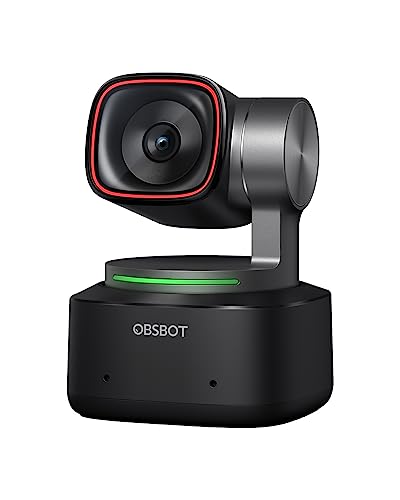
The Tiny 2 answers the question every energetic streamer eventually asks: who is directing my face-cam while I am playing? Its answer is a small motorised gimbal that pans, tilts and zooms to keep the player framed, driven by AI tracking that holds a face — or a hand gesture, or a whole standing celebration — with a smoothness that reads as a camera operator rather than a robot. Voice and gesture controls let the player command zooms and tracking modes mid-broadcast without touching a keyboard, which in the middle of a match is not a gimmick but the only interface available. For players whose broadcast style is physical — standing desk segments, coaching whiteboards, victory laps — it is the only pick that keeps up.
The image inside the tracking is a genuine 4K from a sensor large by webcam standards, with autofocus and exposure judgement that serve the moving frame well. The professional caveats are about trust and complexity: a motorised camera is a mechanism, with a mechanism’s small failure modes, and its software intelligence must be configured — tracking zones, gestures, presets — before it behaves like a colleague rather than a novelty. Players who invest that setup hour gain a broadcast capability no fixed camera offers. Players who want to plug in and never think again should read the next verdict instead.
- Sensor: large webcam-class, 4K recording
- Movement: motorised pan, tilt and zoom with AI tracking
- Control: voice and gesture commands, preset positions
- Use: streaming, coaching, interviews and presentations
Strengths
- Follows a moving player like a hired operator
- Hands-free control during live play
- Strong 4K image inside the tracking
Trade-offs
- Needs a setup session to behave professionally
- A mechanism to maintain, unlike fixed webcams
- Premium pricing among webcams
Best for: physical broadcasters, coaches and standing-desk streamers. Not suited for: set-and-forget players who never move.

Logitech Brio — Best all-round webcam
The Brio is the professional default against which other webcams are measured, and its dominance is a reliability story. Its 4K sensor provides the cropping headroom modern face-cam layouts consume; its autofocus and auto-exposure are the industry’s reference behaviour — quick to settle, reluctant to hunt, sane in mixed light; and its software support across streaming platforms is so complete that “does it work with the Brio” is a question other products answer, not one the Brio asks. For a signed player whose camera must simply never be the story, that ordinariness is the highest praise available.
Its image character suits broadcast: clean, neutral, flattering without cosmetics, with field-of-view options that let a player choose between an intimate face frame and a room-showing width. Low light is competent rather than miraculous — the Razer below out-muscles it in a true cave — and its design is a generation’s idea of a webcam rather than a statement piece. But across a season of patches, platforms and marathon sessions, the Brio’s record is the point. Professionals buy boring where boring has a track record, and no face camera in gaming has a longer one.
- Sensor: 4K, with digital zoom and cropping headroom
- Autofocus: fast, settled, reference-class behaviour
- Field of view: adjustable between intimate and wide
- Support: universal across streaming software
Strengths
- The safest professional webcam purchase available
- 4K headroom for modern face-cam layouts
- Software peace with every platform that matters
Trade-offs
- Low-light performance is good, not class-leading
- No tracking; movement must be framed for
- Design and mount are functional rather than inspired
Best for: signed streamers and pros wanting the default done right. Not suited for: players in very dark rooms or constant motion.

Razer Kiyo Pro Ultra — Best in bad light
Razer’s flagship webcam is built around a single professional insight: streamers do not stream from studios, they stream from rooms whose lighting is an afterthought, and the camera must carry the difference. Its sensor is very large by webcam standards — the kind of size normally found in dedicated cameras — and that size is spent entirely on the face in bad light: cleaner shadows, gentler noise, skin that survives the monitor-glow cave without the waxy smear lesser webcams produce. For the night-owl professional whose brand is the late session, it is the most forgiving lens in this guide.
The supporting package is a broadcaster’s: 4K recording for layout headroom, an adjustable field of view, a physical privacy shutter, and processing aimed at faces rather than landscapes. Its demands are a modern USB connection and a machine that can feed it, and its price sits at the class’s summit alongside the OBSBOT, though it spends the money on sensor rather than motors. Players choosing between the two are choosing their failure mode: the Razer forgives your room, the OBSBOT forgives your movement. Know which forgiveness your broadcast needs, and the summit choice makes itself.
- Sensor: very large for a webcam, 4K recording
- Low light: the class’s strongest face rendering
- Privacy: physical shutter built in
- Field of view: adjustable framing options
Strengths
- Faces stay clean where other webcams smear
- Professional image without a lighting rig
- Build and features aimed at broadcasters
Trade-offs
- Summit pricing for a fixed camera
- No tracking for moving players
- Wants a capable USB setup to shine
Best for: night-session professionals and dark-room streamers. Not suited for: players who move constantly or budget carefully.

Sony ZV-1F — Best mirrorless look
Some broadcasts outgrow the webcam look entirely, and the ZV-1F is the bridge: a dedicated camera with a 1-inch sensor and a bright lens, used over USB or capture as the face-cam, producing the shallow depth of field and colour richness that separate a premium stream’s frame from the field. The player’s background — shelves, trophies, the room’s story — melts into a soft wash no webcam’s processing imitates convincingly, because here it is optics rather than an effect. For creators whose face-cam shares the screen with sponsorships, that visual tier is a business asset.
Pressed into streaming service, it asks more than a webcam does: a mount or small tripod at monitor height, power arrangements for marathon sessions, and a capture path set up once and then left alone. Its fixed ultra-wide lens frames a desk scene generously, which suits the face-cam-plus-room layout, and its autofocus is creator-grade — designed for a person talking to camera, which is precisely the job. It is not the plug-and-forget answer, and this guide recommends it only where the broadcast’s production values justify a camera’s small ceremonies. Where they do, nothing else in this list looks like it.
- Sensor: 1-inch, with a bright fixed lens
- Look: genuine depth of field, Sony creator colour
- Streaming: USB and capture workflows supported
- Autofocus: face-priority, built for presenters
Strengths
- A visual tier webcams cannot counterfeit
- Bright lens forgives dim rooms handsomely
- Doubles as a creator camera away from the desk
Trade-offs
- Setup and power need a deliberate session
- Fixed wide lens; framing is by position
- More camera than a simple broadcast needs
Best for: premium creators and sponsored broadcasts. Not suited for: players wanting webcam simplicity.

Logitech C920S — Best backup and value
Every professional kit has an unglamorous layer: the spare that travels, the loaner for the guest, the camera that covers the second angle or the analyst desk. The C920S is that layer’s patron saint. Its 1080p image is a known quantity across a decade of broadcasts — clean in decent light, honest in mediocre light — its autofocus and exposure are the behaviours a generation of streamers learned on, and its software compatibility is effectively universal, including machines and platforms the newer flagships occasionally argue with. A privacy shutter covers the lens between broadcasts, a small professional courtesy built in.
As a main camera for a professional in this guide’s sense, it is outclassed — no 4K headroom for punched-in layouts, low-light manners a generation old. But that is the wrong examination. Judged as the camera that guarantees a broadcast happens — the backup in the drawer, the travel camera in the bag, the second PC’s eyes — it has no rival here, and many professionals will sensibly buy it alongside a flagship rather than instead of one. Every other pick in this guide performs better. None of them is a better insurance policy.
- Sensor: 1080p, the streaming standard of a decade
- Compatibility: effectively universal, old machines included
- Privacy: built-in shutter
- Role: backup, travel and second-angle duty
Strengths
- Never the reason a broadcast failed
- Costs little enough to own as pure insurance
- Works everywhere, with everything, immediately
Trade-offs
- No 4K cropping headroom
- Low-light quality is a generation behind
- Image is presentable, not premium
Best for: every professional’s backup drawer and budget broadcasts. Not suited for: a flagship main camera role in 4K layouts.
Elgato Facecam Pro — Best for 4K purists
Elgato built its name on the streaming stack — capture cards, stream decks, lighting — and the Facecam Pro is its argument that the face camera should be a broadcast instrument rather than a computer peripheral. Its headline is genuine 4K at high frame rates from a webcam, with optics and processing aimed at one subject: a face, at a desk, in a streamer’s room, rendered with a clarity that survives full-screen interview layouts and aggressive face-cam crops alike. For the professional whose broadcast regularly goes full-frame on the player — press conferences, interviews, analyst segments — that ceiling matters.
Its natural habitat is the Elgato ecosystem, where its software integrates with the control surfaces and capture tools the player may already run, though it behaves as a citizen of the wider streaming world too. The honest costs are its premium positioning and its specialisation: it spends everything on the fixed, well-framed face, offering neither the OBSBOT’s movement nor the Sony’s optical depth. Within its brief it is arguably the purist’s choice — the webcam for the player who has decided that the face-cam is a broadcast camera and should be specified like one.
- Sensor: 4K at high frame rates
- Optics: designed for desk-distance faces
- Software: deep Elgato ecosystem integration
- Role: full-screen interviews and premium face-cam layouts
Strengths
- Broadcast-grade 4K face quality
- Ecosystem peace for Elgato-equipped desks
- Fixed-face specialisation done completely
Trade-offs
- Premium price for a fixed camera
- No tracking or optical depth tricks
- Best inside its maker’s ecosystem
Best for: interview-heavy professionals and 4K layout purists. Not suited for: moving players or minimal budgets.
What does a face-cam actually do for a broadcast?
It converts gameplay into company. Viewers return to streams for the person — the reactions, the commentary, the visible thinking during a clutch — and the face-cam is the channel through which that person exists. Broadcast research and common experience agree on the mechanics: a clear, well-lit, correctly sized face builds the parasocial trust that subscriptions monetise, while a murky corner blob taxes every minute of it. The camera’s technical job is therefore emotional infrastructure, and professionals spec it accordingly — not as the broadcast’s garnish but as its second main ingredient.
Sizing and placement carry half the effect. The face-cam window must be large enough for expressions to read at a glance, framed tight enough that the player is a presence rather than a postage stamp, and positioned where the eye travels between game and face without a journey. The cameras’ fields of view and cropping headroom serve those decisions directly: frame the desk scene once, then let the layout — not the player’s posture — decide how much face the audience gets. Professionals treat the face-cam’s composition with the same seriousness as the game’s capture settings, because the audience does.
How much light does a streaming face actually need?
Less than a studio, more than a monitor. The working standard is one soft source in front of the player, angled slightly, large enough to wrap rather than interrogate — the panel or ring light every streaming ecosystem sells, used at a distance that flatters rather than flattens. That single source transforms every camera in this guide, including the veteran C920S. What the premium sensors buy is the margin around that standard: the evening the light is forgotten, the room where a rig cannot fit, the hotel at a tournament where the face-cam must survive on ceiling bulbs and stubbornness.
Colour temperature is the detail amateurs miss and audiences feel. A face lit warm by a lamp and cool by a monitor becomes two faces arguing, and the better cameras’ white balance judgement — the Brio’s and Razer’s especially — arbitrates the argument gracefully. Set the key light, fix the camera’s white balance to it during a setup session, and the broadcast’s face stays one consistent person across a season. Light is the cheapest production value in streaming; the camera’s job is to not waste it.
Should a professional gamer care about 4K in a face-cam?
As a delivery format, rarely; as working headroom, constantly. Almost no face-cam window displays at 4K, and few broadcasts deliver the face at even half that. The 4K sensor’s value is downstream of arithmetic: it lets the player frame one wide, safe shot and derive the intimate crop digitally without softness, feed a full-screen interview layout from the same camera, and keep the face-cam sharp when the broadcast’s resolution rises. It is, in short, a reframing budget — and reframing is what a solo broadcaster, who cannot reposition a camera mid-match, actually needs.
The counter-argument is cost and light: higher-resolution modes on some cameras trade frame rate or low-light cleanliness, and a 1080p camera in good light will out-face a 4K camera in a cave every session of the week. The verdicts reflect that ordering — sensor size and light behaviour first, resolution as the cropping instrument second. Buy 4K for the layouts you actually run. If your face-cam never leaves a small corner and your room is bright, the veteran picks will serve you honestly and the savings belong in light and audio.
How do you set up a face-cam for a whole season?
Once, deliberately, and then never again — that is the professional ideal. The setup session covers five decisions. Position: monitor-top for eye-line honesty, or a small arm bringing the camera to true eye level, which flatters more and reads as direct address. Framing: head and shoulders with air above, tested at the broadcast’s actual window size, not at full screen. Exposure and white balance: locked to the room’s real lighting after the key light is placed, so patch-day software cannot renegotiate them. Focus: autofocus for movers, or a fixed focus at the chair’s distance for the disciplined sitter. And the failure drill: know how the backup camera joins the broadcast, because the season will test it.
Document the result. A settings file, a photograph of the desk geometry, a note of the light’s position and level — the touring professional’s setup becomes reproducible in a hotel room, and the home studio survives its own cleaning. The cameras in this guide all support profiles or predictable behaviour that makes the documentation short. Season-proofing is the difference between a broadcaster and a hobbyist with an audience, and it is made of these unglamorous paragraphs rather than of any purchase.
What breaks broadcasts, and how do these cameras avoid it?
The failure catalogue is drearily consistent: a driver update that renames the device mid-season, USB bandwidth shared with one peripheral too many, thermal throttling in a summer room, autofocus seduced by a poster behind the player, exposure that breathes every time the gameplay flashes. Professionals defend in layers — dedicated USB ports for the camera, updates deferred until the off-season or tested on the backup machine first, focus areas restricted to the player’s zone where the camera allows, and the C920S-class spare already mounted or already in the drawer. The picks here were chosen partly for the maturity of their behaviour under this regime: known devices, known drivers, known failure modes with known fixes.
There is a reputational layer to the defence. An audience forgives a crashed game instantly and a frozen face oddly slowly, because the face is the relationship. The broadcasters who treat the face-cam as critical infrastructure — backed up, monitored, occasionally glanced at on the preview like a pilot checks a gauge — are not being precious. They are maintaining the one feed whose failure feels personal to every viewer. Buy the camera whose boring reliability matches that standard, and keep the spare.
How does the face-cam interact with a green screen?
Cleanly, if the fundamentals are respected — and the fundamentals are light and distance, again. A green screen wants even illumination of its own, separation between player and backdrop so edges stay honest, and a camera whose exposure does not hunt as the player moves against the green. The better sensors here help at the margins: cleaner shadows mean cleaner keys, and stable exposure means the key does not breathe. Chroma artefacts around hair — the green screen’s public failure — are reduced more by lighting the screen properly than by any camera upgrade, a sentence this guide repeats in different forms because it keeps being true.
The alternative aesthetic deserves its mention: many top broadcasts now keep the real room, lit and arranged as a set, because authenticity became the premium look. That shift raises the camera’s burden — the room is in the product now — and favours the picks with depth and colour: the ZV-1F’s optical melt, the Razer’s low-light cleanliness. Green screen or real room, the decision is a brand decision. The camera’s job is to execute it without flicker, hunt or smear, across the whole season’s sessions.
How does the face-cam work on tournament and media days?
Away from the home studio, the professional’s camera life gets logistical. Media days, bootcamps, LAN events and sponsor shoots all demand a face that looks like the broadcast’s face, produced from a hotel desk or a venue’s media room with whatever light the building provides. This is where the portable, forgiving picks earn a second salary: a large-sensor webcam that survives ceiling bulbs, a veteran spare that runs on any machine the venue provides, a setup documented well enough to rebuild in twenty minutes. Players who travel with their camera — rather than inheriting the venue’s — keep their visual identity continuous across the season’s content, and continuity is what sponsors are actually buying.
The touring discipline mirrors the home one at smaller scale. The camera rides in hand luggage, never in the hold. Its mount solution must not depend on the desk being a standard height, because it will not be. A small travel light, or the knowledge of how to turn a hotel’s window and desk lamp into a key, completes the kit. The broadcasts that look effortless from a major’s media day are produced by players who treated the face-cam as touring equipment from the start — chosen for forgiveness, packed with intent, and set up by checklist rather than by hope.
What do sponsors and teams actually look at?
Production coherence. A sponsor reviewing a player’s content is not grading a webcam; they are asking whether this broadcast can carry their brand without embarrassment — whether the face is clear, the frame composed, the lighting intentional, the whole visual product consistent from stream to stream. A professional camera is one line item in that coherence, and often the cheapest one to fix. Teams with media staff spec face-cams the way they spec jerseys: standardised, reliable, replaceable. The independent professional should steal that thinking wholesale, because the market increasingly prices polish before it prices personality.
There is a subtler commercial layer: the face-cam’s quality compounds in clips. The moments that travel — the clutch reaction, the interview answer — are clipped, shared and judged by people who never saw the stream, at sizes where a murky face reads as a minor-league operation. A camera that keeps the face broadcast-clean in the clip economy is marketing equipment. Professionals who understand that stop asking whether they can afford the upgrade and start asking what the current image is costing them in rooms they will never enter.
How should a player test a camera before committing a season to it?
With a rehearsal broadcast that imitates the worst session, not the best. Run it at the usual hour, in the usual light, through a full match’s worth of movement, and include the failure repertoire: lean out of frame, celebrate, slump, let the gameplay flash explosions across the room. Then watch the recording the way a new viewer would — on a phone, at window size, with the sound low — and grade the face alone. Does focus settle or hunt? Does exposure breathe? Does the skin survive the monitor’s colour? The cameras in this guide were chosen because they pass that rehearsal; any individual unit should still be made to prove it in your room, on your machine, before the season does.
Test the software marriage in the same session. Switch scenes, restart the suite, let a game update land, and confirm the camera returns as the same device with the same settings. Broadcasts die of small divorces between camera and software far more often than of bad sensors. A camera that survives the rehearsal week — technical, visual and marital — has earned its season. One that sparkles in a ten-minute demo and frays by Friday has told you everything, cheaply.
What is the role of the second angle?
Growing, and cheaper than ever to serve. The desk cam, the hand cam for the keyboard-and-mouse close-up, the room angle for the standing segment — multi-angle broadcasts borrow television’s grammar, and the second angle is where yesterday’s main camera retires with honour. This is the C920S’s and the Brio’s second career in many professional setups, and it reframes the upgrade decision: a flagship purchase does not orphan the old camera, it promotes the broadcast. Players planning a season should think in angles from the start, because the mount points, USB bandwidth and layout decisions are all easier made once.
The hand cam deserves its specific mention, because mechanical-keyboard and controller close-ups have become a genre signature — proof of skill rendered visible. It asks little of a camera: fixed focus at desk distance, honest exposure under the desk lamp, a small footprint that does not fight the mouse. Nearly any pick here can serve, which is precisely the point. The professional setup is a small society of cameras with ranks, and buying with the society in mind turns every upgrade into a broadcast improvement rather than a replacement.
How do you keep the face-cam honest during marathon sessions?
Hour six is where broadcasts go to smear: the player has slumped three inches lower, the key light has been nudged by a cat or a celebration, the room has warmed and the camera with it. The defences are habits disguised as settings. A mid-session glance at the preview during a natural break, with the same seriousness as a score check. A chair and desk geometry that returns the player to the framed position by default — marks, in veteran setups, are not beneath anyone. Thermal respect for the camera: airflow around a hard-working webcam is a real variable in a summer room, and the picks here were chosen partly for behaving across marathons their spec sheets describe in minutes.
Fatigue also argues for automation that can be trusted — the OBSBOT’s reframing as the player slumps, the better webcams’ exposure that does not chase every tired rub of the face. The professional’s goal is a face-cam whose quality at hour six is indistinguishable from hour one, because the audience’s trust is built exactly there: in the deep-session consistency that says this broadcast is run by someone who finishes things. Choose and set up for the sixth hour, and the first five take care of themselves.
What should a coach or analyst’s camera do differently?
Teach. The analyst’s face-cam shares the screen with diagrams, replays and whiteboards, and its job is authority: a clear, steady, well-lit presence that can hold a full-screen segment while a play is dissected. Tracking earns a special premium here — the coach who stands to draw on the board mid-explanation needs the OBSBOT’s following or a frame wide enough to contain the lesson — and audio-visual synchrony matters more than in gameplay, because a teacher whose lips and voice disagree loses the room. The Facecam Pro’s full-screen quality and the Brio’s calm behaviour both serve the desk; the choice between them is the choice between a lecture and a conversation.
Analysts also live in other people’s broadcasts — guest segments, co-streams, federation media — where the camera must behave on unfamiliar machines and platforms with no setup ceremony. That guest life argues for the known-quantity webcams over the elaborate rigs, and for carrying the spare. The professional gamer’s camera, in the end, is judged like the professional: not by its best day, but by whether every room it enters gets the same performance. The picks in this guide were chosen to give that sameness six different prices and personalities.
How does a player choose between tracking and a bigger sensor?
By auditing their own broadcast’s failure reel. Watch three recent VODs and tally the face-cam’s sins. Frames where the player drifted out of the sweet spot, stood into a crop, or shrank during a segment are movement sins, and they argue for the OBSBOT’s motors. Frames where the face itself was grainy, smeared or colour-sick in the room’s light are sensor sins, and they argue for the Razer or the Sony. Most players discover their reel is dominated by one family of sin, and the tally — not a review, including this one — should spend the money. The unforgiven sin is the one your audience has been watching all season.
Budget can arbitrate the tie, because both summits are priced like summits. The middle path — the Brio’s balanced competence — exists precisely for players whose reels show both sins in moderation. And the patient path is legitimate too: fix the light first, since a key light acquits half the sensor sins in any reel, then re-audit. Cameras are the third purchase in a broadcast’s improvement, after light and after the honesty of watching your own footage. This guide simply ensures that when the camera’s turn comes, the choice is an informed one.
What does the face-cam owe the player’s future self?
A record that ages well. Broadcasts become archives — the first tournament, the championship run, the farewell stream — and the face-cam’s footage is the part of the archive that is irreplaceable, because gameplay can be re-rendered by history but a young player’s face at the moment of arrival cannot. Recording the face at the best quality the pipeline allows, and keeping local recordings rather than trusting platforms’ VOD policies, is a gift the professional gives their future documentaries, tributes and Hall of Fame inductions. It sounds grandiose at the start of a career. It sounds obvious at the end of one.
The practical translation is modest: enable local recording of the face-cam feed where the software allows, store it with the season’s other records, and let the camera’s quality ceiling — the 4K headroom, the clean low-light files — serve the archive as faithfully as the live window. The players who become institutions are the ones whose early footage can be shown. Choose the camera as if your career will be worth documenting, because the choice is cheaper made in hope than corrected in retrospect.
How do team houses and shared setups change the choice?
Shared desks punish personalised equipment. In a team house or a content studio, the face-cam must serve five players’ faces, three lighting moods and a content schedule that treats the room as a set — which argues for cameras with profiles, predictable behaviour and mounts that survive adjustment by many hands. The Brio’s neutrality and the Facecam Pro’s ecosystem discipline suit the shared desk; the OBSBOT’s presets can be saved per player, turning its configuration cost into a shared asset. The lone-wolf rig — the Sony on its arm, tuned to one face — belongs in the player’s own room, and confusing the two environments is how expensive cameras end up resented.
Organisations should also think about standardisation as kindness. A house where every station runs the same camera is a house where any player can sit anywhere, any producer can fix any problem, and any spare serves any desk. That is the deepest reason the known-quantity webcams dominate professional gaming’s infrastructure despite more exciting options existing. Excitement is a solo player’s luxury. Reliability at scale is a standard, and standards are bought in identical boxes.
How should a rising player stage the upgrade?
In the order the audience notices. The first stage is the light and the camera position, which cost little and transform the existing webcam’s output so completely that many players discover their “camera problem” was a geometry problem. The second stage is the camera itself, bought against the failure reel’s verdict — sensor for the dark room, tracking for the restless broadcast, headroom for the new layout. The third stage is the society of cameras: the retired main becoming the second angle, the veteran spare joining the drawer, the broadcast acquiring the depth that separates a stream from a production.
Staged honestly, the upgrade never strands money. Each stage’s purchase remains useful when the next arrives, and the player’s production grows like a team’s roster rather than a gadget drawer. The mistake is the leap — flagship camera into an unlit room at a bad angle — which produces the specific disappointment of expensive equipment delivering amateur results. This guide’s six picks are a ladder as much as a list. Climb it in order, and every rung pays rent.
What separates a broadcaster’s desk from a player’s desk?
Intention made visible. The player’s desk accumulates; the broadcaster’s desk is arranged — the background composed like a set because it is one, the light placed rather than inherited, the camera positioned at the height of a conversation rather than the height of a monitor’s convenience. None of this requires a dedicated room. It requires the decision that everything inside the face-cam’s frame is part of the product, and the hour spent arranging it once. The cameras in this guide differ in how much of that arrangement they can forgive being skipped — the big sensors forgive light, the tracker forgives framing — but none repeals the dividend of a desk that was thought about.
Start where the frame is busiest: the background’s brightest object, which the eye will visit instead of the face; the monitor’s glow competing with the key light; the door through which life enters unannounced. Fix those three and a mid-tier camera suddenly performs like a flagship, because production value is mostly the absence of distractions. The professional gamer’s camera is the last ten percent of that work. This guide has simply made sure the ten percent, when bought, is the right ten.
Comparison: all six picks at a glance
| Camera | Sensor | Character | Choose it if… |
|---|---|---|---|
| OBSBOT Tiny 2 | 4K PTZ | Self-directing | You move, stand and perform |
| Logitech Brio | 4K | Trusted default | You want the professional standard |
| Razer Kiyo Pro Ultra | Very large, 4K | Low-light forgiver | Your room is a cave and proud of it |
| Sony ZV-1F | 1-inch | Mirrorless look | Your broadcast sells production value |
| Logitech C920S | 1080p | Veteran spare | You need insurance and travel duty |
| Elgato Facecam Pro | 4K high-rate | Broadcast purist | Full-screen face work is routine |
What are the most common mistakes gamers make with face-cams?
Mounting the camera below the monitor and broadcasting the ceiling
The low angle is the face-cam’s classic own goal: chin-led, ceiling-rich, unflattering at any resolution. Raise the camera to eye level or just above, even if it means a small arm or a stack of books during the trial period. The audience should meet the player’s eyes, not inspect their desk from below.
Letting auto-exposure ride the gameplay’s flashes
A face that brightens and dims with every explosion reads as amateur within seconds. Lock exposure to the room and the key light during setup, or choose a camera whose exposure judgement is famously calm. The face is a constant in the broadcast; its brightness should be one too.
Buying resolution before light and audio
The upgrade order that actually improves a broadcast is light first, audio second, camera third — yet cameras absorb the whole budget because they are the fun purchase. A mid-tier pick under a proper key light will out-broadcast a flagship in monitor gloom every night of the season.
Final Recommendation
Start with the honest description of your broadcast. If you are a signed, seated professional who needs the camera to vanish into reliability, the Brio is the default and the C920S is its insurance. If your room defeats light, the Kiyo Pro Ultra forgives it; if your body will not sit still, the Tiny 2 follows it; if your brand sells cinema, the ZV-1F delivers it; and if your face goes full-screen for interviews, the Facecam Pro was built for your layout. Whichever you choose, spend the setup hour, lock the exposure, document the geometry, and put the savings toward the key light — the broadcast will look like the decision was professional, because it was.
Frequently Asked Questions
Do professional gamers really need more than a basic webcam?
Players whose income touches their broadcast do, because the face-cam is contractual infrastructure: sponsors and teams judge production quality, media bookings assume a broadcast-grade image, and audiences convert on clarity and presence. The upgrade is not vanity; it is the difference between looking employed by the industry and looking improvised in a bedroom, and at the professional tier that difference is priced into every deal.
Is a tracking camera worth it for a seated player?
Usually not. Tracking earns its premium when the broadcast includes standing, coaching or celebration. A disciplined seated player is better served by a fixed camera with a generous frame — one less mechanism, one less configuration, the same professional result.
Can I use a normal camera instead of a webcam?
Yes — the ZV-1F in this guide is exactly that route, and mirrorless cameras beyond it serve many top broadcasts. Expect a setup session for power, mounting and capture, a little more desk discipline to keep the rig undisturbed between sessions, and expect the image to repay all of it. Webcams win on simplicity; cameras win on look; professionals choose which currency their broadcast is short of.
What frame rate should a face-cam run?
Match the broadcast. A face at the stream’s own frame rate integrates naturally with gameplay; higher rates serve slow-motion reaction edits and 4K60 pipelines like the Facecam Pro’s. Smoothness of exposure and focus matters more to viewers than the number itself, because a face that flickers or hunts at a high frame rate looks worse than a calm face at a modest one, and viewers read that calm as production quality without ever knowing its name.
Where should the face-cam window sit in the layout?
Where the eye already travels — conventionally a lower corner that does not cover game information, large enough for expressions to read at a glance. Test at the size viewers actually watch, including phones held at arm’s length, because a face that vanishes on mobile is a face-cam in name only.
How often should a professional replace a face-cam?
On evidence, not on launches: when its drivers age out of the stack’s support, when its image visibly trails the broadcast’s rising production standard, when its autofocus has begun to lose arguments it used to win, or when a layout change — full-screen segments, new crops — exceeds its headroom. A season-proven camera is an asset with a track record your whole production depends on; churn is a cost dressed as an upgrade.
Related Guides
Keep exploring with our companion reading: best webcams for streaming and video calls, best cameras for content creators and streamers and best cameras for recording gameplay setups.


