reviewstook.com is reader-supported. When you buy through links on our site, we may earn an affiliate commission.
Where to buy
Monitoring cameras are bought for peace of mind, which makes them easy to over-buy and under-think. The linked picks below are sold through Amazon; the prose-only picks are widely available security cameras included because any honest guide to the best cameras for monitoring has to reckon with the dedicated security brands, not just the webcams.
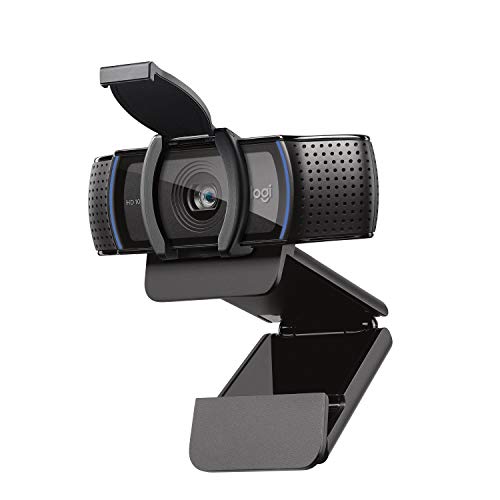
- Logitech C920S HD Pro Webcam: check price on Amazon
- NexiGo N60 Webcam: see the current price on Amazon
- OBSBOT Tiny 2: view this camera on Amazon
Monitoring is the quietest job a camera can do, and the most misunderstood. Most people buy a monitoring camera imagining an emergency — the break-in, the burst pipe, the dog on the forbidden sofa — and judge cameras by that drama. But a monitoring camera’s real life is thousands of uneventful hours, and its real virtues are the boring ones: it stays connected, it records what matters without drowning you in false alerts, it lets you check in from a train platform in four seconds, and it respects the privacy of the home it watches. The best cameras for monitoring are chosen on those terms, and this guide ranks two honest families side by side: dedicated security cameras built for the job, and webcams repurposed as room monitors through a computer, which suit some homes better than the security brands ever will.
What are you actually monitoring? The answer reorganises the shortlist completely. A front door wants one kind of camera; a pet’s afternoon wants another; an elderly parent’s kitchen, a holiday home’s empty rooms, a small shop after closing — each has its own demands of field of view, alerts, storage and discretion. The six picks below cover the common cases, and the guide is frank about the trade every one of them makes.
Key Takeaways
- Decide what you are monitoring before choosing the camera — door, room, pet and property each want a different tool.
- Alert quality beats image quality: a camera that cries wolf gets muted, and a muted camera monitors nothing.
- Webcams through a computer are a legitimate, private monitoring route with no subscription and local recording.
- The OBSBOT Tiny 2’s tracking makes one camera do the work of two in a living space.
- Privacy is a feature: shutters, local storage and honest household rules matter as much as resolution.
- Placement and Wi-Fi strength decide real-world performance more than the sensor does.
In this guide
Quick Picks
| Camera | Badge | Why it is here |
|---|---|---|
| Wyze Cam | Best budget dedicated monitor | A small, inexpensive security camera with colour night vision and flexible storage that made home monitoring mainstream. |
| Blink Mini | Best simple plug-in room camera | A compact indoor camera in a mature ecosystem, easy to deploy in the rooms that matter. |
| Google Nest Cam | Best smart alerts | Intelligent detection that distinguishes people, animals and vehicles, with a polished app experience. |
| Logitech C920S HD Pro Webcam | Best webcam monitor with privacy shutter | A proven webcam that becomes a private, subscription-free room monitor through a computer, with a physical shutter. |
| NexiGo N60 Webcam | Best value webcam monitor | An affordable webcam with a privacy cover for a desk-based monitoring setup that records locally. |
| OBSBOT Tiny 2 | Best tracking monitor | A PTZ camera that pans and zooms to follow movement across a room, covering space one fixed camera cannot. |
How did we judge cameras for watching over a home?
Each camera lived in a real house for a stretch of ordinary life: school runs, a dog with opinions, deliveries, a week away. We scored the alert stream’s honesty — how many notifications deserved attention — the time from phone-in-hand to live picture, night performance in a hallway lit by nothing, and the household’s comfort living alongside the thing. A monitoring camera is a housemate, and housemates are judged on manners as much as competence.
We also tested failure, because monitoring is a promise about bad days: the router rebooted, the power blinked, the Wi-Fi strained under a houseful of guests. Cameras that recovered gracefully and said so in their apps ranked above cameras with finer pictures and fragile tempers. The best monitoring camera is the one you forget exists until the moment it matters — and that is a much harder specification than it sounds.
Wyze Cam — Best budget dedicated monitor
Wyze built its name by making the dedicated monitoring camera cheap enough to be unremarkable, and the current Wyze Cam carries the formula’s virtues: a small cube that goes anywhere, colour night vision that turns a dark hallway legible, and storage flexibility — cloud options or a memory card in the camera for those who prefer their footage at home. For the classic monitoring jobs — the front door from inside the window, the garage, the sleeping dog’s favourite room — it delivers the essential service without ceremony.
The ownership experience is app-centred and alert-driven, and it teaches the genre’s first lesson quickly: position and detection settings are the product. A Wyze pointed at a sunlit window will narrate every cloud; the same camera angled along a hallway becomes a silent, competent witness. Spend the setup half-hour on detection zones and sensitivity, and the camera repays it for years.
Its compromises are the budget’s usual ones — the ecosystem’s best features live behind the company’s service tiers, and the build is functional rather than handsome. As the camera that lets a household monitor three rooms for the price of one premium unit, it remains the category’s benchmark.
Households discover one more use within the first month: the camera as witness to the mundane mysteries — which cat owns the counter at night, whether the cleaner came, when the parcel actually arrived. These small certainties, more than the emergencies, are what owners describe when they recommend the category to friends, and the Wyze’s cheapness is what lets a household scatter enough eyes to answer them.
- Format: dedicated indoor security camera
- Night vision: colour night viewing
- Storage: cloud options or local memory card
- Alerts: motion detection with adjustable zones
- Size: small cube, mounts almost anywhere
Strengths
- Makes multi-room monitoring affordable
- Local storage option keeps footage at home
- Colour night vision at a budget level
Trade-offs
- Best features sit within the maker’s service ecosystem
- App experience carries advertising for the ecosystem
- Prose-only pick: buy from authorised sellers for warranty
Best for: households wanting several monitored rooms on a budget. Not suited for: anyone who wants a completely subscription-free premium experience.
Blink Mini — Best simple plug-in room camera
The Blink Mini is the camera for the room you keep meaning to cover: the nursery corridor, the home office with the expensive chair, the flat’s entrance hall. It plugs in, joins the Blink ecosystem that many households already own for their doorbells and outdoor cameras, and presents a clean, simple app view of the room. Simplicity is its specification — this is the camera a non-technical relative can be given, installed by phone-coaching, and trusted.
Within a Blink household its value compounds: one app, one alert grammar, cameras indoors and out speaking the same language. Motion detection is dependable, two-way talk covers the “off the sofa” conversation with the dog, and the camera’s discretion — it looks like nothing, a small white pebble — suits rooms where a conspicuous security device would change the atmosphere it is meant to protect.
The ecosystem’s storage model leans on its subscription for full features, which is the honest cost of the simplicity, and the camera is indoor-only by design. For its intended job — the important room, watched simply — it is the pick most households will actually finish installing, which in this category is a genuine virtue.
Its gift to a household is often diplomatic rather than technical: because it is so plainly a simple appliance, it starts the family’s monitoring conversation gently. A household that agrees on the Mini’s one room — the hallway, say, armed only when everyone is out — has negotiated the principles that any larger system will need, and negotiated them at the lowest possible stakes.
- Format: plug-in indoor security camera
- Ecosystem: Blink app alongside doorbells and outdoor cameras
- Audio: two-way talk through the app
- Alerts: motion notifications with zones
- Design: small and visually quiet
Strengths
- The simplest install in this guide
- One app for a whole Blink household
- Discreet presence in living spaces
Trade-offs
- Full features lean on the ecosystem subscription
- Indoor use only
- Prose-only pick: check ecosystem compatibility before buying
Best for: Blink households and simple single-room monitoring. Not suited for: outdoor duty or subscription-free purists.
Google Nest Cam — Best smart alerts
The Nest Cam’s argument is intelligence. Its detection distinguishes people from animals from vehicles, learns the household’s familiar faces in its ecosystem’s higher tiers, and produces an alert stream that respects its owner’s attention — the scarcest resource in any monitoring system. In a busy home where a dumb camera would notify forty times a day, that discernment is the difference between a system that stays switched on and one that gets muted by Friday.
The hardware matches the software’s polish: a handsome, well-made camera with strong night performance and battery or wired variants across the range for different placements. For monitoring a driveway-and-garden approach or a living space in a Google-centred smart home, it integrates with a grace the budget cameras cannot imitate — routines, displays around the house, and an app that treats footage as something to be browsed rather than endured.
The costs are the premium ecosystem’s usual ones: the camera’s price, and features that assume the subscription relationship. Households already invested in the platform will find it the natural monitor; households allergic to subscriptions should read the webcam picks below with special attention.
There is an accessibility dividend to its polish that deserves mention: for an adult child keeping a kind eye on a parent’s home — with the parent’s full knowledge and agreement — the Nest’s clear app and intelligent alerts make the arrangement feel like care rather than surveillance. The technology’s manners, in such arrangements, are not a luxury; they are what makes the arrangement sustainable for both generations.
- Format: smart security camera, wired and battery variants
- Detection: distinguishes people, pets and vehicles
- Integration: Google smart-home ecosystem and displays
- Night vision: strong low-light performance
- Design: premium build and appearance
Strengths
- Alert intelligence that protects your attention
- Polished app and ecosystem integration
- Hardware quality throughout the range
Trade-offs
- Premium pricing plus subscription for full features
- Value concentrates inside Google’s ecosystem
- Prose-only pick: choose the variant that suits your placement
Best for: smart-home households wanting the calmest alert stream. Not suited for: buyers avoiding subscriptions and ecosystems.

Logitech C920S HD Pro Webcam — Best webcam monitor with privacy shutter
There is a second philosophy of monitoring, and this camera is its classic instrument: a webcam on a shelf or monitor, connected to a computer that records locally with any of the mature software options for the job. No subscription, no footage leaving the house, no account — the recording lives on your own drive, under your own rules. The C920S suits the role with a sharp, honest picture, a wide enough view for a living room from a bookshelf corner, and the feature that defines its manners: a physical privacy shutter that closes over the lens when the monitoring is off.
The setup suits particular homes beautifully: the home office watched during a holiday, the pet’s room in a house where a computer already lives, the small rental where drilling a security camera is not an option. Software handles the monitoring grammar — motion-triggered recording, scheduled hours, remote viewing — and the arrangement’s total cost is a webcam and an afternoon.
Its terms are plain: the computer must be awake for the watch to be kept, and the system is only as smart as the software you choose. For households whose first requirement is privacy rather than convenience, that trade is not a compromise at all — it is the entire point.
Its second life deserves a line: when the monitoring experiment ends or the household upgrades, the C920S returns to being one of the most proven video-call cameras ever made, on the same shelf it monitored from. Tools that revert gracefully to other duties are the ones a household never regrets buying, and this one’s double career has run in millions of homes for a decade.
- Format: USB webcam used as a room monitor
- Recording: local, via computer software of your choice
- Privacy: physical lens shutter included
- Picture: Full HD with a room-covering view
- Cost model: no subscription required
Strengths
- Footage stays in your house on your drive
- Physical shutter ends all camera anxiety
- Proven, dependable hardware
Trade-offs
- Needs a computer running to monitor
- Smart alerts depend on chosen software
- Placement is tethered to the computer’s location
Best for: privacy-first households and home offices. Not suited for: anyone wanting a standalone camera with its own app.

NexiGo N60 Webcam — Best value webcam monitor
The N60 is the budget door into the webcam-monitoring philosophy: an affordable Full HD webcam with a privacy cover, a decent microphone, and the plug-and-play manners that make it a five-minute install on any computer. As a monitor it covers the desk’s-eye jobs — the office during a trip, the workshop bench, the room where the deliveries are left — with local recording through the owner’s choice of software and no ongoing costs of any kind.
Its picture is honest rather than luxurious, which for monitoring is the correct priority: faces and events are legible, the room is readable at a glance, and the files are small enough that a month of motion-triggered clips is a trivial amount of storage. Households testing whether monitoring is something they actually use — before committing to a security ecosystem — should start exactly here, because the experiment costs almost nothing and the answer arrives within a fortnight.
Like its Logitech sibling it keeps the computer’s hours and inherits the software’s intelligence, for better and worse. As a value instrument for a defined job, it is difficult to argue with.
Renters quietly love this pick for a reason the security brands cannot match: it asks nothing of the walls. No screws, no adhesive mounts, no landlord conversation — a webcam on a bookshelf, a laptop’s schedule, and the deposit survives intact. In a category full of permanent installations, impermanence is a feature with a constituency.
- Format: USB webcam for computer-based monitoring
- Recording: local via owner’s software
- Privacy: lens cover included
- Picture: Full HD, room-legible
- Setup: plug and play on any computer
Strengths
- The cheapest credible monitoring setup here
- No subscription, no account, no cloud
- Installs in minutes anywhere a computer lives
Trade-offs
- Picture quality is functional, not fine
- Computer must run for monitoring to happen
- No native app or smart detection of its own
Best for: testing monitoring cheaply and office or workshop duty. Not suited for: households wanting a polished app experience.

OBSBOT Tiny 2 — Best tracking monitor
One fixed camera watches a rectangle; the Tiny 2 watches a room. Its motorised gimbal pans, tilts and zooms to follow movement — the dog’s patrol, the toddler’s expedition, the cat’s nightly inspection tour — and its larger-than-webcam sensor keeps the picture creditable when it zooms to follow. For open-plan living spaces, big kitchens and workshops where the action refuses to stay in one corner, a tracking camera collapses what would be a three-camera install into one device on a shelf.
It works within the computer-based philosophy — recording locally through software, no monitoring subscription — while adding the tracking intelligence the fixed webcams lack. Voice and gesture control, designed for streamers, translate surprisingly well to a household gadget: the camera can be directed from across the room when your hands are full of the very life it is monitoring.
The moving gimbal is a mechanism, with a mechanism’s need for a stable shelf and reasonable treatment, and like the other webcams it keeps computer hours. For the large single space that defeats fixed cameras, it is the most capable monitor in this guide.
Watch its tracking work a room once and a subtler virtue appears: the footage it gathers is a diary of the house’s life — the dog’s patrol route, the sun’s path across the floor, the toddler’s expanding territory — that fixed cameras never assemble. Owners bought it for security and keep it, often, for the diary. Monitoring technology that earns affection outlasts technology that merely earns tolerance, and affection is a uptime statistic too.
- Format: PTZ webcam with motorised tracking
- Sensor: larger than typical webcams
- Tracking: follows movement across a room
- Control: voice and gesture commands
- Recording: local via computer software
Strengths
- Covers a whole open-plan space alone
- Tracking keeps pets and people in frame
- Strong picture when zoomed to follow
Trade-offs
- Premium price among the webcam picks
- Needs a computer running to monitor
- Moving parts want a stable, safe shelf
Best for: open-plan homes, workshops and pet owners. Not suited for: multi-room coverage or standalone app-based systems.
What should you monitor, and what should you leave alone?
The honest map of a monitored home has three zones. The thresholds — doors, gates, the driveway’s approach — are where monitoring earns its keep with the least privacy cost, because they record arrivals rather than life. The shared living spaces are a judgement call each household makes for itself, best made explicitly and revisited when circumstances change. And the private spaces — bedrooms, bathrooms, anywhere a guest sleeps — are where monitoring does not belong, full stop; a system that respects those boundaries is one the whole household can live with, and guests should be told about cameras in the spaces they will use, as a matter of ordinary courtesy and, in many places, of law.
One arrangement deserves explicit encouragement because it is monitoring at its best: the agreed camera in an older relative’s kitchen or hallway, installed with their full understanding, checked by family with restraint, and understood by everyone as a safety net rather than a supervision. Such arrangements work when the relative controls the terms — where the camera points, when it is on, who may look — and they fail, deservedly, when imposed. The technology in this guide is neutral; the consent is the feature that matters, and it cannot be bought.
Audio deserves its own sentence:
recording sound is more intrusive, and more legally sensitive, than recording pictures in most jurisdictions. Many households disable audio recording on indoor cameras entirely, keeping video for the events that matter. Decide these questions before the cameras go up, write the household’s rules where everyone can see them, and the system becomes a shared tool rather than a suspicion.
How do alerts make or break a monitoring system?
A monitoring system is an attention contract. Every false alert spends the owner’s trust, and the account empties fast: the camera that reports the curtains, the shadows and the spider’s nightly web-building will be muted within the month, and a muted system is worse than none because it feels like coverage. The craft of a good install is therefore mostly alert craft — detection zones drawn around the door rather than the window, sensitivity set for people rather than weather, schedules that match the household’s actual absences, and the smart detection of picks like the Nest where the budget allows it.
There is a human detail in the tuning worth stating: involve the household in it. The partner who keeps triggering the hallway camera at 6 a.m. should help draw the schedule that silences it; the teenager whose friends fill the driveway should meet the person-detection settings. A system tuned by its whole household is defended by its whole household, and monitoring, like most domestic technology, ultimately runs on consent renewed daily.
Review the alert stream weekly for the first month and tune without mercy.
The goal is a stream quiet enough that a notification at 3 a.m. sits you upright — because when the system is tuned, that notification has earned it. Every pick in this guide can reach that state; none of them arrives there without the tuning hour.
How do you get the network right before blaming the camera?
Most monitoring disappointment is networking in disguise. A camera at the far end of a house, behind two walls and a refrigerator’s worth of interference, will drop its stream, delay its alerts and corrupt its reputation — while the same camera two rooms from the router is flawless. The install ritual that prevents a month of confusion is simple: stand where the camera will live, run a speed test on your phone, and be honest about the result. If the corner is a dead zone, the fix is a mesh node or a repositioned camera, and it is cheaper than returning a good camera for a more expensive one that will suffer identically.
Give the cameras their own corner of the network where your router allows it — a guest network or a dedicated band for household devices is a tidy arrangement that many modern routers make painless — and their traffic stops arguing with the household’s, while the separation does quiet security work of its own. It is a ten-minute setting with a five-year payoff, which is the best exchange rate in this entire guide.
Bandwidth has a household politics too.
Several cameras uploading cloud footage share the connection with everyone’s calls, games and films, and the upload side of a home connection is usually the narrow direction. Local-recording setups — the memory-card cameras and the whole webcam route in this guide — are the polite citizens here, keeping their footage at home and their network footprint near zero until the moment you actually look. In a busy house, that politeness can be the deciding argument, and it is one the spec sheets never mention.
How does monitoring change when the subject is a pet?
Pet monitoring is the use case that quietly owns this category, and it has its own camera logic. The animal’s day happens at floor level and in favourite places — the sofa’s forbidden cushion, the door’s waiting post, the sun patch’s migration across the room — so the camera should be placed for the pet’s geography, not the room’s. Two-way talk divides owners: some dogs are soothed by a familiar voice, others are distressed by a voice without a person, and the honest guide’s advice is to test it once, watch the reaction, and let the animal vote. Treat-dispensing cameras exist as a separate gadget family; the cameras here cover the watching, which is the part owners actually use daily.
Pet cameras also become unexpected instruments of care: the appetite change noticed across a week of check-ins, the new limp visible in a hallway crossing, the thunderstorm anxiety that argues for a neighbour’s visit next time. Owners who review their pet footage with a carer’s eye rather than a guard’s often catch the small things early, and while no camera substitutes for a veterinarian, the diary it keeps has started more than a few timely appointments.
The alerts should be tuned for the pet’s scale and habits,
or the stream becomes a documentary of naps. What owners truly value, in survey after survey of their own behaviour, is the check-in: the four-second glance from the office that confirms the dog is asleep on the rug and the house is standing. Cameras that make that glance fast and pleasant — the app polish of the Nest, the local setup’s immediacy — are the ones still in use at month six, which is the only retention statistic that matters.
How do you watch the front door and deliveries from inside?
The most-used monitoring view in many homes is not a room at all but a threshold: the front door watched from a hallway camera or through a window, where the day’s small dramas — the parcel’s arrival and occasional disappearance, the visitor at an empty house, the child home from school — actually happen. An indoor camera aimed at the door covers much of a doorbell camera’s job without outdoor installation, and the ecosystems here all handle the alert grammar of arrivals well, particularly the Nest’s distinction between a person and a package’s motion.
Mind the window’s physics if the camera looks through glass: infrared reflects off the pane at night and blinds the view, so night duty at a window means disabling the infrared and borrowing the porch light’s glow, or moving the camera’s watch indoors to the hallway itself. Many households end with both — the hallway camera for the night, the window view for the day — and discover the arrangement covers the door’s whole biography more honestly than either alone.
What does good night monitoring look like?
Half of monitoring’s life happens in the dark, and the night picture is where cheap cameras confess. Infrared night vision paints the room in grey clarity — faces legible, movement obvious — while colour night modes, like the Wyze’s, borrow whatever ambient light exists to keep colours truthful at lower clarity. Neither is simply better: for identifying an intruder the infrared’s contrast is king, while for checking whether the dog is on the bed or merely near it, colour’s context wins arguments. Judge a monitoring camera by its 2 a.m. picture rather than its noon one, because the night is when the system earns its existence.
Night is also when the system’s discretion is tested socially: a camera’s infrared glow is a faint red constellation that guests notice and occasionally mind, and the status lights that reassure owners can keep a light-sleeping household awake in a corridor. Most cameras here allow those lights to be dimmed or darkened in settings — a small mercy worth the menu dive in any home where the camera shares space with sleep.
Placement changes at night too.
Infrared reflects off nearby walls and windows into a white bloom that can blind the camera to the room beyond, so the night test — camera in position, lights out, check the app from bed — is a mandatory install step rather than a refinement. Move the camera a hand’s width, angle it off the window’s plane, and the bloom dies. The households whose systems work at night are the ones who performed this small ceremony; the rest own cameras that monitor their own reflections.
How do you monitor a home that stands empty?
The holiday home and the long trip pose the sterner test: nobody is there to reboot anything. Priorities reorder themselves — connection resilience first, then power resilience, then the alert stream’s reliability across weeks of silence. A camera on a smart plug that can be power-cycled remotely, a router with its own restart schedule, and local recording that survives an internet outage together form the empty-house doctrine; the dedicated cameras’ ecosystems handle much of this gracefully, while the webcam route needs a computer configured to wake, record and recover unattended, which is achievable but must be rehearsed before the trip, not discovered from the airport.
Water deserves a special plan in the empty house, because the burst pipe and the failed appliance cause more holiday-home damage than any intruder: a camera aimed at the utility corner, the boiler or the under-sink cabinet turns a catastrophe discovered in a month into a phone call made in an hour. It is the least glamorous view in this entire guide and, actuarially, among the most valuable.
Simulate the absence before it happens:
a weekend away with the system armed and the alerts watched teaches more than any manual. Note also the neighbours’ role — a trusted human with a key remains the finest monitoring accessory ever devised, and the camera’s job in an empty house is largely to tell that human when they are needed.
How do you choose between the security brands and the webcam route?
Strip the choice to its essentials and it becomes a question about where your footage lives and who does the work. The dedicated cameras sell completeness: their own apps, their own detection, their own storage, a system that runs whether or not any computer in the house is awake, at the price of subscriptions and trust in a provider. The webcam route sells sovereignty: footage on your drive, software of your choosing, no continuing cost, at the price of your own administration and a computer’s uptime. Neither philosophy is the responsible one in the abstract; each household’s answer follows from its own balance of convenience, privacy and technical appetite.
Hybrid households are common and sensible: a dedicated camera at the front door, where independence matters most, and a shuttered webcam in the office, where privacy matters most. The picks in this guide were assembled to allow exactly such mixtures without app chaos — and the household that mixes deliberately, room by room, usually ends with the system that fits its life most precisely of all.
Comparison Table
| Camera | Type | Storage philosophy | Best room |
|---|---|---|---|
| Wyze Cam | Dedicated security | Cloud or memory card | Hallway, garage, door |
| Blink Mini | Dedicated security | Ecosystem cloud | Entrance hall, office |
| Google Nest Cam | Smart security | Cloud with smart alerts | Living space, driveway |
| Logitech C920S | Webcam monitor | Local, on your computer | Home office, pet room |
| NexiGo N60 | Webcam monitor | Local, on your computer | Desk, workshop |
| OBSBOT Tiny 2 | Tracking webcam | Local, on your computer | Open-plan living space |
What is checking in actually like from far away?
The check-in is the product. Strip away the marketing and a monitoring system sells one moment: you, on a platform or a beach or a hospital corridor, opening an app and seeing your home being ordinary. The engineering that matters is all in that moment’s latency and reliability — how fast the live view wakes, whether the picture that arrives is this minute’s rather than a cached ghost, how gracefully the app behaves on a foreign network or a train’s flickering connection. The ecosystems in this guide have spent a decade polishing exactly that moment, and it shows; the webcam route answers with remote-access software whose quality the household chooses and controls.
The check-in has an etiquette of its own in shared households: looking in on an empty house is the system’s purpose, while looking in on an occupied one is a visit, and visits are announced. Families who keep that distinction bright — a message before the camera opens on a home where people are living their evening — find the technology welcomed for years; families who blur it find the cameras mysteriously unplugged.
Test the moment before you need it:
check in from the end of the street, from a friend’s Wi-Fi, from the train. A system whose first real test is an ocean away will choose that distance to teach you about your router’s upload speed. The households who rehearse their check-ins are the ones whose holidays stay holidays.
How should you think about storage: cloud, card or computer?
Storage is where monitoring philosophies become concrete. Cloud recording is the convenience champion: footage survives the camera being stolen or the house’s worst day, browsing is effortless, and the cost is a continuing subscription plus the trust you place in the provider. Memory-card recording keeps footage in the camera — free after the card, private by architecture, but vulnerable to the camera itself being taken and limited by the card’s size. Computer recording, the webcam route, splits the difference for households with a machine already running: storage as large as your drive, privacy as strong as your house, and availability that depends on the computer’s uptime.
Retention is the storage question nobody asks until it bites: how many days of footage exist before the system begins overwriting itself? Match the window to your life — a household that travels for a fortnight needs a fortnight’s retention at minimum, plus the discipline of exporting anything important the moment it is noticed. Cloud tiers are largely retention tiers wearing other clothes, and reading them that way makes the price lists suddenly legible.
The mature answer is often layered:
cloud alerts for immediacy, local recording for completeness, so the phone buzzes with the event while the full-quality footage waits safely at home. When comparing the picks in this guide, read their storage models as carefully as their sensors — across five years of ownership, the storage decision will cost or save more, in money and in peace of mind, than any other line in the specification.
What about monitoring a small business or a shop?
Small commercial spaces borrow this guide’s cameras constantly — the café’s till, the workshop’s bench, the studio’s door — and the domestic picks mostly transfer, with three changes of emphasis. Coverage becomes a record-keeping duty: retention periods, incident retrieval and footage that may be shared with insurers or police raise the value of the ecosystems’ organised cloud archives. Staff change the privacy calculation entirely: employees must know the cameras exist and why, covert monitoring of staff is a legal and ethical minefield in most places, and the cameras should watch thresholds and tills rather than people at their work. And the network is shared with the business’s other life, so the cameras’ bandwidth manners matter at the till’s busiest hour.
Insurance paperwork deserves a mention in the commercial context: some insurers ask whether premises are monitored and a few reward it, but the footage practices that satisfy a claim — retention, timestamps, exportability — are the same ones this guide recommends for the home, so a business that installs thoughtfully is usually already compliant with its insurer’s quiet expectations. Ask the insurer before assuming a discount; install for the evidence regardless.
Within those rules, the same ranking logic holds:
the Wyze-class cameras cover a small premises affordably, the Nest’s intelligence calms a busy shop’s alert stream, and a webcam on the office computer watches the stockroom with a privacy the staff can verify by looking at the shutter. The technology is domestic; the responsibilities are professional, and the gap between the two is where small businesses should spend their thinking.
What mistakes do people make when they start monitoring?
Buying for the drama leads the list: the camera specified for a break-in and pointed at a bookshelf, when the household’s actual need was watching the dog. Second is the unwatched alert stream — cameras installed, notifications ignored from day three, the system’s whole purpose quietly abandoned. Third is placement by convenience: the camera goes where the socket is rather than where the view is, and monitors a wall’s opinion of the room. Fourth is forgetting the household’s other members — partners, teenagers, cleaners, guests — whose comfort with the system decides whether it survives the month. And fifth is neglecting the network: a camera at the edge of Wi-Fi range fails in ways that look like camera faults, and a mesh node is often the real upgrade the system needed.
What happens when the footage actually matters?
Sooner or later a monitoring system is asked to prove something: the delivery that vanished, the night the fence was tried, the moment a pipe chose to burst. Preparing for that day is a quiet discipline. Know, before the incident, how your system exports a clip and how long your storage keeps it — retention windows close silently, and the clip needed on day ten may have been overwritten on day seven. Save incident footage outside the system immediately, in two places, with the date and circumstances noted while memory is fresh; insurers and police work from such files, and a clear, timestamped, unedited clip is worth more than an hour of description.
Quality decisions made at purchase return here with interest: the camera whose night picture identifies a face, whose angle covers the door rather than the ceiling, whose clock was accurate — these are the systems whose footage settles arguments. It is another reason this guide weights the boring virtues so heavily. Drama is rare; when it comes, it grades the whole system in a single afternoon.
How do you run a fair one-month trial of a monitoring setup?
Monitoring reveals its truth slowly, so judge any new system across a month rather than a weekend. Week one is for placement and tuning — the zones, the sensitivity, the night test — and its alert chaos should be forgiven as calibration. Week two tests the check-in from real life: the commute, the school run, the evening out. Week three is the honesty audit: count the alerts that deserved you, and if the fraction is not high, the tuning is not finished. Week four answers the only question that predicts year two — did the household stop noticing the system except when it spoke usefully? A system passing that test will still be running in five years; one failing it is already on its way to a drawer, whatever its specifications promised.
Keep the trial to one camera and one room, however grand the eventual plan. A single well-understood camera teaches a household its own monitoring character — what it actually checks, what it actually fears, what it actually ignores — and every subsequent purchase is then made with evidence. The picks in this guide all support that modest beginning; the category’s regrets are almost all purchased in sets of four on the first day.
How do you keep the monitoring system itself secure?
A camera network is a set of eyes into your home, and it should be defended like the front door it watches. The hygiene is unglamorous and absolute: a unique, strong password on the camera account, two-factor authentication switched on wherever the ecosystem offers it, firmware updates applied rather than postponed, and the router’s own password changed from its printed default. Shared access should be granted through the app’s family features — each person with their own login — rather than by passing one password around the household, so that access can be withdrawn when circumstances change.
Review shared access once a year, the way you would review who holds a spare key: the ex-partner, the former lodger, the cleaner from two agencies ago. Access lists drift exactly like key rings do, and the audit takes five minutes inside whichever app the household uses.
Retire cameras properly, too:
a camera sold, donated or binned should be removed from the account and reset, because a lens that once watched your hallway should not carry your credentials into its next life. These habits take an hour a year, and they are the difference between a monitoring system and a vulnerability with a lens. Every ecosystem in this guide supports the full routine; the webcam route, whose footage never leaves the house, starts with a structural advantage the others must earn through discipline.
Final Recommendation
Choose by philosophy first. Households comfortable with an ecosystem should take the Wyze for value across several rooms, the Blink Mini inside an existing Blink home, or the Nest Cam for the calmest, cleverest alerts. Households whose first principle is privacy should build the webcam route — the C920S for its shutter and polish, the N60 to test the idea cheaply, the Tiny 2 where one room is too big for a fixed view. In every case, spend the setup hour on placement, zones and the household’s rules: monitoring succeeds as a set of decisions, and the camera is merely the last of them.
Frequently Asked Questions
Is it legal to record inside my own home?
Generally yes for your own spaces and security purposes, but the details — audio recording, guests, tenants, employees such as cleaners or carers — vary by jurisdiction and situation, and some carry real obligations. Check your local rules, tell people who live or stay in the home, and never place cameras in bathrooms or guest bedrooms.
Do monitoring cameras need a subscription?
Some do for their full features, particularly cloud recording history and advanced detection; others record locally to a memory card, and the webcam route in this guide needs no subscription at all. Read the ongoing-cost model before buying, because it is part of the price.
Can a webcam really work as a security camera?
Yes, with a computer running monitoring software: motion-triggered recording, alerts and remote viewing are all achievable, with the privacy advantage that footage stays on your own drive. Its limits are the computer’s uptime and the software’s intelligence, which the household controls.
Where is the best place to put an indoor monitoring camera?
High in a corner of the room that contains the door, angled to cover the entry and the room’s valuables without staring at seating where people relax. Cover thresholds rather than lives, keep it out of bedrooms, and test the view at night before fixing it permanently.
Can monitoring cameras work without Wi-Fi?
Some can record without it — memory-card cameras keep filming locally through an outage, and the webcam route never needed the internet for recording at all. What Wi-Fi provides is the alert and the remote check-in; without it, the system becomes a recorder you review afterwards rather than a watchman who calls you. For sheds, garages and rural properties, that recorder model is often exactly right.
How many cameras does a home need?
Fewer than marketing suggests. Start with the single most valuable view — usually the main entrance — live with it for a month, and add only where a real blind spot has announced itself. Systems grow well one honest need at a time.
One final perspective to install alongside the cameras: a monitoring system is a promise a household makes to itself about attention, and like all promises it should be sized to what will actually be kept. One camera, well placed, honestly tuned and genuinely watched will protect a home better than six that nobody checks. Buy the promise you will keep — the guides above will help you keep it well.
Related Guides
Related reading: our guides to the best cameras for monitoring children and family rooms, cameras with motion detection for home security and the best webcams for home office and everyday use.


