reviewstook.com is reader-supported. When you buy through links on our site, we may earn an affiliate commission.
Where to buy
Five of the six cameras here are available through Amazon and the major camera retailers; the sixth, a professional camcorder, is discussed without a link as it falls outside the pool verified for this article, and video specialists stock it. Continuous recording lives or dies on accessories, so when you order, price the whole station in the same basket: the mains power solution, the high-endurance media, and the mount or enclosure the camera will actually live in. A continuous-4K camera bought without its power plan is a promise the first long day will break.
- Panasonic LUMIX S5II: check price on Amazon
- Panasonic LUMIX S5IIX: check price on Amazon
- GoPro HERO12 Black: check price on Amazon
- DJI Osmo Action 5 Pro: check price on Amazon
- Logitech Brio 4K: check price on Amazon
- Canon XA-Series Camcorder — sold through professional video dealers (prose-only pick in this guide)
Most cameras treat 4K video as a sprint. The best cameras for continuous 4k treat it as a shift of work: hours of uninterrupted recording, all day if the job asks, without a thermal shutdown, a file-size ambush or a battery quietly expiring at the crucial hour. The jobs that ask are more common than the camera industry admits. The lecture series that runs a full day. The nest box and the wildlife hide, where the animal keeps its own schedule. The production line and the laboratory process that must be documented whole. The service, the conference, the court deposition, the time-lapse construction site, the small venue’s permanent streaming camera. In every case the requirement is identical and unforgiving: press record in the morning, trust the camera completely, and collect complete footage at the end.
That requirement reorders everything a buyer usually asks about. Resolution is table stakes; every camera here shoots 4K. What separates them is thermal design, because sustained 4K is a heat problem before it is an image problem, power architecture, because no internal battery is an all-day answer, and media behaviour, because a continuous recorder must handle enormous files, relay across cards or storage, and never corrupt the one take that cannot be repeated. This guide ranks six cameras against those three disciplines, across the very different forms continuous recording takes, from a full-frame body on a tripod to an action camera in a housing to a webcam that never sleeps.
Read the picks by your duty cycle. A camera that records four continuous hours for a weekly lecture and one that records twenty-four hours a day as an observation camera are both continuous, but they are not the same product, and this guide says which is which in plain terms in every section.
Key Takeaways
- Continuous 4K is a heat, power and media problem before it is an image problem.
- The Panasonic LUMIX S5II and S5IIX lead the mirrorless class with active cooling for long sessions.
- Action cameras from GoPro and DJI record for hours when powered externally and housed sensibly.
- A 4K webcam is the simplest true 24/7 recorder when a computer is part of the station.
- A professional camcorder remains the set-and-forget benchmark for all-day event recording.
- High-endurance media and mains power are not accessories in this discipline; they are the discipline.
In this guide
Quick Picks
| Camera | Badge | Why it is here |
|---|---|---|
| Panasonic LUMIX S5II | Best Continuous Mirrorless | Active cooling and long-session design for hours of full-frame 4K. |
| Panasonic LUMIX S5IIX | Best for Streaming Stations | Production recording options for fixed, always-ready 4K stations. |
| GoPro HERO12 Black | Best Compact Endurance | Long runtimes and simple looping in a body that mounts anywhere. |
| DJI Osmo Action 5 Pro | Best Battery Endurance | Exceptional battery life and dual screens for field observation work. |
| Logitech Brio 4K | Best 24/7 Webcam Recorder | Plug into a computer and record or stream indefinitely at 4K. |
| Canon XA-Series Camcorder | Best All-Day Event Recorder | Dual slots, mains power and a design built for unbroken event days. |
How did we judge cameras for continuous 4K?
The judging began with heat, because heat ends more continuous recordings than every other cause combined. A camera recording 4K is running its sensor, processor and media at full effort indefinitely, and the designs divide sharply between those that treat that as the normal case, with fans, heat paths and honest engineering, and those that treat it as a tolerated excursion. Candidates were assessed on their cooling design and their reputation across full-day shoots at warm ambient temperatures, in their actual enclosures and positions, because a camera that survives four hours on a breezy tripod may fail in ninety minutes inside a weather housing in July.
Power came second. Every serious continuous setup runs from the mains, a vehicle, a power station or a very large battery, so bodies were judged on how gracefully they accept external power: USB-C power delivery that runs the camera rather than merely charging it, dummy batteries, and behaviour when power blips, including whether the recording survives an interruption or takes the file with it. Media came third: card capacity at 4K bitrates, relay recording across dual slots, loop recording for observation work where only the recent hours matter, and file handling that an ordinary computer can manage after a week of accumulation. Image quality, the usual headline, was judged last and mattered least, because at the end of a twelve-hour day the best continuous camera is the one still recording.
The picks in detail

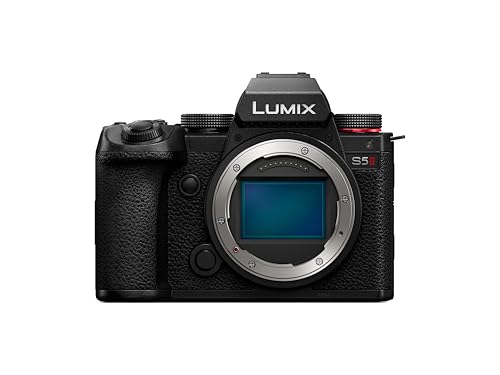
Panasonic LUMIX S5II — Best Continuous Mirrorless
The S5II earns the top of this guide on a single engineering decision: it has a fan. Panasonic built active cooling into this generation, and for continuous 4K that transforms the camera’s character from a sprinter with stamina questions into a shift worker. Indoors, in ordinary room conditions, it records 4K for as long as the power and media last, which is the entire definition of the job. Lecture capture, conference stages, houses of worship, theatre documentation and the fixed camera at the front of a training room are its natural postings, and owners who run it for full working days report the same experience: the camera becomes boring, which in continuous recording is the highest available praise.
The picture it sustains is full-frame 4K with the colour depth and low-light grace that smaller formats cannot match across a long day’s changing light, and its autofocus handles the lecturer who wanders, the panel that rearranges itself, the demonstration that moves to the whiteboard. Dual card slots allow relay recording for the longest sessions and instant backup for the unrepeatable ones, and USB-C power delivery means the standard continuous station, camera on tripod, cable to the wall, is a five-minute build. The fan is audible only in the sense that a silent room and an on-camera microphone can find it; any sane audio arrangement for a day-long recording, which means a microphone near the subject or a feed from the desk, renders it irrelevant.
Its boundaries are the format’s boundaries. It is a camera that wants a tripod and a power cable, not a housing on a fence post, and in a sealed enclosure in direct summer sun even its cooling has physics to obey, so outdoor continuous stations need shade and airflow planning whatever body they use. Media consumption at its best quality settings is hearty, and the day-long archive needs a drive budget to match. Within the enormous class of tripod-based continuous work, though, this is the body that removed the asterisk from mirrorless recording, and it is where most readers of this guide should start.
- Format: full-frame mirrorless
- Cooling: active fan for sustained recording
- Power: USB-C delivery for continuous running
- Cards: dual slots, relay and backup modes
- Duty: full working days indoors
Strengths
- Cooling turns long 4K sessions into routine.
- Full-frame image sustained across whole days.
- Dual cards cover relay and backup patterns.
Trade-offs
- A tripod-and-cable camera, not a fence-post one.
- Sealed hot enclosures still need airflow planning.
- Best-quality media consumption is hearty.
Best for: lectures, conferences, worship and fixed indoor stations. Not suited for: sealed outdoor housings in direct summer sun.
Panasonic LUMIX S5IIX — Best for Streaming Stations
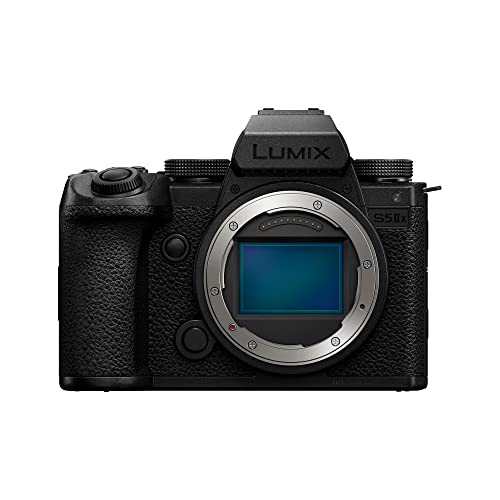
Where the S5II is the continuous recorder, the S5IIX is the continuous station: the X variant’s production recording and output options suit the camera that lives at the front of a venue, a studio or a lecture theatre, feeding a stream or an external recorder while also laying down its own copy. Its cooling shares the family gift for duration, and its deeper video toolkit, including high-quality recording flavours and external recording support, suits stations where the footage feeds other systems and must arrive in the form those systems want. For an organisation building one permanent 4K point of view into a room, this is the body that behaves like infrastructure.
The working pattern is installation thinking. Mount it once, power it from the wall, set its profiles against the room’s lighting states, and the camera’s weekly life becomes a power switch and a confidence check. Its autofocus covers the unstaffed moments, a single speaker at a lectern, a panel finding its seats, and its image holds the window-lit, mixed-temperature light of real rooms with a grace that webcams and action cameras cannot approach. Streaming-native features in this generation simplify the direct-to-platform workflows that smaller venues and solo educators rely on, reducing the chain between the lens and the audience to something a non-specialist can run.
Choose between the two Panasonics by the destination of the footage. If the camera’s own cards are the archive, the S5II is the cleaner buy. If the camera feeds a production, a stream, an external recorder, a second room, the X earns its premium in options you will use weekly. Both ask for the same station discipline, power, media and an audio plan that does not rely on the camera’s own microphones across a room, and both repay it with the quality that makes a permanent installation worth building.
- Format: full-frame mirrorless, production variant
- Cooling: active, for sustained sessions
- Output: streaming and external-recorder friendly
- Power: continuous USB-C and rigging options
- Duty: permanent venue and studio stations
Strengths
- Production options suit feed-and-record stations.
- Same long-session cooling as its sibling.
- Image quality justifies a permanent installation.
Trade-offs
- Premium buys options simple recorders never use.
- Menus reward one careful installation session.
- Still a tripod camera, not a housing camera.
Best for: permanent streaming and recording stations in venues and studios. Not suited for: buyers who only ever record to the camera’s own cards.

GoPro HERO12 Black — Best Compact Endurance
The HERO12’s continuous-recording story is one of subtraction: GoPro removed the onboard GPS and tuned this generation for runtime and thermal calm, and the result is the action camera that endurance users adopted as their default. On external power, mounted with airflow, it records 4K for the length of a working day and beyond, and its loop recording mode serves the observation jobs, the yard, the workshop, the animal pen, where keeping the most recent hours matters more than archiving everything since spring. It is small enough to live where the continuous view needs to be, on the machine, the beam, the hide’s window, the dashboard, and tough enough that its living there is not a worry.
Its image is the modern GoPro character: very wide, stabilised, bright and honest, with colour that cuts acceptably beside bigger cameras for the establishing and context material continuous stations so often need. Time-lapse and interval modes extend its continuous brief across days and weeks for construction and growth documentation, where the recording is really a patient series of stills wearing video’s clothes. The ecosystem of mounts, housings and power doors, including the pass-through arrangements that let it run cabled inside a weather housing, is the deepest in this guide, and for odd continuous postings that ecosystem is often the deciding factor.
The disciplines are the class’s disciplines. In a sealed housing in heat it will protect itself by stopping, so airflow and shade are part of the installation, not afterthoughts. Its files at 4K accumulate at a rate that makes media planning a weekly ritual. And its low-light footage, while serviceable, is not the full-frame bodies’ equal for a dim hall’s all-day record. Deployed within its physics, though, the HERO12 is the continuous camera that professionals reach for when the posting is awkward, the budget is mortal and the recording simply must not stop.
- Format: waterproof action camera
- Runtime: endurance-tuned generation
- Modes: loop recording, time-lapse, long video
- Power: USB pass-through for cabled housings
- Duty: hours to days with airflow
Strengths
- Long, calm recording from a tiny body.
- Loop mode suits observation and security-adjacent work.
- Mounting ecosystem solves awkward postings.
Trade-offs
- Sealed heat still defeats it; airflow is mandatory.
- Low light trails the full-frame bodies.
- Media fills fast at full quality.
Best for: observation, vehicles, workshops and awkward mounts. Not suited for: sealed housings in hot sun or dim-hall quality records.

DJI Osmo Action 5 Pro — Best Battery Endurance
Continuous recording’s hardest postings are the ones without a wall socket: the hide two fields from the farmhouse, the boat, the remote instrument site, the festival stage’s fixed wide shot. The Action 5 Pro is this guide’s answer to those postings, because its battery endurance is the class’s benchmark, stretching a single charge across hours that rival action cameras measure in minutes, and its cold-weather behaviour keeps that promise further down the thermometer than most. For the wildlife watcher recording a feeder or a nest across a morning, the researcher documenting a process in the field, the angler or sailor whose camera lives outdoors, battery endurance is not a convenience; it is the difference between a continuous camera and a part-time one.
The rest of the package supports the posting. Front and rear screens let a lone operator frame and confirm from either side, its subject tracking helps the unattended-but-supervised setups, and its low-light performance is a genuine step for the action class, holding dusk and dawn, the hours wildlife actually keeps, with more grace than its rivals. Waterproofing is native and deep, mounts are plentiful, and on external power for the semi-permanent stations it behaves with the same calm as its battery work suggests. DJI’s colour profiles include flatter options for those cutting its footage against bigger cameras in a documented process.
Its limits mirror the GoPro’s with different emphases: heat in sealed enclosures, media appetite at top quality, and a fixed wide view that decides the composition at mounting time. Battery swapping mid-record also interrupts, so the longest unattended runs still end at a power cable where one can possibly be run. But for the large class of continuous work that happens away from buildings, the Action 5 Pro’s endurance makes it the most honest recommendation in this guide, the camera whose spec sheet promise and field behaviour are the same number.
- Format: waterproof action camera
- Battery: class-leading endurance, cold-capable
- Screens: front and rear for lone operators
- Low light: a step forward for the class
- Duty: hours away from mains power
Strengths
- Records for hours where no socket exists.
- Dusk and dawn footage holds up well.
- Dual screens suit solo field setups.
Trade-offs
- Longest runs still prefer a power cable.
- Fixed wide view is decided at mounting.
- Sealed-enclosure heat rules apply as ever.
Best for: wildlife, field research and off-grid continuous recording. Not suited for: permanent indoor stations, where the Panasonics rule.

Logitech Brio 4K — Best 24/7 Webcam Recorder
There is a class of continuous recording for which the correct camera has no shutter button at all. The observation of a room, a reception, a laboratory bench, a 3D printer farm, a studio’s always-on view: wherever a computer is already part of the station, a 4K webcam like the Brio records or streams indefinitely, limited only by the storage you give it, with no thermal drama, no battery and no recording limit in the camera itself. It is the simplest continuous 4K in this guide by an enormous margin, and for indoor observation work that simplicity is a professional virtue: the station that a non-specialist can restart at 3 a.m. beats the superior camera that needs its owner.
The Brio’s image serves that role properly. Its 4K sensor gives the digital zoom and cropping room that observation framing needs, its light correction handles the mixed and dim conditions of real rooms, and its adjustable field of view lets one model serve the tight bench shot and the wide room view. Paired with ordinary recording or streaming software on the host computer, it becomes the always-ready eye of small studios, remote-teaching rooms, makerspaces and reception areas, and its footage is entirely adequate for the documentation, safeguarding-review and process purposes those stations exist for.
Be clear about the trade: the computer is the recorder, so the station’s reliability is the computer’s reliability, and the image, while good, is webcam-class in low light and dynamic range beside the mirrorless bodies. It will not document a wedding or a wildlife hide. But for the substantial world of indoor, powered, computer-adjacent continuous recording, the Brio is not the cheap option; it is the correct one, and organisations that discover it stop sacrificing real cameras to observation duty.
- Format: 4K USB webcam
- Recording: via host computer, effectively unlimited
- Light handling: automatic correction for rooms
- Field of view: adjustable in software
- Duty: true 24/7 indoor observation
Strengths
- No thermal, battery or take-length limits in the camera.
- Any staff member can run and restart the station.
- 4K headroom allows cropped observation framing.
Trade-offs
- The host computer is the recorder and the risk.
- Low-light image is webcam class.
- Useless away from a computer.
Best for: indoor observation, benches, studios and always-on rooms. Not suited for: events, wildlife or anywhere without a host PC.
Canon XA-Series Camcorder — Best All-Day Event Recorder
Before mirrorless learned endurance, the camcorder was continuous recording, and the XA class remains its benchmark for the classic all-day event: the conference, the graduation, the deposition, the school day of performances. It is discussed without a link here, outside the pool verified for this article, and its design is a checklist of this guide’s criteria answered a decade ago: dual card slots relaying across a day, mains power as a native condition, a lens that zooms from the room to the speaker without a change, proper audio inputs for the desk feed, and a body whose cooling never became a forum topic because it never became a problem.
The experience of running one is the experience of not thinking about the camera. The powered zoom glides, the stabilisation handles the tripod’s absence when the day demands a shoulder, the recording indicators and meters are legible across a room, and the files arrive in the ordinary formats that institutional editors and legal workflows expect. Its smaller-sensor image is clear rather than lush, which for documentation is often the honest preference, and its depth of field keeps a panel of speakers simultaneously sharp in a way full-frame operators must work to achieve.
Choose it when the day’s completeness is the deliverable and the operator rota is wide. The mirrorless bodies above make prettier pictures for the highlight reel; the camcorder makes the whole day, every time, in the hands of whoever was available. Institutions that bought this class years ago are still running them on the same duty, which is the most eloquent review continuous recording can give.
- Format: professional camcorder
- Cards: dual slots with relay recording
- Audio: proper inputs for desk feeds
- Lens: integrated powered zoom
- Duty: unbroken institutional event days
Strengths
- Built for the complete day, not the highlight.
- One box handles picture and desk audio.
- Any trained volunteer can run it.
Trade-offs
- Image is clear rather than cinematic.
- Not a stills or low-light specialist.
- Bought through video channels.
Best for: institutions recording whole events with rotating operators. Not suited for: shallow-focus, low-light or stills work.
Comparison table
| Camera | Endurance basis | Power plan | Best duty | Watch out for |
|---|---|---|---|---|
| Panasonic LUMIX S5II | Active cooling | USB-C mains | Full-day indoor recording | Sealed hot enclosures |
| Panasonic LUMIX S5IIX | Cooling plus production options | Mains and rigging | Permanent streaming stations | Unused options for simple jobs |
| GoPro HERO12 Black | Thermal calm, loop mode | USB pass-through | Observation and vehicles | Airflow in housings |
| DJI Osmo Action 5 Pro | Battery endurance | Battery, then USB | Off-grid field recording | Swaps interrupt the take |
| Logitech Brio 4K | Host computer records | USB from the PC | 24/7 indoor observation | The PC is the recorder |
| Canon XA-Series | Camcorder design | Mains native | Institutional event days | Clear, not lush, image |
How do you build a continuous recording station?
Power first, and power boringly
Decide the power source before the camera position, because the cable’s route decides where the camera can live. Mains where mains exists, with the cable dressed so no cleaner, child or cast member can unplug your documentary. Vehicle or power-station supply where it does not, sized for the longest day with a third to spare. Then test the failure: pull the power mid-recording in rehearsal and learn what your camera does, whether the file survives and whether recording resumes, because in a year of continuous work that test will happen uninvited.
Media sized for the worst week
Calculate the storage from the bitrate, not from hope: hours per day multiplied by the camera’s data rate, multiplied by the days between offloads, plus the margin for the week someone is ill. Use high-endurance media where the camera writes constantly, because ordinary cards wear under continuous duty in ways their warranties quietly exclude, and schedule the offload like a shift task with a name attached to it.
Heat is a site decision
Walk the station at the hottest hour of the hottest expected day. Shade the housing, ventilate the enclosure, keep the camera out of the sun-trap behind glass, and let the action cameras breathe. Most continuous-recording failures that get blamed on cameras are site failures, and they are all preventable in one site visit with a thermometer and a roll of tape marking where the sun actually falls in July.
How do you run a week of continuous recording?
The rhythm that works is a daily glance and a weekly ceremony. Daily: confirm the recording indicator, the remaining media, the power connection, and glance at thirty seconds of the latest footage for framing and focus, because cameras get knocked, mounts sag and subjects move their furniture. Weekly: offload and verify the archive, format media in the camera, clean the lens and the housing’s window, and log anything that changed. The log matters more than it sounds: continuous stations fail slowly, a fan note changing, a mount creeping a degree a week, a card’s write speed fading, and the log is how slow failures get caught while they are still anecdotes rather than outages.
For observation and loop stations, add the retention decision to the weekly ceremony: what is kept, what is overwritten, who can view it and how long it is retained. Continuous recording creates obligations as well as footage, particularly where people are observed, and the stations that handle those obligations deliberately, with a written retention habit, are the ones still running happily in five years.
What mistakes stop continuous recordings?
Trusting the internal battery for a day job
Internal batteries are for sessions, not shifts. Any recording whose loss would matter belongs on external power, and any posting that cannot have external power belongs to the endurance action cameras with a swap plan, not to optimism.
Sealing the camera in a hot box
Weather protection and ventilation are enemies that must be reconciled deliberately, with shaded, vented housings and airflow paths, or the camera’s own thermal protection will end the recording at the sunniest, most important hour.
Buying media by price for continuous duty
Constant writing wears cards, and the failure arrives mid-record, taking the file with it. High-endurance media, rotated and retired on a schedule, is the cheapest insurance in the entire station.
Never reviewing the footage until it is needed
The station that is checked weekly fails in anecdotes; the one checked when the footage is subpoenaed, graded or broadcast fails in headlines. Thirty seconds of review a day is the whole difference.
Final Recommendation
Build from the duty cycle backwards. Full-day indoor recording belongs to the Panasonic S5II, permanent streaming stations to the S5IIX, and institutional event days to the camcorder class that invented the job. Observation and awkward postings belong to the HERO12 with airflow and loop recording, off-grid hours to the Action 5 Pro’s battery, and computer-adjacent 24/7 rooms to the Brio, which will out-continue everything here for a fraction of the fuss. In every case the camera is the smaller half of the purchase: power it from the wall, feed it endurance media, shade it, check it daily, and your continuous 4K will have the quality this discipline actually runs on, which is that it never, ever stops being there.
More detail: the archive a continuous camera creates
Continuous recording quietly manufactures an asset most organisations underestimate: the complete record. The lecture series becomes a searchable library. The construction site becomes its own progress evidence. The wildlife hide becomes a behavioural dataset whose value compounds across seasons, because the animal’s 3 a.m. behaviour, recorded by a camera that never slept, is data no visiting photographer would ever have gathered. Treat the archive with the seriousness of its future uses: consistent naming by date and station, a simple index of what each period contains, and storage that assumes the footage will be wanted in five years by someone who was not present at its making. The cameras in this guide were chosen to keep recording; the archive discipline is what makes the recording worth keeping.
Frequently Asked Questions
Can a mirrorless camera really record 4K all day?
The cooled bodies in this guide can, in ordinary indoor conditions, for as long as power and media last, which is precisely the engineering change this generation brought. Uncooled bodies vary enormously by model, room temperature and settings, so for any camera not designed for it, test a full day at summer temperatures before trusting it with an unrepeatable one.
What is loop recording and when is it right?
Loop recording keeps only the most recent span of footage, overwriting the oldest as it goes. It suits observation, vehicles and process monitoring where the recent past is the evidence and archiving everything would drown the useful in the ordinary. It is wrong for events, lectures and anything whose value is its completeness.
How much storage does continuous 4K use?
More than intuition suggests: at typical 4K quality settings, an hour runs to tens of gigabytes, so a working day is a substantial fraction of a terabyte and a week is a storage plan, not a card. Calculate from your camera’s actual bitrate, then buy for the worst week, not the average day.
Is a webcam a serious continuous recorder?
For indoor, computer-adjacent observation, yes, entirely: no thermal limit, no battery, indefinite recording to the host’s storage. Its image is webcam class and it is useless without the computer, but within its station it is often the most reliable continuous camera an organisation owns.
Why do action cameras stop in housings?
Heat. A sealed housing in sun is an oven, and the camera’s thermal protection ends the recording to save the hardware. Ventilated or shaded housings, pass-through power doors and airflow restore the endurance the camera shows in the open. The camera is rarely the problem; the microclimate is.
How do the picks divide by job?
The lecture and the conference
Spoken-word marathons are the Panasonics’ home fixture and the camcorder’s ancestral one: a fixed position, mains power, a desk audio feed, and a recording whose completeness is the whole contract. The mirrorless bodies add the image quality that makes the archive worth rewatching, the autofocus that follows a wandering lecturer, and the low-light grace for the panel session after the blinds come down. What they demand in return is the station discipline of this guide, media sized for the day and a human who glances at the indicator between sessions.
The wildlife hide and the nest
Animal hours are not human hours, and the continuous camera at a nest or feeder works the shift no photographer can: the dawn return, the midnight visitor, the fledge that happens during the school run. The action cameras own this posting, the DJI for its battery where the hide is off-grid, the GoPro for its loop and its housings where the weather is a participant. Image quality bows to presence here more completely than anywhere else in the guide, because the behaviour has never read the photographer’s schedule and never will.
The process, the line and the laboratory
Industrial and scientific continuous recording values different virtues: timestamps that can be trusted, files that slot into review software, and cameras that restart themselves after a power blip at 2 a.m. The Brio’s computer-based station and the camcorder’s institutional manners serve much of this world, and the action cameras serve its awkward corners, inside the machine guard, at the tank’s window, on the line’s gantry. In every case the specification that matters is the one written after the first failure, which is why this guide keeps returning to rehearsed power, endurance media and the daily glance.
The construction site and the long change
Change measured in months is continuous recording slowed to a heartbeat: interval capture from a fixed, weatherproofed position, powered by mains or solar, reviewed in batches. The action cameras’ time-lapse modes were practically designed for the site cabin’s shelf, and the discipline is alignment, the mount that does not move a degree between January and June, because the finished film’s magic is the building rising inside a frame that never flinched. Mark the position, photograph the setup, and defend both against every well-meaning hand on site.
What does a month of continuous duty teach?
The first week teaches the station’s appetite: the true card consumption at your settings, the power supply’s warmth, the fan’s note in the room’s quiet. The second week teaches its environment: the sun’s path across the housing at the hour you never visit, the cleaner’s relationship with the power cable, the subject’s own rhythm asserting itself against your assumptions. By the end of the month the station has become what it was always supposed to be, infrastructure, and the operator’s skill has quietly changed its nature, from filming to stewardship: glancing, logging, offloading, and trusting a system that was built, deliberately, to be trusted. That transition is the real product this guide is selling, and every pick in it was chosen because it can complete the journey from exciting new camera to boring, beloved fixture.
How do you choose settings for a recording that never stops?
Continuous duty rewrites the usual quality calculus. The highest bitrate a camera offers is a storage decision before it is an image decision, multiplying through every hour of every day, so the working choice is the quality level whose files the archive can actually keep, and for most documentation that level sits one step below the brochure’s maximum, indistinguishable in the review and half the size in the store. Frame rate follows the subject: speech and process work lose nothing at the calmer rates, while machinery and wildlife behaviour may need the smoother ones. Resolution itself, the 4K of the title, earns its keep where the frame will be cropped in review, the wide station from which faces, plates and details are pulled afterwards, and where the deliverable is simply the whole scene, a step down is a legitimate economy rather than a failure of ambition.
Audio settings deserve the same deliberation, because a week of continuous recording with the wrong gain is a week of evidence with a hiss where the voices were. Set levels for the subject’s real volume, use the external microphone or desk feed the station was planned around, and record a test hour at the busiest time before committing the station to its month. The settings card, taped inside the station’s cupboard like the church rigs elsewhere in this series, records the choices and their reasons, so the substitute operator inherits a system rather than a mystery.
What happens when a continuous camera finally fails?
It fails, eventually, and the professional question is what the failure costs. Stations built on this guide’s disciplines lose an afternoon: the spare card, the backup body borrowed from the other station, the log that shows exactly when the picture stopped and what the last good hour contained. Stations built on hope lose the unrepeatable thing, the fledge, the incident, the one lecture in the series given by the visitor who will not return. That asymmetry is the whole argument for the boring virtues, and it is why experienced continuous recorders keep a tested spare of the cheapest adequate camera in the cupboard, not as pessimism but as the premium on an insurance policy whose payout is measured in irreplaceable hours. When you budget your station, price that spare in from the start; the day it is needed, it will be the best money in the entire system.
How do you review footage that never ends?
The hidden cost of continuous recording is attention, and stations that ignore it drown in their own completeness. The working answers are layered. Motion and event markers, where the camera or the software offers them, turn a twelve-hour file into an index of the minutes that moved. Review at multiplied speed is a skill in itself, the eye learning to watch for the wrongness in a familiar scene rather than for detail. And the retention decision, made in advance and in writing, decides what is reviewed at all: the lecture is watched because it is the product, the observation station is sampled and searched because it is an insurance policy, and confusing those two purposes is how archives become landfill. Build the review habit into the station’s weekly ceremony, and let the footage’s purpose, stated on the settings card, govern how much of it any human is expected to see.
There is a creative dividend hiding in the discipline. The continuous archive, reviewed with even a fraction of this method, yields the material nobody planned: the behaviour sequence the researcher publishes, the construction film the client shares, the moment in the ordinary lecture that becomes the course’s trailer. Stations that review find these; stations that merely record donate them to the overwrite cycle. The cameras in this guide keep the pictures; the review habit is what turns keeping into having.
A note on privacy and consent in always-on recording
A camera that never stops is a different social object from one that records an event, and the stations in this guide carry duties in proportion: signage where people are observed, retention limits that are honoured rather than aspirational, access restricted to the purposes the recording was announced for, and particular care in the spaces, classrooms, treatment rooms, workplaces, where continuous observation touches dignity as well as safety. None of this argues against the stations; it argues for building them as deliberately as this guide has recommended building their power and media. The organisations whose continuous recording survives scrutiny, legal and collegial alike, are the ones that can produce the one-page document that says what records, why, for how long, and who may see it. Write that page when you install the camera, not when you are asked for it.
How do you hand a continuous station over to a new operator?
Continuous stations outlive their installers, and the handover is where their reliability is either preserved or quietly lost. The complete handover fits in an hour and a folder. The folder holds the settings card, the power and media plan with its suppliers and sizes, the retention and privacy page, the log, and the one paragraph that matters most: what this station is for, stated plainly enough that a successor can make the thousand small decisions the folder does not cover. The hour is a walk of the station itself, the camera’s position and its reasons, the daily glance performed once together, the offload performed once together, the failure drill, power pulled and restored, performed once together, because a handover that exists only on paper produces an operator who has read about the station rather than met it.
Organisations that run several stations standardise the folder, so that any operator can inherit any station in the estate, and the standardisation itself becomes a quality: the same naming, the same log format, the same weekly ceremony, from the lecture theatre to the loading bay. The cameras in this guide were chosen partly for how well they submit to that treatment, their settings exportable, their behaviour documented, their demands modest and known. A continuous camera’s final virtue is that it can be handed over without drama, like everything else about it when it has been chosen and built well.
What is the cheapest continuous station that is actually respectable?
It is worth pricing the floor of this discipline honestly, because many readers need one room, one process, one nest watched properly rather than an estate of stations. The respectable floor is a single camera chosen from the middle of this guide, the endurance action camera on mains power or the Brio where a computer already lives, one high-endurance card of honest capacity, a shaded and ventilated mount, and the written page of settings, retention and review habit. Everything beyond that, the full-frame image, the dual cards, the camcorder’s institutional manners, buys quality, redundancy or convenience, all real goods, but none of them is the difference between a station and a toy. The difference is the discipline, and discipline, as this guide has now said in several costumes, is the one component that cannot be ordered with the camera.
How do you decide between recording everything and recording on motion?
Many stations in this guide’s world compromise between the two faiths: record continuously at a modest quality for the complete record, and mark or separately capture the motion events at full quality for the review. The compromise suits observation and process work, where completeness is insurance and the events are the evidence, and modern recorders and camera software make the dual habit practical rather than exotic. It suits lectures and events poorly, because there the whole take is the product and a motion trigger’s opinion of what mattered is not the editor’s. Decide by the footage’s destiny, stated on the station’s one-page document: if a human will watch it whole, record it whole at the best sustainable quality; if a human will search it when something happens, let the machine keep everything cheaply and the events beautifully, and spend the saved storage on a longer retention, which is usually the trade the future asks for.
How do you specify a station for someone else?
Many continuous stations are bought by one person and run by others, a facilities manager specifying for a technician, a lecturer for a department, a researcher for the field assistants who will actually empty the cards. The specification that survives that handover names outcomes rather than parts: the hours that must never be missed, the review the footage will get, the retention it must satisfy, and only then the camera class from this guide that meets them. Write the failure budget into the same document, the honest sentence about what an outage costs, because it is that sentence, read at budget time, that funds the spare camera, the endurance media and the uninterruptible supply, and its absence is why so many stations are one blip away from the gap in the record that everyone remembers. Specify the station as a service with a camera inside it, and the service is what you will get.
What does continuous recording do to a camera over years?
Duty ages equipment differently from adventure. The continuous camera’s enemies are not drops and drownings but hours: fan bearings that have turned through seasons, card slots worn by a thousand exchanges, a sensor that has lived at working temperature for a significant fraction of its life, mounts loosened by the building’s own vibration. None of this is an argument against the duty; it is an argument for the service rhythm that matches it. A station camera deserves an annual hour of attention, fan and vents cleared of the dust that is cooling’s silent tax, firmware considered rather than chased, cables and connectors inspected for the green creep of damp, and the spare rotated into service so that both bodies age honestly and the spare is a known quantity rather than a hope in a cupboard. Organisations that keep that rhythm retire continuous cameras on a plan, at a chosen hour, with the archive complete; organisations that do not meet the same retirement unplanned, at the worst hour, with the archive missing its most important week. The cameras in this guide will all serve for years under the first regime, which is the last and most practical sense in which the best camera for continuous 4K is the one somebody is looking after.
Related Guides
For the streaming side of permanent stations, see our live streaming camera guide, and for observation ethics and retention, our workplace recording explainer. Also relevant: our guide to cameras for lectures and conferences, the wildlife camera trap roundup and our guide to high-endurance memory cards.


