reviewstook.com is reader-supported. When you buy through links on our site, we may earn an affiliate commission.
Where to Buy Cameras for Shooting Black and White in 4K
The search for the best cameras for 4k black and white film describes a very specific and rewarding way of working: shooting monochrome deliberately, in 4K, with the tonal discipline of film rather than the safety net of colour converted later. It is how a growing number of filmmakers and photographers are making moody music videos, noir shorts, wedding films with a timeless register, and stills that owe more to Tri-X than to Instagram. The camera that serves this work is not simply one with a black-and-white filter. It needs a monochrome profile with real tonal control, highlight and shadow behaviour that survives grading, and — for the film half of the equation — a 4K pipeline clean enough to hold fine grain without turning it into noise soup.
This guide reads the keyword the way its searchers mean it: cameras for making black-and-white work that looks like film, shot or finished in 4K. Five of the six picks are digital cameras in our verified pool whose makers build serious monochrome tools into the camera — dedicated black-and-white picture profiles, in-camera tonal curves, and in Panasonic’s case a LUT workflow that lets you bake a filmic monochrome look while recording. The sixth is the film-simulation favourite the whole genre orbits around, covered honestly without a link because it sits outside the pool.
One decision runs through everything below: whether to commit to monochrome in camera or shoot colour and convert. Committing changes how you light, how you expose and what you see on set — most of these cameras can show you a live black-and-white preview while recording a file you can still grade. That live monochrome view is, for many shooters, the entire point. You stop seeing a street and start seeing tones, shapes and light, which is the oldest skill in photography and the one this genre exists to teach.
Key Takeaways
- A real monochrome profile with tonal controls is not the same as a desaturation filter — insist on the former.
- Live black-and-white preview changes how you light and compose; it is the feature that teaches the craft.
- Panasonic’s LUT workflow is the strongest in-camera film-look tool on this page.
- Shoot a stop of discipline: protect highlights, because monochrome exposes clipped whites mercilessly.
- Grain should be added or chosen deliberately; high-ISO noise is not grain and does not grade like it.
- A camera that records a gradeable file alongside the baked look gives beginners a safety net.
In this guide
Quick Picks
| Pick | Badge | Why it made the list |
|---|---|---|
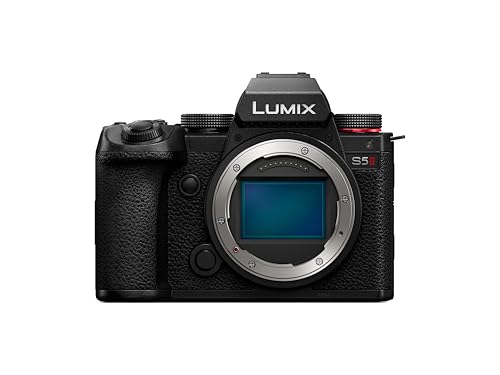
| Panasonic LUMIX S5II | Best overall for in-camera film looks | Real Time LUT lets you load or build a monochrome film look and monitor or bake it while shooting 4K. |
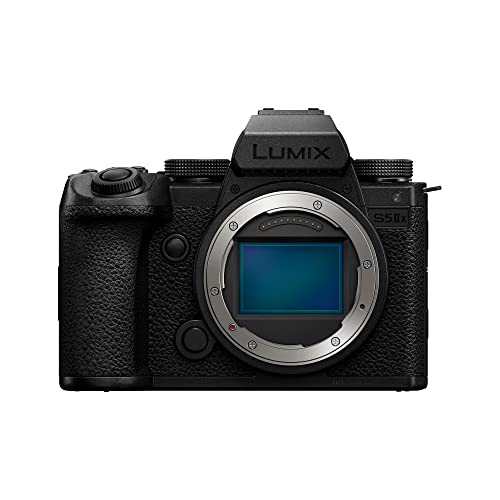
| Panasonic LUMIX S5IIX | Best for video-first monochrome productions | The X variant adds professional video plumbing to the same LUT-driven monochrome workflow, for crews and longer forms. |
| Sony Alpha 7 IV | Best all-rounder with a monochrome Creative Look | Sony’s Creative Look system includes a well-judged monochrome rendering, inside the deepest lens ecosystem on this page. |
| Canon EOS R6 Mark II | Best for fast, responsive monochrome shooting | Canon’s Monochrome Picture Style with filter-effect controls, in the fastest-handling body here, suits reportage-style B&W. |
| Nikon Z50 II | Best smaller-budget route into serious monochrome | Nikon’s monochrome Picture Controls and filmic colour science in a compact APS-C body that leaves budget for lenses. |
| Fujifilm X100VI | Best film-simulation stills camera (prose-only) | Fuji’s Acros simulation is the most loved digital black-and-white rendering in photography; covered without a link as it is outside our pool. |
How Did We Choose Cameras for 4K Black and White Work?
The first filter was the monochrome implementation itself. We looked for cameras whose black-and-white mode is a proper picture profile — with contrast curves, and ideally control over how colours translate into tones, the digital descendant of screwing a red or yellow filter onto a film camera. A simple saturation slider set to zero fails that test, and several otherwise fine cameras were cut for offering nothing deeper. Where a maker provides film-inspired presets or a LUT system, that counted heavily, because the ‘film’ in this keyword is an aesthetic commitment, not a resolution figure.
The second filter was the 4K pipeline. Monochrome is unforgiving of compression: fine detail becomes the picture once colour stops helping, and heavy compression smears exactly the textures — skin, stone, foliage, fabric — that black-and-white work lives on. We favoured cameras with high-quality 4K recording, good dynamic range to hold a full tonal scale, and clean high-ISO behaviour for the night and interior shooting this genre loves. Stabilisation mattered for the handheld, street-and-documentary style of shooting most monochrome filmmakers prefer.
Finally, the preview experience. Every pick can show a monochrome image in the viewfinder or screen while you work, because composing in tones is the skill being bought. We also checked the stills side: most people drawn to this keyword shoot photographs too, and a camera whose monochrome JPEGs are beautiful straight out of camera earns its keep on the days no film is being made.
We also ran a simple reality check on the finished results: monochrome frames from each system were printed, because black and white ultimately answers to paper and to the big screen, not to a phone at arm’s length. The systems separated themselves exactly as the detailed reviews describe — Panasonic’s LUT-driven files held their intended contrast with the least correction, Canon’s filter-effect stills printed with the most filmic sky values, and the Fujifilm’s Acros JPEGs needed nothing at all. A camera that prints well in monochrome has passed the genre’s oldest examination.
Detailed Picks: Six Cameras for Monochrome in 4K

Panasonic LUMIX S5II — Best overall for in-camera film looks
The S5II is the most interesting camera on this page for one feature: Real Time LUT. Panasonic lets you apply a lookup table — including black-and-white film emulations you build yourself or obtain from colourists — directly to your recording or just to your monitoring, while the camera shoots its full-quality 4K. For monochrome filmmakers this is transformative. You can stand on a street corner seeing your exact finished grade in the viewfinder, expose for it, light for it, and walk away with footage that needs almost nothing in post — or keep a clean file underneath and treat the LUT as a viewing aid. No other system here closes the loop between intention and result so tightly.
The supporting cast is strong: a full-frame sensor with the dynamic range monochrome grading feeds on, dependable autofocus for solo shooters, and in-body stabilisation that suits handheld documentary work. Panasonic’s own built-in monochrome photo styles are well judged too, with the grain effect options film photographers ask for. The compromises are ecosystem ones — the L-mount lens range is broad but its used market is thinner than Sony’s — and the LUT workflow rewards shooters who enjoy building looks. If the phrase ‘shoot it like film, finish it in camera’ describes your ambition, this is the camera built for it.
Practically, the S5II also behaves well as a stills camera for the same project: its monochrome JPEGs carry the same tonal thinking as its video, so a filmmaker can scout locations in black and white, build a visual notebook of the film’s world, and arrive on set with the look already rehearsed. The L-mount’s growing range of affordable primes — including characterful manual glass — keeps the total cost of a monochrome kit sane. Among cameras that treat black and white as a first-class citizen rather than a novelty mode, this is the most complete citizen of all.
One caution belongs to every LUT workflow: monitor brightness lies outdoors. Build the habit of checking exposure with the camera’s tools rather than the screen’s impression, and your baked monochrome will survive the move from a shaded street to a bright edit suite without surprises.
- Type: full-frame mirrorless camera
- Video: 4K recording with Real Time LUT monitoring and baking
- Monochrome: dedicated photo styles plus custom LUTs
- Stabilisation: in-body image stabilisation
- Autofocus: phase hybrid autofocus
- Best paired with: a fast prime lens for night monochrome work
Strengths
- Real Time LUT is the best in-camera film-look workflow here
- Full-frame tonal range gives grades plenty to work with
- Strong stabilisation for handheld street and documentary shooting
Trade-offs
- LUT workflow has a learning curve worth respecting
- L-mount used lens market is smaller than Sony’s
- Rewards deliberate shooters more than point-and-go users
Best for: filmmakers who want to commit to a monochrome film look in camera, with the option to keep a clean file.
Not suited for: shooters who want a single preset button and no interest in building looks.
Panasonic LUMIX S5IIX — Best for video-first monochrome productions
Take everything said about the S5II and ask who needs more: the filmmaker shooting a noir short with a small crew, recording long takes, feeding an external monitor and delivering files a colourist will finish. That is the S5IIX. It keeps the Real Time LUT system and the monochrome photo styles, and adds the professional video features of Panasonic’s X line — recording options and connectivity aimed at production rather than content creation, in a blacked-out body that stays discreet on set. For black-and-white work specifically, the advantage is headroom: cleaner files, more grading latitude, fewer compromises when a scene mixes a bright window with a face in shadow.
The question to ask is whether your monochrome work is production or practice. Solo street shooters and learners gain little over the standard S5II and pay for plumbing they will never connect. But if your 4K black-and-white film is an actual film — scripted, lit, crewed, destined for festivals or clients — the X is the body that will not be the bottleneck, and its monochrome monitoring keeps the whole crew looking at the same tones the audience will see.
The X also suits the increasingly common hybrid commission: a monochrome featurette or branded film shot over several days, where files must be organised, backed up and handed to an editor without drama. Its recording media options and timecode-friendly workflow are the unglamorous features that separate a production tool from a content tool. Pair it with the standard S5II as a second body and the pair share lenses, LUTs and batteries — a two-camera monochrome unit whose monitoring matches perfectly, which directors of photography will tell you is worth more than a spec-sheet victory.
If you shoot both stills and film for the same clients, the X’s shared battery and lens ecosystem with the standard S5II makes a two-body kit unusually painless — one charger drawer, one LUT library, two purposes covered.
- Type: full-frame mirrorless camera, video-focused variant
- Video: 4K with professional recording and output options
- Monochrome: photo styles plus Real Time LUT
- Stabilisation: in-body, with enhanced video modes
- Autofocus: phase hybrid autofocus
- Best paired with: an external monitor for crew viewing in monochrome
Strengths
- Production-grade video features around the LUT workflow
- Maximum grading headroom for high-contrast noir scenes
- Same excellent monochrome monitoring as the S5II
Trade-offs
- Pays for professional connections solo shooters rarely use
- Overkill for learning and casual monochrome work
- Same L-mount lens considerations as its sibling
Best for: crews and serious solo filmmakers producing finished black-and-white films in 4K.
Not suited for: beginners, who should buy the standard S5II and spend the difference on a lens.

Sony Alpha 7 IV — Best all-rounder with a monochrome Creative Look
The Alpha 7 IV approaches monochrome through its Creative Look system, which includes a black-and-white rendering with adjustable contrast, and through the sheer maturity of everything around it. This is the camera for the shooter who wants black-and-white to be one strong mode among many: the same body that films a wedding in colour on Saturday can shoot a monochrome street series on Sunday, autofocus tracking a subject’s eye either way. Its 4K video is clean, its high-ISO behaviour is exactly what night monochrome needs, and its lens ecosystem — native and third-party, new and used — is the deepest in the industry, which matters when you start hunting characterful older lenses for a film look.
Where it trails the Panasonics is commitment tooling. There is no LUT-baking workflow to rival Real Time LUT, so the Sony way is to monitor in monochrome and grade afterwards, or accept the in-camera look as final for JPEGs and simpler video. Many photographers prefer exactly that discipline — shoot the tones, finish at the desk — and for them the a7 IV’s combination of autofocus, ecosystem and resale value makes it the safest long-term home for a monochrome habit. It is the least specialised pick here and, for mixed shooters, probably the wisest.
Sony’s colour science deserves a specific monochrome mention: its skin-tone handling, tuned over generations for faces, translates into monochrome renderings where skin holds a luminous mid-grey instead of going waxy or chalky — the single most judged area of any black-and-white portrait or scene. Combined with the a7 IV’s excellent dynamic range, it means the Sony shooter grades from a position of safety: protect the face, and the rest of the tonal scale almost arranges itself. For wedding and portrait filmmakers adding a monochrome film to their offerings, that safety is a commercial feature.
The a7 IV is also the easiest of these cameras to rent lenses for, in most cities, which matters for project work: the exotic fast prime your monochrome short needs for one weekend need not be a purchase at all.
- Type: full-frame mirrorless camera
- Video: 4K with high-quality oversampled modes
- Monochrome: Creative Look black-and-white with contrast control
- Stabilisation: in-body image stabilisation
- Autofocus: real-time eye autofocus for people and animals
- Best paired with: a characterful prime, new or vintage via adapter
Strengths
- Deepest lens ecosystem, including affordable character lenses
- Excellent autofocus and high-ISO for night monochrome
- Equally strong for colour work on other days
Trade-offs
- No in-camera LUT workflow to match Panasonic
- Monochrome tools are simpler than the specialists’
- Menus reward setup time before they feel natural
Best for: mixed shooters who want monochrome as a first-class mode inside a do-everything system.
Not suited for: purists who want to bake a film LUT in camera and skip the grade.

Canon EOS R6 Mark II — Best for fast, responsive monochrome shooting
Canon’s take on in-camera black and white is the oldest on this page: the Monochrome Picture Style descends directly from the film-era idea of coloured lens filters, and it still offers filter-effect settings that change how colours become tones — the red-filter drama that darkens skies and lightens skin, the gentler yellow, the neutral green. In the R6 Mark II that tradition sits inside a body built for speed: rapid continuous shooting, autofocus that finds faces in poor light, and stabilisation that keeps handheld work clean. For documentary and reportage monochrome — protests, streets, weddings shot as they happen — that responsiveness is the feature.
Its 4K video is strong and its colours-to-tones translation for stills is genuinely filmic, especially once you tune sharpness and contrast in the Picture Style editor to taste. The limitations mirror Sony’s: the workflow is monitor-and-grade rather than bake-a-LUT, and Canon’s RF lens range, while excellent, is pricier at the characterful end, with third-party options still developing. Choose the R6 Mark II when the black-and-white work is fast, human and unrepeatable, and the camera’s job is to never be the reason a frame was missed.
Canon’s Picture Style editor is the R6 Mark II’s under-taught treasure: you can build and save custom monochrome styles — your contrast curve, your filter effect, your sharpening restraint — and carry them as named presets between shoots and bodies. A wedding filmmaker can hold a ‘house monochrome’ that matches across a season of films; a documentarian can keep a high-contrast street style and a gentle portrait style one dial-turn apart. That customisation, inherited from Canon’s professional stills line, is how an in-camera look becomes a signature rather than a preset everyone shares.
Wedding shooters should test Canon’s monochrome JPEGs at reception lighting before committing: the rendering of skin under warm tungsten, converted by the red filter effect, is either exactly your signature or not — and you will know within one dance floor.
- Type: full-frame mirrorless camera
- Video: 4K with strong oversampled quality
- Monochrome: Picture Style with filter effects and tonal adjustments
- Stabilisation: in-body, coordinated with RF lenses
- Autofocus: deep-learning subject detection
- Best paired with: a fast standard prime for reportage work
Strengths
- Filter-effect monochrome is the most film-literate here
- Fastest, most responsive handling for unrepeatable moments
- Superb autofocus in the low light monochrome loves
Trade-offs
- No LUT-baking workflow for video looks
- RF character lenses can be expensive
- Picture Style tuning takes experimentation to personalise
Best for: documentary, street and wedding shooters working fast in black and white.
Not suited for: studio filmmakers who build every look in advance with LUTs.

Nikon Z50 II — Best smaller-budget route into serious monochrome
Not every monochrome devotee should start with a full-frame body, and the Z50 II is the argument for starting smaller. Nikon’s Picture Control system includes monochrome options with the filter-effect thinking film photographers expect, and Nikon’s JPEG rendering has a tonal smoothness that flatters black-and-white stills straight from the camera. The body is compact enough to be carried daily — the single biggest predictor of whether a monochrome project actually gets shot — and its 4K video covers the film side of this keyword credibly for shorts, music videos and social work.
The savings against the full-frame picks are real, and they should be spent where monochrome feels them most: a fast prime lens. A small sensor with a bright lens at night will out-shoot a full-frame body strangled by a slow kit zoom in exactly the dim, contrasty scenes this genre seeks. The trade-offs are the format’s usual ones — less ultimate dynamic range and low-light ceiling than the big sensors above — plus a smaller lens range, though it is growing. As an entry into committed monochrome shooting that still respects the 4K requirement, nothing else here balances price, size and rendering this well.
The Z50 II’s other quiet advantage is cost of experimentation. Monochrome is a discipline learned by volume — hundreds of frames, most of them failures, each one teaching your eye what tones do. Doing that learning on a compact, affordable system you carry everywhere, rather than on a flagship you protect, matches how the skill actually develops. Its video is entirely sufficient for the short-form monochrome work — music clips, social films, festival shorts — where most beginners actually publish, and its stills will not embarrass the portfolio that gets you the next commission.
Nikon’s file discipline helps beginners too: its monochrome JPEGs are honest enough to show you your exposure mistakes rather than flatter them away, which makes the Z50 II a stricter and therefore better teacher than cameras that beautify everything.
- Type: APS-C mirrorless camera
- Video: 4K for shorts and online film work
- Monochrome: Picture Control monochrome with filter effects
- Stabilisation: lens-based (VR lenses)
- Autofocus: subject detection including eyes
- Best paired with: a bright prime lens bought with the savings
Strengths
- Compact enough for the daily carry monochrome demands
- Pleasing in-camera monochrome rendering for stills
- Leaves real budget for the fast lens the genre needs
Trade-offs
- APS-C ceiling in extreme low light and dynamic range
- No in-body stabilisation; rely on VR lenses
- Smaller lens ecosystem than Sony or Canon
Best for: newer monochrome shooters who value daily carry and a lens budget over full-frame bragging rights.
Not suited for: professionals delivering large prints or heavy night productions.
Fujifilm X100VI — Best film-simulation stills camera (prose-only)
Any honest guide to black-and-white film aesthetics must reckon with the X100VI, so it appears here as a prose-only pick: it is not in our verified pool, so we describe it without a purchase link and you can source it anywhere. Its claim is the Acros film simulation, a monochrome rendering with grain structure and tonal behaviour modelled on film rather than merely desaturated, produced by the company that made actual black-and-white film for generations. Photographers who shoot it describe JPEGs that need nothing — the rare digital files with the finished, printed feeling this whole genre chases.
The caveats explain why it is sixth rather than first for this keyword. It is a stills-first camera with a fixed lens: wonderful for the daily monochrome discipline, limited for a filmmaker whose brief centres on 4K production, where its video is a supporting feature rather than the main event. It is also famously difficult to buy at normal prices due to demand. Treat it as the stills specialist and the aesthetic benchmark: if your black-and-white film ambitions are really black-and-white photography ambitions with occasional clips, it may be your camera; if you are making films, the Panasonics above serve you better.
A practical route to the X100VI, for those whose hearts are set: because demand keeps it scarce through official channels, the used market and rental deserve first attention — a weekend’s rental will tell you definitively whether its fixed-lens discipline sings to you or merely frustrates, and that answer is worth more than a month of reviews. Photographers who bond with it describe a camera that disappears, leaving only the seeing; filmmakers should remember its video is a sketchbook, not a production tool, and budget their ambitions accordingly.
If the X100VI tempts you mainly for Acros, know that its simulations can be approximated in other systems’ profiles with patient tuning — what cannot be approximated is the camera’s handling, which is the real reason its owners forgive its price and its scarcity.
- Type: fixed-lens premium compact (prose-only pick)
- Video: capable 4K, as a secondary feature
- Monochrome: Acros and Monochrome film simulations with grain effects
- Lens: fixed wide-normal prime, not interchangeable
- Controls: analogue-style dials, hybrid viewfinder
- Best paired with: patience — supply is limited and prices vary
Strengths
- Acros is the benchmark digital monochrome rendering
- Fixed lens enforces the one-camera discipline film teaches
- JPEGs genuinely finished straight from the camera
Trade-offs
- Stills-first; video is not its main event
- Fixed lens limits filmmaking flexibility
- Chronic scarcity makes buying one a project in itself
Best for: photographers whose monochrome heart is in stills, who want film’s look without film’s lab bills.
Not suited for: filmmakers choosing a primary 4K production camera.
How Do the Six Best Cameras for 4K Black and White Compare?
Monochrome cameras are really monochrome workflows. This table reduces each pick to the workflow it offers and the compromise inside it, so you can choose the way of working before you choose the badge on the body.
| Pick | Best at | Watch out for |
|---|---|---|
| Panasonic LUMIX S5II | Baking or monitoring true film LUTs while recording 4K | Workflow demands some learning |
| Panasonic LUMIX S5IIX | Monochrome production work with pro video plumbing | More camera than learners need |
| Sony Alpha 7 IV | Ecosystem, autofocus and all-round excellence | Monochrome tooling is good, not specialised |
| Canon EOS R6 Mark II | Speed and film-style filter effects | Grade-later workflow only |
| Nikon Z50 II | Serious monochrome in a carry-everywhere body | Format ceiling in the darkest scenes |
| Fujifilm X100VI | The most filmic stills rendering available | Fixed lens, stills-first, hard to find |
Should You Commit to Black and White in Camera, or Convert Later?
Converting later is safer and committing is better, and the distance between those truths is where your skill grows. Shooting colour and converting gives you every option in post: you can re-balance how reds and greens become greys with a precision no in-camera profile matches. But it also lets you shoot carelessly in colour-thinking — framing for colour contrast that evaporates in monochrome, exposing for a histogram that hides tonal muddle. Photographers who switch their preview to black and white consistently describe the same revelation: within a week they are seeing light instead of subjects, and their colour work improves as a side effect.
The practical compromise, and the one most picks here support, is to monitor in monochrome while recording a file with options. Shoot RAW stills with a monochrome preview, or record video with a viewing LUT over a clean profile, and you get the education and the insurance simultaneously. Commit fully — baked LUT, monochrome JPEG — when the look is the deliverable and speed matters: event films, same-day edits, personal projects where the discipline is the point. The cameras divide along exactly this line, which is why the comparison table describes workflows rather than specifications.
What Makes a Digital Monochrome Look Like Film Rather Than a Filter?
Three things separate filmic monochrome from a desaturated video file. The first is the tonal curve: film rolls highlights off gently and lifts shadows with a characteristic toe, where digital defaults clip and crush. A good monochrome profile or LUT rebuilds that curve, which is why faces in filmic black and white glow against backgrounds instead of chalking out. The second is the colour-to-tone translation: film stocks respond to colours unevenly, so a red dress and green hedge of equal brightness print as different greys. Filter effects and channel-aware profiles recreate that separation; flat desaturation cannot.
The third is grain — and it is the most abused. Film grain is irregular, clumps in the midtones, and moves organically; digital noise is uniform, coloured at the edges, and sits in the shadows like static. Cameras and LUTs that model grain properly add it as a texture layer, while simply raising ISO adds noise that no grade fully civilises. The practical rule: expose cleanly at a moderate ISO, choose your grain deliberately in the profile or in post, and never confuse a noisy file with a filmic one. Your audience can tell the difference even when they cannot name it.
How Do You Light and Expose for Black and White in 4K?
Monochrome lighting is lighting for shape. Without colour to separate a subject from a background, you separate with brightness: a rim light to carve a shoulder from a dark backdrop, a window placed to model a face in gradients, a practical lamp kept in frame to motivate the key. This is why the genre loves single-source lighting and why the cameras’ dynamic range matters — a noir scene may hold a bare bulb and a face four stops apart, and the file must keep both. Expose for the highlights you cannot lose, usually skin and skies, and let shadows fall where the story wants them; monochrome forgives deep shadow far more readily than clipped white.
In 4K specifically, watch your textures. Compression and sharpening interact with fine detail — rain, grain overlays, chain-link, foliage — and heavy in-camera sharpening produces a brittle, digital edge that betrays the film illusion instantly. Most monochrome filmmakers turn sharpening down, sometimes add a slight diffusion filter to bloom the highlights, and keep shutter discipline cinematic. None of this needs new gear; it needs the preview in black and white so you can see the lighting doing its work while there is still time to move the lamp.
Which Lenses Suit Black and White Film Work?
The genre’s classic focal lengths are wide-normal to short-telephoto primes, and the reasons are tonal as much as optical. A fast prime lets you shoot in the dim interiors monochrome loves without pushing ISO into noise, and its shallow depth of field becomes a tonal tool: focus throws a background into smooth grey gradients that simplify the frame. Vintage lenses have a genuine cult here, and it is not nostalgia — older coatings flare more gently and render highlights with a halation-like softness that modern clinical glass has engineered away. Every system on this page can adapt them cheaply.
Resist the slow kit zoom for this work even though it is convenient. At the apertures it offers indoors, you will pay in ISO or in shutter speed, and both taxes fall directly on the filmic quality you bought the camera for. One bright prime in the 35mm-to-50mm equivalent range, learned deeply, will produce a more coherent monochrome body of work than three zooms — another lesson the fixed-lens Fujifilm pick teaches by force. Zoom with your feet; in black and white, moving changes the light relationships, which is to say it changes the picture itself.
Can These Cameras Shoot Actual Film-Style Projects, or Only Digital?
A note on the keyword’s ambiguity: some searchers literally want to shoot black-and-white film and finish in 4K — scanning negatives for a digital master. These digital cameras serve that workflow too, in two ways. First, as scanning cameras: a high-resolution body on a copy stand with a macro lens digitises negatives superbly, and the full-frame picks here are exactly what scanning services use. Second, as the discipline trainer: shooting monochrome digitally, with instant feedback, is how most photographers now learn the tonal seeing that makes their film work good when each frame costs money.
If your heart is set on a hybrid life — film for stills, digital for motion — the ecosystem choice matters doubly, because adapted vintage lenses can serve both the film body and the digital one. Sony’s and the L-mount’s adaptability are the practical winners. What none of these cameras do is replace the film experience itself, and this guide will not pretend otherwise; they are the best digital route to the same aesthetic, with 4K as the delivery standard the work deserves.
How Do You Build a Monochrome Look You Can Reuse?
Consistency is what turns experiments into a style, so treat your look as an asset. On the Panasonics, that means saving your LUT and its settings as a named, backed-up file, with notes on the lighting it was built under. On the other systems, photograph your Picture Style or Creative Look settings screen, and keep a small set of reference frames — a face in window light, a street at night — shot with every variation, so you can return to a rendering months later and match it exactly. Monochrome series live or die on tonal consistency across scenes shot weeks apart.
Build the look in stages. Start from the maker’s most neutral monochrome profile, adjust only contrast until skin behaves, then explore filter effects one at a time on the same subject — a still life with coloured objects is the classic test, because it shows you precisely how each filter re-maps the world into greys. Add grain last and least; it should be felt at normal viewing distance, not seen. When a frame makes you think of a photograph rather than a setting, save everything and stop touching it for a month of shooting.
What Subjects Make Black and White Beginners Improve Fastest?
Architecture first, because it holds still and teaches pure tone: concrete, glass and shadow are a complete monochrome education, and 4K video of buildings in moving light — cloud shadows crossing a facade — shows why the medium loves time. Portraits second, with one window and one willing face, where you learn what skin does across the tonal scale and why the red filter effect flatters some complexions and dramatises others. Street scenes third, where you stop directing and start selecting, hunting the moment when strangers, signage and light arrange themselves into shapes.
Deliberately avoid, at first, the subjects colour carries: sunsets, flower gardens, food. They teach the wrong lesson — that monochrome is colour with something missing — when the truth this genre runs on is the opposite. Black and white is a different picture of the same world, complete in itself. The cameras here, previewing in tones, will teach you to find that picture; your job is to point them at subjects where tone, texture and light are already the story.
How Do You Choose Between the Panasonic, Sony, Canon and Nikon Approaches?
Each maker’s monochrome philosophy mirrors its house character, and choosing among them is partly choosing a temperament. Panasonic is the engineer’s answer: LUTs, monitoring options, the look as a file you own and refine — ideal for filmmakers who think in systems. Sony is the pragmatist’s: a good monochrome mode inside the most capable all-round tool, for shooters whose black-and-white work is one revenue stream among several. Canon is the traditionalist’s: filter effects and Picture Styles descended from film practice, in the fastest body, for photographers who think in moments. Nikon is the minimalist’s: a pleasing rendering in a small body that begs to be carried, for learners who know the best camera is the present one.
None of these philosophies is wrong, and the image quality differences between the full-frame bodies are smaller than the workflow differences. The useful test is to imagine your thirtieth monochrome shoot, not your first. If you picture a folder of refined LUTs and a signature look, you are a Panasonic shooter. If you picture the same body earning its keep in colour all week, Sony or Canon. If you picture a camera that lives in your coat, Nikon — or the Fujifilm, if stills rule your heart. Buy the temperament, and the technique will follow it happily.
What Settings Should a Monochrome Beginner Lock In First?
Begin with restraint. Choose the maker’s standard monochrome profile — not the high-contrast dramatic one — set sharpening lower than default, and fix your ISO behaviour: auto with a sensible ceiling for stills, and a deliberate manual choice for video. Shoot a familiar circuit — your street, your house, one face you know well — and study where the tones land. Most beginners discover their highlights are braver than they should be and their shadows emptier than they intended, and both discoveries are cheaper made on a test circuit than on a real project.
Only then touch one variable at a time. Spend a week with a yellow filter effect, then a week with red, photographing the same subjects, and the colour-to-tone translation will move from theory into instinct — the instinct that tells you, before you raise the camera, that the red post box will print nearly black against the hedge. Add contrast in small steps and stop when skin still glows. This slow, single-variable method feels pedantic for a fortnight and pays for the rest of your monochrome life; it is, not coincidentally, exactly how film photographers were forced to learn, one roll at a time.
How Does Monochrome Change Storytelling in a Short Film?
Removing colour removes information the audience uses unconsciously — time of day by light colour, emotion by wardrobe, place by palette — and a good monochrome filmmaker replaces every removed cue with a tonal one. Costume becomes a study in grey values: the lovers separated by making one wear near-white and the other near-black will read as a visual argument before a word is spoken. Locations simplify into geometry and texture, which is why modest rooms photograph like film sets in black and white while they merely looked cheap in colour. Many first-time noir directors report the same surprise: monochrome forgave their budget and indicted only their lighting, which is the one department entirely within their control.
Pacing changes too. Audiences read monochrome footage slightly more slowly and more symbolically — a face in shadow is a statement in black and white where it was an accident in colour — so the edit can breathe, holding shots a beat longer than colour instincts suggest. If you are planning a first 4K black-and-white film, plan it as its own grammar from the treatment stage: storyboard in greyscale, costume in values, light for shape. The cameras in this guide will faithfully record whatever grammar you choose; the ones with live monochrome monitoring will also teach it to you on set, frame by frame.
Can You Make Money With Black and White Work?
Increasingly, yes — monochrome has become a differentiator precisely because it is a commitment. Wedding filmmakers offer a black-and-white film as the timeless cut alongside the colour record, and couples who would never have chosen it exclusively happily pay for it as the heirloom version. Brands commission monochrome for the same reason fashion houses always have: it reads as serious, permanent and above trend. Music videos, where a monochrome treatment can unify locations shot days apart in different weather, remain the genre’s commercial engine, and the 4K delivery standard in this keyword is exactly what those commissions specify.
The commercial discipline mirrors the artistic one: consistency and speed. A filmmaker who can show a coherent monochrome reel, deliver a same-week edit because the look was baked or LUT-guided in camera, and match the look across a two-camera shoot will out-book a more talented rival who treats every project as a grading expedition. This is a practical argument for the Panasonic workflow and for Canon’s saved custom styles — your look, productised. Black and white stopped being a limitation the day clients started requesting it by name; the cameras here are how you answer professionally.
A Last Word on Learning to See in Tones
Every photographer who commits to monochrome describes the same month: the world first looks impoverished without colour, then suddenly richer, as light, texture and shape step forward to fill the space colour vacated. The cameras in this guide are instruments for that month and everything after it. Choose the workflow that fits your temperament, lock one look, and shoot it daily. The seeing you develop will improve every photograph you ever make afterwards — including, to most converts’ surprise, all of your colour work too.
Which Mistakes Ruin Black and White Work?
The most common is shooting a colour composition and desaturating it, producing the grey mush that gives digital monochrome a bad name; the fix is previewing in black and white from the first frame. Second is clipping highlights — monochrome has nowhere to hide a blown sky or a chalked forehead, and the damage cannot be graded back. Third is mistaking noise for grain, cranking ISO for an instant film look and delivering files that fall apart in 4K. Fourth, and subtlest, is over-contrast: beginners crush shadows to make images ‘moody’ and delete the midtone detail where black-and-white photography actually lives.
A workflow mistake deserves mention too: baking a look with no clean copy on a paid or unrepeatable shoot. Commit in camera for speed and style, by all means — but on the day that cannot be reshot, record the safety file as well. Every camera on this page can give you both. Use that generosity until your monochrome eye has the years behind it that make insurance unnecessary.
Also avoid the collector’s error of changing systems mid-project. A monochrome series or film shot across two makers’ renderings will fight you in the grade forever, because each translates colour to tone by its own logic and the mismatch hides precisely in skin and sky, where audiences look hardest. Choose the workflow, shoot the whole work inside it, and let consistency do the quiet magic that makes black-and-white feel inevitable rather than applied.
Final Recommendation
For most readers, the Panasonic LUMIX S5II is the recommendation: Real Time LUT is the only workflow here that truly merges the film way of working — commit, see it, shoot it — with 4K digital convenience, and its monochrome results can be final the moment you press stop. Production-minded filmmakers should step up to the S5IIX for its professional recording options, while Canon’s R6 Mark II serves fast documentary shooters and Sony’s Alpha 7 IV serves everyone who wants monochrome inside the deepest system in photography.
Start smaller without shame if the budget says so: the Nikon Z50 II with one bright prime will teach the same seeing, and seeing is the actual subject of this entire guide. The Fujifilm remains the stills poet’s choice, link or no link. Whichever body you choose, make the same vow the film shooters made: preview in black and white, protect your highlights, and let tone do the talking. The camera is the smallest part of that — but it has to be a camera that lets you work that way, and all six of these do.
Related guides
- Best Currently Available Film for Cameras: Six Living Emulsions in Colour and Black-and-White
- Best Color Settings for Survaillance Cameras: White Balance, WDR and Saturation for Identifiable Footage
- Best Cameras for Continuous 4K
Frequently Asked Questions
What does ‘4K black and white film’ actually mean for a camera?
For most searchers it means shooting black-and-white video or stills with a film-like rendering, delivered or recorded in 4K. The cameras here do that with dedicated monochrome profiles and LUT workflows. A minority mean digitising real film to 4K, and the full-frame bodies here also excel as scanning cameras on a copy stand.
Is a dedicated monochrome sensor better than these cameras?
Purpose-built monochrome-sensor cameras extract slightly more detail and sensitivity because no colour filter array sits over the sensor, but they cannot shoot colour, cost considerably more, and are stills tools rather than 4K film cameras. For this keyword’s mix of film and photography, the profile-based cameras here are the practical answer.
Should I add grain in camera or in post?
In post while you are learning, because it is reversible and adjustable per scene; in camera once your look is settled and consistency matters more than flexibility. Either way, add it as a modelled grain layer — never by simply raising ISO, which adds noise that behaves differently and cheaper.
What is a filter effect in a monochrome profile?
It is the digital version of the coloured filters film photographers screwed onto their lenses. A red effect darkens blue skies dramatically and lightens skin; yellow is a gentler version; green balances foliage and skin. Canon’s and Nikon’s systems expose these directly, and learning them is core monochrome craft.
Can I monitor in black and white but keep a colour file?
On most of these cameras, yes in some form: RAW stills always keep full colour data under a monochrome preview, and for video you can monitor with a LUT over a flatter recording profile on the Panasonics. It is the ideal learning setup — monochrome eyes, insured files.
Which lens should a monochrome beginner buy first?
One bright prime around the classic reportage focal lengths. Its low-light ability serves the dim scenes monochrome loves, its shallow depth of field becomes a tonal simplification tool, and using a single focal length teaches composition faster than any zoom. Vintage examples adapt cheaply onto every system here.
Related Guides
Keep exploring with best cameras for filmmaking on a budget and best full-frame mirrorless cameras and how to scan film negatives with a digital camera.


