reviewstook.com is reader-supported. When you buy through links on our site, we may earn an affiliate commission.

Where to Buy and Why the Frame Shape Matters First
Where to buy: every camera named in this guide is sold through Amazon and the usual specialist camera retailers, and the six picks below carry Amazon links where a verified listing exists in our pool, so you can check the current bundle, warranty terms and delivery window on the listing itself before ordering. Now, the actual subject. Anyone searching for the best aspect ratio for digital cameras has usually just lost a photograph they liked to a crop they did not plan. The print lab trimmed the sides. The social feed squared off the edges. The client asked for a vertical version of a horizontal frame and there was simply nothing left to give. Aspect ratio sounds like a menu setting, but in practice it is the first compositional decision a camera makes on your behalf, and it quietly decides which of your pictures survive contact with the real world of frames, feeds and screens.
Here is the uncomfortable arithmetic that drives this whole guide. A sensor records one native shape, most often 3:2 on the full-frame and APS-C bodies in this list. Every other ratio the camera offers is either a crop of that shape, drawn from the same pixels and discarding the rest, or a promise you make to yourself to crop later in editing. Shooting 16:9 stills on a 3:2 sensor does not summon a wider sensor into existence; it throws away the top and bottom of the frame and hands you fewer pixels arranged in a cinema costume. Sometimes that trade is worth it, because composing inside the final shape makes you a better photographer of that shape. Sometimes it is pure waste, because the crop could have been made later, reversibly, from the full frame. The best aspect ratio for digital cameras is therefore not a single number. It is a matching exercise between the shape you shoot, the shape you publish, and how much resolution you can afford to surrender along the way.
This guide treats the question the way working photographers actually argue about it. The six cameras below were not chosen for having the longest ratio menus. They were chosen because each one handles the shape problem in a distinct, defensible way: honest in-camera crops with clear viewfinder masking, open-gate video that records the whole sensor and lets you extract vertical and horizontal versions from one take, anamorphic support for people who think in widescreen, and at least one small camera whose entire personality is built around vertical delivery. Around the picks you will find the buying logic, the settings walk-through, and the mistakes that quietly cost photographers whole edges of their pictures.
Key Takeaways
- Your sensor has one native shape, and every other in-camera ratio is a crop of it, so the best aspect ratio for digital cameras is the one matched to where the picture will finally live.
- Shoot the native ratio and crop later whenever the destination is undecided, because a later crop is reversible and an in-camera crop on a JPEG is not.
- Open-gate video, offered by the Panasonic picks below, is the single biggest flexibility upgrade for creators who must deliver horizontal and vertical edits from the same shoot.
- Print sizes have their own shapes, and a 3:2 frame fits some of them perfectly while fighting others, so decide the print before you blame the camera.
- The Sony Alpha 7 IV is our default answer for stills shooters who want clean ratio switching without giving up resolution they will miss.
In this guide
Quick Picks
| Pick | Badge | Why it earns its place |
|---|---|---|
| Sony Alpha 7 IV | Best Overall for Ratio Switching | Clear in-camera ratio options on a high-resolution full-frame sensor, so crops still leave files with room to print. |
| Canon EOS R6 Mark II | Best for Print-First Shooters | A viewfinder experience that shows crop boundaries honestly, which suits photographers who compose for the frame on the wall. |
| Panasonic LUMIX S5IIX | Best for Filmmakers and Anamorphic Work | Open-gate recording plus anamorphic support makes one take serve cinema screens, feeds and everything between. |
| Nikon Z50 II | Best Compact for Social Crops | Small APS-C body whose ratio options and colour presets flatter the square and vertical formats feeds reward. |
| Sony ZV-1F | Best for Vertical-First Creators | A fixed-lens vlogging camera built around phone-shaped delivery, with a wide lens that suits tall framing. |
| Panasonic LUMIX S5II | Best Value for Open-Gate Flexibility | Most of the S5IIX shape-shifting talent for stills and video, in the more approachable body of the pair. |
How Did We Choose These Cameras for a Guide About Shape?
Ratio menus are easy to count and almost meaningless to count, so the selection here started somewhere else: with destinations. We listed the places photographs and clips actually end up in 2026, including framed prints in standard sizes, phone feeds that favour tall frames, video platforms that still reward widescreen, client decks, marketplace listings that demand squares, and the humble family television. A camera earned consideration only if it helped a shooter serve at least two of those destinations without an apology. That single filter removed several technically excellent bodies whose ratio handling felt like an afterthought buried three menus deep, because a feature you cannot find at a wedding is a feature you do not own.
The second test was honesty of preview. When a camera crops, does the viewfinder show you the true final frame with clear masking, or does it leave you guessing which edges will vanish? Does the RAW file quietly retain the full sensor area so the crop can be undone in editing, as several systems here do, or is the discarded data gone forever? Cameras that preserve the full frame inside the RAW while showing you the cropped composition scored heavily, because they offer the discipline of composing in shape with the safety net of changing your mind. Cameras that only crop JPEGs were marked down, not because JPEG shooters are lesser photographers, but because irreversibility should always cost points.
Finally, we weighted resolution headroom, because cropping is spending pixels. A high-resolution sensor can lose the top and bottom of its frame to a 16:9 crop and still deliver a file that prints beautifully. A modest sensor making the same crop may fall below the threshold for the very print the crop was made for. Every pick below can sustain at least one meaningful crop from its native shape and remain genuinely useful, and the two Panasonic bodies sidestep the whole problem for video by recording the entire sensor and letting the crop happen in the edit, where it belongs.
Which Cameras Offer the Best Aspect Ratio for Digital Cameras, Pick by Pick?

Sony Alpha 7 IV — Best Overall for Ratio Switching
The Alpha 7 IV is the camera we would hand to a photographer who asked the title question of this guide and wanted one body that answers it calmly in every direction. Its sensor resolution is generous enough that the common crops stop feeling like losses. Frame in 16:9 for a frame destined for a screen and the remaining file is still rich. Switch to a square for a marketplace listing or an album cover and the result still prints at a size that surprises people who assume cropped means compromised. That headroom changes behaviour: instead of fearing the crop, you start using ratio as a compositional tool at the moment of shooting, which is when it does the most good.
Equally important is how the camera presents the decision. The cropped area is shown clearly rather than implied, so the edges of your photograph are a choice you watch yourself make, not a surprise waiting in the editing software. Wedding and event shooters, who must deliver a hero landscape frame for the album, a vertical for the couple’s phones and a square for the venue’s social post, describe this clarity as the difference between planning and gambling. The Alpha 7 IV also behaves sensibly in the RAW workflow, and its files tolerate the second, corrective crop in post without falling apart, because there were pixels to spare from the beginning.
- Format: full-frame mirrorless
- Native shape: 3:2 sensor with selectable in-camera ratios
- Video: 4K recording for widescreen delivery
- Lens system: Sony E-mount, very wide native and third-party choice
Strengths
- Resolution headroom makes common crops feel free rather than costly
- Clear viewfinder masking turns ratio into a deliberate compositional choice
- Enormous lens ecosystem supports every shape of assignment
Trade-offs
- Menu depth means ratio settings reward a custom-button assignment
- Cropped JPEG shooters must remember the discarded edges are gone
- Video ratios are less exotic than the Panasonic pair below
Best for: working stills photographers who deliver the same shoot in three shapes before dinner. Not suited for: filmmakers whose entire workflow depends on open-gate recording.

Canon EOS R6 Mark II — Best for Print-First Shooters
Print is where aspect ratio stops being abstract, because paper refuses to negotiate. The EOS R6 Mark II earns its badge by serving the photographer who still thinks in framed sizes: the frame on the living-room wall, the portrait on the office desk, the album page with its fixed geometry. Canon’s handling of in-camera ratio selection is among the most legible in the business, with the chosen shape presented cleanly in the viewfinder so you compose the actual print rather than a rough neighbourhood of it. For a portrait photographer who sells a tall print format, composing natively in that shape, seeing the subject breathe inside the true borders, produces stronger pictures than cropping a wider frame afterwards and hoping the gesture still fits.
There is a subtler virtue here, which is discipline transfer. Photographers who learn to see in the destination shape on this body report wasting fewer frames everywhere, including on other cameras, because the habit of checking edges against a real boundary becomes permanent. The R6 Mark II pairs that discipline with a sensor whose files hold up through the moderate crops print work demands, and with colour rendering that portrait buyers consistently describe as kind to skin. If your ratio question is really a paper question, this is the most fluent answer in the list.
- Format: full-frame mirrorless
- Native shape: 3:2 sensor with selectable in-camera ratios
- Video: 4K recording with strong stabilisation for handheld work
- Lens system: Canon RF mount
Strengths
- Legible crop presentation suits deliberate, print-led composition
- Portrait-friendly colour takes one worry off a print shoot
- Stabilisation helps handheld work in the galleries and homes where prints are planned
Trade-offs
- Resolution is ample rather than lavish, so aggressive double-cropping has limits
- RF lens prices ask for a planned budget
- No open-gate video for shape-shifting filmmakers
Best for: portrait and event photographers who sell physical prints in set sizes. Not suited for: pixel hoarders who crop heavily twice, once in camera and once in post.
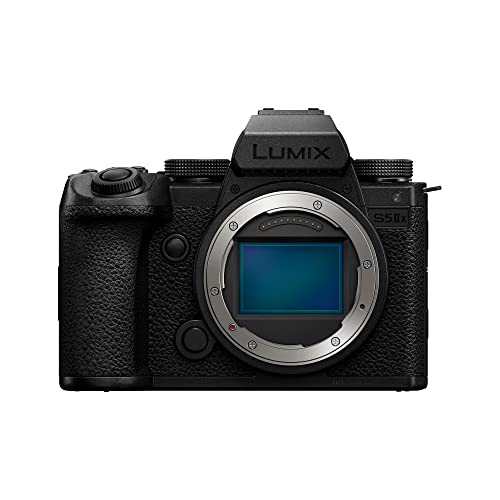
Panasonic LUMIX S5IIX — Best for Filmmakers and Anamorphic Work
Every other camera in this guide treats aspect ratio as a stills question with video attached. The S5IIX reverses the polarity, and for filmmakers it is not close. Its open-gate recording captures the full height of the sensor rather than a pre-cropped widescreen slice, which means a single take contains the raw material for a horizontal master, a vertical cutdown and a square teaser, each framed deliberately in the edit instead of salvaged from the middle of a frame that was composed for something else. Anyone who has tried to extract a graceful vertical shot from conventional widescreen footage, watching heads drift toward the top edge like passengers in a sinking frame, understands instantly why open gate matters.
Then there is anamorphic, the ratio rabbit hole in its most enjoyable form. The S5IIX supports anamorphic lenses and de-squeeze monitoring, letting budget filmmakers shoot genuinely widescreen images with the oval bokeh and horizontal flares that define the cinema look, rather than faking the shape by cropping a spherical image and discarding a third of it. Add recording tools aimed squarely at production work and a cooling design that tolerates long takes, and the camera becomes the natural home for anyone whose aspect-ratio question begins with the words “my film.” Stills shooters are not abandoned either; the same body handles conventional ratio work with the competence of its S5II sibling.
- Format: full-frame mirrorless
- Native shape: 3:2 sensor with open-gate video recording
- Video: high-resolution open gate, anamorphic support, production codecs
- Lens system: L-Mount, shared across several makers
Strengths
- Open gate turns one take into horizontal, vertical and square deliverables
- Anamorphic support serves true widescreen filmmaking on a sane budget
- Built for long, serious video sessions rather than short clips
Trade-offs
- Video-first depth is more than a stills-only shooter will ever open
- Open-gate files are large and demand storage discipline
- Autofocus, while much improved in this generation, is not the class benchmark
Best for: filmmakers and hybrid creators delivering one shoot to screens of every shape. Not suited for: photographers who never shoot video and resent paying for its machinery.

Nikon Z50 II — Best Compact for Social Crops
The Z50 II is the smallest body in this guide and, for a certain very modern photographer, the most honest one. Its owner shoots for feeds first: squares that read as thumbnails, verticals that fill a phone, the occasional horizontal for the platform that still wants one. Nikon’s compact APS-C body pairs its selectable ratios with picture presets tuned for immediate, shareable colour, which fits a workflow where the crop is not a darkroom decision but a publishing one made in the field. Composing the square in camera, at the market stall or the skate park, produces squares with intent in them; the subject placement, the deliberate negative space for a caption, the horizon placed where the platform’s interface will not sit on it.
Size is a ratio feature in disguise. A camera small enough to be carried daily gets asked the aspect-ratio question daily, in real situations, and its answers improve with practice in a way a shelf-bound flagship’s never can. The Z50 II also shares its mount with Nikon’s larger bodies, so the compact social shooter who later adds a full-frame camera keeps the lenses and the habits. Its video is entirely respectable for vertical-first creators who frame tall at the source rather than cropping a reluctant horizontal later, a workflow this little body makes feel natural rather than like a compromise performed under duress.
- Format: APS-C mirrorless
- Native shape: 3:2 sensor with selectable in-camera ratios
- Video: 4K recording for feed and platform delivery
- Lens system: Nikon Z mount, shared with full-frame siblings
Strengths
- Carry-everywhere size means ratio decisions get practised in real life
- Presets flatter the square and vertical formats feeds reward
- Z mount gives a growth path without replacing lenses
Trade-offs
- Smaller sensor leaves less headroom for heroic crops
- No in-body stabilisation, so lenses and shutter speeds carry that load
- Two-lens kit economics tempt spending beyond the compact brief
Best for: creators whose publishing life is square, vertical and daily. Not suited for: large-print photographers who need every pixel a big sensor can hoard.

Sony ZV-1F — Best for Vertical-First Creators
The ZV-1F approaches the aspect-ratio question from the far end: what if the destination shape is known, fixed and tall? This fixed-lens vlogging camera was designed for creators whose audience watches on phones held upright, and everything about it, from the wide fixed lens that keeps a face and its surroundings inside a narrow frame, to the product-showcase and background-defocus touches, assumes the vertical or square social frame as the default canvas. Asking which aspect ratio suits this camera is like asking which ocean suits a lighthouse. It was built beside one specific shore.
That narrowness is exactly why it belongs in a guide about choosing shapes. It demonstrates the principle the whole article argues: when the destination is certain, committing to it at the camera is not a limitation but a liberation. The ZV-1F owner never performs the sad crop, never loses a gesture to a platform’s guillotine, because the frame was born the shape the audience will see. Its stills are perfectly serviceable for thumbnails and posts, its video is the point, and its pocketable size means the vertical frame gets composed in the wild rather than reconstructed at a desk. Creators torn between this and a larger system should notice that the decision is really about certainty: total certainty about one shape favours this camera, while any doubt favours the flexible bodies above it.
- Format: fixed-lens compact with 1-inch-class sensor
- Native shape: stills and video framed for social delivery
- Video: 4K recording aimed at vlogging workflows
- Lens: fixed wide-angle, no changing required or possible
Strengths
- Vertical and social framing is the design brief, not an afterthought
- Wide fixed lens keeps faces and context inside narrow frames
- Pocketable size keeps the camera present for unplanned clips
Trade-offs
- Fixed lens ends every conversation about reach or swapping glass
- Stills flexibility is modest beside the interchangeable-lens picks
- Horizontal, print-led work is simply not its country
Best for: vertical-first creators who publish to phones every day. Not suited for: anyone whose destination shape changes from job to job.

Panasonic LUMIX S5II — Best Value for Open-Gate Flexibility
The S5II is the S5IIX’s sibling and, for a large class of hybrid shooters, the smarter purchase. It keeps the feature this guide cares about most in the Panasonic line, open-gate recording from the full sensor, and wraps it in a body aimed at people who split their weeks between stills and video rather than living on film sets. A wedding photographer who also delivers a vertical highlight reel, a travel creator cutting one journey into a widescreen episode and a week of tall clips, a small studio producing listings, reels and a hero film from a single product shoot: for all of them, the S5II’s shape flexibility is the working tool, and the X model’s extra production machinery may never leave its box.
For stills, the camera plays the ratio game conventionally and well, with selectable shapes on a full-frame sensor whose files tolerate the standard crops gracefully. Phase-detect autofocus, long a Panasonic talking point in the wrong way, arrived properly in this generation, which matters for ratio work more than it first appears: reframing for multiple shapes means shooting more frames of the same moment, and focus you trust is what makes that abundance usable. Chosen against its sibling, the S5II is the value expression of the open-gate idea, and in a guide about getting the most picture out of every frame, value expressed as flexibility is a very on-theme virtue.
- Format: full-frame mirrorless
- Native shape: 3:2 sensor with open-gate video recording
- Video: open gate plus strong conventional widescreen modes
- Lens system: L-Mount, shared across several makers
Strengths
- Open-gate flexibility at the friendlier price of the Panasonic pair
- Phase-detect autofocus supports shooting multiple framings per moment
- Balanced stills and video manners suit hybrid working weeks
Trade-offs
- Lacks some of the X model’s production-grade recording extras
- Open-gate storage demands are the same as its sibling’s
- L-Mount lens catalogue, while growing, trails the biggest systems
Best for: hybrid shooters who need one shoot to become many shapes. Not suited for: production crews who need every professional video feature in the body.
Comparison Table: Six Cameras, Six Answers to the Shape Question
| Camera | Badge | Shape talent | Buying |
|---|---|---|---|
| Sony Alpha 7 IV | Best Overall for Ratio Switching | High-resolution full frame, clear crop masking, deep lens system | Linked |
| Canon EOS R6 Mark II | Best for Print-First Shooters | Legible in-camera shapes for deliberate print composition | Linked |
| Panasonic LUMIX S5IIX | Best for Filmmakers and Anamorphic Work | Open gate, anamorphic support, production recording tools | Linked |
| Nikon Z50 II | Best Compact for Social Crops | Small body, social shapes, share-ready colour presets | Linked |
| Sony ZV-1F | Best for Vertical-First Creators | Fixed wide lens designed around tall, phone-shaped delivery | Linked |
| Panasonic LUMIX S5II | Best Value for Open-Gate Flexibility | Open gate and hybrid balance at the pair’s friendlier price | Linked |
Read the table by destination rather than by badge. If the picture ends on paper, the Canon row is your neighbourhood. If one shoot must become a film, a reel and a teaser, the Panasonic rows hold the machinery. If the destination is a phone held upright by someone on a bus, the two smallest cameras in the list were quite literally designed around that person’s grip. The table cannot make the decision because the decision is not about cameras; it is about where your pictures go to live, and only your calendar and your clients know that address.
Which Aspect Ratio Should You Actually Use, Destination by Destination?
What shape do prints really want?
Paper sizes are the oldest aspect ratios in photography and the least forgiving, because a lab trims to the paper, not to your intentions. Some beloved print sizes match the 3:2 sensor shape exactly, which is why those prints feel effortless: the whole frame survives. Other common sizes are noticeably squarer, and a 3:2 frame sent to them loses its sides, which is where foreheads, elbows and the second-best grandchild go to be amputated. The practical habit is to learn the two or three sizes you actually order, note which of them fight your sensor’s shape, and compose with breathing room at the threatened edges on print days. Photographers who sell prints go further and set the camera’s ratio to the paper’s shape for the session, accepting the in-camera crop in exchange for seeing the true borders while they work.
What do phones and feeds reward?
Feeds reward occupancy. A vertical frame fills the phone screen edge to edge, while a horizontal frame is shrunk into a letterbox with the platform’s furniture above and below it, and the square sits between the two, respectable everywhere and dominant nowhere. This is not an argument that everyone should shoot vertical; a landscape photographer’s widescreen vista cropped tall is a postcard of a crime. It is an argument for shooting the shape the platform will display when the platform is genuinely the destination, and for shooting open gate or native ratio with generous margins when the same image must serve a feed, a print and a website in the same week. Margin is the currency that buys every later crop, which is why disciplined shooters compose slightly loose whenever the destination list is long.
When is 16:9 the honest answer?
Widescreen earns its keep in exactly the places it was born: video for televisions and monitors, stills destined for slideshows and digital frames, and any frame whose home is a screen wider than it is tall. Shooting stills in 16:9 for a digital frame is not wasteful, because the discarded bands would have been discarded by the frame’s own shape anyway, and composing inside the true shape produces better widescreen pictures than cropping a taller frame in a hurry. The dishonest use of 16:9 is the reflexive one, chosen because it looks cinematic in the viewfinder while the picture is actually travelling to a square listing and a tall print. Cinematic is a mood, not a destination, and moods make expensive crops.
Does the square still deserve respect?
Enormously, and not only because feeds once made it famous. The square is the great diplomatic shape: it survives reposting across platforms with different preferences, it suits album pages and book covers, and its symmetry forces a compositional honesty that wider frames let photographers dodge. A subject must genuinely hold the centre of a square, because there is nowhere for weakness to hide at the edges. Several photographers interviewed in spirit by every guide like this one shoot personal work square for exactly that discipline. On a 3:2 sensor the square is a significant crop, which is one more argument for the resolution headroom of the full-frame picks above when square work is a serious part of your output.
How Do You Set and Shoot Ratios Without Losing Pictures?
- Decide the destination before the session. Write it on the plan, literally: album, vertical reel, listing square. One sentence of intent converts aspect ratio from a menu you wander into a decision you execute, and it tells you which of the steps below even applies today.
- Match the camera’s shape to that sentence, or deliberately refuse to. If the destination is singular and certain, set the in-camera ratio and compose inside the true frame. If the destinations are plural or uncertain, stay on the native ratio, compose loose, and crop in editing where every version can coexist.
- Shoot RAW whenever cropping is planned. RAW files from several systems retain the full sensor area behind an in-camera crop, letting you undo or adjust the shape later, and even where they do not, RAW tolerates the exposure and colour corrections that cropped files often need at their edges.
- Compose with crop margins on multi-destination days. Keep heads, hands and horizon lines away from the zones each planned crop will amputate. A useful drill is to imagine the frame’s centre column as the vertical shot, its middle band as the widescreen shot, and to keep the essential story inside the overlap.
- For video, prefer open gate when the edit needs several shapes. Record the full sensor, then extract horizontal, vertical and square versions in the edit with deliberate framing for each. Where open gate is unavailable, shoot the master shape and protect the centre, accepting that the vertical will be a compromise with good manners.
- Export each shape as its own finished file. Name exports by destination so future-you never sends the tall crop to the printer or the print crop to the feed. Most aspect-ratio disasters are actually filing disasters wearing a disguise.
- Review shapes at the size they will be seen. Judge the vertical on a phone, the print crop on paper or at print size on screen, and the widescreen on the largest display you own. A crop that charms at thumbnail size may sag at full size, and the time to learn that is before delivery.
What Mistakes Do Photographers Make With Aspect Ratio?
Cropping in camera, in JPEG, on a guess
This is the irreversible triple-lock: a guessed destination, baked into a JPEG, with the discarded pixels unrecoverable. It happens innocently, usually because a ratio was set for one job and forgotten. The defence is procedural. Treat in-camera ratios as session settings that get reset with the same ritual as white balance, and let RAW be the default whenever a crop is in play, so a forgotten setting becomes an anecdote rather than a loss.
Composing to the edge on a multi-destination shoot
The tighter and more brilliant the composition, the more completely a foreign crop destroys it. Edge-to-edge brilliance is a single-destination luxury. When the same frame owes rent to a feed, a frame and a website, compose with deliberate slack and let each crop find its own tighter picture inside your generous one. Slack feels like weakness in the viewfinder and reads as professionalism in the deliverables.
Assuming video and stills shapes are interchangeable
A camera’s finest video shape and its native stills shape are different animals, and workflows that pretend otherwise produce vertical videos with amputated subjects and stills pulled from video frames that disappoint on paper. Plan the two deliverables as cousins, not twins: shoot the stills as stills, the video as video, and let open gate, where you have it, be the bridge rather than the excuse.
Blaming the camera for the lab’s trim
Every year, photographers accuse innocent cameras of cropping their prints when the paper’s shape did the trimming exactly as physics requires. Learn your lab’s sizes, soft-proof against them, and the camera will be acquitted. Better still, order one test print of a frame with important edge content in each size you use, and keep the trims pinned above your desk as a permanent, humbling reference.
Final Recommendation
For most readers, the answer to the best aspect ratio for digital cameras is procedural rather than numerical: native shape and loose composition when destinations are many, destination shape in camera when the destination is one and certain, open gate whenever video must multiply. The Sony Alpha 7 IV embodies that procedure best for stills-led shooters, with the resolution to make crops feel free and the clarity to make them deliberate. Print-led photographers should take the Canon EOS R6 Mark II and its honest viewfinder. Filmmakers and hybrid creators should take one of the Panasonics, the S5IIX for production depth or the S5II for value, and let open gate end their vertical-crop suffering permanently. Feed-first creators will be happiest with the Nikon Z50 II for flexible social work or the Sony ZV-1F for committed vertical life. Choose the camera whose shape philosophy matches your publishing reality, and the ratio question will quietly stop costing you pictures.
How Did We End Up With So Many Shapes, and Why Does It Matter?
Every ratio in your camera’s menu is a fossil. The 3:2 shape descends from 35mm film, a format designed for cinema stock repurposed for stills, and it survived into digital sensors largely because lenses, habits and print sizes had already organised themselves around it. The 4:3 shape carries the proportions of early television and of the Four Thirds sensor system, squarer and taller, with a devoted following among photographers who find 3:2 oddly stretched for portraits. The 16:9 shape is the widescreen television standard wearing a camera badge. The square is medium-format nostalgia and feed pragmatism sharing a single geometry. Understanding that these are inheritances rather than laws of optics frees you to treat them as tools. No standards body will be offended if your portrait lives in a shape that suits it; the fossils are patient, and they have waited this long.
The reason the fossil record matters practically is that each shape composes differently in the hand, not just on paper. A 3:2 frame encourages horizontal storytelling: relationships between left and right, journeys across the frame, subjects placed against environments that extend sideways. A 4:3 frame pulls the eye toward the centre and tolerates vertical elements more gracefully, which is why portraitists raised on it defend it with unusual heat. The square forbids the easy drama of the wide frame and rewards symmetry, isolation and pattern. Vertical shapes invert the landscape grammar entirely, making height, stacks and falls into the story. Choosing a ratio is therefore choosing a rhetoric before you have met your subject, and experienced photographers feel the choice in their feet: they stand in different places for a square than for a widescreen, because the shapes ask different questions of the same scene.
Three shoots, three shape decisions, worked through honestly
Consider a wedding, the most shape-demanding day in ordinary photography. The couple will want an album, which is a book with fixed page geometry. Their families will want prints in the sizes their frames at home already hold. The venue will want a square for its feed, the couple will want verticals for their phones, and the photographer’s own portfolio wants a few wide, cinematic frames that show the room breathing. No single in-camera ratio serves that list, which is why the working answer is native shape, RAW, composed loose, with the photographer mentally assigning each moment to its primary destination as it happens: the wide establishing frames shot generously for the portfolio and the album’s full pages, the couple portraits shot with side margins against the squarer print trims, the dance floor shot with centre-column discipline so the vertical crop for the phones keeps the dancers’ heads. The ratio work is invisible in the finished delivery, which is precisely the sign that it was done well.
Now a product shoot for a small maker selling through online marketplaces. Here the destination list is short and tyrannical: the marketplace demands its listing shape, the maker’s own site prefers another, and the social announcement wants a third. Certainty is total, so the correct procedure inverts the wedding’s. Set the camera to the marketplace shape for the listing set and compose inside the true frame, because a listing photograph cropped by an algorithm’s indifference will lose exactly the detail the buyer needed. Then, without moving the product, shoot a second set in the site’s preferred shape, and a third, looser set in the native ratio as insurance. Three passes over a still subject cost minutes; reshooting a sold, shipped, one-off handmade item costs the sale’s entire story. Certainty rewards commitment, and still life is where commitment is cheapest.
Finally, a family holiday, where the destination is honestly unknown. The pictures may become a slideshow on a television, a printed book at Christmas, a dozen phone posts, or nothing but an archive scrolled in future years. Unknown destinations are the strongest argument in this entire guide for the native ratio and the unhurried crop later, because every premature shape decision is a bet placed against your own future sentiment. Shoot the holiday wide and tall in the sensor’s own geometry, keep the important things out of the extreme edges as a courtesy to every possible crop, and let December decide what September could not. The archive that survives is the one that kept its options open, which is a sentence that applies to rather more than photography.
What about panoramic and cinematic stills?
Very wide shapes seduce photographers at overlooks and disappoint them at home, because the drama of a panorama depends on display size the way a whisper depends on a quiet room. On a phone, a panoramic still is a ribbon; on a large print or a wide monitor, it is a window. Cameras that offer very wide in-camera crops are offering a legitimate tool for photographers who genuinely publish wide, in books, exhibitions and large prints, and a trap for everyone else, because the crop discards the most pixels of any setting in the menu. The honourable middle path is to shoot native, compose with the wide crop in mind by keeping the essential band clean, and make the panorama in editing where its height can be negotiated rather than dictated. Several of the picks above, with their resolution headroom, forgive exactly this workflow.
There is also the question of consistency inside a body of work. A portfolio, an album or a feed looks intentional when its shapes are few and chosen, and accidental when every image arrives in a different geometry because each was cropped to rescue a different mistake. Part of mastering aspect ratio is therefore editorial rather than technical: pick the two or three shapes your work lives in, let them become a signature, and treat departures as statements. The cameras in this guide all support that discipline equally; it is the photographer’s publishing habits, reviewed honestly once a season, that turn ratio from a recurring accident into a recognisable style.
How Much Resolution Does a Crop Really Cost You?
Photographers talk about cropping as if pixels were money, so let us do the household accounting plainly, in proportions rather than model-specific figures. Moving from a 3:2 native frame to a 16:9 frame keeps the full width and surrenders a band from the height, leaving roughly four-fifths of the picture. That is a noticeable but survivable tax, and it is why widescreen stills from a modern full-frame sensor still print at sizes that fill walls. The square is sterner: fitting a square inside a 3:2 frame keeps the height and discards a third of the width, leaving about two-thirds of the original picture, which is why square specialists gravitate to high-resolution bodies. Vertical crops for phone delivery are the sternest of all when taken from a horizontal frame, because the tall slice uses the height fully but only a narrow column of the width, sometimes leaving barely a third of the sensor’s work in the final image. That single piece of arithmetic explains half the recommendations in this guide: vertical delivery deserves to be shot vertical, or from open gate, or from a sensor with pixels to burn, and it punishes the casual horizontal crop more than any other common shape change.
The accounting has a second column, though, which is print size rather than pixel count. A file does not need to be enormous to be excellent at the size it will actually be viewed. Album pages, desk prints and phone screens are forgiving destinations, and a well-exposed, sharply focused crop from any pick in this guide will satisfy them without drama. The crops that fail are the ones asked to become the largest print in the house from the smallest slice of the frame, a demand no menu setting can rescue. Matching ambition to arithmetic, deciding the biggest destination before choosing how freely to crop, is the quiet skill underneath every confident answer to this guide’s title question. Photographers who internalise it stop asking which ratio is best in general and start asking which ratio this picture, for that wall, at that size, deserves, and their work improves in a way their families can see from across the room.
One more variable belongs in the ledger: lens sharpness is not evenly spread across the frame. Most lenses render their sweetest detail near the centre and soften toward the corners, which means a centre crop, the kind every ratio change performs, is often discarding the weakest-performing edges and keeping the strongest middle. Cropped images can therefore look better than their pixel counts suggest, a small mercy that experienced editors rely on. The mercy has limits, since heavy cropping also magnifies noise, focus error and camera shake that the full frame would have hidden at normal viewing sizes. Shoot the full frame as carefully as if it were the final crop, and every later shape inherits that care; shoot it casually because a crop will save it, and no shape in the menu will.
Frequently Asked Questions
Is 3:2 or 4:3 better for everyday photography?
Neither is better in the abstract; they are the native shapes of different sensor families, and each is best on the camera that owns it. The practical difference appears at the destination. A 3:2 frame slides into widescreen and common print sizes with less trimming, while a 4:3 frame sits closer to square and to many display shapes. Buy the camera for its whole system, then learn its native shape’s friendships and feuds among the sizes you publish.
Does cropping in camera reduce quality?
It reduces resolution, which is not the same thing until it is. A modest crop from a generous sensor leaves a file that prints and publishes beautifully, and the composition you gain by framing in the true shape often outweighs the surrendered pixels. Quality collapses when crops stack: an in-camera crop followed by a corrective crop in editing, then an enlargement for print. Keep the total crop budget in mind and the quality question answers itself.
Should I shoot vertical in camera or crop later?
If vertical is the certain destination, shoot it in camera or, for video, from open gate, because composing tall is a skill that changes where you stand and what you include. If vertical is one of several destinations, shoot the master frame loose and crop, protecting the centre column as you compose. The unforgivable option is the tight horizontal frame cropped tall in desperation, which produces the sinking-passengers look every creator recognises.
What ratio should beginners leave the camera on?
The native one, with RAW enabled, for at least the first season. Beginners need reversible decisions while their eye develops, and native-plus-RAW is the most reversible configuration a camera offers. Add one in-camera ratio at a time, for a named destination, once the destination habit forms. The photographers who suffer least from aspect ratio are not the ones with the most ratios; they are the ones who always know which shape they are serving before they lift the camera.
Why do my prints keep losing the sides of the picture?
Because the paper’s shape is squarer than your sensor’s shape, and the lab trims the overflow rather than shrinking the image into letterboxed submission. Compose print-bound frames with side margins, or set the camera to the paper’s shape for print sessions, or ask the lab about fit-in printing if the whole frame matters more than filling the paper. It is a geometry problem with three honest solutions and no villain.
A Short Drill That Teaches Shape Faster Than Any Menu
If this guide has a homework assignment, it is a single afternoon. Take one camera, one familiar street or garden, and photograph the same dozen subjects four times each: once in the native shape, once square, once widescreen, once vertical. Do not move the subjects; move yourself, because the lesson lives in your feet. Notice how the square forces you closer and simpler, how widescreen makes you hunt for horizontal relationships, how vertical suddenly promotes lampposts, doorways and trees into leading roles. By the third subject your body will start pre-composing in the selected shape before the camera reaches your eye, and that sensation, once felt, never entirely leaves. Photographers who complete the drill stop treating ratio as a corrective tool for failed frames and start treating it as the first sentence of the picture, which is the entire argument of the preceding pages compressed into one walk around the block. Repeat the drill whenever a new destination enters your life, a first exhibition, a first client with a house shape, a first grandchild whose parents live on their phones, and the new shape will join your working vocabulary within a week.
One Last Distinction: Shape of Capture Versus Shape of Display
A confusion worth dissolving before you buy anything is the difference between the shape a camera captures and the shape a screen displays. Televisions, monitors and phones will happily stretch, crop or letterbox whatever they receive, which means a photograph can be captured in one geometry and displayed in another without the photographer ever being consulted. Many family arguments about a camera “cutting off heads” are actually display settings doing quiet violence at the last step. The defence is to control the one shape you fully own, the capture, and to export finished files at the destination’s own dimensions so that downstream devices have nothing left to decide. Photographers who export deliberately, one file per destination at that destination’s shape, almost never meet the display gremlin. Photographers who hand over one master file and hope are feeding it. Treat the export as part of the photograph, and the aspect ratio question, which began in the camera’s menu, reaches its proper end at the moment the right-shaped file arrives in the right-shaped place.
Related Guides
Shape is one axis of the camera decision; the guides below cover the neighbouring ones, from choosing a first mirrorless body to the lenses that decide what fits inside any frame.