Disclosure: As an Amazon Associate, reviewstook.com earns from qualifying purchases. Links on this page are affiliate links; they cost you nothing extra. Prices and availability change often, so check the current Amazon listing before you buy.
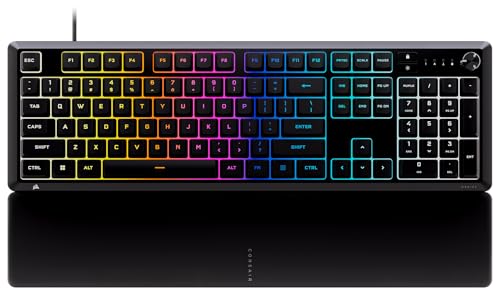
The skiff 100 plus is a search with a wrinkle in it, and this review starts by ironing the wrinkle flat: when we verified Corsair’s Skiff keyboard through Amazon’s Creators API — two separate searches — no listing titled “Skiff 100 Plus” was returned. The listing that exists, current and verified, is the CORSAIR SKIFF 100: a wired gaming keyboard with an IP53 spill and dust resistance rating, responsive keys, RGB lighting and a media dial, in a black US QWERTY layout. So this page does the honest version of the job. It reviews the Skiff 100 that you can actually buy, names the naming gap plainly so no reader mistakes the listing for a “Plus” model that retail does not show, and sets the keyboard against the verified alternative in Corsair’s own line — the K65 Plus Wireless, a 75% mechanical board — for readers whose search was really for Corsair’s current small-keyboard thinking. If a genuine Skiff 100 Plus exists in some channel we cannot verify, the audit habit this article teaches will identify it; until then, the Skiff 100 is the substance behind the search, and it is interesting enough to deserve a full review on its own merits.
Those merits begin with a genuinely unusual idea. Most gaming keyboards are sealed invitations to disaster around drinks, dust and the general entropy of a lived-in desk. The Skiff 100’s IP53 rating — protection against dust ingress and water spray — is the kind of specification that sounds like a footnote until the first knocked-over glass of water, at which point it becomes the entire review. Corsair built this board for the desks people actually have: the streaming corner, the shared family PC, the dorm room, the workshop-adjacent setup where a keyboard’s enemies are environmental rather than competitive. Add the media dial, the RGB presentation and Corsair’s iCUE ecosystem, and the Skiff 100 is a considered answer to a question the enthusiast market rarely asks: what should a gaming keyboard be for someone whose desk is a place, not a shrine?
Key takeaways
- No “Skiff 100 Plus” listing was verified; the current, buyable product is the CORSAIR SKIFF 100, and this review covers it under its real name.
- The Skiff 100’s signature feature is IP53 spill and dust resistance — a gaming keyboard designed to survive a real desk’s accidents.
- It is a wired, full-size-class board with RGB lighting and a media dial, running in Corsair’s iCUE ecosystem.
- The K65 Plus Wireless is the verified alternative: a 75% hot-swappable mechanical board with tri-mode connectivity for buyers who want the enthusiast feature set instead.
- Choose the Skiff for durability and simplicity at a busy desk; choose the K65 Plus for customisation, wireless freedom and compact layout.
- As always with model names, read the listing title to the last word — the difference between the keyboard you researched and the one in the box lives there.
In this guide
How was the Skiff checked, and what did the checks establish?
Two Creators API searches targeted the Skiff name through this site’s own provider connection, the same channel that verified every linked product in this cluster — including the K65 Plus Wireless that appears below as the alternative. The searches consistently returned one Skiff: the CORSAIR SKIFF 100, with its exact title recording the Quiet RGB wired configuration, US QWERTY layout, IP53 spill and dust resistance, responsive keys and media dial. No “Plus” variant appeared in either pass. The possibilities are the usual ones for a name like this — a rumoured or regional variant, a conflation with Corsair’s genuinely “Plus”-badged models such as the K65 Plus, or simple search-engine drift — and the review proceeds on the only footing that respects the reader: the verified product, reviewed fully, with the gap disclosed rather than papered over. The wider keyboard field is mapped in the best 60 percent gaming keyboards and the best wireless gaming keyboards for FPS for readers whose needs point elsewhere.
Design and build: armour for a working desk
The Skiff 100’s design language is functional confidence: a full-size layout with a proper number pad, a media dial placed where a hand actually falls, and RGB lighting that treats illumination as information and atmosphere rather than as a light show competing with the monitor. The chassis brief is durability — a board meant to be wiped down, shaken out and kept in service in environments that would retire a boutique keyboard. The IP53 rating deserves translating, because ratings are where marketing and engineering meet: the dust figure means the enclosure resists the ingress that slowly kills switches and sliders in workshops, garages and pet-owning households, and the water figure means spray and splashes — the knocked drink, the wipedown, the window-side rain moment — are survivable events rather than obituaries. It is not immersion-proof, and the care section below is honest about the difference, but as a statement of intent it repositions the whole product: this is a keyboard designed against the leading actual cause of keyboard death.
Under the fingers, the listing’s own words are “quiet” and “responsive” — a pairing that tells you the target user precisely. This is a board for shared spaces and long sessions: the streamer whose microphone sits eighteen inches away, the parent gaming after bedtime, the office-adjacent player whose keystrokes have an audience. The wired connection is part of the same philosophy — zero latency negotiation, zero battery management, zero wireless troubleshooting, a cable as a feature. Owners steeped in the enthusiast world will note what is absent — no hot-swap sockets headline, no rapid-trigger gaming specification — and should read those absences correctly: the Skiff 100 is not a failed enthusiast board but a successful appliance-grade one, from a company that sells plenty of the other kind and knows the difference. Its natural Corsair sibling for comparison is therefore not a flagship but the K65 Plus Wireless, the point where Corsair’s line turns toward the enthusiast feature set, and the pick sections treat them as the fork they are.

CORSAIR SKIFF 100 — the verified subject pick
Badge: Best for spill-prone, shared and working desks
- Layout: full-size, US QWERTY, black
- Protection: IP53 spill and dust resistant
- Connection: wired
- Character: quiet, responsive keys
- Extras: media dial, RGB lighting, iCUE ecosystem
- Use case: gaming and everyday work on real-world desks
Live with the Skiff 100’s idea for a moment, because its value is cumulative rather than spectacular. Week one, it is a perfectly good full-size gaming keyboard: the keys respond cleanly, the media dial becomes an unconscious habit for volume and media control, and the RGB settles into whatever personality iCUE is set to express. Month three is where the design earns its review: the desk has hosted coffee, a water bottle’s condensation ring, a cat with opinions about keyboards, and the dust that any room generates, and the board has been wiped, tilted, shaken and kept in service without a flicker of the anxiety that accompanies a delicate deck. That is not a small thing. Keyboards die by accident far more often than by obsolescence, and a board engineered against accidents has a longer expected life than a faster board that meets one glass of water.
The quiet character deserves its own paragraph, because it decides households. Mechanical-keyboard culture celebrates sound; the Skiff’s brief respects the people within earshot — the partner asleep in the next room, the baby in this one, the microphone on the stream, the colleagues on the call that runs long. A quiet, responsive board at a shared desk is not a compromised gaming tool; it is the only gaming tool that will still be plugged in next year, because the loud one gets unplugged by committee. Corsair’s iCUE support rounds the package out: lighting, macros and profiles live in the same ecosystem as the rest of a Corsair desk, which matters more with every Corsair peripheral a household accumulates.
Strengths
- IP53 spill and dust resistance addresses the way keyboards actually die — a durability argument no rival in this comparison makes.
- Quiet, responsive character suits shared rooms, streams and late sessions without apology.
- Full-size completeness with a media dial: nothing to relearn, nothing missing, wired reliability throughout.
Trade-offs
- No enthusiast customisation story — buyers wanting hot-swap switches and rapid-trigger gaming features should take the alternative below.
- Wired only: desks that prize a cable-free surface will read the cable as clutter rather than as reliability.
- IP53 is splash and spray protection, not immersion — it forgives accidents, not baths.
Best for: gamers and workers at busy, shared, spill-adjacent desks; streamers; households where the keyboard must survive real life. Not suited for: switch-swapping enthusiasts, wireless minimalists, or competitive players chasing specialised gaming switch technology.

CORSAIR K65 PLUS WIRELESS — the enthusiast alternative
Badge: Best for customisation, wireless freedom and a compact desk
- Layout: 75% mechanical, black/grey, US QWERTY
- Switches: pre-lubed MLX Red linear, hot-swappable
- Keycaps: PBT dye-sub
- Connection: 2.4GHz wireless, Bluetooth, wired — tri-mode
- Character: quiet-leaning linear feel
- Platforms: PC and multiplatform support
The K65 Plus Wireless is where Corsair’s line answers the enthusiast checklist, and it is included here because a share of “Skiff 100 Plus” searchers are really hunting for the Plus in Corsair’s range — which lives, verifiably, on this board. The 75% layout keeps the function row and arrows while surrendering the number pad to desk space. The MLX Red linear switches arrive pre-lubed and sit in hot-swap sockets, so the board’s feel is a starting point the owner can revise. PBT dye-sub keycaps bring the durability and texture that ABS caps age out of. Tri-mode connectivity — fast 2.4GHz for play, Bluetooth for the laptop and tablet, wired when you want it — covers the modern desk’s whole device zoo. It is, in short, the customisable, wireless, compact counter-argument to the Skiff’s durable simplicity, from the same company, which makes the choice between them a clean question of priorities rather than of brands.
Strengths
- Hot-swap sockets and pre-lubed linear switches deliver the enthusiast feel-and-modify story in full.
- Tri-mode wireless frees the desk and serves multiple machines from one board.
- PBT keycaps and a 75% layout make it the compact, durable-feeling typist’s option.
Trade-offs
- No IP53 armour: this board asks for the care the Skiff forgives you for skipping.
- The 75% layout’s missing number pad is a real loss for data-heavy work.
- Wireless brings battery management back into a category the Skiff keeps blissfully simple.
Best for: enthusiasts and multi-device users who want to tune feel, cut cables and save desk space. Not suited for: spill-prone desks, number-pad-dependent work, or buyers who want a keyboard to be an appliance.
Skiff 100 vs K65 Plus Wireless: durability or customisation?
| Criterion | SKIFF 100 | K65 PLUS WIRELESS |
|---|---|---|
| Layout | Full-size with number pad | 75%, no number pad |
| Protection | IP53 spill and dust resistant | Standard construction |
| Connection | Wired | 2.4GHz, Bluetooth, wired |
| Switches | Quiet, responsive set | Pre-lubed MLX Red linear, hot-swap |
| Keycaps | Standard gaming set | PBT dye-sub |
| Signature extra | Media dial, iCUE | Tri-mode multi-device life |
| Desk it suits | Busy, shared, accident-prone | Tuned, personal, compact |
The table is really a personality test. The Skiff assumes your desk is a place where life happens and optimises for survival and peace; the K65 Plus assumes your desk is a project and optimises for expression and refinement. Neither assumption is wrong, and many households honestly contain both desks — the family PC that needs armour and the personal rig that deserves the hobby board. What the comparison rules out is the muddle: buying the enthusiast board for the toddler-adjacent desk because its specification list is longer, or buying the armoured board for the hobby desk and wondering why it never feels like yours. Corsair sells both because both buyers exist; the review’s job is to make sure you know which one is at your chair.
The IP rating, decoded: what the numbers promise and what they don’t
Ingress protection ratings are one of the few specification languages that mean exactly what they say, provided you know the dialect. The code is IP followed by two digits. The first grades solid-particle protection — dust, in a keyboard’s life — on a scale where 5 means the enclosure is dust-protected: some ingress may occur, but not enough to interfere with operation. For a keyboard living near a workshop bench, a litter-adjacent cat tree or a house under renovation, that digit is the difference between switches that age gracefully and sliders that grow gritty. The second digit grades liquid protection, where 3 means resistance to water spray at angles — rain at a slant, splashes, the spray bottle’s miss — rather than jets, immersion or submersion, which live at higher numbers this board does not claim.
The honest reading of IP53 for a keyboard is therefore specific and valuable: the accidents of a desk — the tipped glass caught mid-fall, the condensation ring, the wipe-down with a damp cloth, the dusty season — are inside the design envelope, while the bathtub, the pressure washer and the drink left pooling overnight are outside it. That envelope covers the overwhelming majority of real keyboard deaths, which is why the rating matters more than its modest digits suggest. It also reframes maintenance: an IP53 board can be cleaned the way you clean a countertop, within reason, while an unrated enthusiast board wants compressed air, keycap pullers and reverence. Buyers should nonetheless read the maker’s own care guidance for the final word, because ratings certify a test, and manufacturers describe the life after the test.
The full-size question: why the number pad refuses to die
The Skiff’s full-size layout is a position in an argument the keyboard world has been having for a decade, and the position deserves its defence. Compact layouts won the enthusiast narrative — desk space, mouse room, aesthetics — and their case is real. But the number pad’s constituency never actually left: finance and data work that lives in numeric entry, simulation and strategy games with deep binding schemes, programmers who navigate by pad, and the large population whose hands simply learned a full-size board in school and type their fastest on one. For those users, a compact board is not minimalism but amputation, and the market’s fashion does not repeal their muscle memory. A full-size gaming board with modern conveniences — the media dial, the lighting ecosystem, the protective rating — serves that constituency without asking it to apologise, and the Skiff’s designers clearly knew their buyer: someone whose desk is complete, not curated.
There is a posture argument hiding in the layout debate that rarely gets printed. A full-size board pushes the mouse further right for right-handed users, which compact advocates correctly flag; the counterweight is that a board used for mixed work and play, with the mouse hand returning to a pad for half the day, distributes its loads differently from a pure gaming station. The honest answer, as with so much in this review, is that the desk’s actual work decides — and a review that respects its reader will say the Skiff is the right shape for the mixed, number-carrying, complete-desk life, and the wrong shape for the dedicated gaming shrine, without ranking those lives against each other.
Who builds a desk around quiet? The Skiff’s real constituency
It is worth naming the Skiff 100’s audience precisely, because the board makes little sense as a spec-sheet entry and complete sense as a household decision. There is the streamer whose microphone is a condenser with opinions — for whom a quiet board is not courtesy but production quality, since keystroke clatter is the tax every viewer pays. There is the parent whose gaming hours begin when the house’s youngest resident’s end — for whom quiet is the difference between a hobby that coexists with family life and one that gets negotiated away. There is the shared-home-office pair, two desks in one room, whose keyboards are effectively each other’s background music all day. And there is the dorm resident, the workshop gamer, the kitchen-adjacent family PC — desks where the environment, not the opponent, is the main threat.
What unites the constituency is that their keyboard is infrastructure. It must be there every day, survive the day, and never become a topic. Enthusiast boards serve a different master — expression — and serve it well; the Skiff serves permanence. Corsair, which sells enthusiast boards by the container, clearly understands that the replacement cycle it profits from is not the cycle its customers dream about, and the Skiff is the product of that understanding: a board designed to be bought once per desk-generation. Reviews that grade it on the enthusiast rubric miss the product; graded on uptime, peace and survival — its own rubric — it is one of the most considered keyboards in its maker’s range.
What should you check before buying a keyboard for a real-world desk?
The desk’s actual hazards. Be honest about the last year: drinks within spill radius, dust load, pets, children, workshop adjacency. A keyboard’s environment is the strongest predictor of its lifespan, and protection ratings exist precisely to be matched against it. If your desk’s history includes one liquid incident, the IP53 conversation is not paranoia; it is actuarial.
Who else hears it. Keystroke volume is a household specification. Quiet-character boards keep the peace in shared rooms, on calls and on streams; expressive mechanical sound is a joy in a private room and a negotiation everywhere else. Decide with the whole household’s ears, because they will be consulted eventually regardless.
Layout against your work. Full-size serves data entry, simulation games with deep keybinding and anyone whose left hand lives on a number pad. Compact layouts serve mouse room, posture and travel. The 75% middle path keeps arrows and functions while shedding the pad — the right answer for most mixed desks, and the wrong one for accountants.
Connection philosophy. Wired is a decision, not a default: it removes latency questions, batteries and pairing from your life at the cost of one cable. Tri-mode wireless buys a clean desk and multi-device grace at the cost of charge management. Gamers at the competitive edge and minimalists at the aesthetic edge will choose oppositely, and both will be right — for their desks. The small-board gaming field beyond Corsair is compared in our 60 percent keyboard guide.
How do you set up and care for the Skiff 100?
Placement and iCUE first. Give the media dial a clear approach for your dominant hand, route the cable so a snagged pull slides rather than topples, and spend ten minutes in iCUE setting the lighting and any macros you will actually use — a restrained profile you love beats a spectacular one you abandon. Set the board’s defaults before the first game, not during it.
Cleaning as the design intends. The IP53 brief makes the Skiff unusually forgiving of maintenance: power down, tilt and shake out the crumbs, wipe the surfaces with a barely damp cloth, and let it dry before reconnecting. That routine, monthly, is the whole ownership liturgy — and after a genuine spill, the same calm applies: disconnect, drain, dry thoroughly, and only then test. The rating buys you time and survivability, not invincibility, and patience during drying is the difference between an anecdote and a replacement.
Protect the rest of the desk’s ecosystem. A spill-resistant keyboard beside an unprotected everything-else is half a strategy: coasters with actual discipline, a bottle that lives on the floor-side of the desk, and a cable run that keeps drinks and wires from sharing a path will do more for your setup’s life expectancy than any single product’s rating. The Skiff’s philosophy, fully adopted, is a desk designed against its own entropy.
What mistakes do buyers make in this corner of the keyboard market?
Name drift is the first, and this article’s existence is the evidence: assuming a “Plus” exists because the search box suggested it, then buying whatever a results page attaches to the phrase. Read the delivered title; the Skiff 100 is a complete product that needs no suffix to justify itself. The second mistake is reading IP53 as waterproof and testing it like a kettle — ratings describe resistance under defined conditions, and immersion, pressure washing and sugary drinks left to dry in the switches all sit outside them. The third is buying durability for a desk that needed customisation, or the reverse, as the comparison section warns. The fourth is ignoring the quiet brief until the household votes: a board’s sound is a shared specification. And the fifth is treating a wired board as old-fashioned by reflex, when for a fixed desk it remains the zero-maintenance, zero-latency, zero-battery answer that wireless still imitates at a price.
Final recommendation
Buy the CORSAIR SKIFF 100 as what it verifiably is: a full-size, quiet, wired gaming keyboard armoured with IP53 spill and dust resistance, finished with a media dial and Corsair’s ecosystem polish — the right board for the desks most people actually own. If your search for a “Plus” was really a search for Corsair’s enthusiast tier, the K65 Plus Wireless is that product, verified and excellent, and the comparison above will tell you within a minute which of the two your desk is asking for. Either way, check price on Amazon on the day, read the title you are buying to its final word, and let no search suggestion sell you a suffix that the catalogue cannot.
A spill, handled properly: the first ten minutes and the next ten hours
Since the Skiff’s buyers are statistically the people this will happen to, the procedure deserves print. Minute one: hands off the keys, because typing pumps liquid deeper; reach for the cable and disconnect. Minute two: invert the board over a towel and let gravity do the work it wants to do anyway, then blot — never rub — the surfaces. Minutes three to ten: if the spill was water, the job is mostly patience from here; if it was sweetened, sticky or corrosive, a careful wipe with a barely damp cloth on the affected area, after the bulk has drained, limits the residue that dries into the switches. Then the discipline that decides outcomes: time. Leave the board inverted or angled in moving air for many hours — overnight is the honest unit — before reconnecting, however dry it looks, because the liquid you cannot see is the liquid that matters.
On reconnecting, test methodically: every key once, in a document, including the ones the spill never touched, because a board’s report on itself is the only trustworthy one. Most water events on a rated board end here, as anecdotes. The failures owners report almost always trace to the two impatiences — reconnecting early “just to check”, which powers wet contacts, and sealing the board in a bag or drawer to dry, which preserves the moisture it needed to lose. The rating bought the board its chance; the owner’s patience collects it. Keep this section and the rating together in your mind and the Skiff’s proposition completes itself: it is a keyboard designed for the day things go wrong, by people who also wrote down what to do on that day.
iCUE and the Corsair desk: the ecosystem dividend
A keyboard is increasingly a citizen of a software ecosystem, and the Skiff’s citizenship is Corsair’s iCUE — the platform that unifies lighting, macros and profiles across the maker’s mice, headsets, fans and memory. The dividend is easy to underrate from a single product’s page: one application instead of four, lighting that synchronises across the whole desk rather than approximating it, profiles that travel between devices, and a macro library that lives in one place. For a household already running Corsair gear, the Skiff’s ecosystem membership may be worth more than any single hardware feature in this review, because it is paid out daily in friction not experienced. For a household with no Corsair presence, iCUE is simply competent software with a learning curve like any other — neither a reason to buy nor to avoid, but a weekend’s familiarisation to budget honestly.
The ecosystem lens also sharpens the comparison with the K65 Plus Wireless, which holds the same citizenship: the choice between them is refreshingly free of platform consequences, and can be made purely on the desks they serve. That is how a maker’s range should work — the software constant, the hardware honest about its differences — and it is worth saying in a review that has spent much of its length on a naming confusion, because it shows the same company doing the opposite of confusion: two clearly named, clearly purposed products, either of which a buyer can choose with confidence once the desk’s needs are named. Clarity, it turns out, is a feature too.
Longevity economics: the cheapest keyboard is the one you buy once
Keyboard pricing is usually discussed as a purchase and almost never as a rate, which is a pity, because the Skiff’s whole proposition is a rate. A delicate board replaced after one accident, or retired when its switches grow gritty in a dusty room, costs its price divided by a short life. A board engineered against the common causes of death — liquid, dust, household friction — divides its price by a long one, and the quotient is the number that belongs in the comparison. Add the unpriced costs of replacement — the shopping, the relearning of a new board’s habits, the stream or work sessions spent on a loaner — and the durability argument stops sounding like a feature list and starts sounding like accounting. This is the sense in which the Skiff is the budget option in its own comparison, whatever the shelf prices say on a given day: the K65 Plus is the better hobby, and the Skiff is the better appliance, and appliances win on years.
The same accounting explains the board’s quiet brief and wired connection as longevity features rather than omissions. Batteries are the component that retires wireless boards on a schedule no owner chooses; a wired board has no such clock. Loud switches are the feature that gets boards unplugged by households; a quiet board’s service is never terminated by committee. Even the full-size layout plays its part — a board that serves work and play alike is not displaced by a second board for the other role. Longevity, in the Skiff’s design, is not one specification but the sum of every way a keyboard’s life usually ends, each answered in advance. That is a coherent philosophy, and it is why this review, which began with a missing suffix, ends by respecting the product that actually exists: it was designed by people who thought carefully about how keyboards die, and declined to let theirs.
Setting up a shared family PC around a board like this
The Skiff’s natural habitat — the household machine — has its own ergonomics, and a review that takes the board’s constituency seriously should describe the setup that serves it. Profiles are the first citizen: iCUE’s per-user and per-game profiles let the same board greet a parent’s spreadsheet evening and a teenager’s ranked session with different lighting and macros, without either inheriting the other’s experiments. The media dial earns a household treaty early — it controls the machine’s volume absolutely, which makes it the most contested centimetre of the desk until the family learns that the dial is a feature for whoever is seated, not a weapon for whoever is passing. Cable routing on a shared desk should assume traffic: the cable’s path protected from chair castors and passing feet, because a wired board’s only mechanical enemy is the snag.
Cleaning, on a shared machine, becomes a rota rather than a preference, and the IP53 brief makes the rota mercifully simple — the monthly shake-and-wipe this review prescribed, assigned to whoever’s month it is, with the spill procedure printed and kept where the household keeps such knowledge. There is a small cultural point here that product pages never make: a keyboard that a whole household can maintain is a keyboard that stays maintained, and the Skiff’s appliance-grade design is, in this sense, a social technology as much as an electronic one. The enthusiast board in the same house would be one person’s responsibility and one person’s worry. The Skiff is infrastructure, and infrastructure, properly set up, is how a family’s shared machine stays pleasant for everyone who touches it — which is the final, sufficient answer to anyone who wonders why a gaming keyboard was designed like a appliance in the first place.
What the Skiff’s existence says about where keyboards are going
Step back from the single product and the Skiff becomes a signal worth reading. The keyboard market’s loudest conversation is about customisation — switches, mounting, acoustics, the board as self-expression — and that conversation is real, growing and well served, including by Corsair’s own K65 Plus in this very review. But the Skiff represents the market’s quieter, larger truth: most keyboards are bought to be used, in places, by people whose relationship with the object is measured in uptime rather than in modifications. A flagship maker devoting engineering to ingress protection, acoustic peace and household survival is a maker acknowledging that the appliance virtues — durability, quiet, completeness, indifference to accidents — are a frontier too, and one where progress had genuinely stalled while the hobby frontier sprinted.
The two frontiers are not enemies, and the healthiest reading of the current market is that they are converging on honesty: enthusiast boards increasingly ship with the factory tuning that used to require a hobby, and appliance boards increasingly borrow the enthusiast world’s materials and software polish. The Skiff sits early on that convergence — an appliance with an ecosystem’s software and a gamer’s conveniences, armoured like equipment and priced like a purchase rather than a project. Whether or not a “Plus” ever joins its name, the direction it points is the one the whole category is travelling: toward keyboards judged by the lives they survive. Buy accordingly — for the desk you have, the household you keep, and the accidents you can already predict — and the suffixes will take care of themselves.
A buyer’s afternoon: choosing between the two Corsairs in the shop of your mind
End the analysis with the decision as it actually happens — not in a table, but in the ten minutes of honest self-interrogation that precede a purchase. Ask first about your desk’s last accident, and answer with a date rather than a principle: if liquid has met electronics there within memory, the Skiff’s rating is not a feature but a prophecy, and the decision is already made. Ask second about your household’s ears — who hears your keyboard, at what hours, with what patience — because a board that gets unplugged by consensus has a specification no review can fix. Ask third about your intentions for the board’s inner life: if the words hot-swap, switch and tuning stir genuine appetite rather than polite interest, the K65 Plus is calling, and appetite is data. Ask fourth about the number pad’s place in your week, with your actual software open in front of you. And ask last about the cable — whether your desk dreams in wireless or simply works in wired — because that small aesthetic fact, honestly answered, settles more purchases than any benchmark.
Notice what the five questions never mention: the suffix. Plus or no Plus, the two verified Corsairs divide the world cleanly between the desk that must survive and the desk that wants to express, and a buyer who knows their desk knows their keyboard. That is the note this review has sounded from its first paragraph, through a naming confusion that turned out to be the most instructive part of the product’s story. Names will keep drifting — search engines will keep suggesting, sellers will keep stuffing titles — and the defence will keep being the same unglamorous discipline: the exact title, the stated specification, the desk in front of you. Buy the Skiff 100 as itself, or the K65 Plus as itself, and either way you will have bought better than the search that brought you here knew how to ask for.
Envoi: the dignity of the appliance
There is a quiet dignity in objects designed to be used hard and thanked rarely, and the Skiff 100 belongs to that honourable class. It will not be photographed for a setup tour or debated in a forum’s acoustics thread. It will be there — through the spilled coffee and the dusty summer, the late session and the early spreadsheet, the stream and the homework — doing the unglamorous work of being a keyboard, for years, without once asking to be the centre of attention. Product culture undervalues that dignity because it does not photograph, and review culture undervalues it because it does not benchmark. This review has tried to value it correctly: as the deliberate engineering of survival, peace and completeness for the desks most people actually own. If a Plus ever joins the Skiff’s name in a verified listing, it will be welcomed here, audited, and reviewed on the same terms. Until then, the board that exists has earned its place on those desks under its own three words — Corsair Skiff 100 — and no suffix could make it more itself than it already is.
Households that adopt the Skiff tend to report one unexpected effect worth recording: the keyboard stops being a topic. Nobody discusses it, nobody negotiates over it, nobody prices its replacement in the background of other purchases. In a category addicted to conversation, that silence is the loudest endorsement a product can earn — and it is earned, month after month, by the unglamorous virtues this review has catalogued: the spill survived, the baby unslept-through, the number pad present, the cable unbothered. Buy the board for those silences, and the question of a suffix will never need to be asked again in your house.
And when the day comes that the board finally retires — years in, after accidents that would have killed lesser hardware twice — it will likely be replaced by whatever Corsair then sells for the same honest brief, bought in the same unhurried way: by the desk’s needs, from a listing read to its last word. That is brand loyalty of the only kind worth having, the kind a product earns by surviving the life it was sold into. The Skiff was built to earn it in kitchens, dorms, workshops and shared rooms everywhere — one wiped-down, uncomplaining, still-working morning at a time.
There is a reason the households in this review keep choosing boards like this one, and it is not that they have failed to hear about the alternatives. They have heard, they have weighed, and they have chosen survival, quiet and completeness — the virtues their desks actually consume — over expression they would admire in someone else’s photograph. Respect that choice and it will respect your mornings back, one uneventful, fully working day after another, which is the most any honest appliance has ever promised anyone.
That, in one sentence, is the review: a keyboard for the life you actually live, verified under the name it actually carries, ready for the desk you actually own — which is more than the search that named this page could have promised, and exactly what a good purchase is supposed to be.
Buy it for the desk you have, and it will thank you daily.
Frequently asked questions
Is there a Corsair Skiff 100 Plus?
Not in any listing the Creators API could verify across two searches for this review: the catalogue’s Skiff is the SKIFF 100, full stop. The “Plus” in circulation around this name most likely drifts in from Corsair’s genuinely Plus-badged models — the K65 Plus Wireless reviewed here as the alternative — or from rumour and search suggestion. If a Skiff 100 Plus is ever genuinely listed, its title will say so exactly, its specification will state what the suffix adds, and this page’s advice — audit the listing, never the suggestion — will identify it in a minute.
What does the Skiff 100’s IP53 rating actually protect against?
The first digit addresses dust: the enclosure resists the harmful ingress of dust that accumulates in real rooms, workshops and pet-owning homes. The second addresses water at spray and splash level — the knocked drink, the splash while cleaning, incidental spray — giving the keyboard a survivability that unrated boards simply do not claim. It does not certify immersion, high-pressure water or indefinite exposure, and sugary or corrosive liquids still deserve immediate disconnection, draining and patient drying. Read as “armoured against accidents”, the rating is honest and valuable; read as “waterproof”, it will eventually be betrayed by physics.
Is the Skiff 100 a mechanical keyboard?
The verified listing describes its keys with the words quiet and responsive rather than with a mechanical switch specification, and this review reports it in those terms: a gaming keyboard tuned for low noise and clean response, in the appliance-grade tradition, rather than a switch-specified enthusiast board. Buyers for whom the switch itself is the hobby — hot-swap sockets, named switch lines, lubed linears — are precisely the readers the K65 Plus Wireless alternative exists for. Buyers who want the board to work quietly and survive the desk will find the Skiff’s brief is not a lesser one, just a different one.
Skiff 100 or K65 Plus Wireless for a student dorm desk?
The dorm is the Skiff’s ancestral homeland: shared air, spilled everything, a desk that is also a dining table, and roommates within earshot at all hours. Its armour, quiet character and wired simplicity answer that environment point by point. The K65 Plus earns the dorm desk only when the student is a keyboard hobbyist whose desk is a project — and even then, its wireless convenience must survive a room where dongles vanish. For most students, durability and peace outrank customisation, and the Skiff is the recommendation.
Does the media dial matter, or is it a gimmick?
It matters in the way all good physical controls matter: volume and media adjustments become a reflex that never touches the mouse, never alt-tabs and never hunts for a function combination mid-game or mid-call. Within a week of ownership it is the feature owners mention first, because it is the one their hand uses fifty times a day. Gimmicks are features you photograph; the dial is a feature you wear smooth. On a board whose philosophy is daily-life fitness, it is the most on-brief extra Corsair could have chosen.
How long should a keyboard like the Skiff 100 last?
Its design brief is longevity through accident resistance: with the monthly shake-and-wipe routine in the care section and spills handled patiently, there is no component in its class with a short natural life, and the wired connection removes the battery ageing that retires wireless boards. The honest limit is the desk’s own history — a board can only survive the accidents it is rated for — which is why this review keeps returning to environment as the specification that decides everything. Matched to its desk, the Skiff should outlast the PC it is plugged into, possibly twice.
How does a spill-resistant full-size board change the way a shared desk gets cleaned?
It turns cleaning from a cautious ceremony into an ordinary chore, which matters more on a family or workshop desk than on a pristine gaming station. Crumbs, dust and the inevitable splash near the keys can be dealt with promptly instead of being left to accumulate while somebody finds the courage to unplug everything and shake the board over a bin. The sealed, wipe-friendly design tolerates a damp cloth across the surface, and the number pad area that usually traps debris under a coffee mug’s orbit is no longer a disaster waiting for a quiet moment to happen. Establish one simple household rule anyway: drinks live on a coaster at the side, never parked behind the keyboard where a knocked elbow sends them travelling. Resistance buys forgiveness for accidents, not immunity from physics, and the board rewards owners who treat its rating as insurance rather than invitation.
Is the Skiff 100 a sensible first mechanical-feel board for a teenager’s homework and gaming desk?
It is a thoughtful choice for exactly that double life, because the desk it serves must survive forgotten juice cartons, enthusiastic victories and homework sessions that stretch past midnight. Parents will appreciate a board that keeps working after the spills a younger owner will inevitably cause, while the teenager gets responsive keys, lighting worth showing a friend, and a media dial that makes volume control during a game or a lesson feel properly grown up. The full-size layout also avoids a learning curve: every key a school task or a spreadsheet expects is physically present, with no function-layer hunting during timed work. Quiet operation is the quiet blessing here, sparing the rest of the household the soundtrack of late-night typing. Few boards aimed at young players balance durability, familiarity and manners as evenly as this one manages. Wipe the board down on the same weekly round as the monitor screen, and the whole desk keeps the cared-for look that makes people gentler with the equipment on it.
Related reading: the best 60 percent keyboards · the Royal Kludge RK61 Plus reviewed · the Skyloong GK61 Pro assessed


