Disclosure: As an Amazon Associate, reviewstook.com earns from qualifying purchases. Links on this page are affiliate links; they cost you nothing extra. Prices and availability change often, so check the current Amazon listing before you buy.
The omnibook ultra 14 is a name that currently describes a moving target, and this review begins by pinning it down honestly. HP’s OmniBook Ultra line is its premium thin-and-light family, built around AI-era processors and OLED displays — but when we checked the current listings for this article, there was no clamshell OmniBook Ultra 14 on sale. Every listing carrying the OmniBook Ultra 14 name today is the OmniBook Ultra Flip: a 2-in-1 convertible with a 14-inch 2.8K OLED touchscreen that folds into tablet mode. That is not a bait-and-switch to be embarrassed about; the Flip is arguably the more interesting machine. But a review that pretended to assess a clamshell while linking convertibles would be lying to you in the first paragraph, so this one does the opposite: it reviews what actually exists, explains the naming clearly, and helps you decide whether the convertible Ultra is the 14-inch premium laptop you were looking for — or whether a conventional alternative, represented here by the ASUS Zenbook 14 OLED, suits you better.
Key takeaways
- Current OmniBook Ultra 14 listings are the Ultra Flip 2-in-1 convertible, not a fixed clamshell; buy it as a convertible and it will not disappoint you on that score.
- The Flip pairs a 14-inch 2.8K OLED touch display with Intel Core Ultra processors, Copilot+ capability and a 9MP-class webcam in a travel-weight chassis.
- Two configurations are compared here: a 16GB memory, 1TB storage model and a 32GB memory business configuration.
- The ASUS Zenbook 14 OLED is the conventional clamshell alternative for buyers who do not want a hinge that folds all the way back.
- Choose by workflow — pen, presentations and tablet reading argue for the Flip; pure keyboard-and-trackpad work argues for the clamshell.
In this guide
Quick picks: the three 14-inch laptops in this review
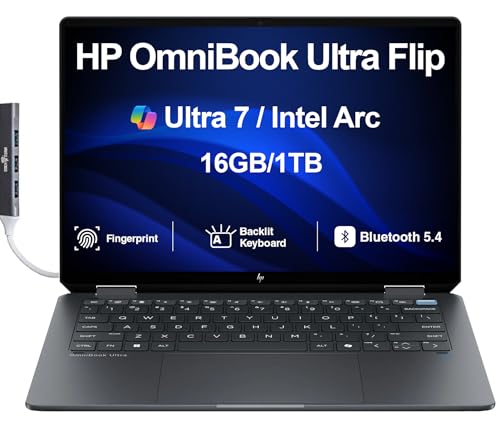
- HP OmniBook Ultra Flip 14 (16GB / 1TB) — the primary listing: 2-in-1, 14-inch 2.8K OLED touch, Intel Core Ultra 7, Copilot+ PC with 47 TOPS NPU as listed, backlit keyboard, fingerprint reader, Windows 11 Pro.
- HP OmniBook Ultra Flip 14 (32GB business configuration) — the step-up: OLED touch, Intel Core 7 258V as listed, 32GB memory, 1TB SSD, Windows 11 Pro.
- ASUS Zenbook 14 OLED — the clamshell alternative: 14-inch WUXGA OLED, AMD Ryzen AI 7 as listed, 32GB LPDDR5X, 1TB SSD, Copilot+ PC, lay-flat hinge.
Premium 14-inch laptops are the most contested ground in the industry because the size is the traveller’s optimum — big enough to work on all day, small enough to forget in a bag — and our wider coverage of the class is a useful companion best OLED laptops.
How were these picks chosen?
Verification came first and produced the framing above: repeated checks returned only the Flip under the OmniBook Ultra 14 name, in two meaningful configurations, and this review links exactly those machines under their correct convertible identity. The two configurations were both included because the memory difference between them is the single most consequential choice a buyer of this machine makes, and it deserved a full comparison rather than a footnote. The Zenbook was chosen as the alternative because it answers the reader who, having learned the Ultra is a convertible, realises they wanted a clamshell all along: same OLED premium class, same AI-era positioning, fixed hinge. Nothing in this article links a product under a name it does not carry on its own listing.

HP OmniBook Ultra Flip 14: what does the convertible Ultra offer?
Badge: Primary listing — the Ultra as it actually exists
- Form: 2-in-1 convertible, 14-inch
- Display: 2.8K OLED touch
- Processor: Intel Core Ultra 7, Intel Evo Edition as listed
- AI capability: Copilot+ PC, 47 TOPS NPU as listed
- Memory and storage: 16GB, 1TB
- Security and extras: fingerprint reader, backlit keyboard, 9MP webcam as listed
- System: Windows 11 Pro
Start with the screen, because on this machine the screen is the argument. A 2.8K OLED at 14 inches delivers the deep blacks and vivid colour that make films and photographs look expensive, with a pixel density that keeps text crisp at the close viewing distances laptop work involves. It is also a touchscreen on a 360-degree hinge, and that combination changes what the machine is for. Folded flat, it is a tablet for reading, annotating and media. Propped in tent mode, it is a presentation screen and a kitchen-counter recipe display that does not fear the keyboard’s exposure. In stand mode on an airline tray, it puts the film closer to your eyes than any clamshell can. None of these modes is a gimmick if your life contains the situations; all of them are weight and cost if it does not, which is why this review keeps returning to workflow as the deciding instrument.
The processor story is the AI-era one: Intel’s Core Ultra line with a neural processing unit rated, on this listing, at 47 TOPS, qualifying the machine as a Copilot+ PC. Translate the acronyms into consequences. The NPU handles the background chores that increasingly define a modern laptop’s feel — video-call effects, live captions, local assistant features, the AI tools creeping into creative applications — on dedicated silicon that sips power instead of spinning up the main processor and its fans. Whether that matters to you today depends on your software; that it will matter across this machine’s lifespan is the safer bet, and a premium laptop is precisely the purchase where betting on the lifespan is rational.
The supporting cast is aimed at people who work in the world rather than at a desk shrine. A webcam in the 9MP class, as listed, is a statement that video calls are a primary use rather than an afterthought, and it pairs with the NPU’s background and framing effects to produce the most flattering version of you your lighting allows. The fingerprint reader makes signing in a touch rather than a password typed on a train. The backlit keyboard serves the dim rooms and night flights. Windows 11 Pro, rather than the Home edition, signals the business traveller as the intended owner, with the management and security features that audience’s employers tend to require.
The honest constraints deserve equal billing. Sixteen gigabytes of memory is the configuration’s pressure point: ample for office work, browsing at scale, calls and light creative tasks, but the ceiling a heavy multitasker, a virtual-machine user or a serious photo and video editor will feel within the machine’s life — and memory in this class of laptop is not a later upgrade, it is a decision made at checkout. That is not a flaw in this configuration; it is the reason the second configuration in this review exists. Storage at 1TB, by contrast, is generously judged for a travel machine in the cloud era.
Strengths
- The 2.8K OLED touchscreen on a full convertible hinge makes one machine serve desk, meeting, travel and leisure modes.
- Copilot+ class NPU and Intel Evo positioning target the AI-era workload and all-day mobility together.
- Webcam, fingerprint reader and backlit keyboard are specified for people who genuinely work away from a home desk.
Trade-offs
- 16GB of memory is the configuration’s ceiling, and it cannot be raised after purchase.
- Convertible hinges and touch glass add weight and cost that pure clamshell buyers may not want to carry.
- OLED owners should keep screen-care habits in mind for static desktop content across long workdays.
Best for: mobile professionals, presenters, annotators and travellers who will actually use the folding modes. / Not suited for: heavy multitaskers at this memory size, or buyers who know they want a fixed-hinge laptop.

The 32GB OmniBook Ultra Flip: who should step up?
Badge: Step-up configuration — memory for the long haul
- Form: 2-in-1 business laptop, 14-inch OLED touch
- Processor: Intel Core 7 258V as listed
- Memory and storage: 32GB, 1TB SSD
- System: Windows 11 Pro
The second configuration answers the first one’s pressure point directly. Thirty-two gigabytes of memory transforms the machine’s relationship with time: the browser with forty tabs beside a video call beside a sprawling spreadsheet beside a creative application stops being a juggling act, and the laptop’s useful life stretches, because memory ceilings are the most common reason otherwise-fine premium laptops get replaced early. The processor listed here, the Core 7 258V, belongs to the efficiency-focused branch of Intel’s line — the branch designed around long battery endurance in thin machines — which tells you the configuration’s philosophy: this is the Ultra Flip specced for the consultant, the analyst and the manager whose workday is a marathon of everything at once, away from power.
Deciding between the two configurations is the cleanest decision in this review, and it should be made by inventory rather than optimism. List the applications you genuinely run simultaneously on your heaviest day. If the list is office suite, browser, calls and a media player, the 16GB machine serves you fully and the step-up money is better kept. If the list includes virtual machines, large datasets, serious creative suites or the development environments that treat memory as a workspace, the 32GB configuration is not an indulgence — it is the machine you were actually shopping for, and buying the smaller one would be the expensive mistake.
Strengths
- 32GB of memory removes the primary ceiling on the machine’s multitasking and lifespan.
- Efficiency-focused processor positioning suits long days away from a charger.
- Keeps every convertible and display virtue of the primary configuration.
Trade-offs
- A higher price tier that light-workload buyers will never recoup in experience.
- Storage remains 1TB, so media-heavy archives still belong on external or cloud storage.
- Still a convertible, with the same hinge and glass considerations as its sibling.
Best for: heavy multitaskers, professionals buying for a four-to-five-year horizon, and anyone whose current laptop’s limit is memory. / Not suited for: light office workloads, where the primary configuration already covers the need.

ASUS Zenbook 14 OLED: the clamshell answer
Badge: Clamshell alternative — premium without the fold
- Form: clamshell laptop, 14-inch, 180-degree lay-flat hinge as listed
- Display: WUXGA OLED
- Processor: AMD Ryzen AI 7 445 as listed
- Memory and storage: 32GB LPDDR5X, 1TB SSD
- Platform: Copilot+ PC, Wi-Fi 6E as listed
The Zenbook’s presence in this review is a kindness to a specific reader: the one who searched for a premium 14-inch clamshell, discovered the Ultra name currently belongs to a convertible, and would rather change brands than change form factors. The Zenbook 14 OLED is that clamshell, with an OLED display of its own, an AMD Ryzen AI processor carrying its Copilot+ credentials, and — pointedly — 32GB of memory in this configuration, which puts it head-to-head with the step-up Flip rather than the base one. Its hinge lays flat to 180 degrees, a small but real concession to collaboration: the screen can be opened flat on a table for shared viewing, even if it will never fold into a tablet.
Choosing between this and the Flip is choosing a philosophy of the premium laptop. The clamshell spends its budget on the essentials of one posture done well — keyboard, screen, battery, silence — and typically carries a little less weight for it. The convertible spends on possibility. Neither philosophy is the sophisticated one; the sophisticated act is knowing which of your actual weeks contains tent modes and pen annotation, and which contains only a desk, a tray table and a keyboard. Buy the machine your weeks describe best 2-in-1 laptops for work.
Strengths
- A true clamshell with OLED quality for buyers who never wanted a folding screen.
- 32GB of memory in this configuration matches the step-up Flip’s multitasking headroom.
- Lay-flat hinge still allows shared viewing across a table.
Trade-offs
- No tablet, tent or pen-first modes, which presenters and annotators will miss.
- Its OLED resolution class differs from the Flip’s 2.8K panel, so compare displays in person if you can.
- Bundle-dependent listings vary, so verify the exact configuration and included extras on the day.
Best for: keyboard-first professionals who want OLED and memory headroom in a conventional premium laptop. / Not suited for: anyone who presents from their laptop or annotates documents by hand.
How do the three machines compare as a working system?
The comparison reduces to three questions in sequence. First, form: convertible or clamshell? That answer eliminates either the Zenbook or both HPs. Second, memory: if the convertible survives, 16GB or 32GB? That answer is decided by your heaviest real workday, inventoried honestly. Third, ecosystem details — your employer’s platform requirements, your existing chargers and docks, your preference between Intel’s and AMD’s current strengths — which matter at the margins once the first two answers are in. Buyers who run the questions in that order find this category suddenly simple. Buyers who start with benchmarks find it endless, because at this level every machine is fast and the differences that govern satisfaction are the structural ones.
One more shared consideration: all three are OLED machines, and OLED laptop ownership has a small etiquette. Vary your content, let the taskbar hide if your work is one static application all day, keep brightness at the level the room needs rather than the maximum the panel offers, and the display will reward you for years. These habits are minor, and they are the whole of the technology’s demands in modern implementations with their built-in care features.
What should you check before buying a premium 14-inch laptop?
Is the memory right for the machine’s whole life?
Because memory in this class is soldered and final, project forward. Software grows heavier across a laptop’s life, AI features are arriving in the applications you already use, and the workload that fits comfortably today will be joined by tools you have not met yet. The rule experienced buyers use: if you are hesitating between two memory sizes on a machine you intend to keep beyond three years, the larger one is usually the purchase you will thank yourself for — and the smaller one is the false economy you will replace early.
How will you connect it at your desk?
A travel laptop lives a double life, and its ports and wireless decide how graceful the desk half is. Count your monitors, your storage and your peripherals, and check the machine’s docking story — a single-cable dock that charges the laptop and drives your screens turns a travel machine into a desktop in one motion MacBook Pro 14 compared. Buyers with an existing dock should verify compatibility before the laptop arrives, not after.
What does premium actually buy at 14 inches?
Not raw speed, which mid-range machines also have, but the accumulation of things that surround speed: the OLED screen, the webcam that flatters your calls, the keyboard and trackpad tuned past adequacy, the chassis that survives bags and trays, the battery manners that respect a working day. Judge a premium laptop by a full ordinary Tuesday with it, imagined in detail. That is the product you are buying.
How do you set up a new OmniBook-class laptop in its first week?
Begin with the unglamorous essentials: run the system updates to completion before installing your life on the machine, because a premium laptop’s first firmware and driver round often includes the battery and thermal tuning its reviewers never saw. Set up the fingerprint reader and a proper backup routine on the same day, while the machine is still a novelty you are happy to spend time on. Then configure the AI-era features deliberately: try the video-call effects on a low-stakes call, decide which of the assistant features earn their place, and disable the ones that do not, because a Copilot+ machine’s value is in the handful of capabilities matched to your work, not in the full catalogue switched on by default.
For the convertible specifically, spend an evening learning its modes with real content: read a long document in tablet mode, watch a film in tent mode on a tray-table-like surface, present something to a friend across a table. Modes discovered in play are modes you will actually use; modes left undiscovered become the weight you carried for nothing, and are the source of the unfair verdict that convertibles are gimmicks. Finally, buy the unexciting accessories the form deserves — a sleeve that fits, a charger that can live in your bag so the original can live at your desk best 14-inch laptop sleeves — and the machine’s double life is fully equipped.
What mistakes do premium laptop buyers keep making?
The first is buying the name rather than the machine, which this keyword embodies: the reader who orders an OmniBook Ultra expecting a clamshell and receives a convertible has been failed by lazy listings and lazy research alike, and the defence is the habit this article models — read the exact listing, confirm the form factor in its own words, and let the product be what it is. The second mistake is speccing for the first month instead of the fourth year, above all in memory. The third is ignoring the webcam, microphone and speakers on a machine whose owner will live on calls; these are the components colleagues experience, and they are worth more than a benchmark increment nobody will ever see.
The fourth mistake is treating a convertible as a clamshell with a party trick and never folding it, then concluding the category is pointless; the category is pointless only for workflows that never fold, which is a fact about the workflow, not the hinge. The fifth is neglecting the return window’s real purpose with a premium purchase: live with the machine through two genuine workdays in the first fortnight, including a call, a commute if you have one, and an evening of leisure. Premium laptops justify themselves in accumulated Tuesdays, and a machine that does not win its Tuesdays should go back while going back is easy.
Final recommendation
If the convertible form serves your work, the OmniBook Ultra Flip is a compelling premium 14-inch machine — and the 32GB configuration is the one to buy for any horizon beyond a couple of years or any workload with ambition. The 16GB model is the right call for the lighter professional load it was specced for. If your work never folds, the Zenbook 14 OLED gives you the same class of screen and memory in the clamshell you actually wanted. And if you came here determined to buy a clamshell carrying the OmniBook Ultra name specifically, the honest news bears repeating once more: that machine is not among the current listings, and the Flip is what the name buys today best 2-in-1 laptops for students.
Frequently asked questions
Is the OmniBook Ultra 14 a clamshell or a convertible?
As currently listed, it is a convertible: the OmniBook Ultra Flip 2-in-1, with a 360-degree hinge and touchscreen. Our checks found no clamshell OmniBook Ultra 14 among current listings. If a fixed-hinge machine is what you need, shop the clamshell alternatives — the Zenbook in this review among them — rather than ordering the Ultra name and hoping.
What does Copilot+ and the NPU actually do for you?
The neural processing unit handles AI-flavoured tasks — call effects, captions, assistant features and the AI tools arriving in creative and office software — on efficient dedicated hardware instead of burdening the main processor. The benefit today is smoother calls and responsive features with less fan noise and battery cost; across the machine’s life, it is insurance as more software learns to use it.
Should you choose 16GB or 32GB of memory?
Inventory your heaviest real workday. Office work, browsing, calls and media sit comfortably in 16GB. Virtual machines, large datasets, development environments and serious creative suites argue for 32GB — and because memory in this class cannot be upgraded later, the decision deserves the forward-looking answer rather than the optimistic one.
Is an OLED screen suitable for all-day office work?
Yes, with light etiquette: vary content where you can, use sensible brightness, and let static elements like the taskbar hide during long single-application sessions. Modern OLED laptops include care features for exactly this use, and the clarity and contrast benefits for text and media are substantial enough that the category has moved decisively toward OLED at the premium end.
Does a convertible make a good only laptop?
For the right workflow, it is arguably the best only laptop: desk machine in the morning, presentation screen in the meeting, tablet on the sofa, film screen on the plane. The condition is honesty — the modes must appear in your actual weeks. A buyer whose laptop has never left a desk gains nothing from the hinge and should spend the difference elsewhere.
What should you verify on the listing before ordering?
The form factor in the listing’s own words, the exact processor and memory configuration, the storage size, the Windows edition, and any bundled extras, since bundle listings vary. Model names in this family cover multiple configurations, and the checkout page — not the search result — is the document that counts.
Battery life: how to think about the numbers you cannot verify here
Battery claims are the softest numbers in laptop marketing, because endurance depends on brightness, workload, wireless conditions and the manufacturer’s chosen test. Rather than repeat figures this review cannot stand behind, here is the framework for judging any machine in this class when you meet it. The processor branch matters: efficiency-focused chips in thin chassis are designed to stretch a working day from a modest battery by racing through tasks and sleeping aggressively between them, and the 258V configuration’s positioning signals exactly that intent. The OLED screen cuts both ways — frugal with dark content, thirstier with bright white documents — so your own applications move the real number more than any laboratory’s video loop does.
The habits that decide your actual endurance are yours to control: brightness set for the room rather than the showroom, the keyboard backlight off in daylight, the browser’s hundred tabs audited occasionally, and a charger strategy that treats the bag charger as infrastructure rather than emergency equipment. A premium travel laptop should be judged by whether it removes battery anxiety from a normal day of your work, and the honest test happens in your first fortnight, on your real Tuesdays, with a return window still open if the answer surprises you.
The keyboard, trackpad and the tactile premium
Specifications end where fingertips begin, and the components a premium laptop is actually judged by after a month are the ones no listing can quantify. A backlit keyboard is listed here, but its worth is in the travel and spacing of its keys across a long document, the confidence of its deck under enthusiastic typing, and whether its layout respects the habits your fingers bring from other machines. The trackpad’s worth is in its surface glide, its click consistency at the corners, and palm rejection that never interrupts a sentence. These qualities are why this review keeps recommending the two-workday trial: they are real, they are decisive, and they are only measurable by living with the machine.
Convertibles add one tactile question of their own. A 360-degree hinge should feel engineered — smooth through its travel, firm at every resting angle, free of the wobble that makes a touchscreen annoying to tap in laptop mode. When you audition the Flip or any rival, tap the screen’s corners in laptop mode and fold it through its positions slowly. The hinge’s manners in those ten seconds predict years of daily satisfaction more reliably than any processor comparison.
Who is the OmniBook Ultra Flip really competing with?
Context sharpens judgement, so place the machine in its true competitive set. At 14 inches with OLED screens and AI-era processors, the premium convertible and clamshell makers are all fishing the same traveller: Lenovo’s Yoga line argues flexibility, Dell’s XPS argues design minimalism, Apple’s MacBook Air argues its own ecosystem’s silence and endurance, and ASUS’s Zenbook argues value within the premium tier. HP’s argument with the OmniBook Ultra is the completeness of its work-from-anywhere kit — the webcam investment, the Pro operating system, the security reader, the convertible’s modes — aimed at the professional whose office is wherever the day puts them.
That positioning clarifies the buying decision one final way. Ecosystem captives should stay captive; the switching costs are real and the grass is rarely greener enough. Windows professionals without a fixed desk are the Flip’s home audience. Keyboard-first writers and analysts who never present are the Zenbook’s. Everyone else should let the two structural questions from earlier — form, then memory — do the deciding, because at this level of the market there are no bad machines left, only mismatched ones.
Ownership across four years: a realistic preview
Imagine the machine at year three, because that is the purchase you are actually making. The OLED still startles guests. The hinge has performed its party trick ten thousand times and either still feels machined or has become the thing you warn friends about — which is why the audition matters. The battery holds most of its youth if it has been treated kindly, the fans have a voice they did not have when new but not yet an opinion, and the specification decision that echoes loudest is the memory you chose on day one. Owners of the 32GB configuration are, at year three, simply not thinking about their laptop. Owners who stretched a 16GB machine into a 32GB life are shopping again. That asymmetry — invisible in every benchmark — is the most practical sentence in this entire review, and it is why the configuration comparison above was given the space it was.
Pen, touch and the creative side of the Flip
A touchscreen convertible invites a category of use this review has so far treated briefly: handwriting and drawing. For the note-taker whose meetings produce sketches, diagrams and annotated screenshots, a pen-capable OLED machine collapses the notebook and the laptop into one object, and the handwriting lives inside the same searchable system as the typed record. For the photographer, the folded screen becomes a presentation slate for clients, and touch makes culling a gallery feel like handling prints. None of this requires artistic talent; it requires the habit of thinking with your hands, which more professionals have than the keyboard-only market assumes.
Two practical cautions belong here. Pen support and pen inclusion vary by listing and region, so verify what the specific configuration you are ordering actually contains before assuming a stylus is in the box. And if pen work is central to your plan rather than occasional, audition the writing feel in person if you possibly can — latency and palm rejection have improved enormously across the industry, but the difference between good and great inking is still something fingertips judge better than specifications do.
Security and manageability: the Pro difference
Windows 11 Pro on both HP configurations is easy to skim past and worth a paragraph, because for the machine’s intended audience it can be the deciding line. Pro brings the disk encryption, remote management and policy controls that employers’ IT departments commonly require before a machine may touch company data, along with conveniences like remote desktop hosting that travelling professionals use more than they expect. A buyer purchasing through or for a business should confirm their organisation’s requirements before choosing any configuration; a buyer purchasing purely personally gains little from Pro but loses nothing by having it. The fingerprint reader complements the story at human scale: sign-in that takes a touch, works with wet-weather hands better than a typed password on a small keyboard, and keeps the machine’s security frictionless enough that you will actually leave it enabled — the only security setting that matters being, as ever, the one still switched on.
Travel realities: weight, chargers and tray tables
The 14-inch premium class exists because of aeroplanes, so judge it there. On a tray table, the convertible earns its hinge in the most literal way: folded into stand mode, the screen sits closer and the keyboard hides beneath, turning the smallest surface in your travel life into a workable cinema and a tolerable document reader. In the bag, what matters is the total travelling weight — machine, charger, sleeve — and the discipline of one charger standard across your devices, so a phone, earbuds and laptop can share a rotation. At the destination, the machine’s manners in a hotel room at midnight — backlit keys, quiet fans under light loads, a webcam that forgives terrible lighting on the morning call — are the premium you actually paid for, experienced in the order you will experience it.
Road warriors should also think about service and support geography before the brand argument: a machine that can be serviced in the cities you travel to is worth more than a marginally finer machine that cannot. Premium lines generally travel with better support networks, and checking that map for your own routes is a five-minute task that belongs in any professional’s purchase, filed beside the memory decision as one of the two judgements benchmarks will never make for you.
The naming lesson: how to shop families, not names
This keyword’s confusion is worth generalising before we close, because every major laptop family now behaves the same way. A line name like OmniBook Ultra describes a tier and a design language, not a single machine: beneath it live convertibles and clamshells in different seasons, processors from rival makers, memory sizes that double, and regional variants with different keyboards and bundles. Retail listings compress all of that into titles of varying honesty. The shopper’s defence is a short ritual this review has modelled throughout: identify the exact configuration’s own title, confirm the form factor and the three specifications that cannot be changed later — memory, storage, display — and treat every other claim as negotiable detail. Five minutes of that ritual per purchase would eliminate most premium-laptop disappointment at a stroke, and it works identically on the Zenbook’s bundle listings and on every rival family named in these pages.
End with the reader who arrived wanting the simplest possible answer to a simple search. The simplest true answer is this: the OmniBook Ultra 14 you can buy today is a folding, touch-screen, OLED machine built for professionals who move — and judged as that machine, rather than as the clamshell its name led you to expect, it is a strong one, strongest in its 32GB form. If your work folds, buy it with confidence and spend your first week learning its modes. If your work does not, the clamshell alternatives are not a consolation prize but the correct tool, and choosing one is not settling. It is the same decision, made with open eyes — which is all this review ever asked of you.
Docking, displays and the home-desk half of its life
A travel laptop that cannot become a desktop is only half equipped, so consider the home half before ordering. The modern pattern is a single cable into a dock: power, external display or two, keyboard, mouse, storage and wired network arriving together, and leaving together when the bag calls. Verify that the configuration you choose drives your external screens at their full resolution and refresh through the dock you own or intend to buy, because that capability lives in port standards and dock chipsets rather than in the laptop’s headline specifications. Set the desk up so the laptop’s own screen remains useful beside the externals — as the calls screen, the reference screen, the chat screen — and a 14-inch traveller becomes the calm centre of a workstation that would shame many desktops, then folds into a bag at the end of the day as if none of it happened. That transformation, repeated daily without friction, is the deepest luxury this class of machine sells, and it is available to every configuration in this review provided the dock question is asked in time.
One last audience deserves direct address: the student or early-career buyer stretching toward this tier and wondering whether the stretch is wise. A premium 14-inch machine bought at the start of a degree or a first serious job can plausibly serve the whole chapter — which is exactly the horizon where the memory advice in this review bites hardest, and where the convertible’s presentation modes earn their keep in seminars, interviews and group work. Stretch for the configuration, not the badge: the 32GB machine kept for five years is the economical purchase, the base machine replaced in two is the expensive one, whatever the receipts say on the day. And buy the accidental-damage protection your lifestyle honestly warrants. Laptops that travel meet pavements, and the premium worth protecting is the years of service, not the shine of the first week.
Environmental and repairability notes for the long view
Premium laptops increasingly publish their environmental credentials, and a buyer planning a long ownership can add one more lens: choose the configuration you will not outgrow, keep the machine longer, and the greenest laptop becomes the one already in your bag. When its service does end, a known premium line holds resale and hand-me-down value that budget machines do not, so the machine’s second life with a family member, a student or a small business is part of its footprint story too. None of this requires piety at the checkout — it is the same long-horizon arithmetic as the memory decision, expressed in a different currency, and it points, as that decision did, toward buying the right machine once.
It remains only to say what satisfaction with this class of machine actually feels like, since specifications cannot. It feels like nothing — like the laptop never being the reason a day went slowly, a call went badly or a journey felt long. The screen pleases without being noticed, the battery lasts without being managed, the machine folds when folding helps and behaves like an ordinary excellent laptop when it does not. The OmniBook Ultra Flip, specced with the memory your life requires, is built to produce exactly that feeling of nothing, and buyers who understand that premium laptops are purchased in units of unnoticed days will know precisely how to value it.
A final checklist before you click buy
Consolidate the whole review into the minute before checkout. One: the listing in front of you says Flip and 2-in-1, and you want a convertible — or it does not, and you have chosen the clamshell alternative deliberately. Two: the memory figure matches the horizon you planned, with 32GB for the long and heavy workloads. Three: the storage figure fits your archive habits after honest accounting for cloud and external drives. Four: the Windows edition matches your employer’s requirements if the machine will touch company data. Five: you have a dock, sleeve and charger plan for the desk and the bag. Six: you intend to spend the first fortnight genuinely auditioning the machine — calls, commute, modes, evenings — while the return window stands open. A buyer who can tick those six lines is not gambling on a name. They are executing a decision, and the machine that arrives will be the machine they meant to buy.
And if the checklist leaves you hesitating between the Flip and the Zenbook at the final moment, break the tie with a memory of your own last month: the meeting where you wished the screen faced the room, the flight where the tray defeated your laptop, the document you wanted to mark up by hand. If those memories exist, the hinge is not a gimmick in your life; it is a tool you have been improvising around. If the month offers no such memory, trust that evidence too, and buy the clamshell with the clear conscience of a person who knows their own workflow better than any advertisement does.
What if a clamshell OmniBook Ultra appears later?
Product lines evolve between seasons, and it is entirely possible that a future wave restores a fixed-hinge Ultra to the range or renames the family again. Readers returning to this article in a later season should apply its method rather than its snapshot: verify the current listings afresh, let the form factor in each listing’s own title govern what you believe, and re-run the form-then-memory sequence on whatever the range then contains. Reviews age; methods should not. The snapshot recorded here — Flip only, in two configurations, at the time of checking — is offered in that spirit, as a dated and honest account of what the name bought when these words were written.
Whichever machine you choose from these pages, choose it as the start of a working relationship rather than the end of a search. Set it up deliberately, learn its modes or its manners, protect it proportionately, and let it recede into the background of ambitious days. That recession — the laptop forgotten in the work it enables — is the true product at this end of the market, and all three machines here, honestly matched to their owners, are capable of delivering it for years.
A closing note on value, in this series’ qualitative terms. Premium 14-inch laptops cluster tightly enough in their tiers that the configuration decision — memory above all — moves your long-term satisfaction more than any brand gap on the day. Watch the live listings for the configuration you have chosen rather than the badge you first searched for, let seasonal movement come to the patient, and remember that the cheapest premium laptop is the one bought once, correctly, with its whole working life in view.
For switchers: moving your life onto a new machine without the lost weekend
A premium laptop purchase often dies a quiet death in the migration, so here is the painless pattern. Before the new machine arrives, let your files live somewhere synchronised — cloud storage or a proper backup — for at least a week, so the move becomes a sign-in rather than a transfer. On day one, install only the applications your current week needs; the long tail of occasionally used tools can arrive on demand across the first month, and many never will, which is its own decluttering. Move your browser profile and your password manager early, because they are the keys to everything else. Keep the old machine intact and un-wiped for a full month as the archive of last resort, and only then retire, gift or sell it. Followed calmly, the switch to an OmniBook-class machine is an evening’s pleasant setup rather than a weekend’s archaeology — and the new laptop gets to make its first impression as a tool, not as a project.
Migration complete, the last task is the pleasant one: make the machine yours in the small ways that compound — the wallpaper that means home, the taskbar arranged to your hand’s memory, the function keys mapped to your habits, the power plan matched to your days. Premium hardware invites this personalisation because it will be around long enough to repay it. A laptop configured to its owner disappears; a laptop left at factory defaults remains, faintly, a stranger. Spend the hour. You will be repaid daily for years.
That is the whole of it: a name that currently means a convertible, a convertible that earns its name for the people whose work moves, a memory decision that decides its lifespan, and a clamshell alternative standing ready for everyone else. Buy with those four facts in hand and the OmniBook question — however the range evolves next season — is one you will have answered properly.
What about gaming, creative work and other second lives?
Premium thin-and-lights are bought for work and judged, sooner or later, by their hobbies, so the question deserves a straight answer. Machines of this class — the Flip configurations and the Zenbook alike — are built around efficient processors with capable integrated graphics, and their honest gaming territory is the vast library of lighter, older and esports-leaning titles at sensible settings, alongside cloud gaming services that move the heavy rendering elsewhere. They are not desktop replacements for the newest blockbuster games at native resolution, and a buyer whose evenings are defined by those titles should shop a different shelf entirely. Creative work divides similarly: photo editing is flattered by these OLED screens and entirely at home, video work is comfortable at the scales most people actually produce, and only sustained professional rendering workloads expose the thin chassis’s thermal ceiling. None of this diminishes the class. A travel laptop that also plays, edits and creates at the level most lives require is a remarkable object — provided it is bought as that object, and not as the gaming rig or the render station it never claimed to be.