Disclosure: As an Amazon Associate, reviewstook.com earns from qualifying purchases. Links on this page are affiliate links; they cost you nothing extra. Prices and availability change often, so check the current Amazon listing before you buy.
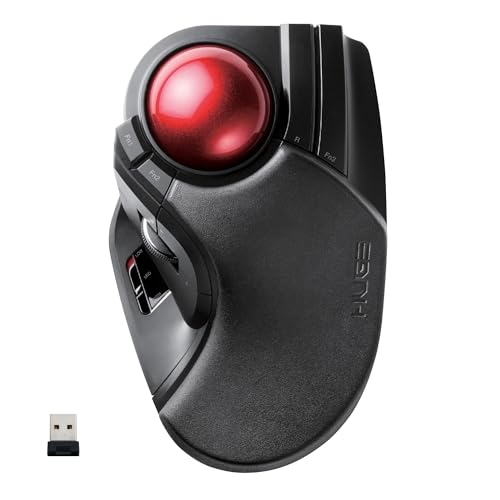
The elecom huge wireless trackball review starts with the name, because the name is the specification: Huge. A 52mm ball — the largest in its class — set in a broad shell with a soft palm rest, worked by the index and middle fingers while the hand rests its full weight on the device. The Huge is not a trackball for people who want a smaller mouse; it is a trackball for people who want the mouse’s entire job — travel, precision, endurance — taken over by a stationary instrument with the physics of a billiard ball. It is reviewed here against the two devices its buyers cross-shop: Logitech’s MX Ergo S, the tilted thumb-ball for the comfort mainstream, and Kensington’s SlimBlade Pro, the other great large-ball design, which answers the Huge’s size with slimness and a twist.
Size is a trade, and this review will keep both sides of it visible. The big ball buys precision at low speed that smaller balls cannot match — a large sphere turns small finger movements into fine cursor steps with an ease that feels like cheating in photo and audio work — and the palm rest buys an arm that is genuinely off duty. What it costs is territory: the Huge occupies a desk the way a keyboard occupies a desk, and it does not travel, visit sofas, or share small surfaces gracefully. Readers whose desks can pay that rent are the review’s audience; readers whose desks cannot should take the Ergo S’s section as their answer and the rest as an enjoyable museum tour.
Elecom’s Huge line has a cult quality that deserves explaining to the uninitiated, because it predicts ownership satisfaction better than any specification. Its owners are disproportionately professionals whose work is measured in pixels and frames, and who arrived at the big ball after exhausting the smaller alternatives — which means the device’s reputation was built by the category’s most demanding users rather than by its most forgiving ones. A product that survives that audience’s scrutiny for years, across a wired original and this wireless revision, has passed an examination no launch review can replicate. This page’s job is to translate that examination for the reader whose desk is asking the same questions.
All three devices were verified against their current listings, model numbers included — the Huge’s M-HT1DRBK identity distinguishes it from Elecom’s wired and smaller variants, and confirming it on the listing in front of you is the review’s only preliminary demand before the argument begins.
Key takeaways
Four properties decide among these three very different instruments: the big ball’s low-speed precision, the palm’s support and angle, the button geography around the ball, and the wireless link’s reliability across a real, wide desk. Read the product sections through those four lenses and the whole comparison readily organises itself.
- Sizeable-ball precision at low speeds
- Palm support and wrist angle
- Button layout around the ball
- Wireless reliability over a wide desktop
In this guide
Swift picks for Elecom Huge Wireless Trackball Review
The trio in one view: the largest ball, the tilted thumb-ball, and the slim twist-ball. Detailed reviews follow, and the buying handbook after them turns each difference into a test you can run on your own desk.
| Model | Best for | Page |
|---|---|---|
| Elecom Huge Wireless | Best for travellers | Check price on Amazon |
| Logitech MX Ergo S | Best for hushed spaces | Confirm cost on Amazon |
| Kensington SlimBlade Pro | Best value route | Confirm expense on Amazon |
How the lineup was chosen
The lineup isolates the Huge’s two wagers. Against the SlimBlade Pro — the only other large-ball design with a serious following — the wager is about what surrounds the ball: the Huge bets on a palm rest, eight buttons and a control-desk philosophy, while the SlimBlade bets on a low profile, four buttons and a twist-to-scroll gesture of genius. Against the MX Ergo S, the wager is about the whole category: whether a reader’s comfort is better served by the finger-ball’s full rest or the thumb-ball’s familiar posture and tilt. A reader who can name which wager sounds like their desk has effectively chosen; the reviews exist to give that instinct its evidence, and the scenarios later in the page exist to test the instinct against three working lives before any money moves.
Criteria were set from the large-ball’s daily life. Precision at low speed, because that is the big ball’s reason to exist. Palm support and wrist angle, because a device you rest your whole hand on is furniture for your skeleton. Button layout around the ball, because the Huge’s eight buttons encircle its sphere and their geography is the device’s second language. And wireless reliability, because a device this stationary tends to live far from its receiver, across the wide desks it was built for. Each product was verified against its live listing before inclusion, with the ball size, button count and connection type taken from the makers’ own pages rather than from secondary sources.
Detailed reviews

Elecom Huge Wireless
Best for precision workers on wide desks who want the biggest ball and a full palm rest
| Name | Elecom Huge Wireless |
|---|---|
| Class | Trackballs |
| What its listing leads with | wireless operation, trackball control, a 2.4 GHz wireless pattern |
| Expense | Check cost on Amazon |
Roll the Huge’s ball once and the review’s thesis is in your fingers: a 52mm sphere has inertia, and inertia is precision’s friend. At low speed the big ball translates a finger’s tremor into a cursor’s calm — the photo editor’s single-pixel nudge, the audio editor’s frame-step, the CAD user’s vertex approach all happen at a scale where the ball’s mass irons out the hand’s noise. At speed, the same mass glides: spin it and it carries across a triple-monitor span, braking under a fingertip with a control that smaller balls, which must be pushed the whole way, never quite achieve. Elecom’s bearings serve the physics faithfully, and the optical sensor reads the big ball’s surface without drama at either end of the speed range. This is the device the phrase “the ball does the work” was coined for.
The ball’s size also changes the sound and feel of the desk in a way owners mention and specifications omit: there is a soft, dense roll to a big sphere on good bearings, a sensation closer to a billiard ball than to a gadget, and it gives the workstation a tactile calm that smaller, busier devices do not. It sounds like a small thing until you multiply it by ten thousand rolls a week. Instruments are loved for their sensations as much as for their results, and the Huge’s sensation is the most distinctive in this comparison — the one owners describe to the curious with their hands, mid-air, before they find words.
Around the ball, the Huge is built as a resting place and a control desk in one object. The large soft palm rest takes the hand’s whole weight — not a hover, not a grip, a rest — and holds the wrist at the shallow angle the design intends, which is the comfort mechanism: an arm that is not holding itself up is an arm that can work all day. Eight customisable buttons ring the ball and line the shell’s edges, more than any rival here, all assignable through Elecom’s software to the stationary-desk repertoire: precision mode, application switching, the editor’s dozen daily commands. The connection is 2.4 GHz wireless, single-machine and unfussy, with the receiver asking only for a sensible position on a wide desk.
The costs are printed in the name. The Huge is huge: measure your desk before the romance, because a device this size on a small surface becomes the surface, exiling the keyboard and crowding the monitor’s stand. It is a committed right-hand, one-desk, one-machine instrument — no Bluetooth for the laptop, no travel life, no sofa. And its button wealth, like the Deft Pro’s, is a promise the software must keep and the owner must bother to collect. Within its brief, though, the judgement of this review is unqualified: for the wide-desk precision worker, the Huge is not an eccentricity but the most rational pointing device in this entire comparison.
Strengths
- 52mm ball whose inertia delivers unmatched low-speed precision and cross-screen glide
- Full soft palm rest that takes the hand’s weight and rests the arm completely
- Eight customisable buttons arranged around the ball
Trade-offs
- Enormous footprint; it must be measured against the desk before ordering
- 2.4 GHz wireless for one machine; no Bluetooth, no travel life
- Right-handed and desk-committed by design
Best for: the triple-monitor professional, the audio and photo editor, the limited-mobility user, the wide desk. Not suited for: small desks, travellers, multi-machine switchers, or the left-handed. Check price on Amazon
One setup discipline matters more for the Huge than for any device in this comparison: sensitivity. Set the ball brisk — a full triple-screen traverse in one good spin — and assign the precision mode to a button your resting finger already touches, because the device’s whole genius is the partnership between glide and crawl. Owners who set it timid push the big ball like a small one and conclude it is laborious; owners who set it as designed discover the two-speed instrument the physics promised.

Logitech MX Ergo S
Best for comfort seekers who want ergonomic relief without the Huge’s commitment
| Model | Logitech MX Ergo S |
|---|---|
| Line | Trackballs |
| Features named on its entry | wireless operation, Bluetooth connectivity, trackball control |
| Entry tag | Check price on Amazon |
The Ergo S is the control in this experiment: the pointing device for the reader who wants the arm rested and the wrist angled kindly, but whose desk, habits or landlord will not accommodate a device the size of a dinner plate. Its thumb-ball sits in a sculpted, tilted shell — the tilt being its signature, angling the hand toward the handshake posture — and the whole package is the most polished in the category: USB-C charging, Bluetooth and dongle connections for two machines, and Logitech’s software with its per-application profiles. It asks the least retraining of any device here, because the hand keeps its mouse posture and only the thumb changes jobs.
Against the Huge, its limits are physics and ambition: a thumb cannot match two fingers on a 52mm ball for low-speed precision, and six programmable buttons, however polished their software, are not eight arranged around a sphere. What it returns in exchange is a normal life — a desk that still fits a keyboard and a coffee, a device that can visit a laptop, a silhouette no colleague will comment on. For the majority of comfort-seekers, that exchange is the correct one, and this review lists the Ergo S not as the Huge’s lesser rival but as the answer for every desk the Huge cannot fit.
There is also a household diplomacy to the Ergo S that the Huge cannot offer: it can be picked up, moved aside, borrowed for a laptop and returned without a negotiation about territory. In shared homes and hot-desking offices, that portability is a daily virtue, and the device that monopolises a surface — however brilliantly — pays a social tax the Ergo S never owes. Count the tax honestly if your desk has other citizens; the best device for a shared desk is the one the sharing survives.
Strengths
- Tilted ergonomic shell with the gentlest learning curve here
- Two-machine connection and the category’s most polished software
- A normal desk footprint and a rechargeable USB-C life
Trade-offs
- Thumb precision cannot match the big finger-ball at low speeds
- No full palm rest; the hand is supported, not retired
- Fewer buttons than the Huge, with none of its around-the-ball geography
Best for: the general comfort-seeker with an ordinary desk and two machines. Not suited for: the finest precision work, or the user who needs the arm fully rested. Check price on Amazon
If the Ergo S is your answer, spend its first week on the tilt and the profiles: the tilt needs days to stop feeling like a slope and start feeling like a rest, and the per-application profiles are the premium’s substance — owners who configure them own a different, better device than owners who leave the software unopened. The Huge’s buyers must build their control desk manually; yours is half-built by the software, if you let it be.

Kensington SlimBlade Pro
Best for large-ball lovers who want a low profile and the twist-to-scroll gesture
| Model | Kensington SlimBlade Pro |
|---|---|
| Class | Trackballs |
| Functions named on its page | wireless operation, Bluetooth connectivity, trackball control |
| Tag | Check price on Amazon |
The SlimBlade Pro is the Huge’s true sibling rival: another large ball, another finger-worked philosophy, opposite conclusions about everything around the sphere. Where the Huge is tall, padded and button-rich, the SlimBlade is low, spare and gesture-rich — its signature being the twist: rotate the ball on its axis and the page scrolls, a gesture so natural that owners describe ordinary wheels as broken afterwards. Its profile sits lower on the desk than the Huge’s, suiting desks where height is the constraint, and its ambidextrous symmetry serves either hand and the hand-alternators no sculpted device can serve. The Pro version adds the modern connections — Bluetooth and 2.4 GHz, rechargeable — that the design’s long history previously lacked.
The trade against the Huge is explicit. Four buttons against eight: the SlimBlade is a pointer with ambitions of elegance, not a control desk. No palm rest: the hand floats lower and lighter, which some wrists prefer and others find less restful across a full day. And the twist, for all its genius, is a gesture some owners never adopt, leaving them with a beautiful ball and a conventional scroll habit. Choose between the siblings by what your hand does all day — rest and command, or glide and twist — because the balls themselves are peers and the philosophies around them are the entire decision.
The SlimBlade also makes the strongest case in this review for the second-desk life: a reading room, a library table, a partner’s study — places where a lower, quieter, ambidextrous instrument belongs and the Huge’s workstation presence would be theatre. Owners with two desks often end with one of each sibling, which sounds like excess until you notice that the two devices share a skill — the big ball itself — so the second desk’s apprenticeship is measured in an afternoon. The category rewards its converts with transferable fluency, and the sibling pair is where that fluency is most pleasantly spent.
Strengths
- Large ball with the twist-to-scroll gesture owners swear by
- Low, ambidextrous profile that suits either hand and lower desks
- Bluetooth and 2.4 GHz connection with rechargeable battery
Trade-offs
- Four buttons only; not a control desk
- No palm rest, so the arm is supported less completely than on the Huge
- The twist gesture is a love-it-or-ignore-it proposition
Best for: the scroller, the hand-alternator, the low-desk owner, the minimalist. Not suited for: button maximalists, or the user whose arm needs the full rest. Verify cost on Amazon
Give the twist its own practice session in the first week — a long document, a tall spreadsheet, nothing else — because it is a motor skill with a threshold: below the threshold it feels like a trick, above it, it feels like the way scrolling always should have worked. Owners who never schedule the session often never cross the threshold, and their SlimBlade remains a very good ball with an unused genius. Twenty minutes of deliberate twisting is the whole tuition.
Buying handbook: what genuinely determines Elecom Huge Wireless Trackball Review
Roomy-ball precision at low speeds
The physics deserves one clear explanation, because it justifies the entire product. A trackball’s cursor step is a fraction of the ball’s rotation, and a larger ball rotates less for the same finger movement — which means the same hand, with the same tremor, produces smaller, calmer cursor steps on a bigger sphere. Add the mass: a heavy ball resists the small involuntary accelerations of the fingers, smoothing the path the way a flywheel smooths an engine. The result, at the low speeds where editors, illustrators and CAD users live, is a grade of control that feels less like pointing and more like placing. Test it with the honest exercise: nudge a selection handle one pixel at a time across a photograph, and count the overshoots. The big ball’s count will embarrass smaller devices, and your own hand will understand the product before your head finishes the sentence.
The same physics has a ceiling worth knowing: at very high sensitivity settings the advantage thins, because the software multiplies the ball’s motion back up to ordinary twitchiness. Keep the sensitivity in the range where the ball’s own scale does the work — brisk for travel, native for placement, precision mode for the pixel — and the physics stays on your side. Owners who crank the sensitivity to mouse-like levels and then judge the ball have disabled the product they bought, one slider at a time.
Palm support and wrist angle
A palm rest is not padding; it is a posture. The Huge’s rest takes the hand’s full weight and sets the wrist at the shallow angle the shell was drawn around, so the forearm’s muscles can genuinely stand down — the state a mouse never permits, because a mouse hand is always either gripping or hovering. Judge any full-rest device across a whole working day rather than a demonstration minute, because the benefit is cumulative and invisible at first: it is the meeting at four o’clock where your arm has nothing to report. The SlimBlade’s lower, rest-free posture suits a different skeleton — one that prefers to float lightly — and the Ergo S’s tilt suits a third. There is no universal winner; there is only the posture your own arm votes for at the end of a long day, and the trial’s job is to hold that election honestly.
Desk height remains the silent partner, as in every trackball review on this site: a rest that sits too high bends the wrist back against its design, too low drops the shoulder. The Huge’s height makes the check more important, not less — measure the whole stack, chair, desk and device, against your elbow’s level arrival, and adjust the chair rather than blaming the shell. A device this committed deserves a workstation set up to receive it, and the ten minutes of geometry will be repaid every day the device serves.
Button layout concerning the ball
Eight buttons around a ball is a language, and its grammar is reach: which buttons fall under the resting fingers, which under the thumb, which require a deliberate journey — and whether the deliberate ones are assigned the deliberate commands. The Huge’s geography rewards the owner who maps it by frequency, the week’s most-issued commands nearest the rest position, the rare ones exiled to the far shore of the ball. Elecom’s software permits the mapping in full, including the precision mode that should be treated as a button in its own right and placed where a resting finger can hold it without thought. Judge the layout after the mapping, not before: the factory arrangement is a first draft written for a stranger, and your hand is the editor it was waiting for.
The accidental-press audit belongs in this section too. A ball surrounded by buttons will collect brushes — the heel of a finger landing from the rest, the thumb arriving enthusiastically — and the mature response is to forgive the geography by reassigning the brushed button to something harmless. Owners who perform that small mercy in week two keep the device for years; owners who endure a daily accidental undo develop a grudge no bearing quality can outroll. Forgiveness, in control surfaces, is a configuration option. Use it.
Wireless reliability over a wide worktop
The Huge’s natural habitat — the wide, multi-monitor desk — is also a radio obstacle course: monitors, metal stands, a tower under the far side, metres of air between the ball and its receiver. A 2.4 GHz link handles that course well when the receiver is given a fair start: on an extension lead or a front port, roughly line-of-sight to the device, rather than entombed behind the tower. Judge the link by a week of real work rather than a first-hour impression, because interference has a schedule — the microwave at lunch, the neighbour’s network at night — and reliability means surviving the schedule, not the demo. If a stutter appears, move the receiver before blaming the ball; in this category, geography is destiny and the fix is measured in centimetres.
The single-connection design has one reliability virtue worth stating: there is nothing to switch, pair or confuse, so the Huge’s link either works or announces itself, with none of the multi-device comedy of wrong-machine cursors. For the one-desk owner that simplicity is a feature with a long half-life. It is also the honest boundary of the product — the laptop on the sofa is another device’s job — and a review that respects the reader will print the boundary in the same size type as the virtues.
Elecom Huge Wireless Trackball Review in concrete habits
Situation: a triple-monitor workstation where a mouse runs out of desk
Three monitors create a geography no mouse survives gracefully: metres of cursor travel, a pad that ends mid-journey, an arm that commutes further than the worker does. The Huge was drawn for this map. One spin crosses the estate; the precision mode handles the far screen’s fine print; the arm stays home. The SlimBlade serves the same map with its twist handling the tall documents the third monitor usually holds. The Ergo S serves it adequately and is the choice if the desk between the monitors is narrow — but measure that desk honestly, because the wide-desk scenario is the one case where this review’s headline product is not merely better but categorically different: it converts the workstation’s scale from a tax into a playground.
A triple-monitor desk also exposes a small truth about sensitivity that this scenario is the right place to teach: the traverse and the task want different speeds, and no single setting serves both, which is why the precision button matters more here than anywhere else. Configure the pair of speeds as a system — glide for the geography, crawl for the work — and rehearse the switch between them until the hand changes gears without consulting you. That two-speed fluency is the actual skill the wide desk demands, and the Huge is simply the device that teaches it most rewardingly.
Scene: an audio editor scrubbing timelines all date
Timeline scrubbing is the big ball’s party piece: the playhead’s fine positioning, the waveform’s frame-by-frame inspection, the long project’s cross-country journeys, all done by one resting hand while the other works the keyboard’s transport keys. Editors describe the Huge’s ball as a jog wheel they never had to buy, and the description is exact — the inertia that smooths a cursor also smooths a scrub, letting the ear find the edit point by feel. Assign the precision mode and the editor’s dozen commands to the ring of buttons and the device becomes a small mixing desk that also points. Of the three here, this scenario crowns the Huge without a contest, and editors choosing between them should let it.
The editor’s scenario has a hearing dimension worth one sentence: audio work is done at monitors or headphones for hours, and the hand that scrubs is also the hand that must not knock, click or rattle its way into the engineer’s fatigue budget. A big ball worked by resting fingers is among the quietest control surfaces ever made — no mouse clicks travelling across a desk, no wheel ratchets — and in a room whose entire purpose is listening, that quietness is a professional virtue the specification tables will never list.
Scenario: a user with limited arm mobility who moves just fingers
For the user whose arm’s travel is limited — by mobility, by injury’s aftermath, by a workspace built inside a smaller envelope — the stationary ball is not a preference but an enabler, and the Huge’s version of it is the most complete: the hand rests fully, the fingers alone travel, the ball’s size turns small movements into full command of the screen. This review will keep its framing honest — a pointing device is equipment, not therapy, and individual needs deserve individual professional advice where health is concerned — but as equipment, the Huge’s combination of rest, size and buttons is the strongest in this comparison for the finger-only worker, and the scenario deserves its place at the centre of the product’s reputation rather than at its margins.
Configuration and initially-seven days how-to
A device this committed deserves a deliberate installation week. These steps sequence it.
Step 1 for Elecom Huge Wireless Trackball Review: neat or maintain the piece once past prior to deciding it is settled
Before the setup is declared finished, perform the ritual once: pop the great ball out, wipe its surface and the bearing points, seat it again, and roll it in a slow circle listening for grit. A ball this size collects a week’s dust visibly, and learning the clean at installation — when it takes thirty seconds and teaches your hands the ball’s removal — is what separates owners whose Huge rolls like glass at year two from owners who conclude the model degrades. Settle the hardware’s hygiene first; every later judgement assumes it.
Step 2 for Elecom Huge Wireless Trackball Review: unbox it slowly, and keep every accessory in the box until the setup has survived a full week
Keep the box, receiver, cable and paperwork together until the arrangement has survived seven real days. The Huge’s trial includes a measurement question — does the desk actually hold it gracefully alongside everything else — that can only be answered by a week of living with the geography, and a return, if the geography votes no, needs the full bundle to be a refund rather than a negotiation. The box is also, practically, the only sane storage for a ball this size if the device ever travels between desks; keep it for that reason alone after the week is out.
Move 3 for Elecom Huge Wireless Trackball Review: connect or match the unit only as its guidebook describes ahead of changing any setting
Install exactly as documented before any tuning: receiver placed with its fair line across the desk, the device at its default sensitivity, the desk height checked against your elbow with the palm rest in the equation. A wide-desk radio path and a tall device’s geometry are the two variables most likely to poison a first impression, and both are installation facts, not product facts. Establish the honest baseline — brisk sensitivity, precision mode assigned, height set — and only then begin the button mapping that makes the control desk yours.
Move 4 for Elecom Huge Wireless Trackball Review: save or photograph the configuration that finally functions
When the buttons and sensitivity settle, document them completely: the exported profile or a photographed map, the sensitivity figure, the receiver’s position. Eight buttons is a small language, and a language undocumented is a language relearned at every new machine. The record also captures the desk geometry — where the device sits relative to the keyboard — which is half the configuration and the half owners forget to write down. Store it with the box, and the Huge becomes restorable in minutes after any disruption.
Stage 5 for Elecom Huge Wireless Trackball Review: schedule a two-week review to catch annoyances that solely repetition reveals
Calendar the verdict for day fourteen. The Huge’s late truths are specific: whether the desk’s geography has truly absorbed it, whether the palm rest’s posture suits your arm across full days rather than impressive hours, whether the button ring’s accidental presses have been forgiven or are festering. Bring the baseline notes from your first session, check them off against the device in front of you, and let whatever remains unexplained make the final call — while sending it back is still a simple option rather than a project.
Common mistakes with Elecom Huge Wireless Trackball Review
Buying it for a minor worktop it physically dominates
The category’s most literal mistake: a device named Huge, bought for a desk that cannot hold it, exiling the keyboard to an angle and the coffee to the floor. The owner’s review then convicts the product of the tape measure’s crime. Measure before the romance — the device’s footprint against your surface’s free territory, with the keyboard’s position non-negotiable — and if the arithmetic fails, buy the Ergo S or the SlimBlade with a clear conscience. A great device on the wrong desk is a bad device, and the desk always wins the argument eventually.
Rushing the two-spell adjustment period
The finger-ball apprenticeship applies to the Huge with interest, because its ball’s scale rewrites the hand’s expectations more thoroughly than any small ball’s. Owners who judge at day three are judging their own unlearning, not the device, and the two-week structure in the how-to section exists to protect the purchase from that verdict. Serve the fortnight with the mouse in a drawer — not beside the ball, where every hard moment becomes a relapse — and let the precision arrive at its own pace. It arrives for nearly everyone who waits, which is why the category’s converts sound so certain and its returners sound so rushed.
Leaving the ball dusty until tracking turns gritty
A 52mm ball is a dust collector of genius: a vast surface, rolling through the desk’s air all day, delivering its harvest to the bearing points with every revolution. The gritty month-three Huge is not a worn device but an uncleaned one, and the cure is the thirty-second ritual its size makes easiest of all — the ball lifts out in one hand, the points wipe clean, the roll is restored. Owners who build the clean into the desk-tidy rhythm never meet the gritty phase; owners who wait for symptoms eventually clean bearings that have been grinding dust for weeks, and some of that wear is real. Maintenance, in this category, is not a chore added to ownership. It is ownership, in thirty-second instalments.
Head-to-head: separating the lineup
Huge against SlimBlade Pro is the sibling contest, and it is decided by the hand’s day. Choose the Huge if your hand rests, commands and edits — if the desk is a workstation and the ball is its control centre. Choose the SlimBlade if your hand glides, scrolls and alternates — if the desk is a reading room and the twist’s elegance will be exercised hourly. The balls are peers; the philosophies are opposites; and the honest tiebreaker is a single question about your longest ordinary task, because that task, repeated ten thousand times, is what the device will actually be for.
Huge against Ergo S is scale against familiarity. The Ergo S is the better device for the ordinary desk and the ordinary week, and this review recommends it to more readers than it recommends the headline product to — a sentence that should tell you how seriously to take the Huge’s specificity. The Huge wins exactly where its size is a solution rather than a spectacle: the wide estate of monitors, the editor’s timeline, the arm that must rest completely. Outside those territories it is a magnificent answer to a question your desk never asked, and magnificence, on a small desk, is just another word for obstruction.
Living with the choice: upkeep and longevity
The Huge’s longevity is a function of its two consumables: the ball’s surface and the bearings’ cleanliness. Keep the thirty-second clean on a rhythm and both last for years; the ball itself, if it is ever dropped on a hard floor and nicked, is replaceable, and a spare is the category’s cheapest insurance for a device this central to a desk. The palm rest’s soft surface wants a wipe rather than a soak, and the shell’s buttons — eight of them, worked daily — reward the same dust discipline as the bearings. A device with no cable to flex and no feet to glide has few ways to die, and most Huges in service are retired by their owners’ changing desks rather than by their own failures.
Keep the documentation with the device: the button map, the sensitivity, the receiver’s home. A control desk’s personality is its configuration, and a Huge whose map is lost is a Huge reduced to a very large mouse. Owners who keep the record find the device survives computer changes, desk moves and years with its character intact — which, for an instrument bought to be a workstation’s centre, is the entire point of owning it.
Final recommendation
Choose the Huge if your desk is wide, your work is fine, and your arm deserves its rest — it is the most capable stationary pointer in this comparison and one of the most satisfying objects in the category. Choose the SlimBlade Pro if the large-ball idea appeals but your hand scrolls more than it commands, or your desk is lower and more shared than the Huge permits. Choose the Ergo S if comfort is the brief and the desk is ordinary. All three verdicts assume the fortnight’s apprenticeship is honoured and the desk is measured first — the two conditions this review has repeated because they are the two that decide every outcome in the category.
The Huge makes a promise most peripherals cannot: that the largest, most committed version of an idea is sometimes the most practical one. On the right desk it keeps that promise daily, in the currency of pixels placed exactly and arms that end the day unspent. Measure the desk, serve the fortnight, and let the big ball earn its name.
If you are upgrading from a smaller trackball rather than from a mouse, one expectation deserves setting in advance: the Huge will not feel like more of the same. The scale change rewrites the hand’s habits almost as thoroughly as the original mouse-to-ball conversion did, and a week of the old apprenticeship’s feelings — overshoot, doubt, the drawer-ward glance — should be budgeted for rather than feared. What transfers is the philosophy; what must be relearned is the physics. Converts who know that in advance describe the switch as a second, shorter education. Converts who expected a simple enlargement describe it as a surprise, and surprise, in ergonomic equipment, is rarely a compliment.
Frequently asked questions
What counts most when choosing for elecom huge wireless trackball review?
The desk, before the device. Its dimensions decide whether the Huge is a solution or an obstruction, its monitor count decides whether the big ball’s glide will ever be exercised, and its height decides whether the palm rest’s posture can be honoured. After the desk, the work’s fineness decides between the finger-balls and the Ergo S, and the hand’s habits decide between the Huge and the SlimBlade. Buyers who audit the desk first almost never return a trackball from this lineup; buyers who audit the device first are the returns statistics wearing a tape measure they never used.
How much should a beginner spend for elecom huge wireless trackball review?
A first trackball buyer should start at the Ergo S’s level unless their desk and work already describe the Huge’s brief in full, because the first trackball’s job is to teach the category, and the Huge teaches it at maximum commitment — size, posture, buttons, all at once. A beginner whose triple-monitor editing desk is already built is the exception: for them the Huge is not an extravagance but the direct answer, and buying the intermediate device first would be the waste. Know which beginner you are by the desk you already own, not by the enthusiasm you currently feel.
Which error do buyers of elecom huge wireless trackball review regret most?
The unmeasured desk, followed closely by the rushed verdict. Both regrets share a root: the purchase was made from the product’s photograph rather than from the buyer’s own geography and calendar. The Huge is unusually honest about its demands — the name is the dimensions’ warning label — which makes its regrets the most preventable in the category. Tape measure first, fortnight second, verdict third, and the regret statistics lose another member.
How much time does a new Elecom Huge trackball need to feel familiar?
Two weeks to competence, a month to the full two-speed fluency the device promises. The rest and the posture feel right within days; the glide-and-brake across multiple monitors takes the fortnight; and the button ring’s geography becomes reflex somewhere in the second month, as each command migrates from memory to finger. Editors and other precision workers should keep the mouse reachable for deadline work during the first month — not as a failure, but as the professional’s insurance the category’s veterans all carried during their own apprenticeships.
When is the premium alternative in elecom huge wireless trackball review really worth it?
When the premium buys the ball’s physics and the rest’s posture for a desk that will exercise both daily — the wide workstation, the editing suite, the finger-only worker. It is not worth it when it buys a spectacle for a small desk or a specification for a casual workload. In this lineup the premium question mostly answers itself through the tape measure: if the desk qualifies, the Huge’s price is the cost of the category’s best instrument; if it does not, no discount makes the footprint smaller.
What should I confirm initially if my elecom huge wireless trackball review purchase disappoints?
Confirm the bearings, the sensitivity and the desk height, in that order. Clean the ball and its points before any other conclusion; set the sensitivity brisk with the precision mode assigned, because a timidly set Huge feels laborious for reasons that are yours, not its; and check the whole stack’s height against your elbow with the palm rest counted. Those three confirmations acquit most disappointing units. If the device still disappoints afterwards, measure the desk one final time — the honest answer is sometimes geography, and the SlimBlade or the Ergo S is waiting in this same review with a smaller claim on it.
Related guides
- Elecom Deft Pro Review
- Elecom Ex G Pro Trackball Review
- A Complete Guide to Elecom Trackballs
- Best Alarm Clocks With Wireless Chargers
- Best Backlit Wireless Keyboards
- Best Bass Heavy Wireless Earbuds
Companion reading for the stationary desk: the Deft Pro and EX-G Pro reviews for the smaller balls, the complete Elecom trackball guide for the whole family, and the wider workstation coverage for everything around them.
One more angle: palm support and wrist angle, revisited
Audit the rest seasonally, the way you would a chair: sit as you actually sit at the tired end of a day, and notice whether the palm still lands on the rest’s centre or has migrated to an edge — migration is the signature of a chair or desk change that happened too slowly to notice. A device whose rest you have drifted off is a device whose posture you are no longer receiving, and the correction is in the furniture, not the product. The Huge’s whole comfort case is positional; keep the position, and the case keeps itself.
One more angle: big-ball precision at low speeds, revisited
Keep one precision ritual in your week to stay honest about the ball’s gift: a task done deliberately at the smallest scale — retouching at full zoom, aligning to the pixel, stepping a playhead frame by frame — performed with attention to how little your fingers are doing. Owners who revisit the sensation monthly stay calibrated about why they own the device, and they notice immediately when dust or a dying bearing begins to tax the gift. The ritual takes five minutes and functions as both a pleasure and an inspection, which is the best kind of maintenance there is.
One more angle: wireless reliability throughout a wide worktop, revisited
Map your desk’s radio shadows once, properly: work the ball at every position you actually use it — centre, far corner, the laptop’s side — and note any position where the cursor hesitates. Then move the receiver to serve the worst position rather than the average one, because reliability is judged at the worst corner on the busiest day. Ten minutes of mapping in the first week prevents the intermittent fault that owners otherwise chase for months, blaming batteries, bearings and software in rotation for a geography problem with a centimetre-sized cure.
One more angle: button layout surrounding the ball, revisited
Re-map the ring once, at the season’s turn, against a fresh audit of your commands. Workflows drift — the application you lived in changes, the project ends, the new one begins — and a button map fossilised around last season’s software quietly taxes every day of the new one. The audit takes twenty minutes: list the week’s most-issued commands, compare them against the ring’s current assignments, promote and demote accordingly. A control desk is a living document, and the owners who revise it own a device that seems to keep improving, when in fact it is simply keeping up.