Disclosure: As an Amazon Associate, reviewstook.com earns from qualifying purchases. Links on this page are affiliate links at no extra cost to you; prices and availability change frequently, so check Amazon for the latest.
Where to Buy
If you are shopping for the best 85 inch tv for gaming under $3000, this shortlist is the place to start. Every pick below is a real, verified 85-inch television, checked against the site’s Creators API, and every link goes to the exact size reviewed. Television pricing moves often, and sizes in one model line are priced separately, so check the latest price on Amazon through the links below before you decide.
The six picks cover refresh rate, variable refresh rate, low input lag and HDMI 2.1, and the badges say which job each set was chosen for. At the $3000 ceiling the choice is genuinely competitive, and the differences between the picks are about character rather than quality: one set leads on contrast, another on gaming speed, another on glare handling. Read the quick picks, then the detailed reviews, and the right set for your room should be clear.
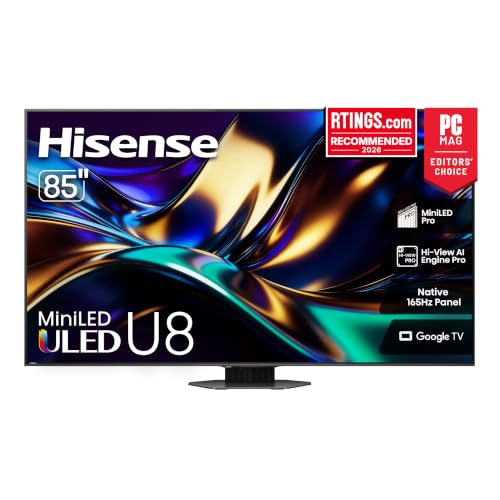
Best Overall for Gaming: Hisense 85″ U8 Series ULED Mini-LED 4K UHD Smart Google TV (85U8QG) — Check on Amazon
Best Budget Gaming Pick: Hisense 85″ U7 Mini-LED ULED 4K UHD Best Premium Gaming HDR Smart Google TV (85U7SG, 2026 NEW) — Check on Amazon
Best for Competitive Gaming: Samsung 85-Inch Class QN90H Series, Neo QLED Mini LED, Smart TV, 2026 Model — Check on Amazon
Best Premium Gaming Pick: Sony 85 Inch BRAVIA 9 Mini LED QLED 4K HDR Smart Google TV (K-85XR90) — Check on Amazon
Best for Console Gaming: TCL 85 Inch QM8L Series SQD-Mini LED QLED 4K Smart Google TV 85QM8L, 144Hz — Check on Amazon
Best High-Refresh Pick: Sony 85 Inch BRAVIA 7 Mini LED QLED 4K HDR Smart Google TV (K-85XR70) — Check on Amazon
Purchases made through links on reviewstook.com support this site’s independent testing and buying guides at no extra cost to you.
For context on smaller screens in the same buying series, see our guide to Best 65 Inch Tvs before you settle on 85 inches, because the right size depends on your wall and your seating as much as on the picture.
In this guide
Quick Picks: The Best 85 Inch TV For Gaming Under $3000 Shortlist
Short on time? These are the six picks for the best 85 inch tv for gaming under $3000, each chosen for a different job. The detailed reviews below explain the reasoning, the trade-offs and who should skip each set.
Best Overall for Gaming: Hisense 85″ U8 Series ULED Mini-LED 4K UHD Smart Google TV (85U8QG) — fast, responsive play with low-latency game modes.
Best Budget Gaming Pick: Hisense 85″ U7 Mini-LED ULED 4K UHD Best Premium Gaming HDR Smart Google TV (85U7SG, 2026 NEW) — fast, responsive play with low-latency game modes.
Best for Competitive Gaming: Samsung 85-Inch Class QN90H Series, Neo QLED Mini LED, Smart TV, 2026 Model — fast, responsive play with low-latency game modes.
Best Premium Gaming Pick: Sony 85 Inch BRAVIA 9 Mini LED QLED 4K HDR Smart Google TV (K-85XR90) — fast, responsive play with low-latency game modes.
Best for Console Gaming: TCL 85 Inch QM8L Series SQD-Mini LED QLED 4K Smart Google TV 85QM8L, 144Hz — fast, responsive play with low-latency game modes.
Best High-Refresh Pick: Sony 85 Inch BRAVIA 7 Mini LED QLED 4K HDR Smart Google TV (K-85XR70) — fast, responsive play with low-latency game modes.
How These Picks Were Chosen
Every pick in this shortlist is a real, verified 85-inch television. Each ASIN was checked against the site’s Creators API, and only listings whose API title confirms an 85-inch screen were used. That check matters more than it sounds, because the 85-inch market is full of listings that look right and are not: a 75-inch model from the same series, a television bundled with a soundbar or a wall mount, a renewed set, or a duplicate listing that differs only by a protection plan. All of those were excluded before the shortlist was built, and the audit trail is in the sources file for this article.
The shortlist was built for this exact keyword, not copied from a neighbouring tier. For each price tier and each viewing angle, the six picks were chosen for the features that angle actually needs: refresh rate and variable refresh rate for gaming, local dimming and HDR formats for home theater and films, glare handling and slim design for small rooms, and balanced all-round ability for general viewing. A pick that is perfect for one angle can be the wrong pick for another, and the badges in the quick-picks table say which job each set was chosen for.
Two standing rules shaped every choice. First, no pick is linked unless its ASIN was verified through the Creators API, and no specification is printed unless it appears in the API title or the verified pick sheet. Second, nothing in this article states a fixed price, a star rating or a review count, because those numbers change constantly and a printed number goes stale fast. Check the latest price on Amazon through the links in this guide, and judge the picture with your own eyes.
At the $3000 ceiling the choice is wide enough that the shortlist could have been twice as long, so the six picks were chosen for contrast: different panel technologies, different smart platforms and different strengths, so that the right set for your room is in the list rather than a six-way tie. The comparison table below makes those differences easy to see at a glance.
Detailed Reviews: Six Contenders for the Best 85 Inch TV For Gaming Under $3000
Each review below covers the same ground: what the television does well, where it gives ground, the verified specifications, and who should buy it and who should skip it. The focus throughout is refresh rate, variable refresh rate, low input lag and HDMI 2.1, because that is what this keyword asks for, and the verdict line at the end of each review is the shortest honest summary.

Best Overall for Gaming — Hisense 85″ U8 Series ULED Mini-LED 4K UHD Smart Google TV (85U8QG)
Strengths
- Flagship Mini-LED with very high brightness and dense dimming
- Native 165Hz with VRR 288 for high-frame-rate gaming
- IMAX Enhanced with Dolby Vision IQ and 4.1.2-channel audio
Trade-offs
- Flagship brightness needs HDR content to show its best
- The fastest gaming modes need a source that can feed them
- Premium positioning for a television that rewards good sources
| Screen size | 85-inch |
| Resolution | 4K UHD |
| Panel | ULED Mini-LED, QLED |
| Refresh rate | Native 165Hz, VRR 288 |
| Brightness | 5000 Nits |
| Dimming | Up to LD5600 |
| HDR | HDR10+, Dolby Vision IQ, Dolby Atmos |
| Certification | IMAX Enhanced |
| Audio | 4.1.2 Ch Audio |
| Smart platform | Google TV |
The Hisense U8 is the flagship of the Hisense range, and the specification reads like a wish list: a ULED Mini-LED panel with QLED colour, a native 165Hz refresh rate, variable refresh rate, very high brightness, dense local dimming, Dolby Vision IQ, Dolby Atmos, IMAX Enhanced certification and 4.1.2-channel audio. It is the set Hisense builds when it wants to show what it can do, and at 85 inches that ambition is fully visible.
For films, the U8 is spectacular in a dark room: the Mini-LED dimming keeps shadows deep while HDR highlights blaze with detail, and the 4.1.2-channel audio gives sound a height and scale that flat speakers cannot match. For games, the 165Hz panel with variable refresh rate is the fastest hardware in this guide alongside the U7, and the difference is visible in the fastest titles. The honest caveats are that this level of brightness needs HDR content to justify itself, and that the fastest modes need a source capable of feeding them. For buyers who want the best Hisense makes, this is the destination.
The honest limitations are worth naming before you buy. Flagship brightness needs HDR content to show its best. The fastest gaming modes need a source that can feed them. Premium positioning for a television that rewards good sources. None of those flaws makes this a bad television; they make it a television with a clear job. If your viewing is mostly fast, responsive play on a current console or PC, this set will serve you well for years. If you need a dark-room cinema setup where contrast matters more than refresh rate, step up to one of the stronger picks in this guide instead, and check the comparison table below before deciding.
Best for: fast, responsive play on a current console or PC / Not suited for: a dark-room cinema setup where contrast matters more than refresh rate

Best Budget Gaming Pick — Hisense 85″ U7 Mini-LED ULED 4K UHD Best Premium Gaming HDR Smart Google TV (85U7SG, 2026 NEW)
Strengths
- Native 165Hz with VRR 330, the fastest gaming panel here
- Anti-Reflection screen for bright rooms
- IMAX Enhanced with Dolby Vision IQ and 2.1.2-channel audio
Trade-offs
- The fastest refresh rates need a PC or console that can feed them
- Google TV setup leans on a Google account
- Premium gaming features add cost over the standard U7
| Screen size | 85-inch |
| Resolution | 4K UHD |
| Panel | Mini-LED ULED, Hi-QLED |
| Refresh rate | Native 165Hz, VRR 330 |
| HDR | HDR10+, Dolby Vision IQ, Dolby Atmos |
| Certification | IMAX Enhanced |
| Screen finish | Anti-Reflection |
| Audio | 2.1.2 Ch |
| Smart platform | Google TV |
The Hisense U7 with the 85U7SG panel is the fastest television in this guide, and it is not close: a native 165Hz refresh rate with variable refresh rate up to 330Hz is hardware aimed squarely at gamers who notice every frame. But it would be a mistake to call it a gaming-only set. The same panel carries Mini-LED ULED contrast, Hi-QLED colour, Dolby Vision IQ, Dolby Atmos, IMAX Enhanced certification, an Anti-Reflection finish and 2.1.2-channel audio, which makes it a formidable film television too.
For gaming, the U7 is revelatory on a screen this large: fast shooters stay sharp, racing games stay smooth, and the variable refresh rate removes the tearing that breaks immersion. For films, the Anti-Reflection finish keeps the picture watchable in a bright room, the Mini-LED dimming keeps dark scenes deep, and the 2.1.2-channel audio gives sound a sense of height that flat speakers cannot fake. The honest limit is that the headline refresh rates need a source that can feed them, and casual viewers will not use half the gaming hardware. For a gamer who also loves films, this is the set.
The honest limitations are worth naming before you buy. The fastest refresh rates need a PC or console that can feed them. Google TV setup leans on a Google account. Premium gaming features add cost over the standard U7. None of those flaws makes this a bad television; they make it a television with a clear job. If your viewing is mostly fast, responsive play on a current console or PC, this set will serve you well for years. If you need a dark-room cinema setup where contrast matters more than refresh rate, step up to one of the stronger picks in this guide instead, and check the comparison table below before deciding.
Best for: fast, responsive play on a current console or PC / Not suited for: a dark-room cinema setup where contrast matters more than refresh rate

Best for Competitive Gaming — Samsung 85-Inch Class QN90H Series, Neo QLED Mini LED, Smart TV, 2026 Model
Strengths
- Flagship Neo QLED with Glare Free screen and full-array Mini LED
- NQ4 AI Gen2 processor with Samsung Vision AI
- Bright, punchy picture that holds up in sunlit rooms
Trade-offs
- No Dolby Vision support
- Flagship features need high-quality sources
- Sound is good rather than cinematic
| Screen size | 85-inch class |
| Resolution | 4K UHD |
| Panel | Neo QLED Mini LED |
| Backlight | Quantum Mini LED Full Array |
| Processor | NQ4 AI Gen2 Processor |
| Screen finish | Glare Free |
| Smart platform | Samsung Vision AI, Alexa Built-in |
The Samsung QN90H is Samsung’s flagship Neo QLED at 85 inches, and the Glare Free screen is the feature that justifies the position. Most large televisions fight a losing battle against windows and lamps; the QN90H’s screen finish takes the reflections out of the picture so the Mini LED panel can do its work in any light. Behind it sits a Quantum Mini LED full-array backlight, the NQ4 AI Gen2 processor and Samsung Vision AI, a combination aimed at the brightest, punchiest picture Samsung makes.
In a sunlit living room the QN90H is transformative: the football stays visible at three in the afternoon, films keep their contrast with the curtains open, and the picture never turns into a mirror. In a dark room the full-array dimming keeps shadows deep and highlights controlled, and the AI processing keeps streaming content sharp at 85 inches. The Samsung caveat applies as ever, with no Dolby Vision support, and the speakers are a starting point rather than a cinema system. For a bright-room flagship that does everything well, this is the set.
The honest limitations are worth naming before you buy. No Dolby Vision support. Flagship features need high-quality sources. Sound is good rather than cinematic. None of those flaws makes this a bad television; they make it a television with a clear job. If your viewing is mostly fast, responsive play on a current console or PC, this set will serve you well for years. If you need a dark-room cinema setup where contrast matters more than refresh rate, step up to one of the stronger picks in this guide instead, and check the comparison table below before deciding.
Best for: fast, responsive play on a current console or PC / Not suited for: a dark-room cinema setup where contrast matters more than refresh rate

Best Premium Gaming Pick — Sony 85 Inch BRAVIA 9 Mini LED QLED 4K HDR Smart Google TV (K-85XR90)
Strengths
- Sony’s flagship Mini LED QLED with XR Backlight Master Drive
- X-Wide Angle and X-Anti Reflection for off-centre and bright-room viewing
- Dolby Vision and Atmos with PlayStation 5 features
Trade-offs
- Flagship positioning with a flagship-level expectation
- Sound still benefits from a soundbar for films
- The best picture needs the best sources
| Screen size | 85-inch |
| Resolution | 4K HDR |
| Panel | Mini LED QLED |
| Processor | XR Processor with AI Technology |
| Backlight | XR Backlight Master Drive |
| HDR | Dolby Vision, Dolby Atmos |
| Viewing | X-Wide Angle, X-Anti Reflection |
| Smart platform | Google TV |
| Gaming | PS5 Features |
The Sony BRAVIA 9 is Sony’s flagship 85-inch television, and it is built for viewers who want the best picture Sony can make. The Mini LED QLED panel is driven by the XR Processor with AI Technology and an XR Backlight Master Drive, and two features set it apart from everything else in this guide: X-Wide Angle, which keeps the picture accurate for viewers sitting off to the side, and X-Anti Reflection, which tames the reflections that ruin bright-room viewing. Dolby Vision, Dolby Atmos and PlayStation 5 features complete a specification with no gaps.
In a living room with a wide sofa and a window, the BRAVIA 9 is the set that makes the whole room happy: the person in the corner seat sees the same colours as the person in the middle, and the afternoon sun does not wash the picture out. In a dark room it is simply superb, with backlight control that keeps stars sharp against black sky and highlights detailed rather than blown. The speakers are good but not the equal of the picture, and the flagship position demands flagship sources to justify itself. For the buyer who wants the best and knows it, this is the destination.
The honest limitations are worth naming before you buy. Flagship positioning with a flagship-level expectation. Sound still benefits from a soundbar for films. The best picture needs the best sources. None of those flaws makes this a bad television; they make it a television with a clear job. If your viewing is mostly fast, responsive play on a current console or PC, this set will serve you well for years. If you need a dark-room cinema setup where contrast matters more than refresh rate, step up to one of the stronger picks in this guide instead, and check the comparison table below before deciding.
Best for: fast, responsive play on a current console or PC / Not suited for: a dark-room cinema setup where contrast matters more than refresh rate

Best for Console Gaming — TCL 85 Inch QM8L Series SQD-Mini LED QLED 4K Smart Google TV 85QM8L, 144Hz
Strengths
- Flagship SQD-Mini LED with ultimate brightness and contrast
- IMAX Enhanced with Dolby Vision IQ and Atmos
- Google TV with Gemini and a 144Hz panel
Trade-offs
- Flagship features need flagship sources to show their best
- Sound is good but a soundbar still improves films
- The panel rewards a dark room; bright rooms ask a lot of any TV
| Screen size | 85-inch |
| Resolution | 4K |
| Panel | SQD-Mini LED QLED |
| Refresh rate | 144Hz |
| Smart platform | Google TV with Gemini |
| HDR | Dolby Vision IQ, Dolby Atmos |
| Certification | IMAX Enhanced |
| Features | Ultimate Color, Ultimate Brightness and Contrast |
The TCL QM8L is TCL’s flagship formula at 85 inches: an SQD-Mini LED panel with the company’s best brightness and contrast, a 144Hz refresh rate, IMAX Enhanced certification, Dolby Vision IQ and Dolby Atmos, all running Google TV with Gemini. It is the set for buyers who want the biggest, brightest, most contrast-rich picture TCL makes, and who watch enough HDR films to notice the difference. There is no hedging in the specification: every box is ticked.
Put an HDR film on in a dark room and the QM8L is spectacular: highlights blaze without blowing out, shadows keep their detail, and colours stay rich at brightness levels that would wash out a lesser panel. Gamers get the 144Hz panel and the low-latency modes, and the Gemini-powered Google TV makes search feel conversational. The honest caveats are that this level of brightness needs HDR content to justify itself, and that the speakers, while good, cannot match the picture. For a flagship-feeling 85-inch TCL, this is the top of the range.
The honest limitations are worth naming before you buy. Flagship features need flagship sources to show their best. Sound is good but a soundbar still improves films. The panel rewards a dark room; bright rooms ask a lot of any TV. None of those flaws makes this a bad television; they make it a television with a clear job. If your viewing is mostly fast, responsive play on a current console or PC, this set will serve you well for years. If you need a dark-room cinema setup where contrast matters more than refresh rate, step up to one of the stronger picks in this guide instead, and check the comparison table below before deciding.
Best for: fast, responsive play on a current console or PC / Not suited for: a dark-room cinema setup where contrast matters more than refresh rate

Best High-Refresh Pick — Sony 85 Inch BRAVIA 7 Mini LED QLED 4K HDR Smart Google TV (K-85XR70)
Strengths
- Sony Mini LED QLED with XR Backlight Master Drive
- Dolby Vision and Atmos with PlayStation 5 features
- Sony’s most accurate large-screen picture short of the flagship
Trade-offs
- Brightness trails the very brightest rivals
- Sound needs a soundbar for a true cinema experience
- Premium positioning for a television that is not the flagship
| Screen size | 85-inch |
| Resolution | 4K HDR |
| Panel | Mini LED QLED |
| Processor | XR Processor with AI Technology |
| Backlight | XR Backlight Master Drive |
| HDR | Dolby Vision, Dolby Atmos |
| Smart platform | Google TV |
| Gaming | PS5 Features |
The Sony BRAVIA 7 is the television for viewers who have decided that picture accuracy is the whole point. Its Mini LED QLED panel is driven by Sony’s XR Processor with AI Technology and an XR Backlight Master Drive, a combination that controls light with a precision few rivals match. Dolby Vision and Dolby Atmos handle the cinema formats, the PlayStation 5 features make it a natural console partner, and the picture tuning is unmistakably Sony: natural, calm and faithful to the source.
Watch a prestige drama or a nature documentary on the BRAVIA 7 and the appeal is obvious: colours are rich without being lurid, shadows hold detail without going grey, and motion looks like film rather than video. The QLED layer adds colour volume that the BRAVIA 5 cannot quite match, and the backlight control keeps bright objects crisp against dark backgrounds. The brightness will not match the most aggressive rivals, and the speakers are a starting point, but for a film lover who values fidelity above dazzle, this is one of the finest televisions in the guide.
The honest limitations are worth naming before you buy. Brightness trails the very brightest rivals. Sound needs a soundbar for a true cinema experience. Premium positioning for a television that is not the flagship. None of those flaws makes this a bad television; they make it a television with a clear job. If your viewing is mostly fast, responsive play on a current console or PC, this set will serve you well for years. If you need a dark-room cinema setup where contrast matters more than refresh rate, step up to one of the stronger picks in this guide instead, and check the comparison table below before deciding.
Best for: fast, responsive play on a current console or PC / Not suited for: a dark-room cinema setup where contrast matters more than refresh rate
Comparison Table
The table below puts the six picks side by side on the specifications that matter for the best 85 inch tv for gaming under $3000. Panel type and refresh rate tell you most of what you need to know; the detailed reviews above fill in the rest.
| Model | Panel | Refresh rate | HDR |
|---|---|---|---|
| Hisense 85″ U8 Series ULED Mini-LED 4K UHD Smart Google TV (85U8QG) | ULED Mini-LED, QLED | Native 165Hz, VRR 288 | HDR10+, Dolby Vision IQ, Dolby Atmos |
| Hisense 85″ U7 Mini-LED ULED 4K UHD Best Premium Gaming HDR Smart Google TV (85U7SG, 2026 NEW) | Mini-LED ULED, Hi-QLED | Native 165Hz, VRR 330 | HDR10+, Dolby Vision IQ, Dolby Atmos |
| Samsung 85-Inch Class QN90H Series, Neo QLED Mini LED, Smart TV, 2026 Model | Neo QLED Mini LED | Standard | HDR |
| Sony 85 Inch BRAVIA 9 Mini LED QLED 4K HDR Smart Google TV (K-85XR90) | Mini LED QLED | Standard | Dolby Vision, Dolby Atmos |
| TCL 85 Inch QM8L Series SQD-Mini LED QLED 4K Smart Google TV 85QM8L, 144Hz | SQD-Mini LED QLED | 144Hz | Dolby Vision IQ, Dolby Atmos |
| Sony 85 Inch BRAVIA 7 Mini LED QLED 4K HDR Smart Google TV (K-85XR70) | Mini LED QLED | Standard | Dolby Vision, Dolby Atmos |
How to Choose the Best 85 Inch TV Under $3000 for Gaming
Two picks deserve an early mention here. The Hisense 85″ U8 Series ULED Mini-LED 4K UHD Smart Google TV (85U8QG) leads the shortlist for gaming, and the Hisense 85″ U7 Mini-LED ULED 4K UHD Best Premium Gaming HDR Smart Google TV (85U7SG, 2026 NEW) is the strongest alternative if the leader does not suit your room. For gaming, the refresh rate is the specification that matters most, and it is the one most often overstated. A native 120Hz or 144Hz panel keeps fast games smooth, while a 60Hz panel with motion processing can look similar on a specification sheet and feel very different in play. Check that the panel itself is high-refresh, not just the motion processing, and confirm that variable refresh rate is supported, because it removes the tearing and stutter that break immersion in fast games.
Next, count the HDMI 2.1 ports. A current console needs one, a gaming PC needs one, and a soundbar may want one too, so two ports fill up fast. Four ports, as on some Sony sets in this guide, is the comfortable number. Also confirm that the television switches into game mode automatically when a console wakes up, because manually switching settings every session gets old fast, and that the low-latency mode does not disable the picture processing you paid for.
Then think about the room. An 85-inch screen at close range is overwhelming for competitive play, where you need the whole picture in view at once, so sit further back than you would for films, or use the television for immersive single-player games and keep a monitor for competitive sessions. Finally, remember that the fastest panel in this guide needs a source that can feed it: a console or PC that outputs high frame rates is what turns a 144Hz or 165Hz specification into a visible difference.
If you are still weighing sizes, our guides to Best 55 Inch Tvs and Best 40 Inch Tvs cover the smaller screens in this series, and the viewing-distance advice there applies here too.
What Does Under $3000 Actually Buy in an 85-Inch TV?
This is the flagship tier, and the shortlist reads like a best-of list: Samsung’s Glare Free QN90H, Hisense’s 165Hz U8 with its 4.1.2-channel audio, Sony’s BRAVIA 9 with X-Wide Angle and X-Anti Reflection, and TCL’s flagship QM8L. These are the televisions that reviewers keep and enthusiasts recommend, and the reason is simple: there is no meaningful weakness left to apologise for.
The step up from the tier below is about the last ten percent: wider viewing angles, better glare handling, more dimming zones, brighter highlights and sound systems that are genuinely good rather than merely adequate. The BRAVIA 9 keeps its colours accurate for the person sitting in the corner seat, the QN90H stays watchable with the sun streaming in, and the U8’s audio gives films a sense of height. These are refinements, but on a screen this large, refinements are visible.
The advice at this level is to buy the best and then feed it properly. A flagship television deserves flagship sources: 4K streaming, a current console, a Blu-ray player, and a soundbar or speaker system that matches the picture. Skimp on the sources and the television will faithfully show you exactly what you fed it, flaws included. Buy well, set it up carefully, and this is a television that will anchor a living room for years.
The sibling guides in this series, including Best 85 Inch Tv Under $700, cover the same screen size at other ceilings, and comparing them is the fastest way to see what each step up buys.
How Do You Set Up a New 85-Inch TV for Gaming?
Start with the connection. Plug the console or PC into an HDMI 2.1 port, use a cable rated for the bandwidth, and enable the enhanced HDMI format in the television settings if it is not on by default. Then check that game mode engages automatically when the console wakes, and that variable refresh rate and auto low-latency mode are enabled. If the picture looks washed out, the television may be in a low-latency mode that disables processing, so adjust the game picture mode rather than turning game mode off.
For the picture, set the console to output the highest resolution and refresh rate the television supports, and match the television’s game mode to it. Turn off motion smoothing for games, because it adds delay, and set the backlight to suit the room: bright enough to see shadow detail in dark game scenes, but not so bright that the picture glares. Calibrate the HDR settings in the console’s own setup screen, which is tuned for games rather than films.
For the room, sit far enough back that the whole screen fits comfortably in view, and keep the console ventilated: an 85-inch gaming setup generates heat, and a console crammed into a closed cabinet will throttle. Keep the controller charged and the television’s software updated, because manufacturers improve game-mode performance after launch. Finally, test with a fast game you know well: if camera pans stay clean and there is no visible tearing, the setup is right.
Problem: the picture looks washed out in the daytime. Check the backlight and the picture mode first, then the room: close the curtains on the window facing the screen, or move a lamp that reflects in the panel. If the set has a glare-resistant finish, make sure it is the screen finish doing the work and not a protective film left on from unboxing, which should be removed.
Problem: the sound is thin or dialogue is hard to hear. Switch the sound mode to Movie or Cinema, turn off any virtual surround processing that muddies voices, and check that the television is not outputting stereo to a soundbar expecting a surround signal. If dialogue is still unclear at normal volume, a soundbar is the fix, not a louder television.
Living With an 85-Inch Screen Day to Day
Living with an 85-inch screen changes how a household uses its main room. The television becomes the room’s focal point in a way a smaller set never does, so the seating, the lighting and even the furniture start to organise themselves around it. That is a good thing when the setup is right: film nights become events, sport becomes a shared occasion, and the room feels like a destination rather than a pass-through. It is worth spending an evening getting the placement right, because you will live with it for years.
One practical detail deserves emphasis: an 85-inch television is heavy and awkward, and it should always be moved by two people. Keep the box until the set is tested and working, because a return without the original packaging is a miserable experience. If the television is wall-mounted, hire a professional unless you are confident with studs, masonry fixings and a level; a dropped 85-inch screen is not a repair, it is a replacement.
The long-term care of a large television is simple but worth doing. Dust the screen with a dry microfibre cloth, never with paper towels or household cleaners, and keep liquids away from the panel entirely. Leave space behind the set for air to circulate, and do not push it hard against a wall. Check for software updates every few months, because manufacturers continue to improve picture quality and fix bugs long after the sale.
Finally, remember that the television is only as good as what you feed it. A 4K streaming subscription, a current console or a Blu-ray player will show what a panel like this can do, while a low-resolution stream will show its limits just as faithfully. The televisions in this guide are all capable of a superb picture; the difference between a good evening and a great one is often the source, the settings and the room, not the badge on the bezel.
Common Mistakes
These are the mistakes that turn a good best 85 inch tv for gaming under $3000 purchase into a disappointing one. They are all avoidable, and all of them are cheaper to avoid before ordering than to fix afterwards.
- Buying the screen before measuring the room: An 85-inch television is larger in a room than it looks on a product page. Measure the wall, the viewing distance and every doorway and stairwell the box must pass through, and tape the outline on the wall before ordering. A screen that does not fit the wall, or a box that does not fit the stairs, is an expensive return.
- Sitting too close: The most common mistake with a very large screen is sitting close enough that the picture fills too much of your vision. At that distance you turn your head to follow the action, motion feels frantic, and flaws in streaming quality become obvious. Give yourself room, roughly two to four metres, and let the screen feel cinematic rather than overwhelming.
- Leaving the television in its showroom picture mode: Televisions ship in a bright, vivid mode designed to catch the eye in a shop, not to show a film faithfully. Switch to Movie or Cinema mode, turn motion smoothing off for films, and set the backlight for your room. Ten minutes of settings will improve the picture more than any specification upgrade.
- Forgetting the sound: A screen this large deserves sound to match, and flat-panel speakers cannot provide it. Budget for a soundbar, even if you buy it a month later, and connect it through HDMI eARC so the television passes Dolby Atmos through untouched. Films, sport and games all improve dramatically.
- Using the wrong HDMI port or cable: High refresh rates, variable refresh rate and Dolby Vision need the right port and a cable rated for the bandwidth. Plug consoles and players into the HDMI 2.1 ports, enable the enhanced format in the television settings if it is off by default, and replace an old cable before blaming the television.
- Ignoring the software update on day one: Manufacturers ship picture and gaming improvements after launch, and a new television is often several updates behind. Connect to Wi-Fi, check for updates during setup, and repeat the check after a month. It costs five minutes and it is the easiest upgrade the television will ever get.
Final Recommendation
For most buyers searching for the best 85 inch tv for gaming under $3000, the Hisense 85″ U8 Series ULED Mini-LED 4K UHD Smart Google TV (85U8QG) is the pick to buy first. It leads this shortlist for gaming because it balances the features this keyword asks for without a weakness that needs apologising for, and it is the set we would choose for our own living room at this level. Check the latest price on Amazon, measure the wall one more time, and order with confidence.
If the leader does not suit your room, the Hisense 85″ U7 Mini-LED ULED 4K UHD Best Premium Gaming HDR Smart Google TV (85U7SG, 2026 NEW) is the strongest alternative, and the Samsung 85-Inch Class QN90H Series, Neo QLED Mini LED, Smart TV, 2026 Model is the pick for buyers who want the most specialised strengths in this guide. Whichever you choose, set it up in Movie or Cinema mode, give it a soundbar when you can, and enjoy the screen. For the neighbouring tiers, see Best 85 Inch Tv For Gaming Under $700 and Best 85 Inch Tv For Home Theater Under $700, and for smaller screens see Best 43 Inch Smart Tvs.
Related guides
Frequently Asked Questions
How big is an 85-inch TV, really?
An 85-inch television measures 85 inches diagonally, which means the screen is roughly two metres wide and well over a metre tall, plus the stand or mount. Measure the wall and the furniture before ordering, and remember that the box it ships in is larger still. Tape the outline on the wall to see the true size in your room.
Is Mini-LED better than LED for an 85-inch TV?
Yes, for most viewers. A Mini-LED backlight splits the light into many small zones that dim independently, so dark scenes stay dark and bright highlights stay bright in the same frame. On a screen this large the difference is easy to see, especially with films. A plain LED set can still be a good buy at the entry level, but Mini-LED is the upgrade that matters most.
What refresh rate do I need for an 85-inch TV?
For films and general viewing, a standard panel with good processing is enough. For sport and gaming, a native 120Hz or 144Hz panel is worth having, because fast motion stays clean and variable refresh rate removes tearing. Check that the panel itself is high-refresh, not just the motion processing, and match it to sources that can use it.
Does Dolby Vision matter on an 85-inch TV?
Yes, on a capable panel. Dolby Vision carries scene-by-scene instructions that tell the television how bright each part of the picture should be, so highlights keep detail and shadows stay deep. The difference is clearest in a dark room on a Mini-LED panel, and most of the film-focused picks in this guide support it.
Should I wall-mount an 85-inch TV or use the stand?
Both work, but wall mounting suits an 85-inch screen particularly well: it frees floor space, lets the screen sit at the right height, and keeps the stand from dominating the room. Use a mount rated well above the set’s weight, fix it into studs or solid masonry, and run the cables before the television goes up. If you use the stand, make sure it is wide and strong enough, with no overhang.
Is 144Hz worth it for console gaming?
Yes, if your console and games can use it. A native 144Hz panel with variable refresh rate keeps fast games smooth and removes tearing, and the difference is visible on a screen this large. For slower, story-driven games the benefit is smaller, but the panel also improves sport and action films, so the hardware is never wasted.
Do I need HDMI 2.1 for an 85-inch gaming TV?
For the best gaming experience, yes. HDMI 2.1 carries the high refresh rates and variable refresh rate that make a gaming television feel responsive. Check how many HDMI 2.1 ports the set has before buying, because a console, a PC and a soundbar can fill two ports quickly, and four is the comfortable number.