Disclosure: As an Amazon Associate, reviewstook.com earns from qualifying purchases. Links on this page are affiliate links at no extra cost to you; prices and availability change frequently, so check Amazon for the latest.
Where to Buy
These are the six picks for the best camera microphone for streaming under $400, each checked against the verified pick sheet used by reviewstook.com for this guide. Follow the product name or the check link under any pick to see it on Amazon.
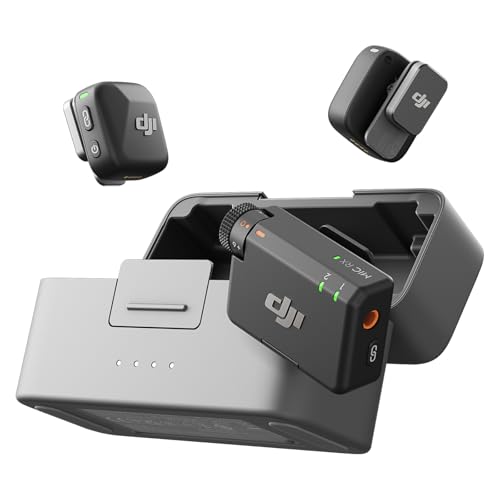
Best Overall — DJI Mic Mini (2 TX + 1 RX + Charging Case)
Two transmitters cover interviews and two-person formats properly. Check on Amazon
Best Value — Rode VideoMic GO II Helix
USB and 3.5mm outputs let one mic serve cameras, smartphones and PCs. Check on Amazon
Best Compact — Sennheiser MKE 200
Both TRS and TRRS connectors supplied, covering cameras and mobile devices cleanly. Check on Amazon
Best Wireless — DJI Mic Mini (1 TX + 1 RX)
Automatic limiting protects against sudden loud moments clipping the recording. Check on Amazon
Best for Interviews — Deity V-Mic D4 Duo
Dual capsules capture the subject in front and the operator behind the camera. Check on Amazon
Best Premium — Sennheiser MKE 400
Professional-line Sennheiser engineering in a compact on-camera body. Check on Amazon
Introduction
Finding the best camera microphone for streaming under $400 is really a search for the microphone that fits how you already film. The budget sets the ceiling, but the format — shotgun on the camera or wireless on the person — decides how your recordings actually sound. This guide compares six verified options for streamers who record and broadcast from a camera setup, explains what separates them in daily use, and is honest about where each one stops being the right tool. If your budget is tighter or roomier than this tier, the neighbouring guides in this series cover the same ground at other levels: Best Camera Microphone For Streaming Under $200 and Best Camera Microphone Under $400.
Streaming punishes audio problems in public and in real time. A camera microphone for streaming has to do two jobs at once: feed a clean voice to the live audience for hours, and behave itself inside a desk ecosystem of monitors, keyboards, PC fans and room echo. The picks below were chosen for streamers who use a real camera — or a phone as one — and want the microphone to live on that camera or on their collar, not on a broadcast arm in front of their face.
Premium money in camera microphones buys two things: capability and calm. Capability looks like two transmitters, adaptive protection against clipping, and shotguns from professional lines. Calm is quieter: a charging case that keeps the system ready, a receiver that simply works, a capsule whose behaviour you can predict in a new room within seconds. Creators who record for clients, sponsors or a serious channel feel that calm on every shoot.
In this guide
Quick Picks
Best Overall: DJI Mic Mini (2 TX + 1 RX + Charging Case) — two transmitters cover interviews and two-person formats properly.
Best Value: Rode VideoMic GO II Helix — uSB and 3.5mm outputs let one mic serve cameras, smartphones and PCs.
Best Compact: Sennheiser MKE 200 — both TRS and TRRS connectors supplied, covering cameras and mobile devices cleanly.
Best Wireless: DJI Mic Mini (1 TX + 1 RX) — automatic limiting protects against sudden loud moments clipping the recording.
Best for Interviews: Deity V-Mic D4 Duo — dual capsules capture the subject in front and the operator behind the camera.
Best Premium: Sennheiser MKE 400 — professional-line Sennheiser engineering in a compact on-camera body.
How These Picks Were Chosen
For streaming we weighted long-session reliability, clean integration with cameras and PCs, and protection against the two classic live disasters: clipping on an excited moment and a dead battery mid-broadcast. Dual-output models that can feed a camera and a computer earned special attention, as did wireless systems with limiting for creators who cannot watch levels while playing, teaching or performing.
Every linked product in this guide comes from a pick sheet verified through the site’s Creators API programme on 2026-11-20: the product name, brand and listing details were matched against the API record before the ASIN was accepted, and only those confirmed ASINs carry Amazon links here. Products we could not confirm were left out or described without links, because an honest guide never invents a product identifier. You will also find no fixed prices and no fixed review scores in this article. Prices move, scores move, and printing either would mislead you within weeks; instead, each pick is positioned by tier and role, and the live listing is one click away whenever you read this.
Two listings from the candidate sheet were deliberately excluded, and the reasoning shows the standard applied. The Shcngqio listings are webcams with built-in microphones, not camera microphones, so they do not belong in this comparison however they are labelled. A red colour variant of the Comica CVM-V30 Lite duplicates the black version already represented, so only one listing is used. Everything that remains earned its place by format, fit for this budget, and a clear job in the list of six.
Detailed Reviews: The Best camera microphone for streaming under $400, Pick by Pick

Best Overall — DJI Mic Mini (2 TX + 1 RX + Charging Case), Ultralight Wireless System, 48h Use, Noise Cancelling
Strengths
- Two transmitters cover interviews and two-person formats properly
- Charging case keeps the system stored, charged and ready as one unit, with 48h stated use
- Noise cancelling and automatic limiting protect unattended recordings
Trade-offs
- More parts to keep track of than a single wired shotgun
- The second transmitter is wasted on strictly solo formats
- Wireless habits — charging, checking links — become part of every shoot
| Type | Wireless microphone system, 2 TX + 1 RX + charging case |
|---|---|
| Use time | 48h stated use with case |
| Features | Noise cancelling, automatic limiting, ultralight transmitters |
| Compatibility | Camera, iPhone and Android; vlog and streaming use |
This is the complete DJI Mic Mini configuration: two transmitters, one receiver and a charging case, with a stated 48h of use, noise cancelling and automatic limiting, for camera, iPhone and Android across vlogging and streaming. Two transmitters change the kind of video you can make — interviews, conversations, two-presenter formats — without passing a single mic back and forth. The charging case changes the ownership experience just as much, because the system lives, charges and travels as one object instead of a tangle of parts. For creators whose format involves a second voice even occasionally, this is the version that does not need upgrading later.
For streamers who move — standing segments, demonstrations, IRL-style desk tours, teaching at a whiteboard — a wireless system like the DJI Mic Mini (2 TX + 1 RX + Charging Case) removes the invisible leash of a fixed microphone. Your voice level stays constant as you turn and walk, and protective features matter here because a live audience hears every clipped shout the moment it happens. The routine is a broadcaster’s routine: full charge before the session, receiver placed for a clear link, and a local test recording before you press go live.
Within a under $400 budget, the DJI Mic Mini (2 TX + 1 RX + Charging Case) should be judged as a best overall rather than against microphones from far above this tier. At this tier the differences between picks are about production style. Owners who understand that positioning tend to keep this kind of microphone in service for a long time, often as the dependable second option after a later upgrade, because its job in the kit stays clear even as other gear changes around it.
Best for: subjects who move, demonstrate or film at a distance from the camera / Not suited for: shooters who want zero charging or pairing in their workflow

Best Value — Rode VideoMic GO II Helix, Ultra-Compact On-Camera Shotgun with USB and 3.5mm Output
Strengths
- USB and 3.5mm outputs let one mic serve cameras, smartphones and PCs
- No battery needed, so it cannot die from a forgotten charge or cell
- Ultra-compact Helix-mount design suits small rigs and tidy desks alike
Trade-offs
- USB features depend on the host and app recognising the mic; test your chain once
- On-camera use still ties subject distance to your framing
- A single mic serving every host will sometimes be wanted in two places at once
| Type | Ultra-compact on-camera shotgun microphone |
|---|---|
| Output | USB or 3.5mm |
| Power | No battery needed |
| Compatibility | Cameras, smartphones and PC |
The VideoMic GO II Helix is Rode’s ultra-compact on-camera shotgun with a dual personality: USB or 3.5mm output, for cameras, smartphones and PC, with no battery needed. That output choice is what makes it one of the most flexible small mics sold today. On a camera it behaves like a classic shotgun; plugged into a computer by USB it becomes a desk and streaming mic; on a phone it covers mobile shooting. The Helix mount in this listing is Rode’s isolation design for the model. One microphone that honestly serves the camera bag and the desk is a rarer thing than the market suggests, and the GO II is built around exactly that idea.
On a streaming desk, a shotgun like the Rode VideoMic GO II Helix keeps the frame clean: no microphone in front of your face, nothing between you and the camera, and a voice that sounds natural rather than broadcast-processed. It suits streamers who sit in a consistent position and want the camera to do the work. Keep your seating position consistent, aim the mic’s front arc at your usual posture rather than your most animated lean, and the stream will sound stable for hours at a time, which is what regular viewers subconsciously reward.
Within a under $400 budget, the Rode VideoMic GO II Helix should be judged as a best value rather than against microphones from far above this tier. At this tier the differences between picks are about production style. Owners who understand that positioning tend to keep this kind of microphone in service for a long time, often as the dependable second option after a later upgrade, because its job in the kit stays clear even as other gear changes around it.
Best for: camera-led filming with the subject near the lens / Not suited for: subjects who regularly work far from the camera

Best Compact — Sennheiser MKE 200, Directional On-Camera Microphone with TRS and TRRS Connectors
Strengths
- Both TRS and TRRS connectors supplied, covering cameras and mobile devices cleanly
- Directional pickup from a manufacturer with deep professional audio heritage
- Compact body suits mirrorless rigs where a long shotgun looks and feels oversized
Trade-offs
- Premium-brand positioning means fewer bundled extras than value brands offer
- Wired format keeps the usual on-camera distance limits
- Mobile use still depends on your phone’s port and adapter situation
| Type | Directional on-camera microphone |
|---|---|
| Connectors | 3.5mm TRS and TRRS supplied |
| Compatibility | DSLR, mirrorless and mobile devices |
| Brand | Sennheiser Professional line |
The MKE 200 is Sennheiser’s directional on-camera microphone for DSLR, mirrorless and mobile recording, supplied with both 3.5mm TRS and TRRS connectors. Sennheiser’s name carries weight in professional audio for a reason, and the MKE 200 is its accessible on-camera expression: a compact directional mic designed to make a camera or a phone sound deliberate. The dual-connector supply matters in practice, because the difference between a camera input and a phone input has stranded many recordings. With both cables covered, the mic moves between hosts without an adapter hunt. It is a buy-once piece for shooters who value a serious audio brand’s tuning.
On a streaming desk, a shotgun like the Sennheiser MKE 200 keeps the frame clean: no microphone in front of your face, nothing between you and the camera, and a voice that sounds natural rather than broadcast-processed. It suits streamers who sit in a consistent position and want the camera to do the work. Keep your seating position consistent, aim the mic’s front arc at your usual posture rather than your most animated lean, and the stream will sound stable for hours at a time, which is what regular viewers subconsciously reward.
Within a under $400 budget, the Sennheiser MKE 200 should be judged as a best compact rather than against microphones from far above this tier. At this tier the differences between picks are about production style. Owners who understand that positioning tend to keep this kind of microphone in service for a long time, often as the dependable second option after a later upgrade, because its job in the kit stays clear even as other gear changes around it.
Best for: camera-led filming with the subject near the lens / Not suited for: subjects who regularly work far from the camera
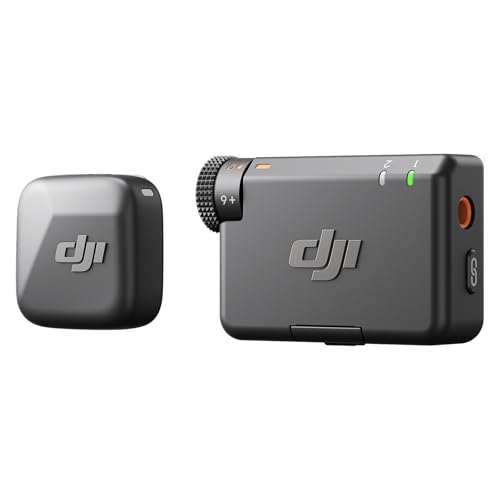
Best Wireless — DJI Mic Mini (1 TX + 1 RX), Ultralight Wireless Microphone with 400m Transmission
Strengths
- Automatic limiting protects against sudden loud moments clipping the recording
- Noise cancelling and an ultralight transmitter suit all-day solo wearing
- Stated 400m transmission gives huge headroom for room and location work
Trade-offs
- One transmitter means one mic’d person; a second voice needs a second system or a different pick
- Wireless workflow adds charging and pairing habits a wired mic never asks for
- Tiny transmitters are easy to misplace in a busy kit
| Type | Wireless microphone system, 1 TX + 1 RX |
|---|---|
| Transmission | 400m stated range |
| Features | Noise cancelling, automatic limiting, ultralight design |
| Compatibility | Camera, iPhone and Android; vlog and streaming use |
The single-transmitter DJI Mic Mini pairs DJI’s ultralight wireless design with noise cancelling, automatic limiting and a stated 400m transmission range, for camera, iPhone and Android recording across vlogging and streaming. Automatic limiting is the feature solo creators should notice: it guards against the sudden laugh, clap or shout that clips a recording before you can react, which is precisely the accident that happens when nobody is riding the levels. The 1 TX configuration is the honest solo format — one person, one voice, nothing extra to carry or charge. DJI’s industrial design makes the transmitter small enough to forget on a collar, which is the point.
For streamers who move — standing segments, demonstrations, IRL-style desk tours, teaching at a whiteboard — a wireless system like the DJI Mic Mini (1 TX + 1 RX) removes the invisible leash of a fixed microphone. Your voice level stays constant as you turn and walk, and protective features matter here because a live audience hears every clipped shout the moment it happens. The routine is a broadcaster’s routine: full charge before the session, receiver placed for a clear link, and a local test recording before you press go live.
Within a under $400 budget, the DJI Mic Mini (1 TX + 1 RX) should be judged as a best wireless rather than against microphones from far above this tier. At this tier the differences between picks are about production style. Owners who understand that positioning tend to keep this kind of microphone in service for a long time, often as the dependable second option after a later upgrade, because its job in the kit stays clear even as other gear changes around it.
Best for: subjects who move, demonstrate or film at a distance from the camera / Not suited for: shooters who want zero charging or pairing in their workflow

Best for Interviews — Deity V-Mic D4 Duo, Dual Capsule Cardioid Microphone, Dual Mono and Stereo
Strengths
- Dual capsules capture the subject in front and the operator behind the camera
- Dual mono and stereo recording modes suit interviews and ambient scenes alike
- Rycote shockmount keeps handling noise down on a working rig
Trade-offs
- The rear capsule only earns its keep if your style actually includes behind-camera voice
- Two capsules mean more to monitor; check both channels before a long take
- Cardioid capsules hear more room than a tight shotgun in echoing interiors
| Type | Dual capsule cardioid camera-mount microphone |
|---|---|
| Modes | Dual mono and stereo recording |
| Mount | Rycote shockmount |
| Compatibility | DSLR cameras, camcorders and smartphones |
The V-Mic D4 Duo is the most conceptually interesting mic in this entire group: a camera-mount shotgun with two cardioid capsules that can record dual mono or stereo, in a Rycote shockmount, for DSLR cameras, camcorders and smartphones. One capsule faces the subject and the other faces the camera operator, which solves the oldest vlogging problem there is — the person filming asks a question and sounds like they are shouting from another room. For interviewers, documentary-style shooters and anyone who narrates from behind the lens, that second capsule is not a gimmick. It changes what a one-person crew can record honestly.
On a streaming desk, a shotgun like the Deity V-Mic D4 Duo keeps the frame clean: no microphone in front of your face, nothing between you and the camera, and a voice that sounds natural rather than broadcast-processed. It suits streamers who sit in a consistent position and want the camera to do the work. Keep your seating position consistent, aim the mic’s front arc at your usual posture rather than your most animated lean, and the stream will sound stable for hours at a time, which is what regular viewers subconsciously reward.
Within a under $400 budget, the Deity V-Mic D4 Duo should be judged as a best for interviews rather than against microphones from far above this tier. At this tier the differences between picks are about production style. Owners who understand that positioning tend to keep this kind of microphone in service for a long time, often as the dependable second option after a later upgrade, because its job in the kit stays clear even as other gear changes around it.
Best for: camera-led filming with the subject near the lens / Not suited for: subjects who regularly work far from the camera
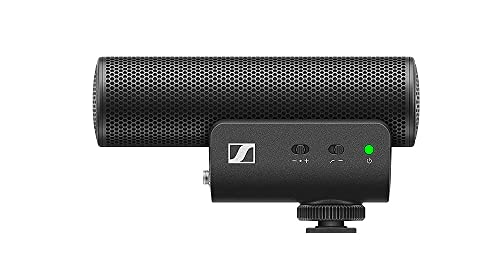
Best Premium — Sennheiser MKE 400, Professional Directional On-Camera Shotgun Microphone
Strengths
- Professional-line Sennheiser engineering in a compact on-camera body
- TRS and TRRS connectors supplied for camera and mobile hosts
- Directional shotgun pickup suits dialogue, pieces to camera and location work
Trade-offs
- A serious tool rewards serious technique; placement and levels still decide results
- Wired on-camera format cannot follow a subject away from the camera
- Fewer bundled extras than value brands include at lower tiers
| Type | Professional directional on-camera shotgun microphone |
|---|---|
| Connectors | 3.5mm TRS and TRRS |
| Compatibility | DSLR, mirrorless and mobile devices |
| Brand | Sennheiser Professional line |
The MKE 400 is Sennheiser’s professional directional on-camera shotgun for DSLR, mirrorless and mobile recording, supplied with 3.5mm TRS and TRRS connectors. Where the MKE 200 is the accessible entry to the line, the MKE 400 is the serious working tool: a compact shotgun from a manufacturer whose microphones record broadcast and film work worldwide. Its appeal is not a long feature list but the confidence that the capsule, the directionality and the build were engineered as one system. For a shooter whose camera work has reached a professional standard and whose audio has not, this is the on-camera correction that matches the pictures.
On a streaming desk, a shotgun like the Sennheiser MKE 400 keeps the frame clean: no microphone in front of your face, nothing between you and the camera, and a voice that sounds natural rather than broadcast-processed. It suits streamers who sit in a consistent position and want the camera to do the work. Keep your seating position consistent, aim the mic’s front arc at your usual posture rather than your most animated lean, and the stream will sound stable for hours at a time, which is what regular viewers subconsciously reward.
Within a under $400 budget, the Sennheiser MKE 400 should be judged as a best premium rather than against microphones from far above this tier. At this tier the differences between picks are about production style. Owners who understand that positioning tend to keep this kind of microphone in service for a long time, often as the dependable second option after a later upgrade, because its job in the kit stays clear even as other gear changes around it.
Best for: camera-led filming with the subject near the lens / Not suited for: subjects who regularly work far from the camera
Comparison Table
| Pick | Role | Format | Key verified details |
|---|---|---|---|
| DJI Mic Mini (2 TX + 1 RX + Charging Case) | Best Overall | wireless | Type: Wireless microphone system, 2 TX + 1 RX + charging case; Use time: 48h stated use with case; Features: Noise cancelling, automatic limiting, ultralight transmitters |
| Rode VideoMic GO II Helix | Best Value | shotgun | Type: Ultra-compact on-camera shotgun microphone; Output: USB or 3.5mm; Power: No battery needed |
| Sennheiser MKE 200 | Best Compact | shotgun | Type: Directional on-camera microphone; Connectors: 3.5mm TRS and TRRS supplied; Compatibility: DSLR, mirrorless and mobile devices |
| DJI Mic Mini (1 TX + 1 RX) | Best Wireless | wireless | Type: Wireless microphone system, 1 TX + 1 RX; Transmission: 400m stated range; Features: Noise cancelling, automatic limiting, ultralight design |
| Deity V-Mic D4 Duo | Best for Interviews | shotgun | Type: Dual capsule cardioid camera-mount microphone; Modes: Dual mono and stereo recording; Mount: Rycote shockmount |
| Sennheiser MKE 400 | Best Premium | shotgun | Type: Professional directional on-camera shotgun microphone; Connectors: 3.5mm TRS and TRRS; Compatibility: DSLR, mirrorless and mobile devices |
Read the table by format first and brand second. The format column decides how a microphone behaves in your scenes; the verified details then separate the candidates inside that format. Readers comparing microphone accessories alongside a purchase may also find Best Microphone Windscreens and Best Microphone Shock Mounts useful companions to this guide.
How to Choose the Best camera microphone for streaming under $400
Streamers should decide where the microphone lives. On the camera suits a fixed desk framing and keeps your face clear for a webcam-style shot. On your collar suits streamers who lean, turn, stand and demonstrate. If you also record the same sessions for later editing, favour picks with safety thinking — limiting, a safety channel, or adaptive gain — because a live peak you cannot re-record is gone for good.
Also expect diminishing returns to begin here, and plan for it. The step from this tier to the flagship tier is real but narrower than the step from built-in audio to this tier. If your lighting, framing or room treatment is still basic, a premium microphone plus attention to those will beat a flagship microphone in a neglected room every time.
What a Under $400 Budget Actually Buys in a Camera Microphone
At this tier the differences between picks are about production style. A two-transmitter wireless system is a format decision as much as a quality decision: it commits you to mic’ing people rather than pointing at them. A premium shotgun commits the other way, to a camera-centred workflow with no wearing, charging or pairing. Neither is universally better. The reviews below treat that choice honestly rather than crowning a single winner for every reader.
It helps to separate what money buys in this category into three layers. The first layer is the capsule and its pattern: how cleanly the microphone hears a voice and how much of the surroundings it refuses. The second layer is the recording chain around the capsule: shock mounting, wind protection, connection options and protection against clipping. The third layer is ownership: cases, charging systems, spare cables and the small disciplines that decide whether the microphone is ready on the day. Cheap microphones skimp on all three layers at once; the tiers in this series exist because each step up repairs one layer more convincingly than the last.
Shotgun, Wireless or Lavalier: Which Format Fits Your Camera Work?
A shotgun microphone lives on the camera and hears what the lens sees. It is the natural choice when the subject faces the camera at a sensible distance, and its great virtues are readiness and simplicity: nothing to wear, nothing to charge in the case of plug-in models, and a sound that matches the picture’s perspective. Its limit is geometry. The subject must stay in front of the camera and reasonably near it, because a shotgun cannot defeat distance — it can only make the best of the distance the framing allows.
A wireless lavalier system moves the microphone to the subject and breaks the link between framing and sound. The picture can go wide, the subject can turn, walk and demonstrate, and the voice stays close and consistent. The costs are routine and vigilance: batteries to charge, a link to check, a clip to place with care. Creators whose content moves usually accept those costs gladly. Creators at a fixed desk usually should not pay them at all. The honest question is never which format is better; it is which set of costs your filming style would rather carry. Readers weighing a wider audio kit can compare this guide with Best Wireless Microphones For Content Creators and Best Lavalier Microphones For Content Creators.
How Do You Set Up a Camera Microphone for Streaming?
The steps below assume no prior audio experience and about ten quiet minutes. Work through them once, slowly, and the routine will compress into a habit you can run in under a minute before any real recording.
Step 1: Choose the audio path first
Decide whether the mic feeds the camera, the PC directly by USB, or a capture chain, and set that path up before opening your streaming software. One clear path beats three half-configured ones.
Step 2: Set levels for your loudest moment
Stream at the volume of your most excited reaction, not your calm commentary, and set gain so that peak stays safe. Viewers forgive a quiet streamer for a second; distortion drives them away.
Step 3: Kill the room before the mic hears it
Soft furnishings behind and beside you, a door closed, and the PC positioned so its fans are off-axis from the microphone will clean a stream more than any filter.
Step 4: Run a private test stream or local recording
Record five minutes locally with game audio, alerts and your voice together. Listen for the balance your audience will hear, not the one in your headphones during the game.
Step 5: Prepare the mid-stream failure plan
Know your mute button, keep a charged backup option within reach if you run wireless, and pin a note of your audio settings where you can see them when something changes unexpectedly.
Step 6: Recheck after every software update
Streaming software and operating systems occasionally reset audio devices. A thirty-second device check before going live prevents the classic silent first ten minutes.
Problem: viewers say your voice echoes -> fix: the stream is likely hearing both the microphone and a second open input, or your monitoring is feeding back. Mute duplicate inputs, monitor on headphones, and confirm only one microphone source is active in the scene.
Problem: your voice clips when you react loudly -> fix: lower input gain and rely on limiting, a safety channel or adaptive gain if your mic offers it; then set your normal voice a little quieter in the mix rather than chasing loudness at the microphone.
P -> P
Common Mistakes
Judging by a test in the wrong room. A microphone tested in a tiled kitchen at arm’s length tells you about the kitchen, not the microphone. Test where and how you actually film, at your real distance, with your real speaking energy, and compare against your previous setup in the same conditions. Most unfair verdicts on perfectly good microphones are born in the wrong test.
Buying the format that impresses instead of the format that fits. Wireless systems look modern and shotguns look traditional, and neither impression predicts your results. Your last twenty recordings predict them. If the subject sat near the camera in eighteen of them, the shotgun was the right buy whatever the trend says, and the reverse is equally true for mobile filming.
Skipping the test recording. Every experienced recordist has a story about the silent interview, the clipped speech or the rustling lavalier that a ten-second check would have caught. The test recording is not paranoia; it is the cheapest step in the entire production. Make it a ritual with a fixed form — loud moment, normal speech, five seconds of movement — and it will save you roughly once a season for the rest of your filming life.
The streaming-specific mistake is setting levels while calm and alone, then streaming loud and animated. Your broadcast voice is bigger than your setup voice. Always calibrate at performance volume, with game or guest audio running, and judge the result from a local recording rather than from your own live monitoring.
Going Deeper: Fieldcraft That Makes Any of These Microphones Sound Better
Lavalier placement is a small craft with a big payoff. Clip the capsule on the upper chest, roughly a hand’s width below the chin, pointing upward, with the cable given a small loop so tugs do not reach the clip. Avoid necklaces, zips and loose scarves that can strike or rub the capsule, and do a five-second movement test — turn your head, gesture, shrug — while listening. Two minutes of placement care at the start saves an hour of editing later, and on wireless systems it matters more than any setting in any menu.
Shotgun aim matters more than shotgun price. These microphones hear a corridor in front of the lens, and a subject at the edge of the frame, turned sideways to demonstrate something, can drift out of the corridor’s best area without leaving the picture. The fixes are choreographic: angle the camera so the subject’s natural position faces the mic, rehearse the turn-and-talk moments, or accept the scene as a wireless scene. Experienced shooters plan audio positions the way they plan camera positions, and their footage sounds ‘professional’ for reasons viewers never identify.
Phone recording adds one wrinkle camera users forget: the phone is also a radio, a computer and a notification machine. Airplane mode during important takes, a recording app that shows levels, and a test clip after any operating-system update will prevent most phone-audio surprises. Adapters deserve the same suspicion as cables — a loose adapter crackles exactly like a failing microphone. The picks in this list that connect digitally by USB remove several of these variables at once, which is part of their appeal for phone-first creators.
Storage sounds like housekeeping until a deadcat goes missing on the one windy day of the year. Keep each microphone with its own cable, mount and wind cover in a single pouch or case, and the kit will be complete every time you reach for it. Loose small parts migrate; pouches do not. This is also why charging-case wireless systems suit some owners so well: the case imposes the discipline automatically. Whatever you buy, decide where it lives today, because ‘somewhere in the camera bag’ is where accessories go to be lost.
Finally, judge microphones by finished videos, not by test clips alone. A test tells you how a mic sounds in your quietest room at your calmest volume. A finished video tells you how it survived your real distance, your real room, your real energy and your real mistakes. Record one genuine piece of content with a new microphone before forming a verdict, and compare it against your previous upload at the same listening volume. That comparison — honest, practical, in context — is the only review that ever really matters, including this one.
Polar patterns deserve a plain-English explanation, because they decide more recordings than brand names do. A shotgun concentrates on a narrow arc in front of the camera and hears less from the sides and rear. A cardioid capsule hears a wider, more forgiving front area. A lavalier avoids the question entirely by sitting inches from the voice, where the voice is louder than everything else in the room. None of these is superior in the abstract; each is a different answer to the question of where your subject stands relative to your camera, and the right answer is the one that matches your most common scene.
Gain staging is the least glamorous and most useful skill in camera audio. The microphone produces a signal, the camera or phone amplifies it, and somewhere in that chain a level must be chosen. Set it too high and loud moments distort permanently; set it too low and raising the volume later raises the hiss with it. The working method is simple: rehearse your loudest moment, set the level so that moment is safe, then speak normally and accept a quieter but clean recording. Clean and quiet can be fixed in editing. Distorted cannot, at any price, with any software.
Headphone checks catch what confidence misses. Camera speakers and phone speakers hide exactly the problems that matter — low rumble, fabric rustle, a hum from a cable resting against a charger, the faint echo that says the mic is farther away than you think. A ten-second listen through earbuds before the real take is the cheapest insurance in all of video production. Professional crews monitor constantly; solo creators can at least monitor at the start, which is when every fixable problem is still fixable.
Final Recommendation
For most readers, the DJI Mic Mini (2 TX + 1 RX + Charging Case) is the best camera microphone for streaming under $400 to buy first: it covers the widest range of real filming with the fewest compromises at this tier, and it is the pick we would hand to a friend who asked for one answer. If value matters most, the Rode VideoMic GO II Helix delivers the essential improvement — a close, clear voice instead of the camera’s distant one — with the least fuss in this list. Readers who already know their format and want the strongest option here should look at the Sennheiser MKE 400, which is the pick most likely to still be serving as a main microphone years from now.
Whichever you choose, spend your first session on placement, levels and one honest test recording rather than on comparisons with the next tier up. The guides for the other lenses at this same budget — Best Camera Microphone For Beginners Under $400 and Best Camera Microphone For Travel Under $400 — repeat this advice in different words for a reason: at every tier in this series, from the entry level to the flagship level, the microphone is only ever half of the recording. The other half is the thirty seconds of care before you press record.
Frequently Asked Questions
Can a camera microphone replace a dedicated streaming microphone?
For many streamers, yes — especially camera-led setups where a visible desk mic crowds the frame. A good on-camera shotgun or a wireless lavalier feeding the camera or PC gives a clean, natural voice with nothing between you and the lens. Dedicated USB and XLR desk mics still win for radio-style close voice, but they commit you to staying near them.
How do I stop my stream audio clipping when I get excited?
Set your gain using your loudest realistic reaction, keep normal speech comfortably below that peak, and choose a microphone with limiting, a safety channel or adaptive gain if your format involves shouting, laughter or sudden sound effects. The protective picks in this list exist precisely for streamers who cannot watch a meter while performing.
Will an external microphone work with my phone as well as my camera?
Often yes, but the connection decides. Cameras typically use a 3.5mm TRS input; phones may need TRRS, USB-C or an adapter, and some picks in this list supply both cables or both analogue and digital outputs specifically to cover that gap. Check your phone’s port, confirm the mic appears in your recording app, and make one test recording before relying on the combination. Dual-host picks are the safest choice for creators who genuinely split their filming between camera and phone.
Do I need wind protection if I mostly film indoors?
Indoors, the foam cover most microphones include is usually enough, and it also guards against harsh close consonants. The moment filming moves outside — even to a garden or a balcony — a deadcat-style cover becomes the difference between usable and ruined takes, because light air movement is present on most days in most places. Several picks here include proper wind covers in the box. Treat outdoor wind protection as part of the microphone purchase, not an optional extra to consider later.
What should I check before blaming a microphone for bad sound?
Check distance first, then levels, then the room, then the cable, and only then the microphone. In practice, most disappointing recordings trace back to a subject too far away, a gain setting that clipped the loud moments, an echoing room, or the wrong cable between mic and device. Work through that order with a short test recording and headphones. Experienced recordists follow the same sequence, because the microphone itself is statistically the least likely culprit in the whole chain.
How close does a camera microphone need to be to sound good?
Closer than most people expect, and this is the single most important idea in this entire guide. A shotgun on a camera gives its best voice results within comfortable conversational distance; beyond that, the room and the environment join the recording. A lavalier solves the distance problem by travelling with the subject. If your current recordings sound distant, the fix is almost never a more expensive microphone — it is a shorter distance between the capsule and the voice, achieved by framing, placement or format choice.
How long will a good camera microphone stay useful?
Years, and usually across several cameras and phones. Microphones do not become obsolete the way camera bodies do; a well-chosen shotgun or wireless system bought at a sensible tier will outlast the device it was bought for and move to the next one. That longevity is the argument for buying the right format at a solid tier rather than the cheapest version of the wrong format. The picks in this list were chosen with that service life in mind, including as second microphones after a future upgrade.