Disclosure: As an Amazon Associate, reviewstook.com earns from qualifying purchases. Links on this page are affiliate links at no extra cost to you; prices and availability change frequently, so check Amazon for the latest.
Where to Buy the Best Flatbed Scanner For Students Under $300
Use the links below to check the latest price on Amazon for every pick in this guide to the best flatbed scanner for students under $300. Each name link and check link goes to the same verified listing, so you can confirm the current model and bundle before you decide. Purchases made through links on reviewstook.com support our testing and writing at no extra cost to you.
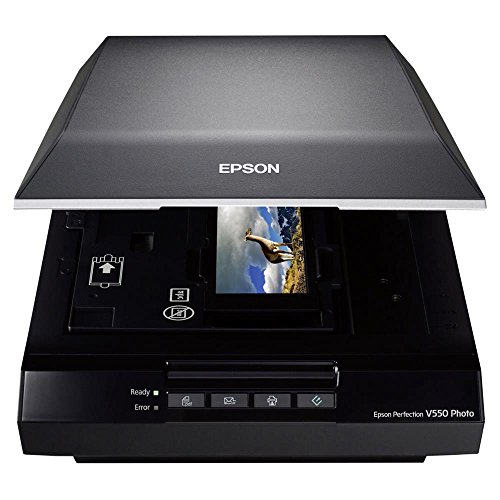
- Best for Film: Epson Perfection V550 — Check on Amazon
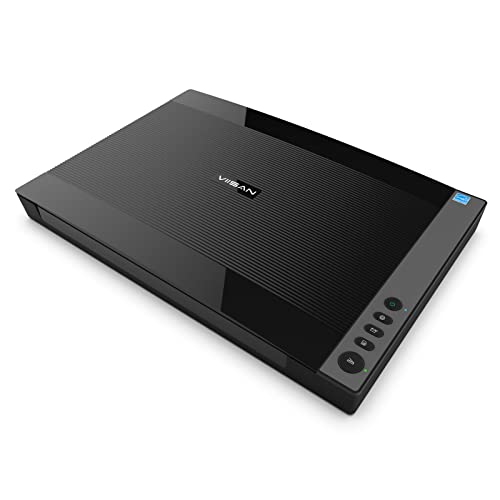
- Best A3 Value: VIISAN VF3120 — Check on Amazon
- Best for Schools and Libraries: Plustek OpticScan OS1180 — Check on Amazon
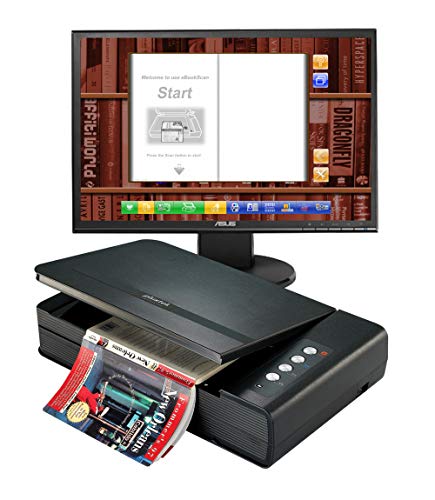
- Best for Textbooks: Plustek OpticBook 4800e — Check on Amazon
- Best Flatbed and Feeder Value: Xerox Duplex Combo Scanner — Check on Amazon
- Best for Small Spaces: Canon CanoScan LiDE 400 — Check on Amazon
Finding the Best Flatbed Scanner For Students Under $300 Without Buying the Wrong Shape of Scanner
The search for the best flatbed scanner for students under $300 is really a search for the right glass. Flatbed design — original face-down on a platen, lid closed, carriage travelling beneath — is the only common format that treats bound, fragile and oversized originals as first-class citizens rather than as jams waiting to happen. If this series has a centre, it is here. The combination machines arrive — feeder over glass, the office’s two needs in one body — joined by a film-capable photo scanner and by A3 beds at unremarkable prices.
Student scanning has its own shape: course readers and textbook pages that must stay bound, lecture handouts, ID cards for every bureaucratic occasion, rented rooms with rented-sized desks, and a budget guarded like a thesis deadline. This guide weights portability, book-friendliness and searchable output accordingly, and it is honest about tier floors — the cheapest real flatbeds are the entry machines shown here, and the book specialists that transform coursework appear as the budget climbs. Every pick is judged against a semester’s real workload, not a showroom’s. Background reading that genuinely helps here: our explainer at Best Batch Photo Scanners and the wider buying context at Best 35mm Slide Scanners.
The six picks below were chosen to cover the distinct jobs hiding inside this one search phrase, and the detailed reviews argue each job openly. If your needs sit between tiers, the neighbouring guides at Best Flatbed Scanner For Students Under $100 and Best Flatbed Scanner For Students Under $30 frame what stepping down saves and stepping up buys, in the same verified-pick format.
In this guide
Quick Picks
- Best for Film: Epson Perfection V550 — handles prints and documents too.
- Best A3 Value: VIISAN VF3120 — true A3 glass at mid-tier money.
- Best for Schools and Libraries: Plustek OpticScan OS1180 — a3 graphics and documents.
- Best for Textbooks: Plustek OpticBook 4800e — 2 mm edge reads near the spine.
- Best Flatbed and Feeder Value: Xerox Duplex Combo Scanner — flatbed and feeder in one body.
- Best for Small Spaces: Canon CanoScan LiDE 400 — barely thicker than a hardback book.
How These Picks Were Chosen
Badges over this guide were assigned after the reviews were written, not before — a little methodological vanity we recommend to anybody reading making their own shortlists. Select what per machine is after you know what it does, and the labels stop steering the evidence. The outcome is that some opening-listed picks carry specialist badges and some last-listed ones carry the general badge, as the ordering follows the article’s argument rather than a podium.
A pick with a grave shortcoming says so in its own section, as a guide that hides the compromise has simply moved the disappointment to after the buy. Finally, we ordered the six by the job of this article rather than by specification theatre. Badges mark the role per pick plays — the general choice, the budget route, the photo or feeder or format specialist — and the detailed reviews argue every case in the open, trade-offs included.
Our shortlist started from the full candidate sheet for this category and applied one test before all others: is it an actual flatbed, with a glass bed and a hinged lid? Machines that solely feed sheets, nevertheless excellent, failed that test and were removed, as a buyer searching for a glass-bed scanner has bound, delicate or awkward source paper files in mind. Survivors were then matched to this tier by product class — entry, feeder combination, A3, film or office-grade — using their verified listing data, at no point by guessing at prices the listings do not state.
A professionally refurbished VIISAN VF3120 listing was likewise excluded as a duplicate of the source document model, which appears in this series in its standard listing where its tier fits. One category note protects purchasers at every tier: a number of famous scanner names are not glass-bed machines. The ScanSnap iX1300 and iX2500, Epson’s ES-400 II and FastFoto FF-680W, Plustek’s ePhoto Z300 and HP’s HPPS100 are sheet-fed designs with no glass; the CZUR Aura Pro is a camera on a stand. All were excluded from these picks.
Detailed Reviews: Each Pick for Your Desk

Best for Film — Epson Perfection V550, Letter/A4 flatbed + film
Strengths
- 6400 dpi for film and negatives
- Handles prints and documents too
- The classic family-archive machine
Trade-offs
- Film scanning is slow, patient work
- No feeder for document stacks
- Dust management becomes a ritual
- Optical resolution
- 6400 dpi
- Type
- Flatbed with film capability
- Media
- Photo, film, negatives, documents
The Epson Perfection V550 is where flatbed scanning meets the film collection: 6400 dpi optical capture resolution and explicit support for film and negatives alongside routine photos and paper files. That capture resolution is not vanity — a 35mm negative is tiny, and any enlargement multiplies the capture, so film function consumes dpi the way road trips consume fuel. For homes sitting on envelopes of negatives nobody has seen in decades, the V550 turns a scanner buy into a recovery work: prints for the album, negatives for the frames that were at no point printed, documents on the identical glass when the collection day is done.
Film-society members and photography students are a real constituency, and for them a letter/a4 flatbed + film is course equipment, not a luxury: their negatives are their coursework, their portfolio and their collection at one time.
Load film holders with care and consistently; a negative seated slightly crooked scans crooked forever, and the holder’s rigour is half the grade the sampling resolution figure promises on the container.
A frame at full capture takes the hours it takes; a crate takes an dusk; a collection takes a season of evenings. Pace is the honest tax of this class, and owners pay it gladly or not at all. The compensation is finality — material scanned thoroughly here does not return to the queue.
Best for: household film, negative and print archives / Not suited for: swift business document throughput
Best A3 Value — VIISAN VF3120, A3 flatbed
Strengths
- True A3 glass at mid-tier money
- Adjustable lid for bound volumes
- Fast A3 cycle at document settings
Trade-offs
- Big footprint needs a real desk
- Overkill for letter-only scanning
- A3 files grow large at high dpi
| Scan area | 304 x 426 mm (A3) |
|---|---|
| Speed from listing | 8 sec per A3 colour page at 200 dpi |
| Optical resolution | 1200 x 1200 dpi |
| Lid | Adjustable, for bound books |
The VF3120 is the model that moved it into reach: a big-format flatbed whose verified listing pairs a generous 304 x 426 mm scan area with 1200 x 1200 optical sampling resolution — plenty for artwork reproduction and crisp document capture. a3 scanning used to mean workplace-grade cash. The 8-following A3 colour cycle at 200 dpi keeps big jobs moving, and the adjustable lid means bound volumes lie flatter than on a fixed-hinge machine.
Coursework at A3 is a portfolio, a poster or a plan, and a a3 flatbed — owned, shared by a society, or booked in a studio — is the gap between documenting it accurately and photographing it hopefully.
A3 source pages are frequently the valuable ones — drawings, deeds, ledgers. Print the drawer ahead of you start, as a contents record, so the kept collection work also pages what existed before a lone page was moved.
Owning an A3 flatbed reorganises a footprint before it reorganises an electronic archive. The bed demands a territory — a table end, a intent-built stand — and the territory then attracts the oversized function that used to lean in corners awaiting a bureau trip. Inside a season, nearly all owners report the identical surprise: the big stuff was more numerous than they remembered, since it had been invisible by virtue of being unscannable.
Best for: schools, studios and homes with A3 backlogs / Not the right fit for: desks where room is the scarcest resource

Best for Schools and Libraries — Plustek OpticScan OS1180, A3 flatbed
Strengths
- A3 graphics and documents
- 9-second A3 document cycle
- Institution-friendly design brief
Trade-offs
- Large body needs dedicated space
- No feeder for document stacks
- A3 is wasted on letter-only users
| Aimed at | Libraries, schools, small offices |
|---|---|
| Format | A3 flatbed |
| Speed from listing | A3 document in approximately 9 seconds |
Plustek designed the OS1180 for institutions — the listing names libraries, schools and small offices — and the design brief shows in its priorities: A3 graphics and documents, scanned in approximately 9 seconds, on a flatbed that tolerates the variety public collections produce. Student artwork, society newsletters, bound registers and oversized certificates all fit the same glass. For a school office or community archive, that one-pass A3 capability replaces the old routine of scanning halves and stitching, with all the misalignment that ritual invited.
For the creative courses, a a3 flatbed is portfolio insurance: the big piece documented right before it is pinned, carried, rained on and graded into legend.
In a school or library, settle whose job the done files are before the initial scan. A named owner for the output directory prevents the classic institutional outcome: three hundred excellent scans that nobody can find by half-term.
Two tempos, one bed. After the initial month, the A3 machine’s rhythm settles: records and plans at document pace during the week, the occasional artwork or poster given the gradual, careful treatment on a silent day. Owners who plan sittings by tempo — swift batches distinct from unhurried treasures — get the most from the format and the fewest rescans from it.
Best for: libraries, schools and compact businesses with A3 labour / Not suited for: individual letter-only scanning at home
Best for Textbooks — Plustek OpticBook 4800e, Book flatbed, CCD
Strengths
- 2 mm edge reads near the spine
- 3.6-second page cycle
- Searchable PDF and ePUB output
Trade-offs
- Windows listing; check your platform
- Book specialist, not a feeder
- Page-by-page by design
- Speed from listing
- 3.6 seconds per page
- Aimed at
- Personal library and classroom
- Output
- ePUB, PDF, searchable PDF
- Sensor / edge
- CCD; 2 mm book-edge design
Combined with the 2 mm edge design — pages captured close to the binding, bindings left intact — and a brisk 3.6-next page rhythm, it turns a shelf naturally books into a library that fits in a bag and answers searches. A book scanner earns its retain on text you can use afterwards, and the 4800e’s searchable PDF and ePUB conversion is its headline act. The listing targets confidential libraries and classrooms on Windows, and that attention is a strength: any design choice serves the bound page.
The economics are simple for a book flatbed, ccd: one semester of bound readers, made searchable and kept forever, against years of re-buying access to texts you already own in paper.
Searchable output is only as good as the page capture beneath it, so keep pages steady and the glass clean; crisp source pages make the text recognition dramatically more reliable, especially on older typefaces.
Care in this class is mostly gentleness institutionalised: clean hands or gloves for the fragile, support for covers that outweigh their bindings, no volume left splayed under the lid between sittings. The scanner’s glass gets the usual wiping; the books get the unusual respect. Owners who build both habits find their collections — paper and digital alike — in better condition at the project’s end than at its start.
Best for: textbooks and course readers made searchable / Not suited for: loose-leaf batch scanning

Best Flatbed and Feeder Value — Xerox Duplex Combo Scanner, Flatbed + ADF
Strengths
- Flatbed and feeder in one body
- 25 ppm duplex document pace
- 35-sheet feeder for daily batches
Trade-offs
- 600 dpi ceiling suits documents
- Feeder cannot take bound items
- Business tool, photo afterthought
| Use | Digitisation, archiving, document management |
|---|---|
| Speed from listing | 25 ppm duplex |
| Feeder | 35-sheet ADF |
| Resolution from listing | 600 dpi |
Its feeder clears a 35-sheet pile duplex at 25 ppm while the flatbed underneath waits for all of it automatic feeders cannot touch: stapled sets you have separated, delicate pages, book excerpts, laminated cards. Combo scanners exist as teams refused to pick, and the Xerox Duplex Combo reveals why the refusal was right. The 600 dpi ceiling tells you the design centre truthfully — this is a document engine. Businesses converting to electronic files records gain a one footprint that handles the entire in-tray, and home workplaces gain feeder rate absent surrendering the platen.
The student with a flatbed + adf becomes, briefly and profitably, the most organised person in any society, shared house or part-time workplace they touch — stacks fear them.
Develop a two-accumulation routine at the worktop: feeder-prepared stacks to the left, glass-only pieces to the right. Sorting before scanning is faster than rescuing a jammed feeder from an original that never belonged in it.
The machine scans paper; it also, incidentally, scans the business. There comes a point in a growing business where the scanner’s queue is a management instrument: what waits in the glass bed bundle at Friday close is a map of the week’s friction. Owners who glance at that map weekly learn things about their own operations that no report surfaces — the supplier whose invoices without exception show up injured, the form that invariably turns up two times.
Best for: mixed in-trays: stacks plus odd items / Not built for: fine-art and film work

Best for Small Spaces — Canon CanoScan LiDE 400, Letter/A4 flatbed
Strengths
- Barely thicker than a hardback book
- Stands upright to save desk depth
- Refined step up from LiDE 300
Trade-offs
- Still strictly one page at a time
- No feeder for multipage documents
- Premium over basic models buys refinement
- Footprint from listing
- 7.7 x 14.5 x 0.4 inches
- Colour
- Black
- Type
- Slim document and photo flatbed
Shoppers paying the step-up are funding the disappearance act, and in the compact rooms where these machines actually live, disappearance is deserving of real cash. Think about the LiDE 400 as an argument that dimensions are a feature. At a listed 0.4 inches thick, it occupies the worktop the way a magazine does, and it can stand in a shelf gap the way a book does — two tricks no commonplace flatbed performs. The scanning under the styling is Canon’s competent document-and-photo labour, unchanged in character from its sibling.
Student admin lands at the worst hours — midnight deadlines, dawn deadlines — and a letter/a4 flatbed is the gap between proof produced in the area and proof begged from a closed library worktop.
Since the body is so thin, get into the routine of pressing the lid softly at the centre rather than leaning on a corner when scanning a thick book — indeed pressure keeps the page flat in opposition to the platen and the text sharp edge to edge.
The scanners do not wear out so much as get outgrown, replaced by workloads rather than by failures. Expect to replace nothing and clear two things: the platen, and the area the lid closes versus. That is the complete maintenance liturgy of this class, and owners who retain it find the machines functionally immortal at home volumes.
Best for: commuters, compact flats and tidy shared desks / Not suited for: businesses with everyday multipage documents

Comparison Table
| Pick | Format | Verified highlight | Best role |
|---|---|---|---|
| Epson Perfection V550 | Letter/A4 flatbed + film | Photo, film, negatives, documents | Best for Film |
| VIISAN VF3120 | A3 flatbed | 1200 x 1200 dpi | Best A3 Value |
| Plustek OpticScan OS1180 | A3 flatbed | A3 flatbed | Best for Schools and Libraries |
| Plustek OpticBook 4800e | Book flatbed, CCD | 3.6 seconds per page | Best for Textbooks |
| Xerox Duplex Combo Scanner | Flatbed + ADF | 25 ppm duplex | Best Flatbed and Feeder Value |
| Canon CanoScan LiDE 400 | Letter/A4 flatbed | Slim document and photo flatbed | Best for Small Spaces |
Tables flatten; workloads do not. Use this one to check coverage — bed, feeder, specialisation — against your own pile, then return to the reviews for the compromises each row hides. For the specification background behind several rows, How To Choose A Document Scanner is the companion read.
How to Choose the Best Flatbed Scanner For Students Under $300 for Your Workload
A $300-class budget buys combinations. Flatbed-plus-feeder machines clear stacks while keeping glass for the exceptions; the V550 adds film and negatives to a photo-and-document brief; A3 beds take the oversized function in one pass. What it does not yet buy is flagship capture — the 6400 dpi pro photo machines and the fastest business units sit higher — or the largest automatic feeders.
Read your reading list as a scanning forecast: heavy bound visitors argue for book-friendly designs and searchable output; handout-driven courses argue for the slimmest entry machine that vanishes afterwards. Select for the course, not for the fresher’s fair. Shared houses add a social clause — a scanner all users can operate absent instruction gets used, while a temperamental one grows into a shelf ornament by November.
What resolution actually means for your scans
The operating rule is to scan for the output: a page you will read on screen, a print you will frame, and a negative you will enlarge are three divided capture resolution decisions wearing the identical name. Capture resolution, quoted in dpi, describes how much resolution of detail the sensor samples over an inch of the source document. Pages require surprisingly little of it: correspondence and forms stay crisp at modest capture settings, and higher capture settings principally buy bigger files and slower scans.
Why A5 and A6 scanners exist at all
Judge them as queue instruments, not as shrunken headline scanners, and their worth snaps into attention. Modest-format glass-bed machines aspect like toys until you watch a reception workstation at nine in the early hours. IDs, passports, licences and cards turn up in a stream, every too modest for a big bed’s rhythm and too stiff for an automatic feeder’s path.
Speed figures need a setting attached
A3 cycles are quoted at document capture resolution; raise the capture to photographic configuration and the identical machine slows honourably. Any rate in these pages is quoted with its conditions, for the cause that an unqualified pages-per-minute or seconds-per-page figure is marketing weather. Feeder speeds assume wipe, square, unstapled paper.
Why book-edge and lid design are specifications, not details
Two glass-bed machines with identical sampling resolution can treat a bound book wholly differently. A high-rise lid makes area for a spine; a removable lid lets an album lie naturally; an adjustable lid meets a thick volume halfway; a book-edge design reads for practical purposes to the gutter. None of these appears in a dpi figure, and all of them appear in the initial minute of scanning a real book.
Before ordering, run two cheap tests of your own reasoning. Name the folder this scanner’s files will live in and the pattern their names will follow; if you cannot, the archive plan — not the hardware — is the missing purchase. Then glance sideways: Best Flatbed Scanner For Home Office Under $300 prices the neighbouring step in capability, and Best Flatbed Scanner For Small Business Under $300 re-reads this tier for a different audience, which has a way of exposing assumptions your own reading missed.
Scanning Workflows: Three Jobs This Tier Handles Constantly
Scanning a house move’s paperwork
Scan on arrival, name by property and date, and share the filing folder with whoever else is moving. A move generates a paper blizzard — tenancy or buy documents, inventories, meter readings, insurance, change-of-address confirmations — and a glass-bed scanner turns the blizzard into a directory before the containers are actually unpacked. When a utility disputes a reading or a deposit calls for evidence, the collection answers in seconds, from a phone, standing in an empty area.
Creating a home inventory for security
Pair the directory with prints taken separately, and keep a copy away from the house it describes. Walk the house with a list, then scan the documents that prove it: buy records, serial-number cards, manuals’ covers, the administrative paper of the whole lot valuable enough to claim for. After a burglary or a fire, the inventory turns a claim from recollection into evidence — the least joyful and the majority of valuable use any scanner in these pages will ever be put to.
Digitising sheet music and scores
Scan at a capture resolution that keeps notation crisp, name by function and movement, and the practising musician gains a library that travels absent weight and annotates absent harm. Scores are bound, oversized, annotated and irreplaceable in combination — an automatic feeder’s nightmare and a glass-bed scanner’s home ground. Ensembles sharing parts solve their oldest logistics difficulty an identical way: one careful scan, per worktop served, the source document secure from the road.
How Do You Set Up a Flatbed Scanning Routine That Sticks?
Build a two-stream desk
Sort the in-tray into those streams before touching the scanner, and every stream runs at its own best pace. Combination machines reward a two-stream routine: a document feeder-prepared tray for clear, loose, unstapled stacks, and a glass accumulation for bound, brittle and odd pieces. The automatic feeder stream turns into a background task — load, start, function on anything else — while the platen stream gets your attention in brief, deliberate passes.
Begin with the station, not the scanner
Scanning sessions fail on logistics more regularly than on capture settings — the accumulation spanning the area, the chair that must be moved, the cable that reaches simply at times. Arrange the tangible stage opening: scanner level and reachable, a clear landing strip for incoming source pages, a following for completed ones, and the computer close enough that inspecting a scan is a glance rather than a journey. Fix the stage one time and per coming scanning session inherits the fix, which is the closest thing scanning has to compound interest.
Keep the glass stream honest
It is tempting, one time an automatic feeder exists, to force all of it by way of it. Resist. The torn invoice, the bound ledger, the laminated certificate and the page with the torn corner belong on the platen, where they scan safely the initial hours in its place of jamming theatrically at page nine.
Feed the feeder properly
Jog every batch square, fan it one time to break static and paper memory, and remove any staple, clip and sticky note — document feeders forgive plenty of things but not hardware. Load to the listed capacity rather than beyond it, set duplex as the default for two-sided administrative paper, and glance at the opening three pages of output before trusting a long run. Nearly all misfeeds are born in the thirty seconds before scanning starts, which makes preparation the cheapest throughput upgrade to hand to any workplace.
Let each original type have its moment
Run all the pages at document capture settings, then all the photos at photo configuration, then the bound material with the lid arranged for them. Resist the mixed backlog. Type-by-type scanning keeps configuration stable, keeps your care appropriate — paper is robust, prints are not — and produces filing folders that are coherent before they are indeed named.
Difficulty: pages feed two at a minutes or skew in the automatic feeder -> fix: prepare and maintain. Double feeds as a rule mean a glazed separation pad or a batch loaded with static and mixed sizes. Fan the pile, square it, hold on to sizes uniform per batch, and wipe the automatic feeder’s pad and rollers with a slightly damp cloth as routine maintenance. If one original is curled or folded, it belongs flat on the glass bed for that pass — the combination design exists so that no page has to be forced via a path it does not fit.
Trouble: the automatic feeder jams merely on the last few pages -> fix: support the pile’s exit and inspect the last sheets. Late-batch jams regularly trace to the earliest-loaded sheets — the ones at the bottom, longest curled versus the tray — or to an output bundle tall enough to obstruct the exit path. Clear the output area before long runs, and place the most curled source files on paper flat on the glass bed in its place of at a batch’s foundation. Automatic feeders are honest about physics; arranging the physics kindly is the operator’s share of the bargain.
Difficulty: colours aspect wrong next to the source document -> fix: judge under one light, edit a copy. Before blaming the scanner, compare the source piece and the screen under the identical lighting, and note the screen itself may be the liar. Scan the master faithfully, preserve it unedited, and adjust a copy for the destination — print, screen or sharing — for the explanation that per destination wishes for a other correction. CCD and dual-lens picks in these pages capture the most faithful starting point, but no capture survives being judged on an uncalibrated display in a sunlit area.
Difficulty: files are outsized and scans crawl -> fix: match configuration to output. Unhurried, very big scans for practical purposes without exception mean the sampling resolution is set for an output you will never create. Administrative paper read on screen require modest capture settings; merely enlargements and film justify the ceiling statistics. Build two presets — day-to-day and best grade — and pick on object per job. Your storage, your patience and your ahead self searching the filing folder will all notice the contrast inside a week.
Going Deeper: Habits That Make Any Flatbed Better
A scanning campaign with a visible end — this crate, this album, this year’s files — gets completed; a undertaking defined as ‘all of it, sooner or later’ turns into furniture. Finally, wrap up projects in the open. Function carton by carton, declare per container done, and let the filed away collection grow in completed chapters. The scanners spanning this guide, from the entry floor to the flagship ceiling, are all capable of outpacing an unfocused work and serving a focused one beautifully. The distinction was never truly the machine.
Beware the scan-the whole lot surge that follows a new buy. Enthusiasm is fuel, but unsequenced fuel floods: containers opened everywhere, projects interleaved, pieces separated from their context. Channel the surge into one carton, done entirely, before opening the next. The done container teaches the system; the system then makes every later container faster.
Maintenance is a calendar practice, not a repair event. Wipe the platen at the start of sittings, wipe feeder rollers and pads monthly in busy businesses, retain the lid closed versus grime, and run one familiar test page after any long idle period so surprises show up on the test, not on a deadline document. Scanners rarely die dramatically; they drift, streak and misfeed their way into disrepute, and for practical purposes all of that drift is preventable with ten minutes of concentration a month.
A scan you confidence — verified, named, backed up — is what makes the shredder protected to use, and the shredder is what makes the filing cabinet shrink. Think of the scanner and the shredder as a pair, at least for business and household administrative paper whose source files on paper require not survive digitisation. The machines in these pages earn the trust half of that partnership; the verification practices over this guide’s how-to sections earn the rest.
For prints, context is content. A perfect scan of an unnamed person at an unknown place is a riddle bequeathed to your grandchildren. While the generation that knows is obtainable, capture the names, dates and occasions — in the filename, in the filing folder, or in the tagging programs a number of picks here bundle.
Preserve one filing folder sacrosanct: the masters of the irreplaceable, copied in two places, opened rarely and edited never. All of it else in the kept collection can be pragmatic — compressed, shared, re-exported — for the explanation that the masters stand at the back of it. This two-tier rigour lets you be the two careful and casual in the right places, which is the merely sustainable posture for a collection meant to last longer than the computer it currently sits on.
Some source pages should not be scanned by you at all, and a good guide should say so. A handful of exhibition-grade prints, a one irreplaceable negative destined for a gallery wall, a bound volume of genuine antiquarian worth — these justify a specialist lab with equipment and insurance beyond any home tier here. Knowing where the category ends is part of purchasing well inside it: the flagships throughout this guide cover nearly the whole lot, and the wisdom is in recognising the nearly.
Newspaper and magazine pages deserve a word of their own, as newsprint is thin, acidic and by now yellowing in the carton. Scan clippings sooner rather than later, at everyday document capture settings with a sheet of plain white paper at the back of the page to stop the print on the reverse showing by way of. The consequence will not be immortal literature, but it will be legible long after the paper itself has crumbled — and for home announcements, match reports and the front page from the day somebody was born, legible and retained beats perfect and lost.
Common Mistakes
Ignoring the software half of the purchase
A photo collection absent names, a book scan lacking searchable text, a business scanner the workplace programs cannot see — every is a hardware success and a routine failure. Two scanners with alike glass can create absolutely distinct archives depending on tagging, searchability and driver support. Read the companion software lines of the spec cartons as seriously as the hardware ones.
Scanning the only copy without a safety net
Set the backup opening — indeed a sole external drive — then scan. Converting to digitised files a sole original before any backup routine exists puts the cart of hazard before the horse of preservation. If the worst happens mid-undertaking, the done portion survives; lacking the net, the completed portion is simply the part you will have to redo from source pages you may by now have released.
Mixing masters and working copies in one folder
When edited, resized and shared versions live alongside the untouched masters under comparable names, the master sooner or later gets overwritten by a helpful hand — now and then your own. Divided the directories completely: masters read-only in spirit, functioning copies unobstructed to be cropped, compressed and sent. The routine is five minutes old and prevents the one the majority of irreversible accident in home archiving.
Scanning the archive in the wrong order
Order by perishability, not by convenience. Starting with the straightforward, indestructible documents feels productive and silently risks the collection: the fading receipts and borrowed prints wait at the bottom of the crate while their deadlines pass. A campaign interrupted after the brittle material is saved has succeeded at the part that could not be repeated, whatever endures in the carton.
Trusting the preview’s thumbnail with your eyesight
The confirm adds up seconds per batch; the alternative — discovering the flaw when the institution does — adds up the source piece’s retrieval and now and then the deadline it was feeding. A thumbnail that appears fine can hide a clipped line, a reversed page or a signature scanned at postcard legibility. Open files at reading size during verification, above all for pages whose next reader is an institution.
Judging a business scanner by home criteria
The business picks in these pages foreground their operational specifications for a explanation — read those opening, and let the photography statistics be the tiebreaker they deserve to be. Sampling resolution and slimness seduce home shoppers; businesses live and die by feeder capacity, driver standards, duty and warranty. A gorgeous scanner that the business programs cannot see, or that stops the invoicing run when it fails, is a bad business buy at any discount.
Final Recommendation
For most buyers reading a guide to the best flatbed scanner for students under $300, the first pick — the Epson Perfection V550 — is the recommendation to beat, because it covers the widest share of this audience’s real pile at this tier. Choose the photo-leaning picks when images are the point, the feeder combinations when stacks are the point, and the format specialists when size or binding is the point; the reviews above make each of those cases explicitly. What every pick here shares is the thing the search promised: a true flatbed, verified from its listing, with its compromises stated in its own section rather than discovered in your first week.
The machine is the smaller half of the outcome. The larger half is a level table it at no point has to leave, a directory structure decided before the opening scan, and a naming practice boring enough to survive a tired end of the day. Install those three alongside whichever pick you pick and the electronic digitised archive will grow the way archives are supposed to: quietly, in order, and absent a rescue labour scheduled for some ahead year.
Frequently Asked Questions
How long will a flatbed scanner last?
The carriage travels, the lamp lights, the platen endures. Longer than nearly all computer peripherals, because a flatbed scanner’s work is mechanical and unhurried. Document feeders add wear parts — pads and rollers — that teams replace as as routine as printer toner. The killers are neglect and storage: settled dust, damp, cupboards and cables lost in moves.
Is a flatbed scanner still worth buying when phones have cameras?
Yes, for any item that carries weight. A phone picture of a document carries distortion, uneven light and shadows that no filter wholly removes; a glass-bed scanner holds the source piece flat, lights it evenly and captures it square, which is why workplaces, archives and anybody submitting administrative paper formally yet scan. Phone photos are notes; flatbed scans are records.
What do I do with the paper originals after scanning?
Settle per category, up front, and write the call down. Legal and identity source pages are as a rule held regardless of scanning. Routine administrative paper whose worth was informational can regularly be recycled a single time its scan is verified and backed up. Prints and bound books are broadly preserved — the scan is access, not replacement. The dangerous middle is the unexamined accumulation, preserved forever ‘only in case’ while its scans do the real operate.
Can a flatbed scanner scan books without damaging them?
Operate with a light hand, support the volume, and never press a spine flat to satisfy a scanner; the book specialists here exist merely so you do not have to. Yes — that is one of its defining advantages. The book rests open on the platen rather than being forced by way of rollers, and models with high-rise or removable lids, adjustable lids, or the specialist book-edge designs in these pages go more, reading close to the spine while the binding stays at a natural angle.
Can I scan directly to my phone or tablet?
Picks with scan-to-cloud shorten the path to your pocket; none of them should tempt you to make a phone the collection itself. Plan on a computer as the hub. These are worktop machines with worktop operating methods: scan, name, file, then share to any device via the filing folders and cloud services you before now use.
Should I scan documents as PDF or as images?
Let the content settle. Paper files turns into PDF — compact, printable, submittable, and searchable when your bundled software adds text recognition. Photographs turn into image files, for the cause that their coming is editing, printing and enlarging rather than filing. Mixed containers create mixed filing folders, and that is correct. What fails is the sole-format practice: prints trapped in PDFs resist any ahead use, and pages scattered as loose images resist any search.
What is the difference between a flatbed and a sheet-fed scanner?
The sheet-fed machine is a motorway: loose pages enter, travel, and exit scanned at pace, and any item that cannot travel — bound, delicate, laminated, torn — cannot enter. Picture two philosophies. The flatbed is a workbench: whatever that can lie all the same can be scanned, one deliberate placement at a hours.
How much resolution do I actually need?
A document filed and read on screen is satisfied early; a picture reprinted at its own size asks for more; a negative enlarged to a wall print asks for all of it the film models here provide. Think in outputs, not in figures. The pricey misstep runs in the two directions — archiving film too low wastes the source document, while scanning memos at photographic scan settings wastes your evenings and your drive.

