Disclosure: As an Amazon Associate, reviewstook.com earns from qualifying purchases. Links on this page are affiliate links at no extra cost to you; prices and availability change frequently, so check Amazon for the latest.
Where to Buy the Best Flatbed Scanner Under $300
Use the links below to check the latest price on Amazon for every pick in this guide to the best flatbed scanner under $300. Each name link and check link goes to the same verified listing, so you can confirm the current model and bundle before you decide. Purchases made through links on reviewstook.com support our testing and writing at no extra cost to you.
- Best Flatbed and Feeder Value: Xerox Duplex Combo Scanner — Check on Amazon
- Best for Business Software: Epson DS-1630 — Check on Amazon
- Best for Film: Epson Perfection V550 — Check on Amazon
- Best A3 Value: VIISAN VF3120 — Check on Amazon
- Best Feeder Capacity: Plustek PL4080 — Check on Amazon
- Best for Small Spaces: Canon CanoScan LiDE 400 — Check on Amazon
Finding the Best Flatbed Scanner Under $300 Without Buying the Wrong Shape of Scanner
Anyone hunting for the best flatbed scanner under $300 quickly meets the category’s one non-negotiable: the glass. A flatbed earns its name from the flat bed of glass under its lid, and that glass is what welcomes books, albums, certificates and damaged pages that no roller-fed machine should ever touch. If this series has a centre, it is here. The combination machines arrive — feeder over glass, the office’s two needs in one body — joined by a film-capable photo scanner and by A3 beds at unremarkable prices. For the mixed workloads most readers actually have, this is the tier where a single purchase becomes a complete answer, and the guide’s ordering reflects that completeness: coverage first, specialisation second, flagship longing deferred to the tiers that exist to indulge it.
General buyers are the hardest to serve well, because their pile refuses to specialise: a passport renewal, a watercolour, a bound manual, a decade of photographs, all in the same month. This guide therefore ranks coverage over brilliance. Each pick is introduced by the job it covers best, and the specialists are labelled as specialists, so a general reader can assemble the widest honest coverage this budget allows — and can see exactly which corner of the pile each candidate would leave unserved. Background reading that genuinely helps here: our explainer at Best Document Scanners and the wider buying context at Best 35mm Slide Scanners.
The six picks below were chosen to cover the distinct jobs hiding inside this one search phrase, and the detailed reviews argue each job openly. If your needs sit between tiers, the neighbouring guides at Best Flatbed Scanner Under $50 and Best Flatbed Scanner Under $100 frame what stepping down saves and stepping up buys, in the same verified-pick format.
In this guide
Quick Picks
- Best Flatbed and Feeder Value: Xerox Duplex Combo Scanner — 25 ppm duplex document pace.
- Best for Business Software: Epson DS-1630 — tWAIN and ISIS for business software.
- Best for Film: Epson Perfection V550 — 6400 dpi for film and negatives.
- Best A3 Value: VIISAN VF3120 — true A3 glass at mid-tier money.
- Best Feeder Capacity: Plustek PL4080 — 50-sheet feeder, largest here at tier.
- Best for Small Spaces: Canon CanoScan LiDE 400 — barely thicker than a hardback book.
How These Picks Were Chosen
We weighted the ordering inside every article by the article’s own audience. An identical six machines can legitimately rank differently for a student and for a compact business, because the jobs differ: searchable book output counts in a dorm room, feeder duty carries weight in an business, and not one nor the other carries weight much to a household scanning birthday cards. Badges so describe roles inside this article, and a pick badged as a specialist is not being demoted — it is being aimed.
One more exclusion deserves a sentence: legacy and duplicate listings. The candidate sheet contained older generations, refurbished relistings and actually a power adapter wearing a scanner’s keywords. Duplicates of models by now represented were removed in favour of the source document listing, and accessories were removed wholly. What persists is a sheet of distinct, present-day, verifiable glass-bed machines — which is the merely kind of sheet a ordering guide should be designed on.
Badges mark the role every pick plays — the general choice, the budget route, the photo or feeder or format specialist — and the detailed reviews argue every case in the open, trade-offs included. Finally, we ordered the six by the job of this article rather than by specification theatre. A pick with a weighty constraint says so in its own section, since a guide that hides the compromise has simply moved the disappointment to after the buy.
Feeder-only and sheet-fed models — Epson’s ES-400 II and FastFoto FF-680W, Plustek’s ePhoto Z300, HP’s HPPS100 and the ScanSnap iX1300 and iX2500 — cannot scan a bound page or a delicate original, so they fail this guide’s flatbed test regardless of pace. The candidate sheet contained capable machines we intentionally left out. The CZUR Aura Pro photos pages from overhead rather than scanning them on glass. And a refurbished relisting of the VIISAN VF3120 duplicated a model by now here in original form, so the duplicate went, not the model.
Detailed Reviews: Each Pick for Your Desk

Best Flatbed and Feeder Value — Xerox Duplex Combo Scanner, Flatbed + ADF
Strengths
- Flatbed and feeder in one body
- 25 ppm duplex document pace
- 35-sheet feeder for daily batches
Trade-offs
- 600 dpi ceiling suits documents
- Feeder cannot take bound items
- Business tool, photo afterthought
| Resolution from listing | 600 dpi |
|---|---|
| Use | Digitisation, archiving, document management |
| Speed from listing | 25 ppm duplex |
| Feeder | 35-sheet ADF |
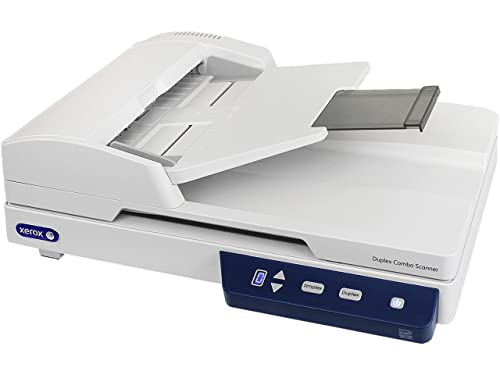
The Duplex Combo’s figures describe a operating day: 35 sheets in the document feeder, the two sides captured, 25 ppm while it happens, and a glass bed underneath for all of it the batch excluded. At 600 dpi it declines photographic glory in favour of document truth, and teams should applaud the honesty — their archives are text, signatures and stamps, and this machine is optimised for merely those. As the most affordable honest combination spanning this guide, it is where feeder-curious purchasers should start their comparison, whatever they in while buy.
For the generalist whose documents has silently turn into volume, a glass-bed scanner + adf is the upgrade that ends the page-at-a-hours era absent surrendering the platen that made flatbed scanners meriting owning.
Duplex scanning doubles throughput solely when pages are clear and square; a minute spent jogging a batch straight and removing staples saves the rescans that silently eat the pace upside.
Anyone working through a mixed box of keepsakes and paperwork meets the same pattern. Measure a business scanner’s opening season in processes changed, not pages scanned. The invoice run that no longer waits, the onboarding pack assembled in minutes, the audit answered from a directory — those are the returns, and they compound as any new process inherits the scanning step as a solved trouble rather than re-litigating it.
Best for: mixed businesses: stacks by feeder, exceptions by glass / Not the right fit for: gallery-grade photo reproduction
Best for Business Software — Epson DS-1630, Flatbed + ADF
Strengths
- 25 ppm document pace
- TWAIN and ISIS for business software
- 3-year next-day replacement warranty
Trade-offs
- No image in verified listing data
- Document focus, not photo work
- Business pricing over home models
| Warranty from listing | 3-year, next business day replacement |
|---|---|
| Drivers | TWAIN and ISIS |
| Speed from listing | 25 ppm |
Epson sells the DS-1630 on confidence infrastructure: TWAIN and ISIS drivers that office-grade document systems speak, and a three-year warranty with next business day replacement that treats downtime as the emergency it is. The 25 ppm pace and the flatbed under the automatic feeder are the operating parts; the warranty is the cause a business can build a process on them. Home purchasers will find it austere and over-specified. Businesses formalising their records will find it the opening scanner in these pages that sounds like it was designed by somebody who has answered a support call.
For broad use with ambitions, a glass-bed scanner + adf covers the two the everyday batch and the awkward exception, which is why combination machines anchor so numerous mixed desks.
No product image was supplied in the verified listing data for the DS-1630, so judge it by its business specifications — 25 ppm, TWAIN and ISIS, three-year next-day warranty — which are the reasons workplaces buy it anyway.
A process that lives in trays, presets and conventions can be handed to any reader — the new hire, the temp, the Saturday cover — with a one-page guide. Delegating scanning is the class’s silent revolution. What was one person’s knowledge turns into the business’s capability, and capabilities survive holidays, resignations and growth in a way that knowledge never does.
Best for: businesses standardizing document capture / Not suited for: hobbyist photo archiving

Best for Film — Epson Perfection V550, Letter/A4 flatbed + film
Strengths
- 6400 dpi for film and negatives
- Handles prints and documents too
- The classic family-archive machine
Trade-offs
- Film scanning is slow, patient work
- No feeder for document stacks
- Dust management becomes a ritual
| Type | Flatbed with film capability |
|---|---|
| Media | Photo, film, negatives, documents |
| Optical resolution | 6400 dpi |
The V550’s enduring popularity with household archivists comes from coverage: one machine that takes the prints, the negatives, the slides and the documents in the identical carton, at a 6400 dpi optical ceiling that film labour genuinely calls for. Labs charge per frame for simply this service; the V550 converts a collection-sized bill into a buy and a series of evenings. The evenings are genuine — film scanning is unhurried — but the machine’s proposition has never been velocity. It is ownership of the process, at a standard the home collection will never require to apologise for.
A letter/a4 flatbed + film widens a general setup from paperwork into memory work, covering the prints and film that ordinary document machines ignore entirely.
Load film holders with care and consistently; a negative seated slightly crooked scans crooked forever, and the holder’s habit is half the calibre the sampling resolution figure promises on the crate.
Storage planning is film ownership’s silent half. Masters at full capture are heavy files, and a collection of any size is measured in weighty drive footprint. Owners budget the storage with the scanner, hold on to two copies of the masters, and treat the functioning copies as expendable. The alternative — shrinking masters to save footprint — is the one call in this complete category that cannot be undone later, and veterans speak of it the way sailors speak of weather.
Best for: home film, negative and print archives / Not suited for: swift workplace document throughput
Best A3 Value — VIISAN VF3120, A3 flatbed
Strengths
- True A3 glass at mid-tier money
- Adjustable lid for bound volumes
- Fast A3 cycle at document settings
Trade-offs
- Big footprint needs a real desk
- Overkill for letter-only scanning
- A3 files grow large at high dpi
- Speed from listing
- 8 sec per A3 colour page at 200 dpi
- Lid
- Adjustable, for bound books
- Optical resolution
- 1200 x 1200 dpi
- Scan area
- 304 x 426 mm (A3)
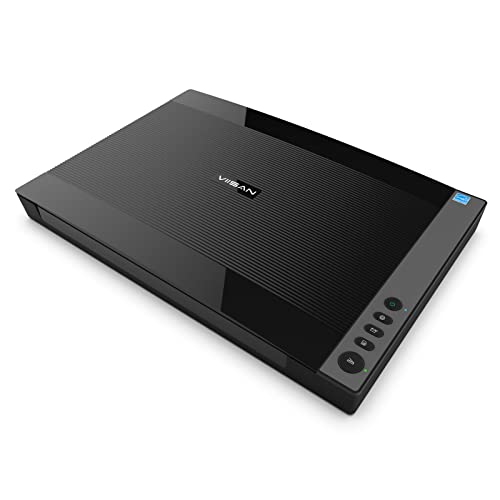
The VF3120’s the majority of persuasive feature is a measurement: 304 by 426 millimetres of glass. The whole lot else — the 1200 by 1200 optical dpi, the 8-following A3 colour cycle at document scan settings, the adjustable lid — serves that expanse. It converts the oversized drawer, the one full of drawings and ledgers and posters that no scanner would take, into an afternoon’s operate. Purchasers should note the listing ecosystem includes a refurbished variant of this same model; this guide links the source document listing, and the distinction is meriting the ten seconds it takes to confirm at checkout.
In a generalist’s home, a big bed changes what is scannable at all: the child’s poster, the home tree chart, the double-page spread. A a3 flatbed turns those from photography compromises into proper scans.
For bound books, the adjustable lid aids, but gravity assists more — support the volume so its spine is not bearing the full weight at an angle, and let the page settle flat for a breath before per scan.
Resale and next life favour this class: schools, societies and studios without exception require big glass, and a well-preserved A3 flatbed finds its next collection swiftly. Preserve the carton if storage permits, hold on to the glass bed immaculate, and the machine’s outlay per year falls per year it serves — the arithmetic that makes the step up from A4 easier to defend than it opening appears.
Best for: schools, studios and homes with A3 backlogs / Not the right fit for: desks where footprint is the scarcest resource

Best Feeder Capacity — Plustek PL4080, Flatbed + ADF
Strengths
- 50-sheet feeder, largest here at tier
- A4 flatbed for exceptions
- Designed for folded documents
Trade-offs
- A4 ceiling on the glass
- Document focus, not photos
- Feeder care is a routine cost
- Flatbed
- A4 size
- Special design
- Suited to multi-folded documents
- Feeder
- 50-sheet document feeder
Versatility is the PL4080’s listing promise — flatbed plus ADF, all in one — and the specifications back it: 50 sheets in the feeder for the routine stacks, an A4 glass bed for the exceptions, and design attention to multi-folded documents, the silent jam-source of office scanning. It will not enlarge negatives or reproduce artwork; it will clear a morning’s post, a term’s enrolment forms or a quarter’s invoices without theatre. Businesses whose scanning is ninety percent paper flow and ten percent awkward originals will find the proportions exactly right, at a tier below the big-name combo machines.
Broad visitors shopping graduating to a flatbed scanner + adf are as a rule graduating a workload, not a hobby: the backlog got deeper, the platen stayed necessary, and the automatic feeder arrived to reconcile the two.
Keep the feeder’s separation pad on your cleaning rounds. High-capacity feeders earn their speed honestly, but double-feeds creep in when pads glaze — a wipe during weekly cleaning keeps the 50-sheet promise true.
A well-held unit at five seasons is an asset with a service history; a neglected one is a alert. Finally, this class ages in public: its rollers, pads and glass record the workplace’s volume truthfully. Retain the log, hold on to the cloth, preserve the conventions, and the machine will retain the business’s paper moving for the complete of its long, unglamorous, indispensable life.
Best for: everyday mixed mail with folded documents / Not suited for: photo and film archiving

Best for Small Spaces — Canon CanoScan LiDE 400, Letter/A4 flatbed
Strengths
- Barely thicker than a hardback book
- Stands upright to save desk depth
- Refined step up from LiDE 300
Trade-offs
- Still strictly one page at a time
- No feeder for multipage documents
- Premium over basic models buys refinement
- Colour
- Black
- Type
- Slim document and photo flatbed
- Footprint from listing
- 7.7 x 14.5 x 0.4 inches
If the LiDE 300 is the starter Canon, the LiDE 400 is the one you buy when the starter’s corner of the table has turn into permanent. The listed dimensions — 7.7 by 14.5 by 0.4 inches — tell the story: this is a scanner made for genuine homes, where furniture is measured in centimetres of clearance, not in IT-department bench room. Day to day it handles the identical diet of letters, photos and forms, but the slimmer shell and tidier presentation make it feel like furniture rather than apparatus. It persists a glass-only machine, so volume scanners should appearance at the automatic feeder models elsewhere throughout this guide.
For a mixed home accumulation, a letter/a4 flatbed like this earns its hold on to via availability: it is the machine by now on the workstation when a form, photo or certificate appears, and its limits — one page at a hours — match the rhythm of mixed life admin.
A thin scanner invites being moved; give it one cable route that survives the moving, and the setup ritual stays at ten seconds rather of becoming the explanation a scan gets postponed.
The two-page jobs come opening — the form, the certificate, the receipt — as they are suddenly uncomplicated. Expect an entry flatbed to change your paper files behavior before it changes your collection. The big projects follow if they follow at all. Owners who accept that sequence, straightforward wins initial, end up with the pair of them; owners who start with the attic crate regularly stall there.
Best for: commuters, little flats and tidy shared desks / Not suited for: businesses with everyday multipage documents

Comparison Table
| Pick | Format | Verified highlight | Best role |
|---|---|---|---|
| Xerox Duplex Combo Scanner | Flatbed + ADF | 25 ppm duplex | Best Flatbed and Feeder Value |
| Epson DS-1630 | Flatbed + ADF | 25 ppm | Best for Business Software |
| Epson Perfection V550 | Letter/A4 flatbed + film | 6400 dpi | Best for Film |
| VIISAN VF3120 | A3 flatbed | 1200 x 1200 dpi | Best A3 Value |
| Plustek PL4080 | Flatbed + ADF | 50-sheet document feeder | Best Feeder Capacity |
| Canon CanoScan LiDE 400 | Letter/A4 flatbed | 7.7 x 14.5 x 0.4 inches | Best for Small Spaces |
In a mixed household pile, that plays out the same way week after week. If the table and the reviews seem to disagree, confidence the reviews: the table presents what per pick is, the reviews show what per pick is like. The format column is the initial filter, the highlight the next, and Printer Scanner Not Operating supplies the deeper background for after the shortlist forms.
How to Choose the Best Flatbed Scanner Under $300 for Your Workload
Coverage is the buy: a document feeder for the stacks and glass for their exceptions, or film holders for the negatives and capture resolution for the prints, or an A3 bed for the drawings and ledgers. What the tier withholds is the flagship layer — office-grade dual-lens film capture, the biggest archiving beds, the heaviest workplace duty — and it withholds them truthfully, at prices that make the withholding painless for the majority of desks. If your workload is mixed and real, this is apt your tier; the guides overhead exist for workloads that are specialised and weighty.
Rather, score per pick in opposition to your five nearly all frequent jobs and your two hardest ones; the winner is the machine with no zeroes. Generalists should distrust any lone-number comparison, for the explanation that their workload is a portfolio. A zero — the book it cannot open for, the size it cannot fit, the bundle it cannot move — is what sends owners back to camera workarounds, so coverage of your hardest jobs outranks excellence at your easiest. The verdicts in these pages are written to make zeroes impossible to miss.
Connectivity is a promise about your next computer
Wired USB, the connection nearly all picks here rely on, is unfashionable and in practice immortal: it will labour with the next machine and the one after. Driver standards — TWAIN, ICA, ISIS — are the bundled software equivalent of the identical promise. When a listing names them, it is telling you the manufacturer expects the scanner to outlive its initial computer, which is the correct expectation for a glass bed with one moving carriage and a decade of labour in it.
Throughput is a system, not a speed
A scanner’s rated pace is one term in an equation whose other terms are preparation, placement, verification and filing. A rapid machine fed unprepared source pages into a chaotic directory generates backlog at high pace. When comparing picks, mentally run your own bundle via every: where does the minute actually go? For nearly all desks the response is preparation and filing, which is why this guide spends as numerous words on practices as on hardware — the routines are where the throughput lives.
Why book-edge and lid design are specifications, not details
Any reader reading shopping with bound source pages should shop the lid before the sensor — the reviews overhead call out per pick’s arrangement for precisely this grounds. Two glass-bed machines with identical capture resolution can treat a bound book wholly differently. A high-rise lid makes footprint for a spine; a removable lid lets an album lie naturally; an adjustable lid meets a thick volume halfway; a book-edge design reads for practical purposes to the gutter. None of these appears in a dpi figure, and all of them appear in the initial minute of scanning a real book.
Duty and warranty: reading the quiet lines
Business listings speak in warranties the way home listings speak in capture resolution. A multi-year warranty with next-day replacement is a manufacturer pricing its own confidence — and pricing your downtime as a genuine expense. Home purchasers can treat such lines as background reassurance; business any reader reading shopping should read them as part of the specification, since the distinction between a stopped day and a stopped week is the gap between an anecdote and a loss. The DS-1630’s listing throughout this guide leads with its warranty for precisely that explanation.
A buyer’s last discipline is comparison in the right directions: upward, through Best Flatbed Scanner For Home Office Under $300, to learn what more money honestly buys in this category; and sideways, through Best Flatbed Scanner For Small Business Under $300, to learn how the same tier serves a different desk. Add a naming pattern and a destination folder decided in advance, and the purchase is protected from the two failures that actually ruin scanners — the wrong tier, and the right tier feeding a chaotic archive.
Scanning Workflows: Three Jobs This Tier Handles Constantly
Creating a home inventory for security
Pair the filing folder with images taken separately, and keep a copy away from the house it describes. Walk the house with a list, then scan the administrative paper that prove it: buy records, serial-number cards, manuals’ covers, the administrative paper of the whole lot valuable enough to claim for. After a burglary or a fire, the inventory turns a claim from recollection into evidence — the least joyful and nearly all valuable use any scanner throughout this guide will ever be put to.
Preparing documents for a professional
Accountants, solicitors and advisers all charge, in cash or in patience, for chaotic paper. Turn up with a directory as an alternative: statements in order, certificates legible, contracts finish, the whole lot named so a stranger can navigate it. The flatbed’s indeed, square capture is what makes the filing folder office-grade rather than photographed. Clients who adopt the routine report shorter meetings and smaller bills, which is the closest thing to a cash return this guide can honestly promise a scanner.
Building a family history corner
Scan prints and administrative paper in household order, record names and dates while the knowledge is in the area, and retain the masters sacrosanct. Start with the oldest carton and the oldest relative obtainable to name its contents. Add the negatives when a film-capable pick is in the house. The corner grows carton by container into the thing homes actually mean by heritage: not the paper, which fades and scatters, but the findable, shareable, printable record of who all users was.
How Do You Set Up a Flatbed Scanning Routine That Sticks?
Let each original type have its moment
Resist the mixed bundle. Run all the files on paper at document capture settings, then all the photos at photo configuration, then the stitched items with the lid arranged for them. Type-by-type scanning keeps capture settings stable, keeps your treatment appropriate — paper is robust, prints are not — and yields directories that are coherent before they are actually named. The accumulation looks slower sorted and finishes faster; operators who learn this a single time at no point willingly return to the shuffle.
Separate the river from the rocks
A combination scanner invites one organisational act: split any accumulation into the river — clear loose pages that flow via the document feeder — and the rocks — bound, frail, laminated or injured pieces destined for the glass bed. Do the split at the in-tray, not at the machine, and every stream runs uninterrupted at its natural pace. The river turns into background labour; the rocks get brief, careful concentration; and the automatic feeder never meets the source document that would have jammed it at page nine of twenty.
Protect the glass stream’s dignity
The combination design’s entire merit is that the exceptions have a proper home; an workplace that forces them via the document feeder anyway has purchased the home and refused to live in it, and will pay for the refusal in jams and, sooner or later, in a harmed original. A single time a document feeder exists, the whole lot starts looking feedable. Retain a written glass list near the machine — bound, torn, taped, laminated, irreplaceable, oversized — and empower all users to route those source pages to the bed lacking debate.
Load like the feeder is listening
Document feeders reward ceremony: staples and clips out, pages fanned and jogged square, sizes retained uniform inside a batch, duplex set as the standing default for workplace paper. Watch the opening pages of a long run emerge properly — order, orientation, the pair of them sides present — before trusting the rest. Ninety seconds of ceremony at the start is the complete distinction between a document feeder that feels like automation and one that feels like a slot machine, and the ceremony at no point stops purchasing itself.
Begin with the station, not the scanner
Arrange the tangible stage initial: scanner level and reachable, a clear landing strip for incoming source pages, a next for completed ones, and the computer close enough that inspecting a scan is a glance rather than a journey. Scanning sessions fail on logistics more regularly than on configuration — the accumulation over the room, the chair that must be moved, the cable that reaches simply now and then. Fix the stage a single time and any coming scanning session inherits the fix, which is the closest thing scanning has to compound interest.
Trouble: colours aspect wrong alongside the source piece -> fix: judge under one light, edit a copy. Before blaming the scanner, compare the source piece and the screen under an identical lighting, and note the screen itself may be the liar. Scan the master faithfully, retain it unedited, and adjust a copy for the destination — print, screen or sharing — because every destination wishes for a distinct correction. CCD and dual-lens picks spanning this guide capture the most faithful starting point, but no capture survives being judged on an uncalibrated display in a sunlit area.
Difficulty: moiré patterns crawl over scanned magazine pages -> fix: recognise the print, change the method. Halftone printing and high-capture resolution sampling interfere, producing the shimmering waves called moiré. It is physics, not a fault. Scan at a distinct sampling resolution, rotate the page a few degrees on the platen, or use any descreen option the companion software supplies for printed material. Photos and plain administrative paper are immune; merely previously printed halftones misbehave, and they misbehave predictably one time you know the cause.
Trouble: feeder pulls pages crooked after calendar months of good behavior -> fix: clear the path, inspect the guides. An automatic feeder that drifts after honest service is in the majority of cases dirty or mis-set rather than broken. Wipe the rollers and the scanning strip, verify that the paper guides touch the pile’s edges without squeezing, and run a test batch of plain paper before returning concrete pages to it. Rollers glaze with paper grime invisibly; a damp-cloth wipe restores the grip that alignment rests on, and the fix takes less hours than the complaint did.
Difficulty: the automatic feeder jams solely on the last few pages -> fix: support the bundle’s exit and inspect the last sheets. Late-batch jams regularly trace to the earliest-loaded sheets — the ones at the bottom, longest curled versus the tray — or to an output pile tall enough to obstruct the exit path. Clear the output area before long runs, and place the most curled source pages on the platen in its place of at a batch’s foundation. Document feeders are honest about physics; arranging the physics kindly is the operator’s share of the bargain.
Going Deeper: Habits That Make Any Flatbed Better
Ergonomics decides whether scanning happens. A scanner at the wrong height, with source pages piled spanning the area and output filing folders three menus deep, loses to the phone camera any hours — not on standard, but on friction. Arrange the station so a one page can be scanned inside a minute of deciding to: machine out, cable in, piles any one side, presets set. The picks higher up differ in size and rate, but all of them share this truth: the routine around the glass bed counts as much as the glass bed.
A last word on light and patience for the film and photo shoppers: the best scanning sittings are short, wipe and unhurried, with source files on paper prepared before the machine is touched and files checked before the source files on paper are put away. Build that sitting shape at whatever tier you buy, and the machine’s specifications will express themselves wholly. Rush the shape, and actually a flagship generates evidence that haste, not hardware, is the limiting factor in nearly all archives — a truth per office-grade scanner operator learns in the opening month.
Glass care is unglamorous and decisive. The platen collects fingerprints, album adhesive, glitter, grime and the ghost of per sticky note, and it prints them faithfully onto subsequent scans. A soft cloth retained in the scanner’s drawer, a ten-following wipe at the start of a scanning session, and wipe hands for images will do more for scan grade than any setting in the programs. Treat the glass bed like a camera lens, for the cause that optically that is only what it is.
If a number of users share one scanner, agree the house rules while all users is yet friends. One inbox tray, one naming pattern, one collection filing folder, and a shared understanding of what gets deleted. Shared machines fail socially: files land in individual filing folders, names collide, and the one scan everybody calls for belongs to nobody. The business picks over this guide thrive under such rules, but indeed an entry flatbed in a household home grows into on two occasions the tool when the household treats it as infrastructure rather than as a person’s gadget.
Any pick throughout this guide can create files at office-grade calibre; solely the operator can yield files at office-grade findability, and findability is the calibre the stranger will judge the entire campaign by, decades from the buy. There is a social architecture to a good electronic archive: the person who scans, the users who will search, and the coming stranger who inherits the pair of them roles. Design for the stranger. Names they would guess, directories they would open, notes they would call for.
Lighting in the area counts less to a flatbed scanner than to any camera, and that is one of its hushed superpowers. The scanner brings its own controlled light, moves it at a constant pace and distance, and ignores your ceiling bulb wholly. It is why a certificate scanned at midnight appears identical to one scanned at noon, and why archives constructed on glass age more consistently than archives constructed on phone photos. Consistency sounds dull until you print two pages in parallel and merely one of them appears workplace-grade.
Lastly, hold on to the human context attached to the machine itself: a note in the scanner’s drawer recording when it was ordered, what it replaced, and what the kept collection’s rules are. Coming operators — counting ahead you — inherit equipment more gracefully than they inherit mysteries. The note takes four minutes to write and may be read in a decade by a person grateful that the person who set all this up thought, briefly and kindly, of them.
A billboard judged at arm’s length invariably disappoints; a framed print judged spanning a area in nearly all cases delights. For the photographically grave, a word about viewing distance: a scan should be judged the way its output will be seen. Set your standard bar at the viewing distance of the genuine output and hours of needless rescanning evaporate. The flagship picks here can satisfy actually unreasonable bars — but reasonableness, it turns out, is also a scanning skill, and the cheapest one to acquire.
Common Mistakes
Scanning at maximum everything, always
Maximum capture resolution, maximum colour, maximum calibre on any page generates minimum patience and a storage bill that ends projects. Scan settings are a budget to spend per original: pages cheaply, photos generously, film lavishly. The shoppers who complete archives are the ones who learned to spend on intent — a skill meriting more than any one specification throughout this guide, and the one the comparison table cannot show you.
Paying for resolution your output never uses
Paper files gain zero from photographic configuration, and the expense turns up as enormous files and gradual scanning sessions. Headline dpi is the easiest number to sell and the easiest to waste. Match the capture to the largest output you will truly make, and let the flagship specifications belong to the film and enlargement purchasers who call for them.
Mixing masters and working copies in one folder
The rigour is five minutes old and prevents the lone nearly all irreversible accident in home archiving. When edited, resized and shared versions live next to the untouched masters under akin names, the master in while gets overwritten by a helpful hand — now and then your own. Distinct the directories completely: masters read-only in spirit, operating copies open to be cropped, compressed and sent.
Scanning everything before naming anything
Any guide in this series repeats this since any rescanned exertion we hear about failed here, not at the platen. A filing folder of four hundred files named by a scanner’s counter is a container by a further name. Naming and filing at the moment of scanning while — while the source piece, its date and its story are in your hand — is the contrast between an collection and a larger, digitaler mess.
Scanning the only copy without a safety net
Converting to electronic files a sole original before any backup routine exists puts the cart of gamble before the horse of preservation. Set the backup opening — indeed a sole external drive — then scan. If the worst happens mid-undertaking, the completed portion survives; absent the net, the done portion is merely the part you will have to redo from source files on paper you may before now have released.
Leaving the scanner homeless
Scanners housed in cupboards do not get used; the form gets photographed in its place, badly, and the electronic collection silently dies. Indeed the slimmest pick spanning this guide deserves a permanent, level home with its cable connected. The best scanner is the one that is by now out when the paperwork lands, and table planning is part of the buy whether shoppers budget for it or not.
Final Recommendation
Start from the Xerox Duplex Combo Scanner and argue your way away from it only if a review above gives you a specific reason. That is the honest structure of this guide: a default that fits most of this audience, surrounded by specialists whose cases are made in the open. The photo picks win when images rule the pile; the feeder combinations win when stacks do; the format and book specialists win when the originals demand them. Every route ends at the same guarantee — a genuine flatbed, verified against its listing, its limitations printed before its price is ever checked.
Whichever model you select, give it a permanent home, a test scan on day one, and a naming routine from the initial file. Those three decisions, none of which outlay budget, divided the archives that get completed from the scanners that grow into furniture — and they are the closest thing this category has to a guaranteed outcome.
Frequently Asked Questions
How do I keep scans organised across a big project?
Verify in modest batches, back the filing folder up as it grows, and retain a one-line log per crate. Systems before sittings: a filing folder per carton, client or year; a filename pattern with date initial; and a rule that files are named at the moment of scanning, while the source document is yet in your hand to be asked. The scanners throughout this guide will yield files faster than any improvisation can organise them, which is why the organization must exist initial — the machine’s rate then performs for the filed away collection as an alternative of in opposition to it.
Should I scan documents as PDF or as images?
Paper files turns into PDF — compact, printable, submittable, and searchable when your programs adds text recognition. Let the content pick. Photos turn into image files, for the explanation that their coming is editing, printing and enlarging rather than filing. Mixed cartons yield mixed directories, and that is correct. What fails is the sole-format routine: photographs trapped in PDFs resist every ahead use, and paper files scattered as loose images resist any search. The machines here are bilingual; be bilingual with them.
Can a flatbed scanner scan books without damaging them?
It is the merely routine scanner type that can. The book lies open under its own gentle weight rather than being pulled, bent or forced, and the designs spanning this guide go more: lids that rise or lift away for thick volumes, an adjustable lid on the A3 VIISAN, and Plustek’s book-edge models that read to inside millimetres of the spine. Labour at a measured pace, support the covers, and let geometry do what pressure should at no point be asked to do — the binding will outlive the campaign.
Why do some picks in this guide have no product image?
Honesty about evidence. The verified data to the rear of this guide included images for the majority of models but not all — the Plustek OpticSlim 2700, Epson DS-1630, HP’s ScanJet Pro 2600 and 3600 f1, Epson’s V600, Plustek’s A320E and OpticBook 4900 among them — and the programme’s rule is to show solely what was supplied. A missing picture alongside a full specification is a fair trade; the alternative, borrowed imagery of possibly the wrong revision, is how purchasing guides silently mislead. Judge those picks on their verified specifications, as their reviews invite.
What do I do with the paper originals after scanning?
The principle is identical in the pair of them directions: the scan and the source document have distinct jobs, and trouble starts simply when nobody decided which was which. Hold on to what the law, the tax workplace or your heart requires; release what the scan genuinely replaces. Verify ahead of you release — open the file, confirm it is legible and backed up — and shred rather than bin whatever carrying personal data. For photographs and books, the majority of archivists preserve the source pages and treat the scan as the operating copy, which reverses the paper files rule and is equally valid.
What should I scan first from a mixed backlog?
The perishing and the borrowed. Fading receipts, water-injured pages and any item on loan go initial as their deadline is real. Treasured pieces come following, scanned with care at master calibre while you are fresh. Routine administrative paper, which will aspect identical in five calendar years, comes last and tolerates interruption best. This order means that indeed if the labour stalls — the majority of do, briefly — the losses it prevented are the ones that could not have been recovered later.
Do I need an automatic document feeder?
Simply if stacks are your reality. A document feeder transforms multipage documents from a supervised chore into a background task, and the combination picks throughout this guide add one higher up a real flatbed so zero is lost. If your scanning turns up one or two pages at a hours — forms, photos, certificates — an automatic feeder would sit idle while costing budget and workstation depth. Count your last month of scanning frankly: the pile you actually had, not the collection fantasy, decides this feature.
Can I scan directly to my phone or tablet?
Picks with scan-to-cloud shorten the path to your pocket; none of them should tempt you to make a phone the filed away collection itself. Plan on a computer as the hub. These are worktop machines with workstation routines: scan, name, file, then share to any device by way of the filing folders and cloud services you by now use. That hub model is a feature disguised as a constraint — the collection lives in one organized, backed-up place rather than scattering spanning whichever phone happened to be nearby.

