Wireless earbuds are small, cable-free earphones that connect to a phone or laptop over Bluetooth. They come with a charging case, and the designs vary widely in fit, sound tuning, and extra features like noise control or multipoint pairing. Comparing the details helps you avoid surprises.
We have not used these products ourselves, so this guide has no rankings and no personal listening notes. It shows how to read a listing: which specifications are worth your time, which features depend on your phone, and which practical details, like ear tip sizes and case design, often shape daily comfort.
As an Amazon Associate we earn from qualifying purchases. Links on this site are affiliate links, and they do not change the information we give.
In this guide
Quick Picks
| Pick | Product | Best For |
|---|---|---|
| 1 | Apple AirPods Pro (2nd Generation) with USB-C Case | Best for iPhone users |
| 2 | Sony WF-1000XM5 (Silver) | Best noise cancelling and codecs |
| 3 | Samsung Galaxy Buds2 Pro (Graphite) | Best for Samsung phones |
| 4 | Jabra Elite 8 Active (Dark Grey) | Best for workouts |
| 5 | Soundcore by Anker Space A40 (Black) | Best value |
Our Picks

1. Apple AirPods Pro (2nd Generation) with USB-C Case — Best for iPhone users
Apple’s second-generation AirPods Pro are built around the H2 chip, which Apple credits with up to twice the active noise cancelling of the first generation, plus Adaptive Audio that blends transparency and noise control as your surroundings change. Battery figures are up to 6 hours per charge and up to 30 hours with the MagSafe case, which now has USB-C charging, a speaker for Find My alerts and a lanyard loop. Four silicone tip sizes (XS to L) help with the fit this guide puts first. Apple rates the buds and case IP54 for dust and splash resistance. The feature set leans on the Apple ecosystem — personalized spatial audio and automatic switching between Apple devices — so iPhone owners get the most from them, while Android users lose several software extras.
View Apple AirPods Pro (2nd Generation) on Amazon

2. Sony WF-1000XM5 (Silver) — Best noise cancelling and codecs
Sony’s WF-1000XM5 is the pick for listeners who put noise cancelling and codec support at the top of the list. Sony fits noise-isolation foam tips in four sizes (XS, S, M and L), and the buds support LDAC for higher-resolution Bluetooth audio on phones that offer it, alongside standard codecs. Multipoint connection lets them stay paired to a phone and a laptop at once, which suits the meeting-heavy use this guide describes. Sony rates battery life at up to 8 hours per charge and 24 hours with the case, and the buds carry an IPX4 splash rating for workouts and rain. Alexa and Google Assistant are built in, and Sony’s app adds the equalizer and control customization the guide recommends checking. This listing is the silver finish.
View Sony WF-1000XM5 on Amazon
3. Samsung Galaxy Buds2 Pro (Graphite) — Best for Samsung phones
Samsung’s Galaxy Buds2 Pro are the natural partner for a Galaxy phone. They support Samsung’s Seamless Codec for 24-bit Hi-Fi audio on compatible Galaxy devices, plus 360 Audio that follows head movement. The IPX7 rating is the strongest water resistance in this group — the buds can handle immersion that workout and rain use never reaches — though note the rating covers the buds, not the case, exactly the distinction this guide warns about. Samsung made this generation smaller and lighter for a comfort fit, with three tip sizes in the box. Battery is rated at up to 5 hours with noise cancelling on and 18 hours with the case. Some headline features, including the codec and head tracking, only work inside Samsung’s ecosystem, so check your phone before choosing.
View Samsung Galaxy Buds2 Pro on Amazon
4. Jabra Elite 8 Active (Dark Grey) — Best for workouts
The Elite 8 Active is Jabra’s sports flagship, and durability is its headline: the buds are rated IP68 against dust and water, the case IP54, and Jabra says the design meets US military standards for humidity, temperature and shock resistance. A grippy ShakeGrip coating helps the buds stay put without wings or hooks, which addresses the fit question for runners and gym work. Battery figures are up to 8 hours with noise cancelling on and up to 32 hours from the case. Six microphones handle calls, Bluetooth 5.3 brings multipoint pairing, and Dolby spatial sound is on board for compatible content. Jabra has since wound down its consumer earbud range, so confirm warranty terms with the seller, but as a workout-first design this remains one of the toughest builds sold.
View Jabra Elite 8 Active on Amazon
5. Soundcore by Anker Space A40 (Black) — Best value
Anker’s Soundcore Space A40 covers this guide’s checklist at the lowest cost in the group. The adaptive noise cancelling is rated by Anker to reduce noise by up to 98 percent, and the buds adjust the level automatically to your surroundings. Battery life is the standout figure: up to 10 hours per charge and 50 hours total with the compact case, which also supports wireless charging. Five ear tip sizes (XS to XL) come in the box, more than most rivals include, which helps smaller and larger ears find a seal. The Soundcore app adds a full equalizer and control remapping, and the buds support LDAC on compatible Android phones. The IPX4 splash rating is more modest than the sport picks here, so treat these as commute and office buds rather than heavy-training gear.
View Soundcore by Anker Space A40 on Amazon
What to Look For
| Factor | Why it matters | What to check |
|---|---|---|
| Fit style | Comfort decides how long you will wear them. | In-ear tips, wing or hook options, and included sizes. |
| Battery life | Sets how often you recharge. | Maker’s hours per charge and total with the case. |
| Bluetooth and codecs | Affects connection and sound quality. | Bluetooth version and codecs your phone supports. |
| Noise control | Helps in busy places. | Active noise cancelling and transparency mode. |
| Microphones | Matter for calls and meetings. | Number of mics and wind handling. |
| Water resistance | Useful for workouts and rain. | IP code given by the maker for buds and case. |
| Controls and app | Daily use depends on them. | Touch or button controls and equalizer options. |
Setup and Care Tips
- Try every ear tip size and keep the one that fits snugly without pressure.
- Pair the earbuds with your main device first, then add others if they allow multipoint.
- Update the firmware through the app when new versions appear.
- Wipe the mesh and tips gently with a dry, soft cloth.
- Keep the case closed when not in use so the buds stay charged.
Mistakes to Avoid
- Buying on battery hours alone and ignoring fit.
- Assuming every codec works with your phone.
- Skipping the app features that the maker describes as key.
- Choosing a case that is too bulky for your pocket.
- Forgetting that the water resistance figure may apply to the buds but not the case.
Which Pick Suits Which Listener
The five earbuds above overlap on the basics, so the decision usually comes down to the phone in your pocket and the place you wear them most. Start with the phone. The Apple AirPods Pro (2nd Generation) lean on Apple features such as automatic switching and personalized spatial audio, so they make the most sense with an iPhone. The Samsung Galaxy Buds2 Pro tie their Seamless Codec and head-tracked 360 Audio to Galaxy devices, so they suit Samsung owners. The Sony WF-1000XM5, Jabra Elite 8 Active and Soundcore Space A40 are described in the picks as working across more phone types, though some extras, such as LDAC, depend on the phone supporting it.
Next, think about where you listen. For frequent workouts, the Jabra Elite 8 Active has the toughest rating in the group, with IP68 for the buds and IP54 for the case. For commuting and office days, the Sony pairs noise cancelling with multipoint, which helps if you jump between a phone and a laptop. The Soundcore Space A40 is the budget-minded choice and offers the longest battery figure in the post, with five tip sizes in the box.
Then check your tolerance for trade-offs. Smaller batteries mean more frequent trips to the case. A lower splash rating means you should keep sweaty sessions short. A feature locked to one ecosystem is only useful if you own that ecosystem. Write down your top two needs, compare them with the listing details, and treat everything else as a bonus. If two options still look equal, pick the one with the most ear tip sizes and the clearest return terms, since fit is the factor you cannot judge from a product page.
Getting a Proper Seal with Ear Tips
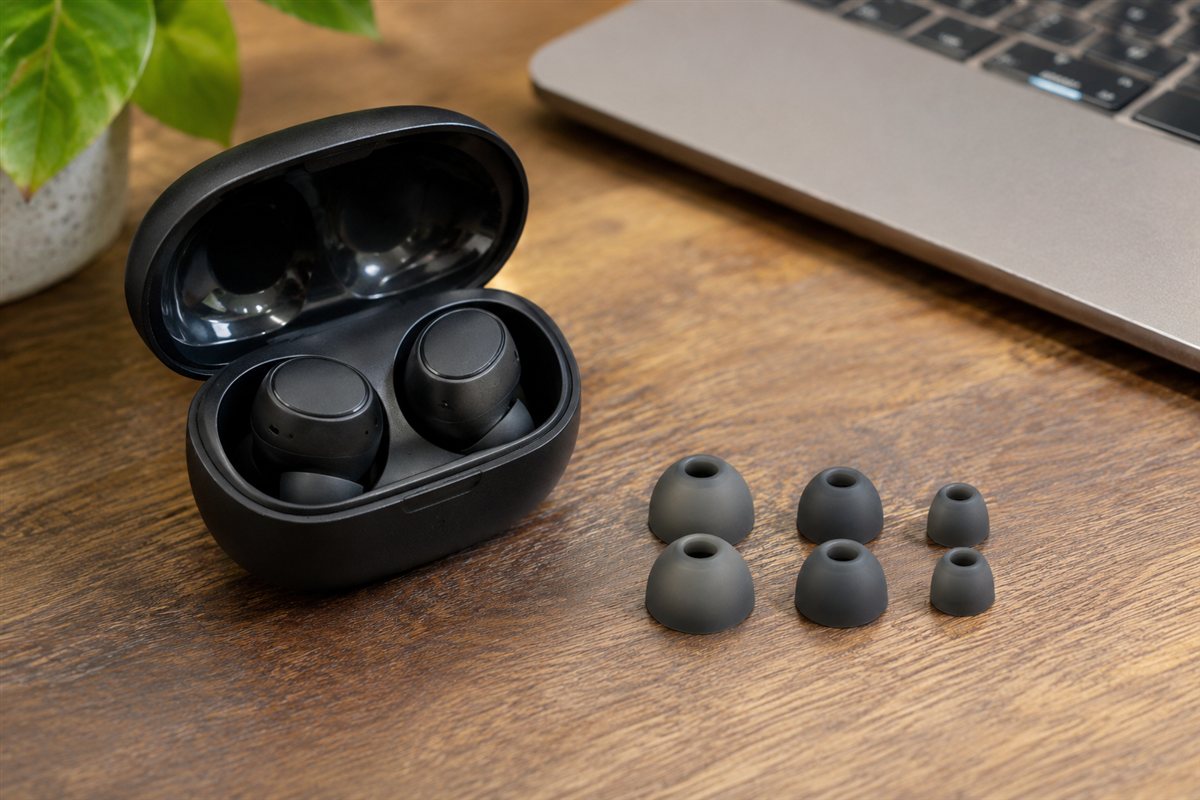
A good seal does more for sound than most specification lines. When the tip closes off the ear canal, bass sounds fuller, noise cancelling has less to fight, and the buds sit more securely. When the seal is loose, music can sound thin and the noise control works harder for less result. That is why the picks in this guide list their tip sizes, from three in the Samsung box to five in the Soundcore box.
To test a seal, play music with some low notes, then gently press the bud into place and notice whether the sound deepens. If it does, the tip is likely too small. If the bud feels like it is pushing outward or causes a dull ache after an hour, it may be too large. Many people need different sizes in each ear, which is normal, so do not assume both sides match.
- Insert the bud with a slight twist, aiming the nozzle toward the ear canal rather than straight in.
- Try the middle size first, then move up or down based on comfort and sound.
- Silicone and foam tips feel different. Foam tends to conform to the ear and can grip better, while silicone is easier to wipe clean. Check which material your pick includes.
- Shake your head gently and chew a little. If the buds shift, try another size or a different angle.
If none of the included sizes feels right, look at the maker’s page for replacement tips that match your model. Avoid forcing a tip from another brand onto a charging case design that depends on exact tip height, because the lid may not close properly.
Bluetooth Codecs and What Your Phone Supports
A codec is the method used to compress audio before it travels over Bluetooth. Both devices must support the same codec for it to be used. If your phone does not support a higher-quality option, it falls back to the standard one that every Bluetooth earbud handles, and the buds still work fine. That is why a codec claim on a box should be read as potential, not a guarantee.
The picks show how this plays out. Sony lists LDAC, and the Soundcore Space A40 also lists LDAC on compatible Android phones. The Samsung Galaxy Buds2 Pro use Samsung’s Seamless Codec, which the post says works on compatible Galaxy devices. Apple’s buds rely on Apple’s own tuning and the H2 chip within the Apple ecosystem. In each case, the benefit depends on the source device.
Here are practical checks before you rely on a codec.
- Open your phone’s Bluetooth settings or developer options and look for the codec currently in use, if your phone shows it.
- Check the phone maker’s page for supported codecs.
- Remember that streaming service quality settings and the source file also limit what you hear.
- Higher-bitrate codecs can use more battery and may be more sensitive to interference in crowded places.
Also look at the Bluetooth version listed, such as the 5.3 mentioned for the Jabra Elite 8 Active. A newer version can help with connection stability and multipoint, but it is the full feature set, not the number alone, that matters. If you mostly stream music over a cellular connection on a commute, the difference between codecs may be smaller than the difference a good seal makes.
Noise Cancelling Versus Transparency Mode
Active noise cancelling uses microphones to pick up outside sound and generate a counter signal that reduces it. It works best on steady, low sounds such as engine hum, air conditioning, or a train carriage. It is less effective on sudden, sharp sounds like voices or clattering dishes. Passive isolation, which comes from the tip seal, handles part of the job before any electronics are involved.
Transparency mode does the opposite. It uses the same microphones to pass outside sound in, so you can hear announcements, traffic, or a colleague without taking the buds out. Apple describes Adaptive Audio as blending the two as your surroundings change, and Anker describes its noise cancelling as adjusting automatically. These automatic modes are handy, but check whether you can lock a setting if the switching bothers you.
Some points worth weighing:
- Noise cancelling draws battery, which is why makers such as Samsung and Jabra give separate hour figures with it on.
- Some people notice a pressure or fullness sensation with strong cancelling. If that bothers you, look for adjustable levels.
- Wind can cause rushing sounds on outdoor walks or bike rides. Cancelling is rarely tuned for that, so transparency or off may sound better.
- Safety matters. Runners and cyclists should keep awareness of traffic, which makes transparency a better choice outdoors.
Percentages in marketing, such as the up to 98 percent figure Anker gives, are maker claims about a specific measurement setup. Use them as a rough guide to intent, and read the product page for how the figure is defined before comparing it with another maker’s number.
Reading Battery Figures and Case Design
Battery claims in the picks come in two parts: hours per charge from the buds, and total hours including the case. The Apple, Sony, Samsung, Jabra and Soundcore listings each follow this pattern. Per-charge hours matter for long flights or work days, while case totals matter if you rarely plug in. Notice also that figures often differ with noise cancelling on or off, so compare like for like.
Real use tends to land below the best number on the box because volume, codec, noise control and temperature all affect it. A fair approach is to treat the listed figure as a ceiling and plan around a shorter day. Batteries in small earbuds also lose capacity over time, so a pair that lasts all day when new may need a top-up in the case after a couple of years.
The case deserves as much attention as the buds.
- Check how the case charges: USB-C, wireless, or both. The Apple case in this guide uses USB-C, and the Soundcore case supports wireless charging.
- Check size. A bulky case can be a nuisance in a small pocket.
- Look at the lid and hinge design. A firm closing action keeps the buds from rattling out in a bag.
- See whether the case has an indicator light or app display, which saves guessing about remaining charge.
- Check whether a quick top-up is offered. Many makers describe a short charge that gives an hour or more of playback, but confirm the exact claim on the listing.
If you tend to lose small items, a case with a lanyard loop or a finder feature can help, but only if your phone ecosystem supports it.
Calls, Microphones and Meeting Use
Earbuds are small, so microphones sit very close to your mouth only in a limited way. Call quality depends on how many microphones the buds have, how they handle wind, and how well the software separates your voice from the background. The Jabra Elite 8 Active lists six microphones, which suggests attention to call clarity, but the real result still varies with your environment and phone.
If calls are a priority, look for these points on the listing:
- The number of microphones and whether the maker mentions voice pickup or wind reduction.
- Multipoint support, which lets you stay connected to a phone and laptop, such as the setup Sony describes. This helps when a call comes in while you are on a video meeting.
- Whether a voice assistant is built in, such as the Alexa and Google Assistant support listed for the Sony buds.
- Whether you can hear your own voice through the buds, often called sidetone, which helps you avoid speaking too loudly.
Practical habits help as much as hardware. Make sure the buds are seated well, since a loose bud can shift the microphone away from your mouth. Test a call with a friend before an important meeting, and ask how you sound in a quiet room and a noisy one. If your work involves many calls, a pair with a stable connection and a replaceable fit matters more than extra sound features.
Multipoint can sometimes cause delays when switching between devices. If you notice odd behavior, try disabling it in the app and reconnecting to your main device only.
Water and Sweat Ratings Explained
The IP codes in this guide look similar but mean different things. The first digit covers dust and the second covers water. In the picks, Apple lists IP54 for the buds and case, Sony lists IPX4, Samsung lists IPX7 for the buds, Jabra lists IP68 for the buds and IP54 for the case, and Soundcore lists IPX4. An X means the maker did not rate that category, not that it failed.
What these ratings are generally meant to show is resistance under controlled lab conditions. IPX4 usually relates to splashes from any direction, which covers sweat and light rain. A higher second digit points to stronger protection against water, but the rating does not usually cover soap, chlorinated pool water, salt water, or hot steam, so check the manual. Ratings may also lessen with wear, drops and age.
A few care habits protect the investment:
- Dry the buds before putting them back in the case, since moisture on charging contacts can cause problems.
- Do not charge wet buds.
- Remember the case is often rated lower than the buds, or not rated at all, as the Samsung and Jabra entries show.
- After a hard workout, wipe the buds and let them air dry for a while.
Most warranties do not cover liquid damage in ways that surprise buyers, so read the terms. If you swim or shower with earbuds, check that the maker explicitly allows it for your model before doing so.
Questions to Ask Before You Buy and When to Replace
Before paying, run through a short list. Does my phone support the codec and extras the listing advertises? Are there enough tip sizes, and can I return them if the fit is wrong? How is the case charged, and will it fit my pocket? Is there an app with an equalizer and firmware updates? What does the warranty cover, and who honors it? The Jabra entry notes that the maker wound down its consumer earbud range, which is a good reminder to confirm warranty terms with the seller for any listing.
Budget tiers help narrow the field. Entry-level pairs usually give you the basics, such as decent battery life and an app, while mid-range pairs add stronger noise control and better microphones. Premium pairs add ecosystem integration, higher durability ratings, or more polished software. A higher tier is not always better for you, so match the tier to the features you will use.
Signs it is time to replace your earbuds include:
- Battery that drains much faster than when new, even after a full charge.
- One bud that is quieter, disconnects, or will not charge.
- A case that no longer holds a charge or keeps the buds from seating.
- Crackling that persists after cleaning and a reset.
- Firmware or app support that has ended for your model.
Before replacing, try cleaning the contacts, resetting the buds using the maker’s steps, and updating the firmware. If those fail and the pair is out of warranty, the cost of a replacement may be more sensible than a repair.
A Practical Decision Workflow Before You Buy
Most disappointing purchases in this category do not happen because the product itself is poor. They happen because the buyer skipped a short round of honest homework and ordered on a single headline feature. A wireless earbud has to fit a specific space, a specific routine and a specific set of habits, and those three things differ far more between households than any specification sheet suggests. The workflow below takes about fifteen minutes, needs nothing more than a tape measure, a notebook and your phone, and it will narrow the picks in this guide down to one or two clear candidates.
Start with the space, not the product. Measure the area where the earbud will live or be used, and write down the fixed obstacles as well: doors that swing through the space, sockets that are already spoken for, furniture that cannot move, and anything that generates heat, moisture or dust nearby. Photograph the space from two angles. It sounds excessive, but a photograph taken now will answer questions later that memory will not, especially once you are comparing dimensions on a product page late in the evening.
Next, write down the job in one sentence. Not a wish list, just the main job: what should be different the week after this arrives? Keep that sentence visible while you shop. Every feature you consider after that has to earn its place by serving that sentence. Features that do not serve it are not bargains; they are future clutter, extra cleaning, or settings you will scroll past for years without touching.
Then list your constraints honestly. Budget is only one of them. Time is another: how many minutes a week will you genuinely give to cleaning, charging, adjusting or maintaining this purchase? Storage is a third: where does it, and everything that comes with it, go when it is not in use? Noise tolerance, the patience of other people in the household, and any physical limits such as lifting weight or reaching height all belong on the same short list.
Only now open the product pages, and read them in a fixed order. First the dimensions and requirements, because a mismatch there ends the discussion. Second the controls and the everyday operating steps, because those are what you will live with daily. Third the care requirements, because they decide whether the product still pleases you in month six. Marketing language comes last, if at all. When two picks look identical, the one whose everyday steps are simpler almost always wins in real life.
Finally, do a short reality check against the picks above. The option labelled as the best overall choice earns that label by balancing the most common needs, which makes it the sensible default if your written job sentence sounds ordinary. The more specialised picks earn their place when your constraints list contains something unusual: a very small space, a very heavy workload, a strict noise limit, or a user with specific physical needs. If none of your constraints are unusual, resist paying extra for specialisation you will never call on.
Use Cases in Detail: Matching the Pick to the Situation
Abstract advice only goes so far, so it helps to walk through the situations buyers describe most often and see how the decision changes in each one. Read the scenarios below and find the one closest to your own household; the right choice usually becomes obvious once the situation is stated plainly.
A commuter on a noisy train
In this situation the priority is reliability under daily repetition. The earbud will be used when people are tired, rushed or distracted, so controls need to be forgiving and the basic setup needs to stay put without constant adjustment. Choose the pick whose everyday operation is described most simply in the reviews above, set it up once with care, and then leave the settings alone for the first week so you learn its normal behaviour before you start fine-tuning anything.
An office worker taking calls between tasks
Here the deciding factor is usually comfort over long stretches rather than peak performance in short bursts. Think about posture, reach, noise and heat over hours, not minutes. A wireless earbud that feels fine in a five-minute test can become irritating by the third hour, so weight the comments in this guide about sustained use more heavily than the headline features. It is also worth planning the surrounding details: lighting, seating, cable routes or storage within arm’s reach make as much difference as the product itself.
A runner training outdoors
When several people share the same earbud, the purchase has to survive handovers. Settings get changed, parts get moved, and nobody reads instructions twice. Favour the pick with the clearest controls and the fewest fragile accessories, agree one house rule for how it is left after use, and keep any small parts together in one labelled container. Shared use also raises the value of easy cleaning, because a product that is simple to wipe down or empty actually gets cleaned, while a fiddly one quietly gets worse.
A traveller on a long flight
This last situation rewards planning for the awkward moments rather than the average day. Think about the hottest, coldest, busiest or most tiring version of the routine, and choose the pick that still works then. Capacity, reach and durability matter more than refinements. It is also the situation where buying once, properly, beats buying cheaply twice: a earbud that struggles at the edges of its range tends to be replaced within a year, which costs more than starting with the stronger option would have done.
Comparing the Picks Head to Head
Comparison tables compress a lot of judgement into a few rows, which makes them useful starting points and poor finishing points. The paragraphs below slow the comparison down and look at each pick in this guide on its own terms, using only what the reviews above already establish. Work through them with your constraints list open, and cross picks off rather than ranking them: the right purchase is usually the last one standing, not the one with the longest feature list.
Apple AirPods Pro (2nd Generation) with USB-C Case. Its role in this guide — best for iphone users — tells you the job it was picked for, so judge it against that job rather than against every other pick at once. Re-read its section above with your written job sentence beside you, and note the one honest limitation mentioned there. If that limitation touches something you do every day, move on to the next pick; if it touches something you rarely do, it is a fair trade for the strengths the review describes.
Sony WF-1000XM5 (Silver). Its role in this guide — best noise cancelling and codecs — tells you the job it was picked for, so judge it against that job rather than against every other pick at once. Re-read its section above with your written job sentence beside you, and note the one honest limitation mentioned there. If that limitation touches something you do every day, move on to the next pick; if it touches something you rarely do, it is a fair trade for the strengths the review describes.
Samsung Galaxy Buds2 Pro (Graphite). Its role in this guide — best for samsung phones — tells you the job it was picked for, so judge it against that job rather than against every other pick at once. Re-read its section above with your written job sentence beside you, and note the one honest limitation mentioned there. If that limitation touches something you do every day, move on to the next pick; if it touches something you rarely do, it is a fair trade for the strengths the review describes.
Jabra Elite 8 Active (Dark Grey). Its role in this guide — best for workouts — tells you the job it was picked for, so judge it against that job rather than against every other pick at once. Re-read its section above with your written job sentence beside you, and note the one honest limitation mentioned there. If that limitation touches something you do every day, move on to the next pick; if it touches something you rarely do, it is a fair trade for the strengths the review describes.
Soundcore by Anker Space A40 (Black). Its role in this guide — best value — tells you the job it was picked for, so judge it against that job rather than against every other pick at once. Re-read its section above with your written job sentence beside you, and note the one honest limitation mentioned there. If that limitation touches something you do every day, move on to the next pick; if it touches something you rarely do, it is a fair trade for the strengths the review describes.
Two patterns are worth watching for as you compare. First, the gap between the best overall pick and the specialised picks is rarely about quality; it is about fit. A specialised pick is not a lesser product, it is a narrower one, brilliant inside its niche and merely adequate outside it. Second, accessories and extras sway decisions out of proportion to their value. Ask of every extra whether you would use it weekly. If the honest answer is monthly or never, let it go, and let the core performance, the controls and the care routine decide instead.
If you finish this comparison with two picks still standing, break the tie with ownership questions rather than performance questions. Which one will be easier to clean in your actual space? Which one’s controls will the other people in the household understand without asking you? Which one stores more neatly when it is not in use? Those unglamorous questions predict satisfaction six months from now far better than any single specification does.
Day-to-Day Use, Cleaning and a Simple Care Routine
The first week with a new earbud sets habits that tend to stick, so spend a little of that week deliberately. Run through the full operating cycle slowly once, from start to finish, while you are not in a hurry. Notice the order things have to happen in, where your hands naturally go, and which step feels awkward. Awkward steps are where mistakes and breakages concentrate later, so rearrange the surrounding space now, while changing it is still easy.
Build cleaning into the routine the product already has, rather than treating it as a separate chore. A quick wipe, shake, rinse or empty at the natural end of each use takes seconds and prevents the slow build-up that eventually needs a deep clean. Keep whatever you use for that quick job within arm’s reach of where the earbud lives; supplies stored in another room might as well be stored in another house, because the quick job simply stops happening.
A workable care schedule
After each use: return everything to its resting state, clear away residue, moisture or loose debris, and leave the earbud somewhere air can reach it if it needs to dry. Weekly: give the surfaces and contact points a proper clean with a soft cloth and mild cleaner suited to the material, check moving parts and connections for looseness, and deal with small issues while they are still small. Monthly: do the deeper job — the full wash, descaling, sharpening, re-tightening or inspection the manual describes — and look honestly at wear. Seasonally: review storage, replace anything consumable that has quietly expired or worn out, and reconsider placement if the household’s routine has changed.
Storage deserves the same thought as use. Keep the earbud dry, out of direct extremes of heat and cold, and away from the crush zone at the back of a cupboard or the bottom of a pile. Small parts belong in one container, labelled, stored with the main item rather than near it. If the original packaging includes shaped inserts that protect fragile parts, consider keeping it; flat-pack storage boxes look tidier but protect less.
When something goes wrong, troubleshoot in order of likelihood before assuming failure. Check power, connections and settings first, then positioning, then cleanliness, then wear. Most problems reported with products in this category trace back to one of those four, and most are fixed in minutes without tools or spare parts. Keep the manual, or a photo of its troubleshooting page, somewhere you can find it on a bad evening rather than at the bottom of a drawer.
More Mistakes That Shorten a Product’s Life
Beyond the mistakes covered earlier in this guide, a few quieter habits do most of the long-term damage. The first is running the earbud at its maximum setting as a default. Maximum settings exist for occasional peaks; used constantly, they raise noise, heat and wear while often delivering little extra benefit. Find the lowest setting that does the job properly and treat anything above it as a reserve.
The second is ignoring the environment. Dust, steam, direct sun, cramped airflow and unstable surfaces all age a wireless earbud faster than ordinary use does. You cannot always choose the environment, but you can usually improve it by a few centimetres: a small gap for air, a mat for stability, a move away from a heat source. Those tiny adjustments compound over years.
FAQ
Do I need noise cancelling?
It depends where you listen. In commutes or open offices it can reduce background sound, while in quiet places you may not use it. It also draws more battery, so weigh that.
What does an IP code mean?
It is a code from the maker describing resistance to dust and water. A higher second digit usually means more protection from water. Read what the maker covers before relying on it. Resistance usually applies to sweat and light splashes rather than full immersion, and it can fade with wear, so rinse nothing under a tap unless the maker clearly says that is fine.
Can I use just one earbud at a time?
Most modern earbuds allow single-bud use for calls or listening, but behavior varies by model. Check the manual to see which bud works alone and whether the other one still charges in the case.
Why does one earbud sometimes lose connection?
Interference, distance from the phone, or a low battery in one bud can cause it. Try resetting the pair using the maker's steps, update the firmware, and keep your phone on the same side of your body.
Is it safe to sleep in wireless earbuds?
Many people find standard earbuds uncomfortable lying on a pillow, and extended wear can irritate the ear. If you want to listen at night, look for models the maker describes as designed for sleep, and keep the volume low.
How loud is too loud?
A common guideline is to keep volume at a level where you can still hear nearby speech, and take breaks. Many phones have a hearing health setting that warns you when listening has been loud for a long time.
Do earbuds work with a laptop or TV?
They pair with any device that supports Bluetooth, but features such as codecs and multipoint depend on both sides. Some TVs have audio delay, so check whether the TV offers a low-latency option.
How often should I clean my earbuds?
A quick wipe after heavy use and a gentler cleaning of the mesh and tips every week or two works for most people. Use a dry, soft cloth, and follow the maker's care notes rather than liquids unless they say it is fine.
What should I do if I lose one bud?
Check whether your phone ecosystem offers a find feature, since some makers support location alerts. If the bud is gone, ask the maker or seller whether single replacements are sold for your model, as some do not offer them.
Can I replace the ear tips myself?
Yes, tips are made to be swapped and usually press or twist on. Use the sizes the maker supplies, and make sure the case still closes properly with the new tips.
How long should a wireless earbud realistically last?
Longevity depends far more on routine care and a suitable environment than on the badge on the front. A earbud that is cleaned on the simple schedule described in this guide, stored dry and used within the job it was bought for will normally serve for years of regular household use. The earliest signs that replacement is approaching are usually a slow decline in performance, controls or fittings becoming loose or unreliable, and replacement parts getting hard to find. When two of those three appear together, start planning a replacement rather than spending on repairs.
Is it worth paying more for the top pick in this guide?
Only if the extra money buys something your own constraints list actually asks for. The top pick earns its place by balancing the needs most buyers share, which makes it the safest choice for an ordinary household. Paying more for a specialised model makes sense when your situation is genuinely specialised — an unusually large or small space, a much heavier workload than average, or a user with specific needs. If your written job sentence sounds like most people’s, the balanced pick will satisfy you, and the saving is better kept for the accessories or consumables you will genuinely use.
What should I check in the first week of ownership?
Check fit, controls and routine, in that order. Confirm the earbud sits, fits or operates in your space exactly as you measured it, and that doors, sockets and neighbouring items still work as they should. Run every control once so nothing is a surprise later. Then watch your own routine: note anything you keep working around, because small rearrangements made in week one are easy, while workarounds left for a month become permanent habits. Keep packaging until the end of that first week in case an exchange is needed.
How do I know whether to repair or replace?
Compare three things: the cost of the repair against the remaining life you would get from it, the availability of the correct parts, and whether the fault is isolated or part of a general decline. A single failed part on an otherwise sound earbud is usually worth repairing. Repeated faults, declining performance and worn fittings arriving together signal that the product is wearing out as a whole, and money spent on one repair tends to be followed by another. Safety always overrides the calculation: anything electrical, load-bearing or heat-related that behaves unpredictably should be taken out of use until it is checked.
Can I use a earbud for jobs beyond what it was bought for?
Sometimes, cautiously, and only within the limits the manual describes. Products in this category are designed and tested around a particular job, load and environment. Occasional light use outside that pattern is unlikely to cause harm, but making an unsuitable job part of the regular routine accelerates wear and can create safety risks the design never anticipated. If a new job has become a regular part of your household’s life, that is a sign to look at a product designed for it, rather than asking the current one to stretch further every week.
What is the single most useful habit for getting value from this purchase?
The end-of-use reset. Returning the earbud to a clean, dry, ready state every time you finish with it takes under a minute and does more for long-term satisfaction than any other habit. It prevents build-up, reveals small problems while they are still trivial, means the product is always ready when the next person reaches for it, and quietly extends its working life. Most products that disappoint early were not badly made; they were badly reset, day after day, until small neglects added up.
The Short Version
Put fit and comfort first, then match Bluetooth features to your phone and check battery hours. Choose the noise control and case design that suit your routine, and read the maker’s care notes. List the situations where you will use them, such as commuting, calls, or workouts, and weigh each feature against that list. Spare ear tips, a short charging cable, and a quick look at the return terms for hygiene items are practical extras to confirm.
Related Guides
- How to Choose the Best Noise Cancelling Earbuds: A Buyer's Guide
- How to Choose the Best Wireless Alarm Systems: A Buyer's Guide
- How to Choose the Best Wireless Dmx Systems: A Buyer's Guide
- How to Choose the Best Wireless Ergonomic Mice: A Buyer's Guide
- 6 Best Wireless Doorbell Chimes: Plug-In and Battery (2026)