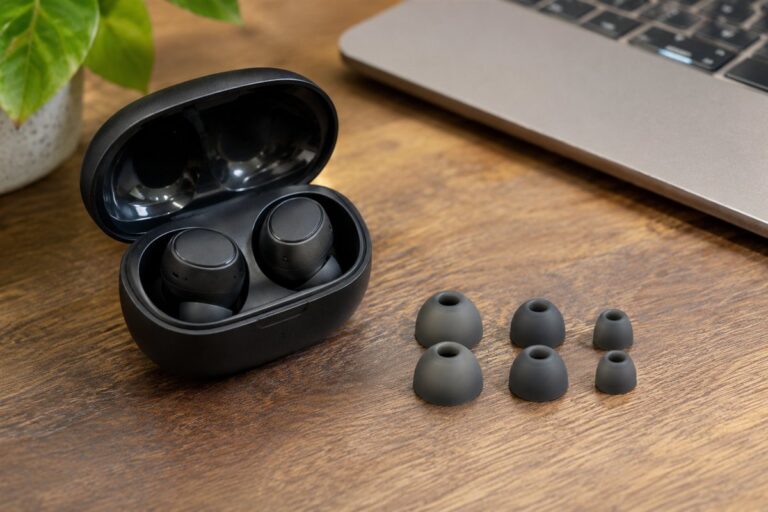
Noise cancelling earbuds use small microphones to reduce steady background sound such as engine hum, so music and calls come through more clearly. We have not used these products ourselves, so this guide does not rank anything. It shows you how to compare fit, battery and features so you can choose a pair that suits your day.
Begin with fit, because a good seal helps both comfort and sound. Ear tips come in several sizes, and some earbuds use wings or hooks for hold. Next, think about where you will wear them, such as on a commute, at a desk or at the gym. Makers describe noise cancelling strength in their own terms, so read those figures as claims and look at the modes on offer, including a transparency mode for hearing your surroundings. Check battery life for both the earbuds and the case, the charging method, and the codecs your phone supports. Controls matter too, so see whether you prefer touch, buttons or voice. A short note of your daily routine will make the table below easier to apply.
As an Amazon Associate we earn from qualifying purchases. Links on this site are affiliate links, and they do not change the information we give.
In this guide
Quick Picks
| Pick | Product | Best For |
|---|---|---|
| 1 | Sony WF-1000XM5 | Best Overall |
| 2 | Bose QuietComfort Ultra Earbuds (2nd Gen) | Best Noise Cancelling |
| 3 | Apple AirPods Pro (2nd Generation) with USB-C | Best for iPhone Users |
| 4 | Samsung Galaxy Buds2 Pro | Best for Galaxy Phones and Workouts |
| 5 | Soundcore Liberty 4 NC by Anker | Best Value |
Our Picks

1. Sony WF-1000XM5 — Best Overall
Sony’s flagship earbuds pair two proprietary processors with dual feedback microphones, so the cancelling adapts as your surroundings change, and the foam Noise Isolation ear tips come in four sizes (XS to L) to help you get the seal the guide above stresses. The 8.4mm Dynamic Driver X supports LDAC and DSEE Extreme for higher-quality streaming from compatible phones, and six microphones with AI-based noise reduction are aimed at clearer calls. Sony rates battery life at up to 8 hours per charge and 24 hours with the case, a 3-minute top-up adds about an hour, and the case supports wireless charging. Bluetooth 5.3 multipoint lets you stay connected to a laptop and phone at once, touch controls and the Sound Connect app handle settings, and the IPX4 rating shrugs off light rain and workout sweat.
View Sony WF-1000XM5 on Amazon
2. Bose QuietComfort Ultra Earbuds (2nd Gen) — Best Noise Cancelling
If silencing the commute is the priority, Bose builds these around what it calls world-class active noise cancellation, with CustomTune technology that calibrates the sound and cancelling to your ears each time you put them in. Bose Immersive Audio adds a spatial effect that makes music feel less locked inside your head, and an Aware mode lets outside sound back in when you need to hear an announcement or traffic. Fit gets unusual attention: the box includes multiple ear tip sizes plus stability bands, which helps the buds stay put without constant adjusting. Bose rates up to 6 hours of listening per charge, the USB-C case adds further charges on the go, and the IPX4 rating covers splashes and sweat. Touch controls and the Bose app manage modes and shortcuts, making this the set for travellers who put quiet first.
View Bose QuietComfort Ultra Earbuds (2nd Gen) on Amazon

3. Apple AirPods Pro (2nd Generation) with USB-C — Best for iPhone Users
Built around Apple’s H2 chip, this version of AirPods Pro offers up to twice the active noise cancelling of the original model, plus Adaptive Transparency that reduces harsh environmental noise while still letting you hear what matters. Personalized Spatial Audio uses the shape of your ears, and the silicone tips come in four sizes (XS, S, M, L) so you can follow the guide’s advice and test for a proper seal. Apple rates up to 6 hours of listening per charge and up to 30 hours with the MagSafe charging case, which has USB-C, a speaker for Find My alerts and a lanyard loop. Touch controls on the stems adjust volume with a swipe, dust and sweat resistance is rated IP54, and features like Conversation Awareness and the hearing health tools are aimed squarely at people already using an iPhone.
View Apple AirPods Pro (2nd Generation) with USB-C on Amazon
4. Samsung Galaxy Buds2 Pro — Best for Galaxy Phones and Workouts
Samsung’s Buds2 Pro are noticeably small and light for flagship earbuds, which suits the all-day comfort the guide recommends checking, and the maker rates them IPX7 water resistant, the strongest rating among these picks, so gym sessions and rainy runs are less of a worry. The two-way speaker design handles the hi-fi 24-bit audio Samsung offers with its own phones, intelligent active noise cancelling uses three microphones to cut background sound, and an ambient mode passes your surroundings through when you need them. Voice Detect can lower your music and switch to ambient sound when you start a conversation, which is handy at a desk or a coffee counter. Wireless charging, wear detection and the Galaxy Wearable app round out a package that makes most sense if your phone is a Galaxy, though the core features work over standard Bluetooth with other Android phones.
View Samsung Galaxy Buds2 Pro on Amazon

5. Soundcore Liberty 4 NC by Anker — Best Value
The Liberty 4 NC is the budget-friendly route into adaptive cancelling: Soundcore’s Adaptive ANC 2.0 system uses an in-ear sensor and an oversized 11mm driver, and the maker claims it can reduce noise by up to 98.5 percent, adjusting to your ears and environment in real time. Battery life is the headline here, rated at up to 10 hours per charge and 50 hours with the case with cancelling off, or 8 and 40 hours with it on, and a 10-minute charge adds about 4 hours. Six beamforming microphones with an AI algorithm handle calls, Bluetooth 5.3 supports multipoint connection, and the case charges wirelessly. Hi-Res Audio with LDAC is supported on compatible Android phones, controls and EQ live in the Soundcore app, and an IPX4 rating covers rain and spills, making this a strong pick for long travel days on a budget.
View Soundcore Liberty 4 NC by Anker on Amazon
What to Look For
| Factor | Why it matters | What to check |
|---|---|---|
| Fit and tips | A good seal helps comfort and sound quality. | Look at the tip sizes, shape and any wing or hook options. |
| Noise cancelling modes | Different places need different levels of filtering. | Read about adjustable levels and transparency mode. |
| Battery and case | It sets how long you can listen between charges. | Compare stated hours for earbuds and case, and the charge port. |
| Call quality | Microphones decide how clear you sound to others. | Check the number of microphones and wind handling notes. |
| Controls and app | Easy controls help when your hands are busy. | Compare touch or button layout and app settings. |
| Connection | It affects pairing, range and device switching. | Check the Bluetooth version and multipoint support. |
Setup and Care Tips
- Try each ear tip size and keep the one that feels comfortable and seals well.
- Pair them with your phone and update the firmware through the app.
- Keep the volume at a level that suits you in quiet places.
- Wipe the tips and mesh gently with a dry, soft cloth.
- Keep the earbuds in their case when you are not using them.
Mistakes to Avoid
- Choosing earbuds without checking the tip sizes.
- Expecting noise cancelling to remove all sound.
- Ignoring battery hours when you travel a lot.
- Skipping the app and missing useful settings.
- Wearing earbuds in situations where you need to hear your surroundings.
How do noise cancelling earbuds work, and where do they help most?
Noise cancelling earbuds use microphones to pick up steady outside sound and play an opposing signal to reduce it. They work best on constant, low sounds such as engine hum, air conditioning or a train ride.
The fit also does part of the job. A good seal with the ear tips blocks some sound physically, so the electronics have less to cancel. That is why trying different tip sizes matters as much as the cancelling mode.
Different places call for different strengths:
- Commutes and flights: steady rumble is where cancelling is most noticeable.
- Open offices: it can soften background chatter and keyboard noise, though sudden voices usually still come through.
- Busy streets: a transparency or ambient mode is safer, because you need to hear traffic and announcements.
- Workouts: check the water and sweat resistance rating, and how the buds stay in place.
Some people find strong cancelling feels strange at first, like pressure in the ear. If that bothers you, look for adjustable levels in the app so you can find a comfortable setting.
Cancelling is not the same as soundproofing. Sudden noises such as a door slam or a nearby voice still reach you, which is a safety feature as much as a limitation when you are out walking.
Wind can also affect microphones outdoors. If you walk or cycle a lot, look at what the maker says about wind handling, and treat claims as claims rather than guarantees.
Which noise cancelling earbuds should you buy?
The best noise cancelling earbuds for you depend on your phone, your commute and your budget. Each pair named in this guide suits a different buyer.
- If you want a strong all-rounder for Android and laptops: go for the Sony WF-1000XM5. It offers multipoint connection and wireless charging.
- If quiet is your top priority: choose the Bose QuietComfort Ultra Earbuds (2nd Gen). It is built around noise cancelling and ships with several fit options.
- If you use an iPhone: look at the Apple AirPods Pro (2nd Generation) with USB-C. It is designed to work closely with Apple devices.
- If you carry a Galaxy phone or train often: consider the Samsung Galaxy Buds2 Pro. It is small and light and has a high water resistance rating.
- If you want long battery life on a tighter budget: pick the Soundcore Liberty 4 NC by Anker. It is the value choice with a long rated battery life.
Consider your habits too. Frequent callers should look closely at microphone design, travellers at battery and case size, and gym users at the fit and water resistance. Matching the pair to your top use is more reliable than chasing the longest feature list.
Think about your phone first. Features such as certain codecs or hearing tools can depend on the device, so a pair that is brilliant on one phone can feel average on another.
The buttons above open the current listings, where you can check colors, what is in the box and compatibility notes.
How do fit, codecs and battery life affect noise cancelling earbuds?
Fit, codec support and battery life shape how good noise cancelling earbuds feel in everyday use. A pair that seals well and lasts your whole day will beat one with a longer feature list that sits badly in your ear.
Start with fit. Try every ear tip size, press the buds gently into place and check that the seal holds when you move your jaw. Foam, silicone and stability bands each feel different, so choose what is comfortable for hours.
Codecs are the ways audio is compressed over Bluetooth. Both the earbuds and your phone must support the same codec to use it, so a high-quality codec is useful only if your device offers it. If you listen casually, this matters less than comfort and cancelling.
- Battery in the buds: decides how long you can listen before returning them to the case.
- Battery in the case: adds extra charges, which matters for travel and long days.
- Cancelling on or off: makers often rate battery life differently for each, so read both figures.
- Quick charge: a short top-up can rescue a day when you forget to charge.
Batteries wear over time, so heavy daily use may shorten how long the buds last between charges after a year or two. Keep the case and buds dry and avoid leaving them in a hot car.
What to check before you buy noise cancelling earbuds
Before you buy noise cancelling earbuds, check fit, compatibility, battery and the terms around returns. Earbuds are personal, so a careful checklist matters.
- Ear tips: confirm the sizes included and whether extras are available.
- Phone compatibility: check the codecs, app availability and any features that depend on a specific brand of phone.
- Battery: compare the stated hours for the buds and the case, with cancelling on and off.
- Charging: check the port type and whether wireless charging needs a pad you already own.
- Water resistance: read the rating and what the maker says it covers, and keep in mind that it is not a licence to swim.
- Call quality: look at the microphone setup and how the maker describes wind handling.
- Controls: decide whether you prefer touch, buttons or voice, and whether the controls can be customized in the app.
- Warranty and returns: read the terms on the listing, because in-ear items may have special return conditions.
When the pair arrives, test the fit for a full session before you decide. Update the firmware through the app, set your preferred modes, and check that both buds connect cleanly.
Hygiene matters with anything worn in the ear. Wipe the tips and mesh gently with a dry, soft cloth, avoid pushing sharp tools into the mesh, and check whether replacement tips are sold if the originals wear out.
Keep the box and tips until you are sure, in case you need to exchange or return the pair.
Are noise cancelling earbuds worth the extra cost, and who should skip them?
Noise cancelling earbuds are worth it if you regularly face steady background noise, and they are less useful if you mostly listen somewhere quiet. Weigh the trade-offs honestly before you decide.
- “Is it worth paying more for a premium pair?” It can be, if you value stronger cancelling, better call quality and extra features. A value pair may cover the basics well for casual listening.
- “What are the downsides?” Cancelling cannot remove every sound, batteries wear down, and the small case can be easy to lose.
- “Are they safe to wear outdoors?” Use transparency mode and keep the volume reasonable so you can hear traffic and announcements.
- “Do I need the app?” Not always, but the app often unlocks equalizer settings, firmware updates and mode controls.
Signs it is time to replace a pair include a battery that no longer lasts your usual journey, a case that fails to hold a charge, or cancelling that has become uneven between the two buds. Check the maker’s support notes before you give up, as a firmware update or a cleaning can sometimes help.
Who should skip them? People who dislike anything in the ear canal may prefer over-ear headphones. If you need to hear your surroundings all day, an open design could suit you better.
Compare the picks above, check the current listing for fit options and phone compatibility, then choose the pair that fits how and where you listen.
Choosing Noise Cancelling Earbuds: The Criteria That Matter Most in Real Life
The reviews above score each pick against its strengths, but your decision will be easier if you first decide how much each criterion matters to you. This section takes the main buying factors for noise cancelling earbudss one at a time and explains how to judge them against your own routine, space and budget habits, without any reference to headline claims. Read it with your situation in mind rather than looking for a universal winner, because the same feature can be essential for one household and pointless for another.
Fit and seal above all
Noise cancelling starts with the seal in your ear canal. Tip sizes, earbud shape and how securely they sit decide both comfort and how much cancelling can achieve. A useful habit is to rank this criterion against your top three priorities before you look at any product names. Once you know whether it is essential, nice to have, or irrelevant for your situation, the shortlist in this guide becomes much easier to read. Buyers who skip this step often end up paying for capability they never use, or saving money on the one feature they needed every single day. Neither mistake is obvious until the item is already in regular use.
What the cancelling is good at
Active cancelling excels at steady, low noise like engines and air conditioning, and does much less with voices and sudden sounds. Match expectations to your noisiest environment. In practice, the sensible way to judge this is to picture your own routine rather than a showroom demonstration: how often the item will be used, where it will live, and who else will rely on it. Shoppers often treat this point as a minor detail and only notice it after the first week of ownership, when changing your mind has become awkward. Weigh it against the other criteria in this guide instead of chasing one headline feature, and be honest about which compromises you will actually feel from day to day.
Battery pattern, not just totals
Think in terms of a day: how long the buds run, how fast the case restores them, and whether a short top-up covers a commute when you forget to charge. It helps to test this against a realistic week rather than a best-case day. Think about the busiest, messiest version of your routine and ask whether the choice still makes sense then. If two options look similar on paper, this is often the factor that separates the one you keep enjoying from the one you work around. Jot down your answer before you order, because it is much easier to compare honestly on paper than from memory once boxes start arriving.
Call quality and controls
Microphones that cope with wind and traffic decide whether calls are practical outdoors, and controls you can operate without looking decide whether features get used at all. Do not judge this in isolation. It interacts with almost everything else in this guide: a stronger showing here can excuse a weakness elsewhere, while a poor fit here can undermine an otherwise excellent choice. If you are buying for a household or a shared space, ask the other people involved what they expect, because mismatched expectations are a common reason a good product ends up returned. A few minutes spent on this question now saves the cost and hassle of exchanging later.
Sound character and app support
Tuning differs between brands, and an equaliser in the app lets you adjust it. Check codec and feature support for your phone rather than assuming everything carries over. A useful habit is to rank this criterion against your top three priorities before you look at any product names. Once you know whether it is essential, nice to have, or irrelevant for your situation, the shortlist in this guide becomes much easier to read. Buyers who skip this step often end up paying for capability they never use, or saving money on the one feature they needed every single day. Neither mistake is obvious until the item is already in regular use.
Noise Cancelling Earbuds in Practice: Matching the Pick to Your Situation
Most disappointment with noise cancelling earbudss comes not from buying a bad product but from buying a good product for the wrong situation. The scenarios below describe the situations readers most often describe, and what each one demands. Find the scenario closest to your life and let it steer which of the picks above deserves your closest attention, because a pick described as ideal for one use may be an awkward fit for another, however well it is made.
Commuting by train or bus
Steady vehicle drone is exactly what cancelling handles best, and a secure fit matters when you are jostled, so prioritise seal and stability over extras. Frequency changes the maths here. Something used once a season can be stored awkwardly and set up slowly, while something used every week needs to earn its place in your routine. If this scenario sounds like your main use, weight durability and upkeep more heavily than occasional-use buyers need to, and read the care section below before deciding. A product that is slightly less exciting but far easier to live with usually wins after the first month of ownership.
Open-plan office work
Cancelling softens the background wash of an office but will not erase a nearby conversation, so pair realistic expectations with comfortable all-day fit. For this kind of use, reliability and ease matter more than exotic features. Set the item up the way you would on an ordinary day, not for a special occasion, and notice how much preparation and tidying the routine really involves. If a setup only works when everything goes perfectly, it will frustrate you in real life. The picks in this guide that suit this scenario are the ones whose strengths match the routine, which is why the per-product notes above describe who each model suits rather than declaring one winner for everyone.
Frequent flying
Long battery stretches, comfort under a headrest pillow and strong low-frequency cancelling matter most, along with a case that survives being stuffed into a seat pocket. The detail that usually decides satisfaction here is not the headline feature but the small friction points: how long setup takes, how much space the routine needs, and how easy it is to put everything away afterwards. Walk through the scenario step by step before you buy and check each stage against the product descriptions above. Where a stage looks awkward, look for the pick in this guide that was designed with that stage in mind, because that match is worth more than a longer feature list.
Getting Started: Setup and First-Use Guide
How a noise cancelling earbuds is set up and used in its first week shapes how it performs for years. The steps below follow the order experienced owners recommend, from preparation to the habits that keep everything working as intended. None of them requires special skill, and together they prevent the majority of the problems described later in this guide. Keep the manufacturer’s instructions beside you as you work through them, because model-specific details always override general guidance.
Step 1: Test every tip size properly
Spend ten minutes comparing tip sizes in both ears, which may differ, and judge by seal and stability while walking and talking, not by sitting still. Before you move on, run one complete, gentle test cycle and watch and listen as it works. Note anything that looks, sounds or feels different from the manual’s description while the details are fresh, and photograph the setup with your phone. That photo becomes a handy reference later when you are trying to remember how things were arranged, which way a part faced, or where a cable or connector originally sat.
Step 2: Set up the app and firmware once
Pair carefully, update firmware, then set your preferred controls, transparency behaviour and equaliser so daily use is a single tap rather than a menu hunt. Take your time with this stage even if it looks simple. Most early problems trace back to a rushed first setup rather than a faulty product, and ten careful minutes now prevent a string of small annoyances later. Keep the manual open beside you, work on a clean surface with good light, and check each part against the parts list before you start, so a missing piece is discovered before you need it rather than halfway through.
Step 3: Learn the noise controls by touch
Practise switching between cancelling, transparency and off without looking, because on a platform or in a meeting you will not want to open an app. If anything feels forced at this point, stop and re-read the instructions instead of pushing harder. Parts that are aligned correctly generally fit together with modest pressure, and forcing a connection is how clips snap, threads cross and seals end up seated badly. It is also worth keeping packaging and paperwork until the item has survived its first few uses, in case you need to exchange it or claim on the warranty.
Step 4: Balance volume honestly
Cancelling lets you listen quieter in loud places, which protects your hearing; resist undoing that benefit by turning everything up anyway. This is a good moment to involve anyone else who will use the item regularly. A two-minute walkthrough now avoids the situation where one person uses it incorrectly for months because nobody showed them the basics. Agree on where accessories and spares will live, because a surprising amount of frustration with any household product is really just hunting for a part that was put away in a different place each time.
Care, Cleaning and Storage: Keeping Your Choice at Its Best
Ownership costs are mostly decided by care habits rather than purchase decisions. A noise cancelling earbuds that is cleaned on a routine, stored sensibly and checked occasionally will outlast a neglected premium model almost every time. The guidance below is deliberately realistic: short, regular jobs that fit around normal life, rather than heroic annual efforts that nobody sustains. Adapt the rhythm to how often you actually use the item, and increase frequency during heavy-use seasons.
Clean tips and contacts regularly
Earwax and pocket lint degrade seal and charging. Wipe tips and case contacts with a dry cloth and clear mesh gently with a soft brush. Once a season, do a slightly deeper check: look for cracks, corrosion, fraying, looseness or discolouration, test every control and moving part, and replace anything consumable that has passed its best. Write the date on a note kept with the item so you know when you last did this. Products that get this modest level of attention routinely outlast identical products that are only looked at when something goes wrong, and they stay pleasanter and safer to use throughout their life.
Keep them dry and sweat-aware
Dry buds before casing them after workouts, and never charge a damp case, because moisture at the contacts is a common cause of charging faults. Build this into a routine rather than treating it as an occasional rescue job. Small, regular attention takes minutes and prevents the slow build-up that eventually needs scrubbing, soaking or professional help. Set a reminder based on how often you actually use the item, not on an idealised schedule, and keep the few supplies you need stored with it so the job never starts with a search through cupboards. If more than one person uses the item, agree on who does what, or the task will silently belong to nobody.
Store them in the case, always
Loose buds in pockets get crushed, lost and coated in lint. The case is their home, their charger and their protection in one. Always let things cool, dry or settle as the manual directs before you start, and never use abrasive tools or harsh chemicals on surfaces they were not made for. Work in good light so you can actually see residue, wear or damage, and inspect moving parts, seals and connection points while everything is apart. Catching a worn or loose part during a routine clean is far cheaper and safer than discovering it mid-use, and it gives you time to order the right replacement instead of improvising.
How the Picks in This Guide Compare
With the criteria and scenarios above in mind, the shortlist can be read more usefully as a set of different answers rather than a league table. Each pick below is summarised by the role this guide assigned it, so you can match roles to your situation. Where two picks seem close, the deciding factor is usually one of the criteria in the first section of this expansion: the one you ranked highest should break the tie.
Sony WF-1000XM5
This guide positions the Sony WF-1000XM5 as best Overall. That positioning reflects where its design choices concentrate: it is the pick to examine first if that role matches the scenario you identified as yours. It also implies a trade-off, because design effort spent on its strength is effort not spent elsewhere, so check the criteria you ranked highest against the full review above before deciding. Readers whose priorities differ will often be happier with a different pick from this same list, which is precisely why the guide offers several rather than one.
Bose QuietComfort Ultra Earbuds (2nd Gen)
This guide positions the Bose QuietComfort Ultra Earbuds (2nd Gen) as best Noise Cancelling. That positioning reflects where its design choices concentrate: it is the pick to examine first if that role matches the scenario you identified as yours. It also implies a trade-off, because design effort spent on its strength is effort not spent elsewhere, so check the criteria you ranked highest against the full review above before deciding. Readers whose priorities differ will often be happier with a different pick from this same list, which is precisely why the guide offers several rather than one.
Apple AirPods Pro (2nd Generation) with USB-C
This guide positions the Apple AirPods Pro (2nd Generation) with USB-C as best for iPhone Users. That positioning reflects where its design choices concentrate: it is the pick to examine first if that role matches the scenario you identified as yours. It also implies a trade-off, because design effort spent on its strength is effort not spent elsewhere, so check the criteria you ranked highest against the full review above before deciding. Readers whose priorities differ will often be happier with a different pick from this same list, which is precisely why the guide offers several rather than one.
Samsung Galaxy Buds2 Pro
This guide positions the Samsung Galaxy Buds2 Pro as best for Galaxy Phones and Workouts. That positioning reflects where its design choices concentrate: it is the pick to examine first if that role matches the scenario you identified as yours. It also implies a trade-off, because design effort spent on its strength is effort not spent elsewhere, so check the criteria you ranked highest against the full review above before deciding. Readers whose priorities differ will often be happier with a different pick from this same list, which is precisely why the guide offers several rather than one.
A final way to decide is to imagine the second month of ownership rather than the first day. Novelty fades, routines remain, and the noise cancelling earbuds that fits your routine, your space and your care habits is the one still earning its place when the excitement has gone. If you are torn between two picks, choose the one whose weaknesses fall on criteria you care about least, and whose strengths meet you every single day.
Common Problems and How to Solve Them
Even a well-chosen noise cancelling earbuds will misbehave occasionally, and most common problems have ordinary causes that are cheap to fix. The entries below follow the same pattern: what you will notice, what usually causes it, and what to do first. Work through the simple checks before assuming anything is broken, and stop using the item and seek professional help whenever safety could be involved.
Problem: Cancelling seems weak on one side
A poor seal on that ear is the usual cause. Reseat the bud, try a different tip size for that ear, and clean the mesh before suspecting the electronics. If several people use the item, ask them about it before you troubleshoot alone. Often someone has noticed an early symptom, adjusted something, or been using a workaround that masks the real cause. Agreeing on one correct way of using and storing the product stops the cycle where each person’s small improvisation adds up to a recurring fault. A short note kept with the item, listing the agreed routine, sounds excessive until the first time it prevents an argument.
Problem: One bud will not charge
Lint or moisture on the charging contacts is the common culprit. Clean the contacts in bud and case, dry everything, and reseat the bud until its indicator responds. Start with the simplest explanations before assuming the product is faulty. Work through the checks in order, change one thing at a time, and test after each change so you know what actually fixed it. If the problem appeared suddenly after a period of good service, think about what changed: location, users, supplies, weather or a recent clean can all be the real trigger. Only when the basic checks fail is it worth contacting the maker or a professional.
Problem: Calls sound muffled to other people
Check that microphones are not covered by a hat, hair or your hand position, and test indoors to separate wind and traffic noise from a real fault. Prevention is mostly about the habits in the care section above. This issue rarely appears out of nowhere; it builds from small neglects, rushed setups or using the item slightly outside the job it was designed for. If it happens once, fix it and adjust the routine. If it keeps happening, the honest conclusion may be that the product and the use case are mismatched, and the comparison notes in this guide will help you pick a better-suited replacement rather than repeating the purchase.
FAQ
Do noise cancelling earbuds block every sound?
No. They mainly reduce steady, low sounds. Sudden or high sounds usually still come through to some degree.
Do I need a particular phone?
Most work with any Bluetooth phone, but some features, such as certain codecs, depend on the phone. Check the maker’s compatibility notes.
Do noise cancelling earbuds work without music playing?
Yes, the cancelling can work with no music playing. Many people use them as quiet earplugs on trains or planes. Battery use may be slightly higher with cancelling on.
Can noise cancelling earbuds be bad for your ears?
Listening at high volume can be harmful with any headphones. Cancelling can help you keep the volume lower in noisy places. Take breaks and follow safe listening guidance.
How long do noise cancelling earbuds last?
The battery wears gradually with use, so runtime tends to fall over a couple of years. Care and charging habits help. The maker's battery notes and warranty give more detail.
Which ear tips are best for noise cancelling?
The best tip is the one that seals comfortably in your ear. Foam tips often grip well, while silicone suits many people. Test every size included in the box.
Can you use one noise cancelling earbud at a time?
Many models support single-bud use, but it depends on the product. Check the manual for the details. Cancelling may work differently with one bud in.
Do noise cancelling earbuds work with a laptop?
Yes, most pair with a laptop over Bluetooth. Some support multipoint, which lets them connect to a phone and laptop at once. Check the listing for details.
Can you wear noise cancelling earbuds in the rain or at the gym?
It depends on the water and sweat resistance rating, so read what the maker states. Wipe them dry afterward. Treat the rating as protection from splashes, not as a reason to submerge them.
Do noise cancelling earbuds block out voices?
Only partially. Cancelling is strongest against steady low-frequency noise; voices and sudden sounds are reduced mostly by the physical seal of the tips, so a good fit still matters.
Can I use one earbud at a time?
Most models allow single-bud listening, which is handy for calls and staying aware of surroundings, though battery drains unevenly, so alternate ears between sessions.
Are noise cancelling earbuds safe for cycling or running near traffic?
Use transparency mode or a single bud outdoors so you can hear vehicles and warnings. Full cancelling on the road removes awareness you genuinely need.
How long do earbuds last before batteries fade?
With daily use, expect gradual battery decline over a few years. Habits help: avoid constant full discharge, keep them dry, and store them in their case at moderate temperatures.
Why do my ears ache after long sessions?
Usually fit: a tip that is too large, a bud shape that presses your ear, or wearing them far longer than intended. Try other sizes, take breaks, and alternate with speakers when you can.
Questions to Ask Before You Buy
Earbuds are personal, and the right pair depends on where and how you listen. Think through these questions before you compare listings.
- Where will you use them most: commuting, the office, the gym or at home?
- Do in-ear tips feel comfortable to you for long sessions, or do you prefer a different fit?
- Do you need to hear announcements or traffic, and is a pass-through mode helpful?
- Will you take calls, making microphone quality and wind handling relevant?
- How long are your typical listening days, and can you top up the case on the go?
- Do you want physical buttons, touch controls or voice commands?
Matching Them to Your Routine
Commuters and Travellers
Long journeys put a premium on a snug fit and a case you can charge on the move. A transparency mode can help you stay aware of announcements.
Office and Study Use
For desk work, comfort over many hours matters more than anything else. Look for light bodies and several tip sizes in the box.
Exercise
If you move a lot, check the maker’s description of water and sweat resistance and the way the buds stay in place. Follow the manual and instructions for cleaning after workouts.
Feature Trade-offs
| Feature | Benefit | Trade-off |
|---|---|---|
| Larger case | More recharges on the road | Harder to carry in a pocket |
| Stem design | Often better call microphones | Sticks out from the ear |
| Stronger noise reduction | Quieter surroundings | Some people find it feels odd at first |
| Wireless charging case | No cable needed | Needs a compatible pad |
Compatibility Checks
Look at which Bluetooth versions and audio formats the earbuds support and whether your phone, tablet or laptop supports them too. Some features depend on a companion app, so confirm it is available for your device. If you want to pair with more than one device, check whether multipoint connection is offered and how switching works. When in doubt, the maker’s manual and instructions will describe supported devices and setup steps.
Who Should Skip Them
If you often need to hear your surroundings, such as when walking busy streets, a more open design may suit you better. People who dislike anything in the ear canal may also prefer over-ear headphones.
The Short Version
Look at fit first, then compare battery, call quality and controls. Choose the cancelling modes and connection options that match where and how you listen.
Related Guides
- How to Choose the Best Wireless Earbuds: Buyer's Guide (2026)
- 6 Best Quiet Garbage Disposals: Low-Noise Motors Compared (2026)
- 6 Best Air Circulator Fans: Airflow, Size and Noise (2026)
- 6 Best Window Air Conditioners: BTU, Room Size, Noise (2026)
- 6 Best Quiet Range Hoods: Low-Noise Vents for Cooks (2026)