Smart displays for the kitchen turn a spare corner into a hands-free hub for recipes, timers, shopping lists and music. Unlike a plain smart speaker, the screen lets you see steps while your hands are covered in flour. This guide leans toward larger screens, wall or stand mounting and tablet-style options rather than the usual small countertop models.
We have not used these products ourselves, and screen sizes, mounting options and features differ by generation. Confirm the current details on each listing before buying. Each pick below is a different type of device, so the best one depends on how much wall or counter room you can spare.
As an Amazon Associate we earn from qualifying purchases. Links below are affiliate links, and they do not change the product information we give.

What to Look For
| Feature | Why it matters |
|---|---|
| Mounting | Some screens hang on a wall or sit on a stand, which frees the counter |
| Screen size | A bigger screen helps when reading a recipe from a few feet away |
| Sound | Fuller speakers matter if the display doubles as your kitchen radio |
| Smart home tools | Look for built-in controls if you manage lights, plugs and cameras |
| Power cord reach | A short cable may force you to move the display near an outlet |
In this guide
Specs at a Glance
| Display | Type | Size class | Notes |
|---|---|---|---|
| Echo Show 15 | Wall or stand | Large screen | Widgets and family calendar |
| Echo Show 21 | Large smart display | Largest in the line | Stand or wall mount |
| Google Nest Hub Max | Counter display | Larger Google screen | Built-in camera |
| Amazon Fire HD 10 | Tablet | Large tablet | Show mode for Alexa |
| Amazon Fire Max 11 | Tablet | Large tablet | Accessory dock may be sold separately |
| Echo Spot | Clock-style speaker | Small round screen | Good for timers and music |
The 6 Best Smart Displays for the Kitchen

Top pickBest for busy family kitchens
1. Amazon Echo Show 15
A large landscape screen made to hang on a wall or sit on a stand. It shows a family calendar, notes, timers and recipes at a glance, which suits a busy kitchen wall. Check the listing for the mounting hardware included.
Suits: busy family kitchens. Strengths: big widgets and wall mounting. Weaknesses: needs wall space or a stand. Skip it if you want a small counter unit.
View Amazon Echo Show 15 on Amazon

Best for open kitchens
2. Amazon Echo Show 21
The largest screen in the Echo Show family, with a stand or wall mount option and stronger speakers. It is a good fit for an open kitchen where the display doubles as a small television, though it takes real room.
Suits: open kitchens. Strengths: very big screen and sound. Weaknesses: size and cord placement. Skip it if you have limited space.
View Amazon Echo Show 21 on Amazon
Best for google households
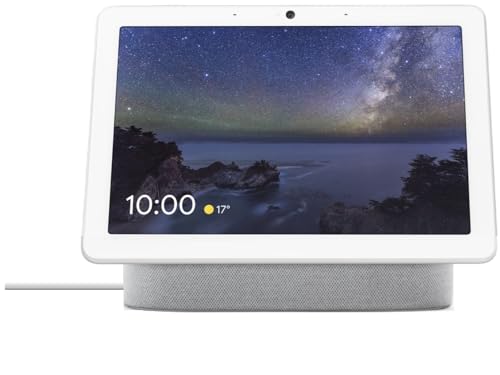
3. Google Nest Hub Max
A larger Google Assistant display with a built-in camera and a physical switch to cut the camera and mic. It handles recipes, video calls and smart home controls, and works well with Google photos and calendars.
Suits: Google households. Strengths: bigger screen and camera switch. Weaknesses: older design. Skip it if you want a motorized screen.
View Google Nest Hub Max on Amazon

Best for flexible tablet use
4. Amazon Fire HD 10 tablet
A large tablet that can run in a mode that behaves like an Alexa display. It can also stream video and open recipe apps, but it is not as speaker-focused as a dedicated display, so confirm features on the listing.
Suits: flexible tablet use. Strengths: can leave the kitchen. Weaknesses: not a true speaker. Skip it if you want loud audio.

Best for bigger recipe screens
5. Amazon Fire Max 11 tablet
A larger tablet in the Fire line with a sharper screen. Pair it with a stand or a compatible dock to keep it upright at the counter. Check what the dock and accessories include before ordering.
Suits: bigger recipe screens. Strengths: sharp, large display. Weaknesses: needs a stand or dock. Skip it if you want a fixed display.
Best for small shelves and windowsills
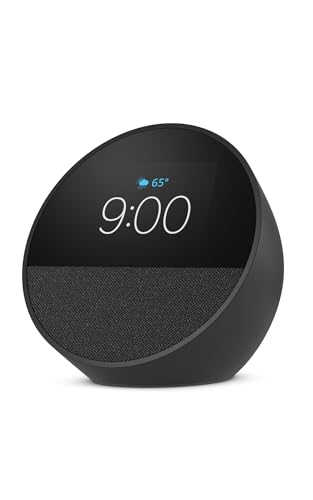
6. Amazon Echo Spot
A compact round-screen speaker that looks like a small clock. It is useful for timers, music and quick answers, and it fits where a full display would not. The screen is too small for long recipes.
Suits: small shelves and windowsills. Strengths: tiny footprint. Weaknesses: not for step-by-step recipes. Skip it if you cook from video.

Care and Setup
- Wipe the screen gently with a dry cloth, since steam leaves a film.
- If you hang a display, check the wall hardware and the stud placement.
- Keep cords tidy and out of reach of hot pans.
- Check for software updates now and then.
Mistakes to Avoid
- Hanging a large display right above the stove.
- Forgetting to measure the wall space or counter depth first.
- Expecting a tablet to match the sound of a speaker.
- Placing the unit where the router signal is weak.
Wall, Stand or Cabinet Mounting
If you want to keep the counter clear, mounting is the first thing to settle. A wall mount puts the screen at eye level and frees your workspace, but it commits you to a location and needs the right hardware. A stand keeps things flexible, since you can move the display, but it uses some counter or shelf space. Under-cabinet mounting is a middle path, but it limits screen size and can make the display awkward to read.
Start by checking what the listing says about mounting. Some displays include a wall bracket or stand, and others sell mounts separately or support only certain types. Look at the weight and the mounting pattern, then compare them with your wall. Drywall alone is not a safe support for a heavy display, so locate studs or use anchors rated for the load. If you rent, check whether you can drill holes, or consider a freestanding option that avoids damage.
Think about the height and angle. A screen mounted too high makes you tilt your neck, and one too low may be blocked by objects on the counter. Stand where you cook and mark the height where the screen is comfortably readable. Keep it away from the cooktop, the sink and any vent that blows steam toward the wall.
Cable routing deserves attention. A visible cord can look messy, and a cord hanging near a burner is a hazard. Plan for an outlet near the mounting point, and use a cable cover or an in-wall solution only if the work is done safely and meets local rules. If you are not sure about electrical work, hire a qualified person.
Using a Tablet as a Kitchen Display
Tablets are flexible, and a model that can switch into a display-style mode gives you a screen for recipes, video and apps in one device. But it behaves differently from a dedicated smart display, and those differences are worth knowing before you buy.
First, tablets are built to be portable, so they usually need a stand or dock to sit upright on a counter. A case with a built-in stand, a separate holder or a charging dock all work, but each takes space, and a dock may be sold separately. Check what is in the box and what you need to add.
Second, power. A tablet has a battery, and leaving it plugged in all day is common in a kitchen. Many modern devices manage charging to limit wear, but heat is hard on batteries, so avoid placing it near the oven or in direct sun. If you notice swelling, a case that bulges or an unusually hot device, stop using it and follow the maker’s safety guidance.
Third, sound and voice. Tablet speakers are usually modest and the microphones are tuned for close use, so voice commands from across the room may be less reliable than on a dedicated display. If you plan to use it as a kitchen radio, consider adding a speaker.
Finally, features differ. A tablet in a display mode may support timers, recipes and smart home controls, but check the listing for exactly which functions are available and whether a separate subscription is needed.
Screen Size, Reading Distance and Brightness
A larger display is not always better, but a screen that is too small for your kitchen will frustrate you. The key question is how far you stand from the screen while cooking. If you read recipes from arm’s length, a small display is fine. If you want to read from across an island or from the sink, text needs to be larger, and a bigger screen helps.
Think about what you want to see. A recipe with a list of ingredients and steps needs more space than a timer. A family calendar with several columns is easier to read on a wide screen. A video call or a streaming show benefits from a bigger panel, but those tasks may fit a living room better than a busy kitchen.
Brightness and finish matter in a bright room. A glossy screen can reflect windows and overhead lights, and a matte or anti-glare finish helps if the listing mentions one. Auto-brightness adjusts to the room, which is useful when the kitchen goes from bright morning light to evening dimness. Look for a night mode or a dimming schedule so the screen does not light up the room at night.
- Check resolution and aspect ratio on the listing, not just the diagonal size.
- Look at the viewing angle, because you will not always face the screen head-on.
- Consider text size options in the settings for easier reading.
Family Hub Features, Calendars and Shared Lists
A larger display can act as the command center for a household. The idea is simple: a shared calendar, a grocery list, notes and reminders, all visible at a glance. For that to work, everyone in the home has to use it, so the setup should be easy for them.
Start with the calendar. Check which calendar services the display supports, and whether it can combine several accounts into one view. A shared family calendar is more useful than a personal one that only one person updates. Decide in advance who adds events and how, such as by voice, on a phone app or on the display itself.
Lists are the next feature. A shared grocery list that anyone can add to, from a phone or by voice, saves a lot of arguments. Make sure the list syncs with the app your family already uses, or be ready to change habits. Reminders and notes can also help with chores, school schedules and medication reminders, although you should not rely on a display alone for anything critical.
Photo frames and widgets add personality, but they can also leak private information onto a screen visible to visitors. Review what shows on the home screen when no one is interacting with it. Some displays let you hide details until a person is recognized or unlocks the screen.
If your household uses different assistants and phones, check compatibility before buying. A display that works well with one platform may be limited with another, and that affects how much the family actually uses it.
Sound, Media and Noise in a Busy Kitchen
Many people buy a kitchen display partly as a radio and entertainment screen, so audio matters. Compare speaker size and layout, and read the listing for how the maker describes the sound. A larger body usually has more room for drivers and better bass, while a slim tablet or small clock-style speaker is more limited. Hard surfaces in the kitchen can make sound harsh, so a display with gentle, room-filling sound is easier on the ears.
Think about the services you use. Check that the display supports your music, podcast and video accounts, and look at whether any need a separate subscription. If you rely on a particular service, confirm that it works with the voice assistant and not only the app.
Noise can be a problem in both directions. Kitchen appliances can drown out the display, and the display can be too loud for other people in the house. Look at volume controls, a night mode and any option for speaking responses quietly. A display that supports multi-room audio can play music across the house, but it needs a stable network and compatible speakers.
If you stream video, a tablet or large display makes a good second screen for cooking shows, but steam and splatter can damage the screen, so keep it protected. A dry microfiber cloth is the safest cleaner, and the maker’s guidance should come first when you consider screen cleaners.
A Checklist for Placing a Display in a Busy Kitchen
Kitchens are messy, noisy and full of steam, so a screen needs a thoughtful spot. Before you buy, think through these points.
- Choose a place within reach of a power outlet and away from splash zones near the sink.
- Keep the screen out of direct sun, which can wash out the display.
- Avoid mounting it directly above a stove, where heat and grease build up.
- Check Wi-Fi strength in that corner of the room.
- Think about the cord path so it does not hang near burners or knives.
- Consider whether you will also use the screen from across the room.
Walk through the room as if you were cooking dinner, and see where the screen would be easiest to read and least in the way.
Voice, Touch and Hands-Free Use Compared
Cooking with wet or messy fingers changes how you interact with a screen. The table shows how each input style helps.
| Input | Strength | Limit |
|---|---|---|
| Voice | Works with dirty hands | Struggles in loud rooms |
| Touch | Fast for scrolling a recipe | Needs a clean finger |
| Buttons | Reliable for volume and mute | Fewer options |
| Phone app | Controls from afar | Needs a phone nearby |
Many people use a mix. Voice for timers and conversions, touch for steps, and buttons to mute the microphone when a mixer is running.
Privacy and Home Network Habits
A screen with a microphone or camera deserves some thought. Check the physical privacy controls described in the listing, such as a camera shutter or a mute switch. Read the maker’s privacy settings, and decide which data you are comfortable sharing. Use a strong, unique password for the account tied to the device, and keep its software up to date by following the maker’s update instructions.
If you share the kitchen with guests or children, consider settings for who can see calendars, messages and photos on the screen.
Cleaning and Care in a Kitchen Setting
Wipe the screen with a soft, dry or slightly damp cloth, and use only cleaners the maker approves. Never spray liquid directly onto the device. Keep vents clear of dust and cooking residue, and unplug it before cleaning around the connection. If the screen stops responding or the speaker sounds distorted, power-cycle it as the manual suggests, and contact the maker if the problem continues.
Reading a Listing for Screen and Speaker Details
Listings highlight screen size in inches, but sharpness, brightness and viewing angle matter just as much in a kitchen with bright lights. Look for a description of the panel, and check whether the screen is glossy, which can reflect windows and lamps. Wide viewing angles help when you read a recipe from the side while chopping.
Speaker details are often brief. A kitchen display may play music, timers and video calls, so check whether the speakers face forward and how loud they can get. Also check which assistants and apps the display supports, and whether it can show a recipe site you already use. If you plan to mount it, confirm that the listing mentions a wall mount or stand, and read the weight so you can choose suitable hardware.
Kitchen Smart Display FAQ
Is a wall display better than a counter model?
A wall unit saves counter space, but you need a nearby outlet and a clean place to hang it.
Can a tablet act as a smart display?
Some can in a special mode, but features vary, so check the listing.
Do I need a camera?
No. Many people prefer a model with a shutter or one without a camera.
Will these work with my existing smart home?
Compatibility varies. Check the device and the assistant you use.
How high should I mount a kitchen display?
Mount it at a height where you can read it comfortably from where you cook, usually around eye level when standing. Mark the spot with tape first and check the view from the stove, sink and prep area.
Can I mount a smart display on drywall?
Only with hardware rated for the display's weight, ideally into a stud or with heavy-duty anchors. Check the listing for weight and mounting details.
Is a tablet as good as a dedicated smart display?
A tablet is more flexible, but it often needs a stand, relies on its battery and may have weaker speakers and voice pickup. Check what the display mode supports before you buy.
Can I leave a tablet plugged in all the time?
Many people do, but heat is hard on batteries. Keep it away from the oven and direct sun, and stop using it if it swells or becomes unusually hot.
Can I share a calendar across the family?
Most platforms support shared calendars, but they depend on the services you use. Check which calendar accounts the display supports before choosing.
Will steam damage the screen?
Steam and splatter can leave a film and, over time, harm electronics. Keep the display away from the stove and sink, and wipe it gently with a dry cloth.
Do I need a large screen for recipes?
Not always. If you read from close up, a smaller screen works, but a larger one helps when you read from across the room.
Wall, Counter or Cabinet: Choosing the Mounting Style
The three homes for a kitchen display each change how you use it. A wall-mounted display sits at eye level, stays permanently clear of work surface, and suits a kitchen where the display is mainly a family hub for calendars, lists, and camera views. A counter model is simpler to install, easier to move, and better for video calls and media because it sits closer. An under-cabinet arrangement saves the most space of all and keeps the screen near the work zone, but it needs suitable cabinets and careful attention to heat and steam from below.
Wall mounting deserves a realistic look at the practicalities. The display needs power, so the position of the nearest outlet shapes the installation more than the ideal viewing spot does. Cables can be run neatly along or inside the wall by someone competent, or managed with surface trunking that looks tidy enough in most kitchens. The wall itself matters: a solid wall takes fixings confidently, while plasterboard needs the correct anchors for the weight involved, and rented homes may rule out drilling altogether, which pushes the decision back toward a counter or tablet solution.
Whatever the style, viewing distance decides the screen size that makes sense. A display consulted from across the room, for a calendar or a camera feed, rewards a larger screen. A display used at arm’s length while cooking can be smaller without any loss, because recipe text at close range is easy to read. Matching the screen to the distance is a better guide than simply buying the largest model the budget allows, and it is why this guide includes everything from a compact spot display to very large wall models.
Using a Tablet as the Kitchen Display: An Honest Assessment
A tablet on a stand or dock is the flexible option in this guide, and its strengths are real. It runs the full range of normal apps, browses the web properly, handles video services that dedicated displays sometimes restrict, and can leave the kitchen to serve as an ordinary tablet elsewhere. For a household that already owns a suitable tablet, dedicating it to the kitchen during cooking hours costs nothing and answers the question of whether a kitchen display is useful at all before any money is spent.
The compromises are equally real. A tablet is not always listening in the same way unless it is set up for it, its speakers are usually thinner than a dedicated display of similar size, and keeping it charged and awake requires a dock or a cable arrangement that someone has to manage. Notifications, updates, and the general business of a full computer arrive with it, which some households find distracting in a room they want to keep simple. None of this disqualifies the tablet route; it defines the kind of user it suits, namely someone comfortable adjusting settings and who values app freedom over set-and-forget simplicity.
If you take the tablet route, set it up deliberately. Create a home screen with only the kitchen apps, enable the voice assistant hands-free mode if you want it, set the screen to stay on while charging, and use a stand that holds it at a readable angle and keeps the charging cable tidy. A tablet tossed on the counter with a flat battery delivers the worst version of the idea, while the same tablet on a dock with a tidy home screen delivers most of what a dedicated display offers.
Family Organisation: Calendars, Lists and Notes
The large displays in this guide earn their place as family hubs, and the calendar is the centrepiece. A shared family calendar visible at breakfast, showing the day’s appointments, school events, and reminders where everyone can see them, prevents more small household failures than any other smart home feature. For this to work, the calendar has to be the real one the family maintains, connected properly to the display account, and everyone who adds events needs to add them to the shared calendar rather than a private one by habit.
Lists work the same way. Shopping lists, to-do lists, and notes pinned to the display home screen are useful exactly in proportion to how current they are, which means the household needs one agreed list per purpose, accessible from phones as well as the display. Two competing shopping lists, one on the display platform and one in a separate app, guarantee that items are missed. Choosing the display partly on whether its list system matches what the family already uses is a mundane but genuinely important part of the decision.
Sticky notes and widgets sound like decoration, but on a kitchen hub they carry the small traffic of family life: a note that dinner is in the slow cooker, a reminder about a permission slip, a photo frame rotating family pictures when the display is idle. Households differ in how much of this they want on a shared screen in a room guests enter, and the privacy settings discussed elsewhere in this guide let you decide what appears. The point is that the hub role is configurable, from a full family noticeboard to a restrained clock and calendar.
Cooking With a Large or Small Display
For cooking itself, the display’s job is guidance, and the requirements are modest: readable text at your working distance, voice control that works with messy hands, timers you can trust, and unit conversions on demand. Both the largest wall models and the smallest counter models in this guide can do these things. The difference appears with video: following a video recipe or a technique demonstration is far more comfortable on a larger screen, and if learning new dishes from video is a real part of your cooking, screen size moves up the priority list.
Recipe sources matter as much as the screen. Assistants draw recipes from particular services and websites, and the experience of step-by-step guidance varies between them. If you cook mainly from one beloved source, check how that source behaves on the platform you are considering, ideally by trying the assistant on a phone first. A household that cooks from printed books and personal notes will use the display differently, mostly for timers, conversions, and music, and can happily choose a smaller, simpler model.
Hands-free control is the feature that changes cooking most, and it depends on microphones as much as software. In a kitchen with an extractor running and water flowing, a display placed near the work zone hears you better than one across the room. Wall displays mounted near the main preparation area serve cooks well for this reason, while a hub mounted by the dining table serves the family calendar better. Some kitchens genuinely want both roles, and a modest counter model for cooking plus the family calendar on phones is a perfectly sensible alternative to one large hub trying to do everything.
Sound and Media in an Open-Plan Kitchen
Many of these displays spend more hours playing radio, podcasts, and music than doing anything else, so sound deserves honest weight in the decision. Larger models with bigger speakers fill an open-plan space more comfortably, while compact models are voiced for near-field listening and can sound thin across a big room. If the display will be the kitchen’s main music source during cooking and meals, favour the models in this guide described with fuller sound, and place the display so the speaker fires into the room rather than into a corner or a cupboard side.
Multiroom audio is worth checking if the house already has speakers on one platform. A kitchen display that joins the existing speaker groups lets music follow you and lets announcements reach the kitchen, while one on a different platform sits apart from the system. This compatibility question, like the calendar and list questions, is unglamorous and decisive: the display that fits the systems the household already runs is almost always the right display.
Video calling is the other media use that separates the picks. A camera-equipped display at a sensible height, with a wide enough view, makes kitchen video calls genuinely pleasant, because the cook can keep working while talking. Wall models frame a standing person well; small counter models frame whoever leans in. Households that video call family weekly will use this constantly, while those who never do can treat the camera as optional and may prefer to choose a model without one or keep its shutter closed.
Care, Cleaning and Living With a Screen in the Kitchen
A kitchen screen lives in the hardest environment in the house for electronics: grease vapour, steam, flour dust, and splashes all reach it eventually. The defence is routine. A weekly wipe with a soft, slightly damp microfibre cloth keeps the screen clear and the speaker grille open, and mounting or placing the display out of the direct line of hob steam slows the build-up significantly. Under-cabinet displays sit closest to rising steam and cooking splatter, so they benefit most from a wipe after heavy cooking sessions, not just weekly.
Touchscreens in kitchens get touched with imperfectly clean hands, and that is normal and fine, provided the cleaning habit keeps up. Avoid abrasive pads and strong chemical sprays on the screen, never spray liquid directly onto the device, and unplug before cleaning around ports or vents. If a protective film or cover is offered for your model, it can help in a very busy kitchen, but a dull film that spoils readability is worse than a bare screen cleaned often.
Cables and mounts need an occasional check too. A wall mount should be checked for firmness if the display is touched often, and cables should be inspected for heat damage if they pass near the hob or oven. Tablets used as displays deserve a battery health thought: a tablet kept permanently at full charge on a dock ages its battery faster, so if the tablet also serves elsewhere, rotating it off the dock occasionally is kinder. These are small attentions, but they are the difference between a kitchen display that serves for years and one that fades early.
Choosing Your Pick From This Guide
Decide the job first. If the display is a family hub, the large wall models are the natural candidates, and the choice between them rests on platform and size. If it is a cooking companion, a mid-sized counter or hub model near the work zone serves better than a giant screen across the room. If it is an experiment or a flexible second screen, the tablet options let you start with what you may already own. Naming the primary job honestly narrows this guide to one or two candidates quickly.
Then decide the platform by what the household already runs: phones, calendars, lists, music services, cameras, and speakers. A display that joins those systems without accounts being duplicated or lists being split will be used daily and trusted. A display that requires the household to migrate its habits usually stalls, however good the hardware is. This is the least exciting advice in the guide and the most predictive of long-term satisfaction.
Finally, check the physical facts: the space, the outlet, the wall, the viewing distance, and the cleaning access. A display you can wipe easily gets wiped; a display mounted awkwardly gets neglected. The right pick is the one that fits the room, the household systems, and the primary job at the same time, and every model in this guide is the right pick for some kitchen described in those terms.
Reading the Room: Light, Glare and Where Screens Struggle
Kitchens are the brightest and most reflective rooms in many homes, with windows, glossy cabinets, and pale worktops all bouncing light onto a screen. A display that looks perfect in a shop can wash out opposite a south-facing window or mirror the ceiling lights back at the cook. Before fixing a wall position permanently, hold the decision loosely: rest the display, or a tablet standing in for it, in the intended spot at the brightest time of day and read recipe-sized text from your working position. Five minutes of this test prevents the most common mounting regret.
Angle is the main remedy. A screen tilted slightly, or moved a short distance along the wall out of the direct reflection path, often reads perfectly where a flat-on position failed. Wall mounts that allow a small tilt earn their keep here. Automatic brightness helps when the sensor sees representative light, so avoid mounting the display where a cabinet shadow falls across the sensor while the rest of the screen sits in sun. These are fitting details, but on a device consulted dozens of times a day, they are the difference between a hub and a frustration.
Evening behaviour matters too. A hub that stays bright in a dim evening kitchen dominates the room and can disturb an open-plan living space, so check the night or ambient mode on your chosen model and set its schedule during installation. A display that dims to a soft clock after dinner feels like furniture; one that glows at full brightness feels like an appliance left on. The best installations in this guide’s spirit are the ones the household stops noticing, because the screen is simply right at every hour.
The Hub as a Window: Cameras, Doorbells and Household Awareness
Large kitchen displays come into their own as viewers. A doorbell press that shows the visitor on the kitchen screen while your hands are wet, a glance at the garden camera while the kettle boils, or a check on a sleeping child from the dining table are small moments that accumulate into a feeling of a house that is easy to run. If those moments appeal, the compatibility between the display platform and the cameras you own is a first-order question, as decisive as screen size, and worth settling before the display is chosen rather than after it is mounted.
Response speed is the hidden quality here. A camera view that takes long seconds to appear will miss the doorbell moment entirely, so the combination of display, camera, and home network all play a part. A strong network signal at the display’s position, which this guide recommends checking for every kitchen installation, matters doubly for camera viewing. Households planning to rely on the hub this way should treat a brief test during the return period, ringing their own doorbell with wet hands, as a legitimate and revealing trial.
Privacy runs alongside awareness, as ever. Indoor cameras viewed on a shared kitchen screen should be a household agreement, with guests considered too, because a screen that can show other rooms changes what visitors understand about the house. The settings to limit which cameras appear, and when, exist on the platforms in this guide. A hub configured with intention gives the household awareness without turning the kitchen into a control room, and that balance is a setup choice, not a product feature.
One Hub or Several Smaller Screens
Some households solve the kitchen display question with one large hub; others end up happier with a modest counter display in the kitchen and the family calendar living on phones and a hallway tablet. The single large hub concentrates cost and capability in the room where the family gathers, and it gives shared information a physical home, which many families find genuinely organising. The distributed approach costs less, puts a screen near each task, and avoids drilling into a kitchen wall for a device whose ideal position may change when the kitchen does.
The deciding factor is usually how the family actually shares information. Households that already coordinate well through phone calendars gain less from a wall hub than households where coordination fails because nobody opens the app. For the second kind of family, and there is no shame in being it, a big screen in the kitchen that nobody has to open, unlock, or remember is transformative, because it removes the step where the system used to break. Judge your household by its real behaviour over the last month, not by the system it admires in principle.
Renters and future renovators form the third case. A household planning to remodel its kitchen within a couple of years should hesitate before permanent mounting and fitted power, and the tablet and counter options in this guide exist partly for them. A display that can move to the new kitchen, or to another room entirely, protects the purchase against the renovation. Flexibility is a feature, and in this category it is sometimes the feature that matters most.
One Last Word on Choosing
Whether your kitchen ends up with a wall-sized hub, a tablet on a dock, or a small display by the kettle, the measure of success is the same: shared information that nobody has to hunt for, cooking help that arrives hands-free, and a screen that suits the room at every hour of the day. Decide the job, decide the platform by the systems your household already runs, and decide the position by light, distance, power, and cleaning access, in that order. A choice made in that order rarely needs revisiting, because it rests on facts about your household rather than on the appeal of any single product. The models in this guide will change over the years, as models do, but a household that knows its job, its platform, and its wall can choose the next one in minutes. That confidence, more than any individual feature, is what a good buying guide is supposed to leave behind.
More Questions Answered
Can I mount a display inside a cabinet door?
It is generally not recommended. Heat, steam, and the door’s movement work against the device and its cable, and the screen ends up at an awkward height. An under-cabinet mount designed for the purpose, or a wall position nearby, serves the same space-saving goal more safely.
Do large wall displays need professional installation?
Not necessarily, but they need secure fixings into a suitable wall, a power solution you are happy with, and ideally a second pair of hands for the mounting itself. If any of that is uncertain, professional installation is money well spent for a heavy screen above a work area.
Can the display show photos when idle?
Yes, most models in this guide offer a photo frame or ambient mode using your photo library or curated collections. Check whose library it draws from and set the album deliberately, since the display sits in a shared room.
Will a kitchen display raise my electricity bill noticeably?
These are low-power devices, broadly comparable to leaving a small efficient light on, and screens typically dim or sleep when the room is empty where the feature is enabled. The tablet route draws similar modest power while docked.
What if my kitchen has no spare outlet near the right spot?
That constraint should drive the placement decision. Options include choosing a spot near an existing outlet, using a tablet that can run between charges, or having an electrician add an outlet where you want the display. Avoid trailing extension leads across work areas or near the hob.
The Short Version
For a wall screen, the Echo Show 15. For the biggest screen, the Echo Show 21. For Google users, the Nest Hub Max. For a flexible tablet, the Fire HD 10. For a bigger tablet, the Fire Max 11. For tight spaces, the Echo Spot.