A waterproof memory card case is a small hard shell with a gasket seal that holds SD, microSD or other cards. We have not used these products ourselves, so this guide covers features and construction only and does not promise how any case will hold up in water.
The right case depends on the cards you carry and where you work. A hiker, a diver and a wedding photographer all need different capacity, size and ways to tell full cards from empty ones. Use the table to compare the key points, then check each maker’s listing for exact details.
As an Amazon Associate we earn from qualifying purchases. Links on this site are affiliate links, and they do not change the information we give.
In this guide
Quick Picks
| Pick | Product | Best For |
|---|---|---|
| Best Overall | Pelican 0915 Memory Card Case | Maximum shell and seal protection for SD cards |
| Best High Capacity | Kiorafoto KMC-SDMSD24 Memory Card Case | 12 SD and 12 microSD cards in one case |
| Best for the Outdoors | Guardian Hunting Waterproof SD Memory Card Holder | Trail cameras and wet-weather field work |
| Best Compact | JJC MCR-ST12 Portable Memory Card Case | A slim everyday carry for mixed SD and microSD kits |
| Best for CompactFlash | Kiorafoto KMC-CF6 Memory Card Case | Six CF cards in a sealed hard holder |
Our Picks

1. Pelican 0915 Memory Card Case — Best for Maximum Protection
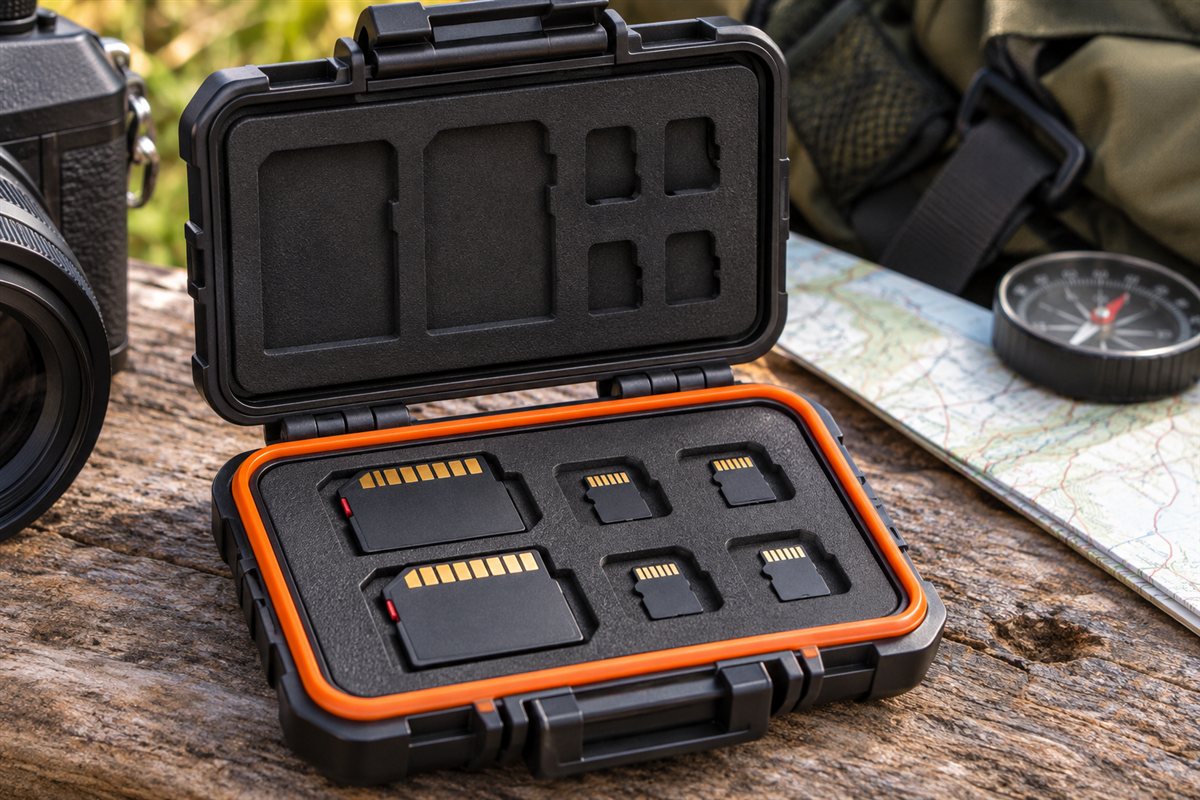
The Pelican 0915 is the case most shooters picture when they want a hard shell that can be dropped, stacked under heavier gear and carried in wet weather without a second thought. The body is molded from tough polycarbonate resin, and a water resistant seal rated IPX4 by the maker helps keep splashes and rain away from the cards inside. The removable insert liner absorbs shock and is cut for up to 12 SD cards, with space for 6 miniSD and 6 microSD cards as well, so one case covers a mixed kit of full-size and small cards. Exterior dimensions are 5.55 by 3.27 by 0.85 inches, small enough for a jacket pocket or the flat sleeve of a camera bag, and Pelican backs the case with its lifetime guarantee. If you carry standard SD media and want the strongest shell-and-seal combination in this size class, this is the straightforward pick.
2. Kiorafoto KMC-SDMSD24 Memory Card Case — Best for High Capacity
With room for 12 SD cards and 12 microSD cards, the Kiorafoto KMC-SDMSD24 suits photographers and drone pilots who swap small cards all day and want everything kept in one place. The hard shell is rated IPX5 water-resistant by the maker, which covers rain and splashes, and the interior gives each card its own slot so cards do not rattle against each other in transit. Kiorafoto describes the case as anti-shock, and it ships with a carabiner so you can clip it to a bag strap or belt loop instead of burying it at the bottom of a pack. Because microSD cards sit in dedicated slots rather than loose adapters, it is easier to keep full and empty cards separated, which is one of the main organizing points raised in the guide above. Choose this one if capacity for mixed SD and microSD media matters more to you than the absolute toughest shell.
3. Guardian Hunting Waterproof SD Memory Card Holder — Best for Trail Cameras and Outdoor Use
The Guardian Hunting holder takes a different approach: instead of molded plastic slots it uses a foam interior 0.75 inches thick with 16 pre-cut slots, inside a rugged case sealed by a rubber gasket that the maker describes as completely waterproof. The foam can even be trimmed with scissors between slots if you want a space for a phone card reader next to your cards. Outside dimensions are 5.5 by 4 by 2.25 inches, and a flexible handle allows hand or belt carry. Guardian designed the case with trail camera users and outdoor photographers in mind — people who check cameras in the rain, work in mud and dust, and need SD cards to survive the trip back to the truck. The soft foam suits cards that get pulled and swapped often, and the larger body is easy to open with cold or gloved hands. Pick it if your cards live outdoors rather than in a studio.
4. JJC MCR-ST12 Portable Memory Card Case — Best for Compact Travel
The JJC MCR-ST12 is the slim option in this group: a 12-slot portable case that holds 4 SD, SDHC or SDXC cards plus 8 microSD (TF) cards in an EVA foam interior. JJC rates the case water-resistant and anti-shock, with the foam cushioning cards against the knocks of daily travel. The low profile makes it easy to slide into a laptop sleeve, a jacket pocket or the front pocket of a camera bag, and the simple layout keeps a small working set — a few full-size cards for the camera and micro cards for a drone or action camera — together in one spot. It does not offer the crush resistance of a thick resin shell, so it fits the guide’s advice for everyday carry rather than expedition use. If you travel light and your kit mixes one SD camera with microSD devices, this compact organizer covers the basics without added bulk.
5. Kiorafoto KMC-CF6 Memory Card Case — Best for CompactFlash Cards
CompactFlash has mostly disappeared from new cameras, but plenty of working DSLRs still rely on it, and the Kiorafoto KMC-CF6 is built specifically for those shooters. It holds 6 CF cards in a water-resistant, anti-shock holder with slots sized for the larger card format, and it includes a carabiner for clipping to a bag. That matters because CF cards are bigger, heavier and easier to damage with grit or a knock than SD media, so a rigid case with a seal is a better home than a soft pouch or a loose pocket. The compact body keeps a day’s worth of CF media together and easy to track by slot position, following the used-versus-blank system the guide recommends. If your camera still uses CompactFlash and you want the same gasket-sealed protection that SD shooters get from the cases above, this is the format-correct choice.
What to Look For
| Factor | Why it matters | What to check |
|---|---|---|
| Seal design | A rubber gasket and a firm latch keep moisture out | The maker’s stated water resistance class and gasket condition |
| Card type | SD and microSD cards need different slots | Which card formats the case accepts and how many of each |
| Capacity | More slots mean fewer cases to carry | Slot count and whether slots are numbered |
| Shell material | Hard plastic resists crushing better than soft pouches | Wall thickness, hinge style and latch strength |
| Size and clip | A small case fits a pocket or camera bag | Outer size, weight and carabiner or lanyard loop |
| Labeling | Marking cards as used prevents mistakes | Write-on area, color tabs or a flip card system |
Setup and Care Tips
- Check that the gasket sits flat in its groove and is free of grit or hair before you close the case.
- Close the latch fully and press the lid to feel that it clicks.
- Rinse the shell with fresh water after salt or mud, and dry it before you open it.
- Keep used and unused cards in separate slots, and mark them with a clear system.
- Replace a case if the gasket cracks, the hinge loosens or the shell warps.
Mistakes to Avoid
- Opening a wet case in the field and letting droplets reach the cards.
- Overfilling a slot with a thick adapter that stops the lid from closing.
- Skipping the gasket check before each trip.
- Mixing used and blank cards with no labeling.
- Trusting a case with no stated water resistance class for wet conditions.
Waterproof or water resistant: what do memory card case ratings mean?
A water resistant memory card case handles splashes and rain, while a case called waterproof is meant to survive more, but the exact limits come from the maker. Always read the stated rating rather than trusting the word on the front.
The picks in this guide show the range. The Pelican 0915 is described with an IPX4 rating, the Kiorafoto KMC-SDMSD24 with IPX5, and the Guardian Hunting holder is described by its maker as completely waterproof with a rubber gasket. These claims are the maker’s, so check each listing for what they cover.
IP ratings come in two digits. When the first is replaced with an X, it means dust protection was not stated. The water digit tells you about protection against sprays or immersion, and higher does not always mean stronger in every way, because the tests are different.
- Splash and rain: lower water ratings are fine for a hike or a wet field.
- Heavier exposure: if the case may be dropped in a stream or a boat, look for the strongest claim you can find and read the limits.
- Cases without a rating: treat these as splash protection at best.
Seals also age. A gasket that is dirty, stretched or cracked will not do its job, whatever the rating on paper. Inspect it before each trip, and keep it clean. A rating describes a new case under test conditions, not a case with sand in the seal.
A simple habit helps here: before a trip, close the empty case, press it gently and listen for the latch to click. Then open it and look at the gasket for grit. This takes seconds and tells you more about the seal than any number on the box.
It is also worth deciding how wet your work really gets. A morning walk in light rain asks very little of a case, while a day on a boat or beside a river asks a lot. Match the case to the harshest conditions you expect, not the average day, and keep a spare plastic bag as a second layer if the weather turns.
Foam insert or molded slots: which memory card case interior is better?
Foam inserts suit people who swap cards often and want a soft landing, while molded slots hold each card in a fixed position. The better one depends on your card types and how you work.
Foam, such as the pre-cut foam in the Guardian Hunting holder or the EVA foam in the JJC, cushions cards against knocks. It can usually be pressed to fit and allows a card to be pulled quickly. Over time foam can compress, collect dirt and hold moisture if it gets wet, so let it dry.
Molded slots or a rigid insert, like the removable liner in the Pelican 0915, keep each card separate and in a consistent place. That makes it easier to track used and blank cards by position. They tend to be easier to wipe clean.
- Foam: soft, quick access, can trap moisture.
- Molded slots: neat, repeatable, easy to wipe.
- Mixed formats: choose an insert that has proper slots for each card size you carry.
If your kit includes SD, microSD and CompactFlash, check the slot sizes carefully. A card that is loose in an oversize slot can rattle, and a thick adapter may stop the lid from closing. The CompactFlash card in particular needs a case sized for it, like the Kiorafoto KMC-CF6.
Whatever interior you pick, keep cards in the same slot order and never leave a card half inserted, since a bent or pinched card can fail when you need it. Keep the case closed whenever you are not swapping cards, and dry your hands before you open it outdoors.
Which waterproof memory card case should you buy?
Choose by your cards and your conditions: the Pelican 0915 for a tough shell, the Kiorafoto KMC-SDMSD24 for large capacity, the Guardian Hunting holder for rough outdoor use, the JJC MCR-ST12 for a slim carry and the Kiorafoto KMC-CF6 for CompactFlash.
- If you want a strong shell for standard SD cards, go for the Pelican 0915 Memory Card Case. It has a removable insert and a lifetime guarantee from the maker.
- If you carry many SD and microSD cards, choose the Kiorafoto KMC-SDMSD24 Memory Card Case, which holds a dozen of each.
- If you check trail cameras in bad weather, look at the Guardian Hunting Waterproof SD Memory Card Holder, which has a larger body and a handle.
- If you travel light with a mixed kit, the JJC MCR-ST12 Portable Memory Card Case is the slim option.
- If your camera still uses CompactFlash, the Kiorafoto KMC-CF6 Memory Card Case is the format-correct choice.
If you are torn between two, count your cards and think about where the case will live. A big case in a small pocket is annoying, and a tiny case that cannot hold your cards is useless. Use the buttons above to open the listing and confirm the details.
What to check before you buy a memory card case
Before buying a memory card case, check the card formats, slot count, size, seal and what comes in the box. A few minutes of checking will save you from a case that does not fit your cards.
- Card formats: confirm the case holds SD, microSD, CompactFlash or whichever you use, and how many of each.
- Slot count: add spare room for growth.
- Outer size: compare the dimensions with your pocket or bag compartment.
- Seal and latch: look for a gasket and a firm latch, and read the stated water resistance.
- Carry options: check for a carabiner, handle or strap loop.
- Labeling: check for a way to mark used and blank cards.
- Glove use: make sure you can open it with cold or gloved hands.
- Warranty and returns: read the terms on the listing.
- Care: check for cleaning notes about the seal.
Also think about whether you need one big case or two small ones. Splitting cards across two cases means a single failure does not take out everything. If anything in the listing is unclear, such as the number of slots per format, ask the seller before you order.
Are waterproof memory card cases worth it, and who should skip them?
A waterproof memory card case is worth it if you shoot outdoors, travel or carry many cards, but it is unnecessary if you shoot casually at home. Be realistic about what it can and cannot do.
- It does not guarantee protection. A damaged or dirty seal can let water in.
- It adds bulk. Hard shells are bigger than a simple pouch.
- It does not replace backups. Copy your files soon after a shoot.
- Foam can hold moisture if the case is opened wet.
Is it worth paying more? A tougher shell or a better seal makes sense if your cards hold work you cannot repeat, such as an event or a trip. If you shoot casual snapshots and back up daily, a basic case is enough, or a small box may do.
Compare the picks above, check the current listing for size, slots and what is included, then choose the case that fits your cards and how you shoot.
How Many Cards Do You Actually Carry? A Capacity Planning Walkthrough
Slot counts on a spec sheet only become useful once you compare them with the cards you really own and the cards you are likely to add. A simple planning exercise takes five minutes and prevents the two most common buying mistakes: a case that is full on the first trip, and a case so large that it lives in a drawer instead of in your bag. Start by laying every card you own on a table and grouping them by format. Count full-size SD cards separately from microSD cards, and note any CompactFlash or other larger formats, because a slot shaped for one format rarely holds another securely.
Worked example: counting a mixed kit
Imagine a hobby photographer who owns six full-size SD cards for a main camera, four microSD cards for a small action camera and a drone, and two spare SD cards that live in a second camera body. That is twelve cards in total, but they are not twelve identical slots. The kit needs eight SD-sized positions and four microSD positions, unless the microSD cards travel inside SD adapters, in which case they occupy SD-sized positions instead. Writing the count down in this grouped way matters more than the total. A case advertised with a large total slot count can still be the wrong case if most of those slots are for a format you barely use.
Next, add a growth allowance. Cards are inexpensive compared with cameras, and most people add one or two cards a year as capacities grow and older cards are retired to backup duty. Planning for roughly a quarter more slots than you own today is a sensible middle ground. In the example above, twelve cards today suggests room for about fifteen positions tomorrow. That points toward a mid-size case rather than the smallest travel case, without jumping to a bulk storage case that is awkward to carry daily.
Matching case size to how you travel
How the case travels matters as much as how much it holds. A case that rides in a jacket pocket or a small sling needs to be slim, light and quick to open with one hand. A case that lives in a padded camera bag can be larger and can trade slimness for stronger crush protection. A case stored in a vehicle or a boat needs the best sealing you can get, because it faces temperature swings, dust and the occasional splash even when nobody plans to submerge it. Decide the primary home for the case first, then check capacity. Reversing that order is how people end up with an excellent case that never leaves the house.
Finally, think about separation. Many photographers keep exposed cards apart from blank cards so a full card is never formatted by mistake. Some cases support this with two rows or two colors of slots; in a single-row case you can use orientation as a code, storing blank cards label-up and exposed cards label-down. Whatever system you choose, pick it before the trip and use it every time, because a system that changes mid-trip is no system at all.
Seals, Latches and Drops: Reading Protection Claims Carefully
Protection language on packaging sounds absolute, but each word covers a different risk. Water resistance, crush resistance and dust protection are separate qualities, and a case can be strong in one and ordinary in another. Reading the claims carefully helps you match the case to the hazard you actually face, whether that is a rainy hike, a dropped bag or a dusty workshop shelf.
What a gasket seal does and does not do
Most waterproof card cases seal with a flexible gasket, usually a rubber or silicone ring pressed between the lid and the body when the latch closes. The seal works only when three conditions hold: the gasket is clean, the gasket is undamaged, and the latch is fully closed so the gasket is evenly compressed. A single grain of sand or a stray hair across the gasket can create a leak path. That is why a quick wipe of the seal before closing, and a habit of checking that the latch has clicked fully home, protect your cards more than any rating printed on the box. A seal also ages. Gaskets that are stored compressed in heat slowly take a set and seal less firmly, so a case kept in a hot car for years deserves a closer look and a simple home test before an important trip.
A simple home test is low-risk and revealing. Close the empty case, or the case holding an old spare card you can afford to risk, and hold it under a running tap or submerge it briefly in a sink, following any limits the maker states. Dry the outside fully before opening, then check inside for moisture. Testing empty or with a sacrificial card tells you whether the seal still works without gambling the only copy of important images.
Crush and drop protection in plain terms
Memory cards are small and surprisingly tough, but their plastic shells can crack and their contacts can be damaged by bending. A rigid outer shell spreads a load across the whole case instead of letting a heavy object press on one card. Interior slots then hold each card so it cannot rattle, bend or rub against its neighbor. When you compare cases, press the closed lid gently: noticeable flex above a slot is a sign that load can reach the card. Also check how the case behaves when dropped on a corner, since corners are where shells split. You cannot drop-test a case in a shop, but you can look for rounded, reinforced corners and a hinge that is protected rather than exposed.
| Risk | What protects against it | What to check before a trip |
|---|---|---|
| Rain and splashes | A continuous gasket seal and a latch that closes fully | Gasket clean and supple, latch clicks shut evenly |
| Brief submersion | A sealed rigid shell rated by the maker for immersion | Home-test the empty case, confirm the depth and time limits stated by the maker |
| Drops and crushing | A stiff shell, reinforced corners and individual slots | Lid flex, hinge condition, cards held without rattling |
| Dust and grit | A closed seal and smooth interior that wipes clean | Interior free of grit that could scratch contacts |
A Simple Card Routine That Prevents Most Losses
Most lost images are not caused by a failed case. They are caused by a loose routine: cards swapped in a hurry, a full card mixed with blanks, or the only copy of a day of shooting left in a pocket. A case supports a good routine, but the routine itself is the protection. The steps below cost nothing and work with any case you choose.
Before you leave
Format cards in the camera that will use them, not on a computer, unless the camera maker advises otherwise. Formatting in-camera sets up the file structure the camera expects and gives you a clean, known-good card. Charge batteries, then pack cards in the case in a fixed order: blanks first, in the order you plan to use them. Put the case in the same pocket or bag compartment every time. A fixed home for the case means you can find it without looking, and you notice immediately if it is missing.
While you shoot
Swap cards at natural breaks rather than in the middle of action, and put the exposed card straight into the case using your orientation code for exposed cards. Never leave a loose card in a trouser pocket, where it collects lint, bends when you sit, and can go through the laundry. If you shoot with two cameras, consider keeping their cards in separate rows or separate cases, which makes later sorting faster and avoids formatting a card that holds the other camera’s files.
When you get home
Copy the cards to your computer or drive before you do anything else, and keep the cards unformatted until you have confirmed the copies open correctly and a second copy exists in another location. Only then format the cards for the next outing. This order — copy, verify, back up, then format — is the single most valuable habit in this entire guide. The case protects the cards physically; this routine protects the images themselves, and the two together cover nearly every realistic way a shoot can be lost.
Once a year, retire cards that have become unreliable: a card that occasionally errors, mounts slowly or needs repeated formatting is telling you something. Move it out of important work, label it clearly, and let the case hold cards you trust. A slightly smaller kit of dependable cards beats a large kit with one doubtful card hiding in it.
MicroSD, SD, CompactFlash and Beyond: Why Format Shapes the Case
Card formats differ in more than outline. Full-size SD cards are large enough to label by hand and easy to handle with cold or gloved fingers, but their thin plastic shells flex if a slot grips them unevenly. MicroSD cards are tiny, easily lost, and almost impossible to label directly, which is why many owners keep them permanently in SD adapters — the adapter becomes the labelled, grippable card, and the case slot only ever sees the adapter. CompactFlash cards are thicker and sturdier, with a different pin interface that must never be forced, and newer large formats used by some professional cameras are bigger still and generate more heat in use, so they benefit from slots that hold them without pressure on their labels or edges.
These differences explain why a case that mixes formats in one flexible foam sheet often serves nobody well. Foam cut loosely holds small cards badly; foam cut tightly makes large cards hard to remove without bending them. Molded slots shaped per format solve the problem properly, which is why keen travellers with mixed kits should count slots per format, as the earlier walkthrough showed, rather than trusting a headline total. If your kit is all one format, the choice relaxes — almost any well-sealed case with the right count will do — and your decision can turn on size, sealing and handling instead.
Adapters: the small decision with outsized effects
Adapters deserve their own rule. An adapter that lives in the case as a parking place for a microSD card should be a plain, reliable one kept only for storage, because adapters used for storage do not need to be fast — they need to be present. Losing track of adapters is a common, quiet failure: the microSD card is safe in the case but unreadable on the road because its adapter is in another bag. Keep one adapter per microSD position in the case itself, and treat any adapter you actually shoot through as a separate, checked item, since a faulty adapter can mimic a faulty card.
Field Habits: Using the Case When Conditions Are Bad
Cases are opened in the worst places: on a windy ridge, in a boat, beside a dusty track, with rain starting. Technique matters more in those moments than any product feature. Open the case facing away from wind and spray, on a stable surface rather than balanced on a knee, and take out only the card you need. Keep the lid closed between swaps. If a card must be changed with wet hands, dry them first on clothing — water carried into the case on your fingers defeats the seal from the inside, a failure mode no rating covers.
A two-case system for important work
For weddings, travel that cannot be repeated, or any paid work, consider splitting cards across two smaller cases carried in different bags. The reasoning is simple risk division: a lost, stolen or soaked bag then costs you half your cards rather than all of them. The same logic applies at the end of the day — download promptly, keep the copies apart from the cards, and never let the only copy of anything important travel in the same bag as the originals on the journey home. For everyday photography this is more system than you need, but the principle scales down gracefully: even a casual shooter benefits from the habit of downloading the same evening rather than letting a week of cards accumulate in one case in one bag.
Labelling that survives real use
Labels fail when they rely on memory. A durable scheme uses few categories and marks them physically: a number written on each card with a fine permanent marker, a matching numbered list in your phone noting what each card holds and when it was last formatted, and the orientation code for blank versus exposed described earlier. Photographers who shoot volume sometimes add a colored dot for the camera body a card belongs to. Whatever you choose, rehearse it at home. A labelling scheme invented on a trip, under time pressure, will be applied inconsistently — and an inconsistently labelled card is worse than an unlabelled one, because you trust it.
Review the kit once a season. Retire cards that have errored, replace a gasket that no longer springs back or a latch that no longer clicks positively, and confirm the case still matches the kit you actually carry — cameras change, formats change, and a case bought for a previous kit quietly becomes the wrong case. Five minutes of review before a season of shooting is the cheapest reliability upgrade in photography, and it costs nothing but attention.
Cards and Cases in Heat, Cold and Transit
Memory cards tolerate a wide range of conditions, but the case mediates what they actually experience. In a hot vehicle, temperatures inside a closed car can climb far beyond a comfortable room, and heat accelerates the ageing of both card electronics and case gaskets. Keep the case out of direct sun, ideally in an insulated bag low in the vehicle, and never on a dashboard. In cold conditions the cards themselves usually cope well; the risk is condensation when cold gear comes into warm, humid air. Let the closed case warm up gradually before opening it indoors, so moisture condenses on the outside of the case rather than on the cards inside — a small patience that prevents a surprising share of contact corrosion and read errors.
In transit by air, cards belong in hand luggage, both because checked bags face rougher handling and wider temperature swings, and because your images should travel with you rather than separately from you. Security scanners in normal airport use are not a practical concern for flash memory cards, so no special shielding is needed; the genuine risks in transit remain the mundane ones — loss, crushing and water — which are exactly what a good case and a fixed place in your bag address. Photographers travelling with work they cannot reshoot add the download-and-separate habit described earlier, mailing or uploading copies ahead where connectivity allows. The theme across all three environments is the same: the case is not a vault, it is a buffer, and it works best when paired with placement and habits that keep extremes away from it in the first place.
One Case, Several Roles: Photographers, Trail Cameras and Everyday Carry
The same case logic serves different owners once you translate it into their routines. A trail-camera user swaps cards outdoors, often with gloves, in mud and rain, and values large, glove-friendly latches, bright interior colours that reveal a dropped card, and capacity for many cards of one format. A travel photographer values slimness and the two-case split for important trips. A parent backing up family photos from phones and cameras values simple labelling above all, because the cards hold irreplaceable material and are handled rarely but urgently. Read your own routine into the sections above — capacity counted per format, seal checked before trips, cards downloaded promptly — and the right case is simply the one whose size, sealing and handling match the routine you actually live, carried in the place you actually carry it, every single time.
A closing habit: the thirty-second case check
End every outing with the same thirty seconds. Open the case over a table, confirm every slot that should hold a card does hold one, confirm exposed cards sit in your exposed orientation, wipe the gasket with a clean finger or cloth, and close the case until the latch clicks. That tiny ritual catches the card left in a second camera, the card still in a reader, and the seal fouled by the day’s grit, while all of them are still easy to fix. Tools and cases reward rituals out of all proportion to their cost, and this one — repeated until it is automatic — is the difference between photographers who lose cards and photographers who merely own them.
One last distinction is worth keeping, because it decides returns and regrets: a case protects cards, not data. If the images matter, the download-and-backup routine in this guide matters more than the case, and if the cards themselves matter — because they hold the only copies during a trip — then the case, the seal check and the two-case split all earn their keep. Hold both halves together and you have the complete picture this guide set out to give: physical protection for the small, fragile objects, and procedural protection for the irreplaceable things stored on them.
FAQ
Does waterproof mean it can go underwater?
Not necessarily. Makers use different terms such as water resistant or waterproof, with different depth or time limits. Read the maker’s own wording and limits in the listing.
How many slots do I need?
Count the cards you carry on a typical trip and add a few spares. A small case is easy to pocket, while a larger one keeps all your cards together. Some people also store spare adapters in similar cases, but a card case has slots shaped for cards, so check whether the insert can be removed and what else the listing says it fits. Think too about whether you want one case per trip or one per camera.
Are memory card cases really waterproof?
It depends on the case and the maker's stated rating. Some are described as water resistant and others as waterproof, with different limits. Read the listing for the exact wording and keep the gasket clean.
Can you put a memory card case in your pocket?
Yes, if the case is small enough. Slim cases fit a jacket pocket, while larger holders suit a bag or belt clip. Check the outer size on the listing.
How do you keep track of used memory cards?
Use a simple system, such as placing used cards in a certain row or flipping them in the slot. Some cases have write-on areas. Pick one method and use it every time.
Should memory cards be stored in a case?
Yes, a case protects cards from dirt, bending and moisture. It also keeps them together. Store the case in a dry spot between trips.
Can a memory card case hold both SD and microSD cards?
Some can, with separate slots for each. Check the listing for the card types and counts. Using loose adapters may stop the lid from closing.
How do you clean the seal on a memory card case?
Wipe the gasket with a soft, damp cloth and let it dry. Remove grit or hair. Replace the case if the gasket cracks.
What size memory card case do I need?
Count the cards you carry on a typical trip and add a few spares. Choose a case with slightly more slots than that. Then check that it fits your bag.
Questions to Ask Before You Buy
- How many cards do I carry on a normal shoot day, and do I want spare room for growth?
- Do I use full-size cards, micro cards, or both?
- Will the case clip to a bag strap, or live inside a pocket?
- Can I tell used cards from blank ones at a glance?
- Can I open and close the lid with gloves on?
- Does the seal look easy to clean, with no deep grooves where grit can hide?
Matching It to Your Shoot
A wedding or event shooter swaps cards often and needs fast access, so a wide opening with clear slot labels matters more than a tiny footprint. A trail runner or kayaker with an action camera may need only two or three slots, and a slim case that rides on a strap without bouncing. Travel photographers tend to like a mid-size case that holds backups, because spare cards are easy to misplace in a loose bag.
If you shoot in dusty or sandy places, think about how the lid closes. A hinge with a firm latch usually handles grit better than a thin snap. Always read the maker’s waterproof notes in the manual before trusting any case near water, and treat the seal as something to inspect regularly.
Feature Trade-offs
| Choice | Upside | Downside |
|---|---|---|
| Hard shell | Resists crushing in a packed bag | Bulkier in a pocket |
| Soft pouch | Flat and light | Cards can bend under pressure |
| Many slots | One case holds everything | Larger and slower to find a card |
| Few slots | Compact and quick | Little room for spares |
| Carabiner loop | Easy to clip on | Can snag on branches |
Who Should Skip It
If you only shoot a few frames at home and keep one card in the camera, a dedicated case may sit unused. A simple small box in a drawer can do the job. People who already own a padded camera bag with card pockets and rarely work outdoors can also skip it. Spend that effort on a good backup habit instead, such as copying files to a drive after each session and keeping original cards until the copy is checked.
Storage Notes
Keep the case in a dry spot between trips and let it air out with the lid open after a wet outing. Wipe the seal with a soft cloth, check it for grit or cracks, and label each slot so you always know which cards are full. Store spare cards in the same place every time so you never hunt for one at the beginning of a shoot.
The Short Version
Check the seal, the card formats and the slot count, then compare size and labeling. Read each maker’s details closely and choose the case that fits your cards and your trips.
