A 3D printing pen melts plastic filament and lets you draw shapes in the air or on a stencil. The things to check are the display, the filament type it accepts, how you control speed and what comes in the kit. Some pens use their own plastic strands instead of standard spools.
The six pens below come from SCRIB3D, MYNT3D and 3Doodler and run from a simple speed-slider pen to a pen with an adjustable temperature display and a set built around the maker’s own strands. Details come from each listing page and are the makers’ own. We have not used these pens ourselves. Read each pen’s manual before heating it.
As an Amazon Associate we earn from qualifying purchases. Links below are affiliate links, and they do not change the product information we give.
What to Look For
| Feature | Why it matters |
|---|---|
| Filament | Standard 1.75 mm PLA or ABS, or the maker’s own strands |
| Control | A speed slider or buttons, and a temperature display |
| Kit | Starter colors, stencils and a power adapter |
| Age range | Makers list different ages, so read the listing |
In this guide
Specs at a Glance
| Pen | Control | Filament | Kit and notes |
|---|---|---|---|
| SCRIB3D P1 | Display; stepless speed | PLA | 3 colors (30 ft); stencil book; power adapter; 4.61 x 7.87 x 1.97 in |
| SCRIB3D Advanced | LCD; 8 speed options | Not stated on the page | 20 ft of filament; stencil book; project guide |
| MYNT3D Professional | OLED display; 140 to 230 C in 1 degree steps | PLA (3 colors in kit) | Adjustable feed; AC adapter; 1 year warranty |
| MYNT3D Super | Stepless speed slider | 1.75 mm ABS and PLA | 3 colors of PLA; AC adapter; sealed nozzle |
| 3Doodler Start+ | Rechargeable by USB-C | 3Doodler Start strands | 72 strands; mat; 10 new stencils; ages 6+ |
| 3Doodler Flow | LCD with temperature | 1.75 mm PLA, ABS and wood | Refill filaments; stencil book; guide |
The 6 Best 3D Printing Pens

Top pickBest for a first pen with a kit
1. SCRIB3D P1 3D Printing Pen
A pen with a display and a stepless speed control, sold with 30 feet of PLA in three starter colors, a stencil book and a power adapter. The product page also lists pencil lead and ink attributes that do not apply to a 3D pen, so rely on the description text.
Suits: a first pen with a kit. Strengths: speed control and starter plastic. Weaknesses: odd attribute data on the page. Skip it if you want temperature control.
View SCRIB3D P1 3D Printing Pen on Amazon

Best for a pen with more speed steps
2. SCRIB3D Advanced 3D Printing Pen
The maker calls it its most advanced pen, with a large LCD, buttons for loading and unloading and eight speed options. The kit has 20 feet of filament, a stencil book and a project guide.
Suits: a pen with more speed steps. Strengths: an LCD and eight speeds. Weaknesses: filament type is not clear on the page. Skip it if you need a stated filament list.
View SCRIB3D Advanced 3D Printing Pen on Amazon
Best for fine temperature tuning
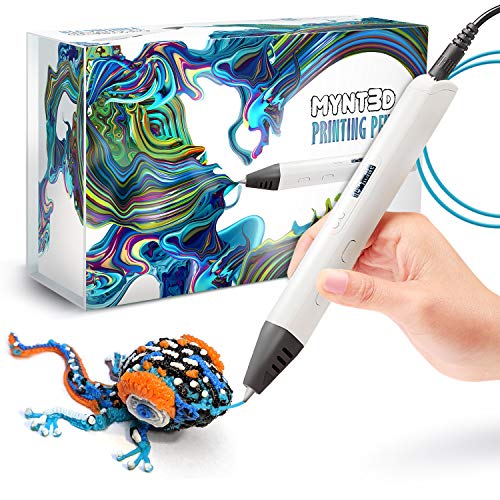
3. MYNT3D Professional 3D Pen
An OLED display shows temperature, which the maker says is adjustable from 140 to 230 C in 1 degree steps, with an adjustable feed. The kit has three colors of PLA, an AC adapter and a one-year limited warranty.
Suits: fine temperature tuning. Strengths: a wide temperature range and a warranty. Weaknesses: only PLA is mentioned in the kit. Skip it if you want a simpler pen.
View MYNT3D Professional 3D Pen on Amazon

Best for a plain pen with ABS and PLA
4. MYNT3D Super 3D Pen
A slim pen with a stepless speed slider that accepts 1.75 mm ABS and PLA, with a sealed nozzle the maker says is nearly clog-proof. The kit has three PLA colors and an adapter. The page lists the material as ABS and calls it a touch pen, which looks like a data slip.
Suits: a plain pen with ABS and PLA. Strengths: a slim body and a sealed nozzle. Weaknesses: no display. Skip it if you want a readout.
View MYNT3D Super 3D Pen on Amazon
Best for young builders
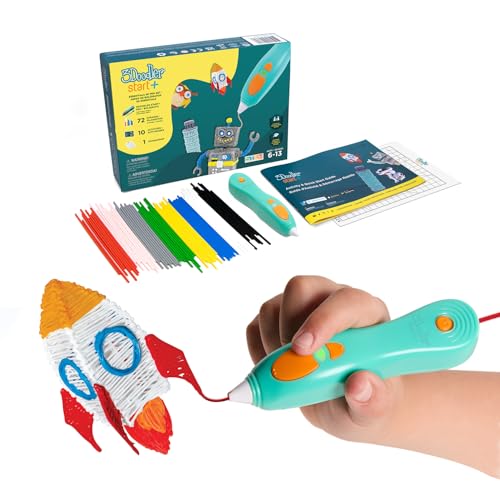
5. 3Doodler Start+ Essentials
A younger-user set for ages 6 and up. The maker says the pen has no hot parts, charges by USB-C and uses only 3Doodler Start plastic. The set adds 72 strands, a doodle mat, an activity guide and 10 new stencils, so it does not take standard spools.
Suits: young builders. Strengths: a complete set and a mat. Weaknesses: limited to the maker’s strands. Skip it if you want standard filament.
View 3Doodler Start+ Essentials 3D Pen Set on Amazon

Best for older users who want a display
6. 3Doodler Flow 3D Printing Pen
A pen for teens and adults with an integrated LCD that shows temperature. The maker says it takes 1.75 mm plastics such as PLA, ABS and wood and adds refill filaments, a stencil book and a guide.
Suits: older users who want a display. Strengths: a temperature readout and standard filament. Weaknesses: the listed weight is 15.8 ounces, the heaviest here. Skip it if you want a light pen.
View 3Doodler Flow 3D Printing Pen on Amazon
Best Picks by Category
These labels summarize listing details and are not hands-on test results. Check price on Amazon for the current price of each pick.
- Top rated: SCRIB3D P1 3D Printing Pen — check price on Amazon.
- Most reviewed: SCRIB3D P1 3D Printing Pen — see listing for current reviews.
- Best value: MYNT3D Professional 3D Pen — a budget-tier pick; check price on Amazon.
- Lowest price: MYNT3D Professional 3D Pen — in the budget tier; check price on Amazon.
- Premium option: 3Doodler Flow 3D Printing Pen — a premium-tier pick; check price on Amazon.
Price, Rating and Review Comparison
The table compares the picks by price tier. Prices change often, so confirm the current price on Amazon and see the listing for current ratings and reviews.
| Product | Price | Rating | Ratings | Price tier |
|---|---|---|---|---|
| MYNT3D Professional 3D Pen | Check price on Amazon | See listing | See listing | Budget |
| MYNT3D Super 3D Pen | Check price on Amazon | See listing | See listing | Budget |
| 3Doodler Start+ Essentials | Check price on Amazon | See listing | See listing | Budget |
| SCRIB3D P1 3D Printing Pen | Check price on Amazon | See listing | See listing | Mid-range |
| SCRIB3D Advanced 3D Printing Pen | Check price on Amazon | See listing | See listing | Premium |
| 3Doodler Flow 3D Printing Pen | Check price on Amazon | See listing | See listing | Premium |
How Much Feedback Backs Each Rating
A high average from a handful of ratings is weaker evidence than a slightly lower average from thousands. Here is how the sample size looks for each pick.
- SCRIB3D P1 3D Printing Pen: a large sample — see listing.
- SCRIB3D Advanced 3D Printing Pen: a large sample — see listing.
- MYNT3D Professional 3D Pen: a large sample — see listing.
- MYNT3D Super 3D Pen: a large sample — see listing.
- 3Doodler Start+ Essentials: a large sample — see listing.
- 3Doodler Flow 3D Printing Pen: a moderate sample — see listing.
Care and Setup
- Read the manual for heat-up and cool-down steps.
- Work on a mat, as the manual describes.
- Unload filament before storing the pen.
- Start with a stencil before drawing in the air.
Mistakes to Avoid
- Feeding filament the maker does not list.
- Skipping the unload steps in the manual.
- Drawing at the highest speed before you have practiced.
- Assuming every pen takes standard spools.
How does a 3D printing pen work?
A 3D printing pen heats plastic filament inside a small nozzle and pushes it out as a soft strand that cools and hardens in seconds. You guide the strand by hand to draw lines, fill shapes or build up layers.
Inside the body, a small motor feeds the filament forward while a heater melts it. A speed control changes how fast the plastic comes out, and some pens also let you change the temperature. Faster feed gives thicker lines and needs a steadier hand. Slower feed gives finer detail.
The result is not like a printer. A 3D printer follows a digital file, while a pen is freehand. That is the appeal for many buyers, because it feels more like drawing than engineering.
Common uses include:
- Tracing stencils to build flat shapes that you then fold or stack into 3D objects.
- Freehand sculpting in the air, such as small frames, charms or decorations.
- Repairs and crafts where a small plastic bead or seam is useful, as long as the plastic type suits the job.
- Classroom and family projects that teach basic shapes, patience and planning.
Because the tip gets hot, supervision matters, especially for younger users. The 3Doodler Start+ listing says the pen has no hot parts, which is a different design from the heated-nozzle pens in this guide. Whichever type you choose, read the maker’s safety notes before the first use.
Pens are also more forgiving than they look. A wobbly line can be reheated and smoothed, and mistakes can often be trimmed away once the plastic has cooled. That makes them a relaxed way to learn how plastic behaves before moving on to bigger projects.
Which 3D pen should you buy?
Choose the pen that matches who will use it and what plastic you want to feed it. The list below maps common needs to the pens already covered in this guide, using only what the listings state.
- If you want a first pen with a kit and a speed control: go for the SCRIB3D P1 3D Printing Pen, which comes with starter PLA in three colors, a stencil book and a power adapter.
- If you want more speed steps and a larger readout: choose the SCRIB3D Advanced 3D Printing Pen, which lists an LCD and eight speed options. Check the listing for which filament it accepts, because the page is unclear.
- If you want to tune temperature: pick the MYNT3D Professional 3D Pen, which lists an OLED display, an adjustable feed and a one-year limited warranty.
- If you want a simple, slim pen that takes ABS and PLA: the MYNT3D Super 3D Pen lists a stepless speed slider, a sealed nozzle and no display.
- If you are buying for a younger child: consider the 3Doodler Start+ Essentials, which the maker lists for ages 6 and up and which uses only its own Start strands.
- If you want standard filament and a temperature readout for older users: the 3Doodler Flow 3D Printing Pen lists an LCD and 1.75 mm plastics such as PLA, ABS and wood.
If you are still unsure, decide on filament first. A pen that needs the maker’s own strands locks you into one source of refills, while a pen that takes standard filament gives you more choice of colors and materials.
PLA vs ABS filament: which is better for a 3D pen?
PLA is the easier choice for most beginners, while ABS is tougher but needs more care. The right filament also depends on what your pen supports, so always match the type to the manual.
Here is how the two compare in general terms:
- PLA: melts at a lower temperature, tends to be easier to control and is commonly chosen for beginners and classroom use. It can soften in a hot car or near a heat source.
- ABS: is generally stronger and more heat resistant once cooled, but it usually needs a higher working temperature and good ventilation. It can be harder to draw with smoothly.
- Specialty filaments: the 3Doodler Flow listing mentions wood-type plastic. Only use these if the maker lists them for your pen.
The kit contents give a clue. The MYNT3D Professional and MYNT3D Super kits come with PLA colors, and the MYNT3D Super lists both ABS and PLA. The 3Doodler Start+ works only with its own strands, so this comparison does not apply to it.
Whatever you choose, keep the filament diameter in mind. Several listings mention 1.75 mm, and a mismatch can jam the feed. Never push in a filament the manual does not list.
Also use a well-ventilated room when you work, as melting plastic can give off fumes. Follow the maker’s guidance on temperature and workspace.
Storage matters too. Keep spare filament in a dry, cool place away from direct sun, and coil it loosely so it does not tangle or kink. Old or damp filament can feed unevenly, which makes drawing harder than it needs to be.
What to check before you buy a 3D printing pen
Check the filament type, the controls, the power source and the age guidance before you order. These four points cause most disappointed purchases.
- Filament compatibility: does the pen take standard spools, or only the maker’s own strands? Confirm the diameter and the plastic types.
- Controls: a stepless slider gives smooth speed changes, preset speeds are easier to repeat, and a display helps if you want to see temperature.
- What is in the kit: look for starter filament, stencils, a mat, a project guide and the power adapter. Kits vary a lot.
- Power: mains adapter or rechargeable by USB-C? A cable limits movement but gives steady power.
- Age range: makers list different ages. Match the pen to the youngest user who will handle it.
- Weight and grip: the 3Doodler Flow listing shows a heavier weight than the others, which may matter for long sessions or small hands.
- Warranty and returns: confirm the warranty terms and the seller return window on the listing.
- Refills: check how easy it is to buy more filament in the type your pen needs.
Also notice where listing data looks odd. In this guide, a couple of pages list attributes that do not fit a 3D pen. When that happens, rely on the written description and the manual, and ask the seller if you need to confirm a detail.
Think about extras too. A silicone mat, a few spare nozzle-cleaning tools or a second spool of a favorite color may not be in the kit. Decide which of these you need so the total setup matches what you expect when the box arrives.
How do you use a 3D pen safely and get better results?
Use a heat-safe mat, follow the manual’s heat-up and cool-down steps, and start with simple stencils. Good habits make a bigger difference to results than the pen itself.
Try this routine:
- Set up a stable workspace. Use a flat table, a mat and good light, and keep the cable out of the way.
- Warm the pen fully. Wait until the indicator or display shows it is ready before loading filament.
- Load gently. Push the filament in until the feed takes it, and do not force it.
- Start slowly. Use a low speed and trace a stencil. Lift the pen slightly so the strand lays down in a line.
- Build in layers. For tall shapes, draw flat parts first and join them with short bursts of plastic.
- Unload before storage. Follow the manual’s unload step so filament does not harden in the nozzle.
- Let it cool. Leave the pen on a safe surface until it has cooled completely.
If the pen stops feeding, do not keep pushing. Let it heat up again, follow the manual’s clearing steps, and check that the filament is the right type and diameter.
Keep pens away from young children without adult supervision, and never touch the nozzle. A burn from a hot tip is the main safety risk with heated pens.
When you finish, keep the pen upright on a heat-safe stand or mat until it cools, and unplug it. Do not leave it switched on and unattended, even for a short break, and do not wrap the cable tightly around a warm body.
Is a 3D pen worth it, and who should skip it?
A 3D pen is worth it if you enjoy hands-on making and are happy with freehand results, but it is not a substitute for a 3D printer. Be clear about the trade-offs before you buy.
The downsides:
- It takes practice. Smooth lines and neat joins come with time, and early projects can look rough.
- Heat is involved. Most pens have a hot nozzle, so adults should supervise young users.
- Refills add up. Whether it is standard spools or maker-specific strands, you will need more filament as you go.
- Precision is limited. If you want exact, repeatable parts, a printer is the better tool.
Who should skip it: people who want accurate functional parts, anyone who does not want to supervise a heated tool, and buyers who dislike working freehand. A craft kit without a hot nozzle may suit them better.
Is it worth paying more? A pricier pen mainly buys you a display, more speed steps or a temperature range. If you only want to trace stencils, a simpler pen with a good starter kit can be enough.
Feedback is worth a glance too. Look at how many people rated each pen, and skim for comments about jams, heat and the quality of the starter kit, rather than leaning on a single average.
Your next step is simple: compare the pens above, check the current listing for filament type, kit contents and age guidance, then choose the one that fits who will use it.
Going Deeper: Living With Your 3d printing pen
The short reviews above tell you what each option is. This section tells you what each option is like to live with: where it shines in real routines, who should walk past it, and the honest limitation that only appears after the first few uses. Read it with your own routine in mind, in a heat safe desk surface with room for filament spools, across short creative sessions and small repair jobs, because the best choice on paper and the best choice for your week are not always the same product.
Top pick
1. SCRIB3D P1 3D Printing Pen: the deeper picture
In daily use this option is best understood as a straightforward starter pen with simple controls for learning the basics. That character shows up most clearly in the middle of a project, not the first ten minutes: it keeps its composure when the work gets repetitive, and its design choices start to make sense once you have a routine. Owners who get the most from it tend to set it up carefully once, then stop thinking about it, which is exactly what a good tool or leisure product should allow.
Choose it if you are new users and families who want an easy first pen for crafts and school projects. The fit is about temperament and routine as much as specification: your habits will either use its strengths every session or walk straight past them. Skip it if you are users planning long detailed builds, who will want finer speed and temperature control. There is no failure in that judgement; a product that fights your routine will sit unused however strong its reviews, and the space and money it occupies will serve you better elsewhere.
The honest limitation is this: simple controls mean less fine tuning when a project needs slow, precise extrusion. None of the options in this guide is free of compromise, and this is the compromise you accept with this one. If that limitation touches the work you do most often, take it seriously and look at the neighbouring picks. If it touches work you do rarely, you may never notice it in years of use.
2. SCRIB3D Advanced 3D Printing Pen: the deeper picture
In daily use this option is best understood as a step up with a display and more control for varied projects. That character shows up most clearly in the middle of a project, not the first ten minutes: it keeps its composure when the work gets repetitive, and its design choices start to make sense once you have a routine. Owners who get the most from it tend to set it up carefully once, then stop thinking about it, which is exactly what a good tool or leisure product should allow.
Choose it if you are hobbyists who switch between materials and want settings they can see and repeat. The fit is about temperament and routine as much as specification: your habits will either use its strengths every session or walk straight past them. Skip it if you are young children using it unsupervised, since hotter materials demand adult oversight. There is no failure in that judgement; a product that fights your routine will sit unused however strong its reviews, and the space and money it occupies will serve you better elsewhere.
The honest limitation is this: more settings reward practice; the first sessions involve testing rather than finished pieces. None of the options in this guide is free of compromise, and this is the compromise you accept with this one. If that limitation touches the work you do most often, take it seriously and look at the neighbouring picks. If it touches work you do rarely, you may never notice it in years of use.
3. MYNT3D Professional 3D Pen: the deeper picture
In daily use this option is best understood as fine speed control aimed at detailed, deliberate work. That character shows up most clearly in the middle of a project, not the first ten minutes: it keeps its composure when the work gets repetitive, and its design choices start to make sense once you have a routine. Owners who get the most from it tend to set it up carefully once, then stop thinking about it, which is exactly what a good tool or leisure product should allow.
Choose it if you are makers who trace templates, join printed parts and repair plastic items carefully. The fit is about temperament and routine as much as specification: your habits will either use its strengths every session or walk straight past them. Skip it if you are casual users who just want to doodle, because its strengths show only with patience. There is no failure in that judgement; a product that fights your routine will sit unused however strong its reviews, and the space and money it occupies will serve you better elsewhere.
The honest limitation is this: it rewards a slow hand, so quick freehand sketching feels less forgiving than on simpler pens. None of the options in this guide is free of compromise, and this is the compromise you accept with this one. If that limitation touches the work you do most often, take it seriously and look at the neighbouring picks. If it touches work you do rarely, you may never notice it in years of use.
4. MYNT3D Super 3D Pen: the deeper picture
In daily use this option is best understood as a simpler sibling focused on easy handling and everyday craft use. That character shows up most clearly in the middle of a project, not the first ten minutes: it keeps its composure when the work gets repetitive, and its design choices start to make sense once you have a routine. Owners who get the most from it tend to set it up carefully once, then stop thinking about it, which is exactly what a good tool or leisure product should allow.
Choose it if you are beginners who want the brand feel without a learning curve of extra settings. The fit is about temperament and routine as much as specification: your habits will either use its strengths every session or walk straight past them. Skip it if you are users who need a display to monitor temperature precisely for mixed materials. There is no failure in that judgement; a product that fights your routine will sit unused however strong its reviews, and the space and money it occupies will serve you better elsewhere.
The honest limitation is this: without a display you judge readiness by behaviour of the filament rather than a readout. None of the options in this guide is free of compromise, and this is the compromise you accept with this one. If that limitation touches the work you do most often, take it seriously and look at the neighbouring picks. If it touches work you do rarely, you may never notice it in years of use.
5. 3Doodler Start+ Essentials: the deeper picture
In daily use this option is best understood as a child oriented design with cooler handling and its own ecosystem of sticks. That character shows up most clearly in the middle of a project, not the first ten minutes: it keeps its composure when the work gets repetitive, and its design choices start to make sense once you have a routine. Owners who get the most from it tend to set it up carefully once, then stop thinking about it, which is exactly what a good tool or leisure product should allow.
Choose it if you are younger makers with adult supervision, for safe early creative play. The fit is about temperament and routine as much as specification: your habits will either use its strengths every session or walk straight past them. Skip it if you are teens and adults wanting standard filament choice and hotter materials. There is no failure in that judgement; a product that fights your routine will sit unused however strong its reviews, and the space and money it occupies will serve you better elsewhere.
The honest limitation is this: its dedicated sticks limit material freedom compared with standard filament pens. None of the options in this guide is free of compromise, and this is the compromise you accept with this one. If that limitation touches the work you do most often, take it seriously and look at the neighbouring picks. If it touches work you do rarely, you may never notice it in years of use.
6. 3Doodler Flow 3D Printing Pen: the deeper picture
In daily use this option is best understood as an accessible pen for general crafting and decorative projects. That character shows up most clearly in the middle of a project, not the first ten minutes: it keeps its composure when the work gets repetitive, and its design choices start to make sense once you have a routine. Owners who get the most from it tend to set it up carefully once, then stop thinking about it, which is exactly what a good tool or leisure product should allow.
Choose it if you are casual crafters making gifts, decorations and simple models at the desk. The fit is about temperament and routine as much as specification: your habits will either use its strengths every session or walk straight past them. Skip it if you are users doing technical joins who need the finest extrusion control in this group. There is no failure in that judgement; a product that fights your routine will sit unused however strong its reviews, and the space and money it occupies will serve you better elsewhere.
The honest limitation is this: general purpose tuning means specialists will eventually want a more adjustable pen. None of the options in this guide is free of compromise, and this is the compromise you accept with this one. If that limitation touches the work you do most often, take it seriously and look at the neighbouring picks. If it touches work you do rarely, you may never notice it in years of use.
Head-to-Head: The Comparisons Buyers Actually Face
Scrib3d p1 versus scrib3d advanced
The P1 keeps things simple so a first session is about drawing, not menus. The Advanced adds visible settings that matter once you switch materials or slow down for detail. If this is a first pen for a household, the P1 is the kinder start; if one keen hobbyist will use it weekly, the Advanced grows with them.
Mynt3d professional versus mynt3d super
The Professional is built around control, especially speed, which decides whether fine lines stay fine. The Super trades that precision for simplicity. Repair and joining work favours the Professional; relaxed crafting favours the Super.
3doodler start+ versus 3doodler flow
Start+ is the supervised child option with its own sticks and cooler handling, while Flow suits older users on standard supplies. Households should choose by the youngest regular user, because that decision drives safety and material choice more than any other factor.
Buying Criteria, Expanded
Filament compatibility and running cost
Check which filament types and diameters a pen accepts before anything else, because that decides your material choice, your colours and your ongoing supply cost. Pens tied to proprietary sticks are simple but limit choice; pens using standard filament open a wider, cheaper supply world. Also confirm how the pen handles the materials you actually plan to use, not every material in theory.
Speed and temperature control
Control is what separates a toy experience from a tool experience. Adjustable speed lets you slow down for corners and speed up for filling, and temperature control lets you match different materials. A display is not essential, but it makes settings repeatable, which matters when a project spans several sessions.
Ergonomics and session length
You hold a pen for the whole project, so grip shape, weight and button placement decide comfort more than headline features. A pen that cramps your hand after ten minutes will sit in a drawer. Consider who will use it most, hand size included, and whether a slimmer barrel suits smaller hands.
Nozzle behaviour and clog management
Clogs are a normal part of pen ownership, so easy nozzle access and clear unclogging steps matter. A pen that lets you reverse filament and clear the path quickly turns a clog into a two minute pause; a sealed design can turn it into the end of the session. Read the clearing routine before buying, not after the first jam.
Setup, Use and Care in Practice
First session setup that prevents most problems
Work on a heat resistant mat, keep filament spools where they can feed without tangling, and start with flat practice shapes on a template before attempting anything vertical. Extrude a short test line whenever you change material or settings, and keep a small bin beside you for trimmings. Good habits in the first session, loading filament fully, waiting for full heat, and unloading properly at the end, prevent most of the clogs and stringing that frustrate new owners.
Technique for stronger, neater results
Slow down. Most weak joins and messy lines come from moving faster than the extrusion. Anchor the start of a line with a small dot, keep the nozzle close to the surface for flat work, and let each layer cool briefly before building on it. For vertical work, build in short lifts and brace larger structures with temporary supports you trim away later. Trim and tidy as you go rather than saving all cleanup for the end.
Storage and care between sessions
Unload filament at the end of a session if the pen will sit unused, because filament left loaded can absorb moisture and jam on the next heat up. Store filament dry and out of sunlight, coil it loosely, and keep the nozzle area clean of residue while it is still warm, following the maker guidance for your model. A pen stored clean starts the next session in minutes.
Troubleshooting and Decision Scenarios
Problem: The pen keeps clogging
Clogs usually trace back to filament left loaded, a temperature mismatch for the material, or a partial load that never seated properly. Unload fully, trim the filament end square, reload and extrude steadily until the flow runs clean. If clogging repeats with one spool, suspect that spool rather than the pen, and test with a fresh length before blaming the hardware.
Problem: Lines are stringy or will not stick
Stringing points to heat and speed balance, while poor sticking points to surface and pace. Slow your hand, keep the nozzle nearer the work, and start each shape on a surface the material grips, such as a template sheet or a rough mat. For joins, touch the nozzle briefly to both parts so the surfaces soften together, then add material into the seam rather than on top of it.
Problem: The finished piece is brittle
Brittle results usually mean layers went down too cool or too thin to bond. Work a little slower, build walls with more than one pass, and reinforce stress points such as joints and narrow necks with an extra wrap of material. For functional repairs, test the repair on a hidden area first and load it gently before trusting it in daily use.
Scenario: You are buying for a child
Choose the child oriented option, plan supervised sessions, and start with flat template projects that finish quickly and build confidence. Short successful projects matter more than ambitious ones at this stage.
Scenario: You want a pen for repairs and joining prints
Prioritise control: fine speed adjustment and reliable temperature behaviour matter more than bundled extras. Keep a small stock of the material you repair most, and practice seams on scrap before touching a valued item.
Scenario: You craft gifts and decorations
A versatile general pen plus a good colour range of filament serves you better than a specialist pen. Build a small library of templates you reuse, and finish pieces with trimming and light sanding where the material allows, which lifts the result noticeably.
One final habit ties all of these decisions together: buy for the work you can describe in concrete terms today, not for an imagined project list. When you can name the material, the frequency and the space involved, the right choice from a shortlist like this usually becomes obvious, and the runner up becomes a clear second rather than a source of doubt. Keep your receipt, note the date you started using the product, and record what you learn in the first month, because that small record makes your next purchase in the category dramatically easier and stops you repeating a mismatch you have already paid to discover once.
It is also worth deciding in advance what would make you replace or upgrade. A clear trigger, such as a change in the work you do, wear that affects results, or a household change in who uses the item, turns a future decision into a simple check rather than a fresh research project. Until that trigger arrives, commit to the choice you made, set it up properly, maintain it on a simple schedule, and judge it by the work it does for you week after week. Most satisfaction in categories like this comes from setup, routine and realistic expectations, and those are entirely within your control from the first day.
One final habit ties all of these decisions together: buy for the work you can describe in concrete terms today, not for an imagined project list. When you can name the material, the frequency and the space involved, the right choice from a shortlist like this usually becomes obvious, and the runner up becomes a clear second rather than a source of doubt. Keep your receipt, note the date you started using the product, and record what you learn in the first month, because that small record makes your next purchase in the category dramatically easier and stops you repeating a mismatch you have already paid to discover once.
It is also worth deciding in advance what would make you replace or upgrade. A clear trigger, such as a change in the work you do, wear that affects results, or a household change in who uses the item, turns a future decision into a simple check rather than a fresh research project. Until that trigger arrives, commit to the choice you made, set it up properly, maintain it on a simple schedule, and judge it by the work it does for you week after week. Most satisfaction in categories like this comes from setup, routine and realistic expectations, and those are entirely within your control from the first day.
3D Printing Pen FAQ
Do all of them take standard filament?
No. The 3Doodler Start+ uses the maker’s own strands. The MYNT3D Super and 3Doodler Flow list 1.75 mm filament.
Which have a display?
The SCRIB3D P1, SCRIB3D Advanced, MYNT3D Professional and 3Doodler Flow.
Can a 3D pen use any 1.75 mm filament?
Not always. Many pens list 1.75 mm filament, but the plastic type still has to match, such as PLA or ABS. Check the manual and listing for the exact types the maker supports.
Is a 3D printing pen safe for kids?
It depends on the pen and the child's age. Most pens have a hot nozzle and need adult supervision, while the 3Doodler Start+ listing describes a pen with no hot parts for ages 6 and up. Always read the maker's age guidance.
How long does a 3D pen take to heat up?
Heat-up time varies by model, and the manual or display will tell you when the pen is ready. Do not load filament until it reaches working temperature. Wait for the ready indicator.
Why does my 3D pen keep clogging?
Common causes include the wrong filament type, a temperature that is too low, or filament left in the nozzle after use. Follow the manual's clearing and unloading steps. Using only the filament the maker lists reduces the risk.
Can you draw in the air with a 3D pen?
Yes, though it takes practice. Many beginners start by tracing stencils on a mat and then move to freehand work. Slower speed and short strands help the plastic hold its shape.
Do I need a temperature display on a 3D pen?
A display is helpful if you want to adjust heat for different plastics, but it is not essential for simple stencil work. Pens with a fixed temperature and a speed control can be easier for beginners. Choose based on how much control you want.
What can you make with a 3D printing pen?
People make small shapes, charms, frames and decorations, often by tracing stencils and joining the pieces. Results depend on skill and the plastic used. Projects that need precise measurements are better suited to a 3D printer.
Is a 3D pen better than a 3D printer for beginners?
They suit different goals. A pen is freehand, inexpensive to start and simple to set up, while a printer follows digital files and gives more repeatable results. Pick the pen if you want a creative tool, and the printer if you need accurate parts.
The Short Version
For a kit with a display, the SCRIB3D P1. For eight speeds, the SCRIB3D Advanced. For temperature tuning, the MYNT3D Professional. For ABS and PLA, the MYNT3D Super. For younger users, the 3Doodler Start+. For a temperature readout and standard filament, the 3Doodler Flow.